
Microsoft Outlook Desktop Shortcut - Create

How to Create a Special Outlook Desktop (Office XP style) Shortcut


OPTION ONE

Add Outlook Desktop Shortcut for All Users


Download this registry file.

View attachment Add_Outlook shortcut_All_Users.reg


Click on it with the left mouse button.

If the User Account Control prompt window appears, click yes.

When a window similar to this one
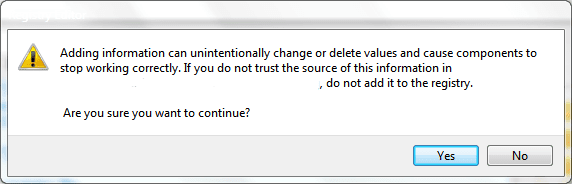
Reg merge.PNG appears, click yes.

If the Outlook icon doesn't appear immediately, refresh the desktop.

To REMOVE the icon, use the following registry file in the same procedure:

View attachment Remove_Outlook shortcut_All_Users.reg


OPTION TWO

Add Outlook Desktop Shortcut for Current User Only


To add this shortcut only for the current user, use the following registry file instead.

View attachment Add_Outlook shortcut_Current_User.reg

Click on it with the left mouse button.

If the User Account Control prompt window appears, click yes.

When a window similar to this one
Reg merge.PNG appears, click yes.

If the Outlook icon doesn't appear immediately, refresh the desktop.

To REMOVE the icon, use the following registry file in the same procedure:

View attachment Remove_Outlook shortcut_Current_User.reg
..............................................................

The icon will look like this:
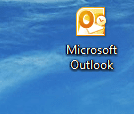
Outlook icon.PNG

Right click on the icon will produce this menu:
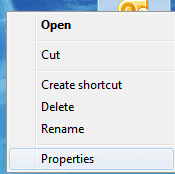
rightclick.PNG

Clicking properties will open the Mail Setup window:
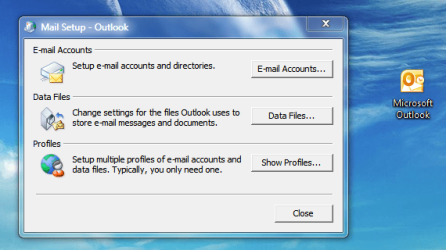
properties.PNG

Clicking the icon with the left mouse button will open Outlook - just like an ordinary shortcut would behave.
 
Last edited by a moderator:
I have used that method to add the icon in XP. It does have advantages over just a regular shortcut, for instance the right click menus are different and specific to outlook. In windows 7 I just launch outlook, right click the icon when it appears, and "pin to taskbar". It appears to work like any other taskbar icon. I may try your reg files and see if there is any difference in the right click menu.

EDIT: I ran the Add_Outlook shortcut_Current_User reg file and ended up with a folder icon with no name on my desktop. Clicking it did nothing? Running the Remove_Outlook shortcut_Current_User file removed it. I'm running Home Premium x64 and office 2003.

SECOND EDIT: Your reg file looks identical to the one I used successfully on XP.
 

My Computer

Computer type
PC/Desktop
Computer Manufacturer/Model Number
Home Built
OS
Windows 10 Education 64 bit
CPU
AMD Phenom II X4 980 Black Edition Deneb 3.7GHz
Motherboard
Asus M4N68T-M V2 µATX Motherboard
Memory
8GB 4GBx2 Kingston PC10600 DDR3 1333 Memory
Graphics Card(s)
Zotac NVIDIA Geforce GT640 2 Gig DDR3 PCIe
Sound Card
VIA VT1708s High Definition Audio 8-channel Onboard
Monitor(s) Displays
22" LG E2242 1080p and 2 19" I-INC AG191D
Screen Resolution
1280x1024 - 1920x1080 - 1280x1024
Hard Drives
Crucial M100 256 GB SSD and 500 GB WD Blue SATA
PSU
Thermaltake TR 620
Case
Power Up Black ATX Mid-Tower Case
Cooling
Stock heatsink and fan
Keyboard
Logitech Wireless K350 Wave
Mouse
Logitech Wireless M570 Trackman Wheel
Internet Speed
80 Mbps Down 30 Mbps Up
Antivirus
Windows Defender
Browser
Internet Explorer 11
Other Info
HP DVD1040e Lightscribe - External USB2
I tested it on my system, Win7/Office 2010, and they both work (current and all users). I can guarantee for Office 2007, but I'm not sure about 2003/XP combo. To put it simply, I don't know what happened on your system, but obviously something ended up pointing to nowhere.

It has two advantages - it's nicer (no shortcut arrow) and that right-click quick access to mail settings.

I've been using this since XP/2003 too, I was surprised I hadn't found it here among the Tutorials, which I mentioned to Brink too. :D It is also documented, but only the first variant, which is why I put that one - first. :D
 

My Computer

Computer Manufacturer/Model Number
Asus N73SV
OS
Windows 7 x64 Ultimate SP1
CPU
Core i7-2630QM
Motherboard
Intel HM 65
Memory
6 GB DDR3
Graphics Card(s)
Nvidia GT 540M / Intel HD 3000 - Optimus switching
Sound Card
HD Audio (Intel Azalia/Realtek) ALC269
Monitor(s) Displays
LED flat panel
Screen Resolution
1920 x 1080
Hard Drives
2x Seagate Momentus 640 GB - 1,28 TB in total
Internet Speed
4 MB/256 kbps
Other Info
External HDs

WD Elements 1,5 TB
WD MyBook 500 GB
Maybe its an x64 thing, something to do with office being in Program Files (x86) instead of just Program Files. Anyway its a nice tweak when it works.
 

My Computer

Computer type
PC/Desktop
Computer Manufacturer/Model Number
Home Built
OS
Windows 10 Education 64 bit
CPU
AMD Phenom II X4 980 Black Edition Deneb 3.7GHz
Motherboard
Asus M4N68T-M V2 µATX Motherboard
Memory
8GB 4GBx2 Kingston PC10600 DDR3 1333 Memory
Graphics Card(s)
Zotac NVIDIA Geforce GT640 2 Gig DDR3 PCIe
Sound Card
VIA VT1708s High Definition Audio 8-channel Onboard
Monitor(s) Displays
22" LG E2242 1080p and 2 19" I-INC AG191D
Screen Resolution
1280x1024 - 1920x1080 - 1280x1024
Hard Drives
Crucial M100 256 GB SSD and 500 GB WD Blue SATA
PSU
Thermaltake TR 620
Case
Power Up Black ATX Mid-Tower Case
Cooling
Stock heatsink and fan
Keyboard
Logitech Wireless K350 Wave
Mouse
Logitech Wireless M570 Trackman Wheel
Internet Speed
80 Mbps Down 30 Mbps Up
Antivirus
Windows Defender
Browser
Internet Explorer 11
Other Info
HP DVD1040e Lightscribe - External USB2
Thank you, I should put that caveat on top of the TUT :eek:

The issue could be here, at this key

HKEY_CLASSES_ROOT\CLSID\{00020D75-0000-0000-C000-000000000046}

It has several subkeys which point to the location of Outlook. Try changing them manually to point to x86 and tell me if that works out, please.

Btw., does all users tweak work? I didn't work that one out from your post.
 

My Computer

Computer Manufacturer/Model Number
Asus N73SV
OS
Windows 7 x64 Ultimate SP1
CPU
Core i7-2630QM
Motherboard
Intel HM 65
Memory
6 GB DDR3
Graphics Card(s)
Nvidia GT 540M / Intel HD 3000 - Optimus switching
Sound Card
HD Audio (Intel Azalia/Realtek) ALC269
Monitor(s) Displays
LED flat panel
Screen Resolution
1920 x 1080
Hard Drives
2x Seagate Momentus 640 GB - 1,28 TB in total
Internet Speed
4 MB/256 kbps
Other Info
External HDs

WD Elements 1,5 TB
WD MyBook 500 GB
I didn't try the all users reg file, I just assumed the same thing would happen. I haven't broken anything "yet" and I think I'll just stick with things the way they are. ;)
 

My Computer

Computer type
PC/Desktop
Computer Manufacturer/Model Number
Home Built
OS
Windows 10 Education 64 bit
CPU
AMD Phenom II X4 980 Black Edition Deneb 3.7GHz
Motherboard
Asus M4N68T-M V2 µATX Motherboard
Memory
8GB 4GBx2 Kingston PC10600 DDR3 1333 Memory
Graphics Card(s)
Zotac NVIDIA Geforce GT640 2 Gig DDR3 PCIe
Sound Card
VIA VT1708s High Definition Audio 8-channel Onboard
Monitor(s) Displays
22" LG E2242 1080p and 2 19" I-INC AG191D
Screen Resolution
1280x1024 - 1920x1080 - 1280x1024
Hard Drives
Crucial M100 256 GB SSD and 500 GB WD Blue SATA
PSU
Thermaltake TR 620
Case
Power Up Black ATX Mid-Tower Case
Cooling
Stock heatsink and fan
Keyboard
Logitech Wireless K350 Wave
Mouse
Logitech Wireless M570 Trackman Wheel
Internet Speed
80 Mbps Down 30 Mbps Up
Antivirus
Windows Defender
Browser
Internet Explorer 11
Other Info
HP DVD1040e Lightscribe - External USB2
Okay. I have it from another source that Windows 7 x64 / Office 2010 combo works, so I'll leave the disclaimer above at 'might not work'.
 

My Computer

Computer Manufacturer/Model Number
Asus N73SV
OS
Windows 7 x64 Ultimate SP1
CPU
Core i7-2630QM
Motherboard
Intel HM 65
Memory
6 GB DDR3
Graphics Card(s)
Nvidia GT 540M / Intel HD 3000 - Optimus switching
Sound Card
HD Audio (Intel Azalia/Realtek) ALC269
Monitor(s) Displays
LED flat panel
Screen Resolution
1920 x 1080
Hard Drives
2x Seagate Momentus 640 GB - 1,28 TB in total
Internet Speed
4 MB/256 kbps
Other Info
External HDs

WD Elements 1,5 TB
WD MyBook 500 GB
I've moved to 64-bitlandia now, and I have fought with this head-on. I have emerged - victorious!!!!, with the 32 bit outlook icon on my 64 bit desktop. :D I'll have the fix up soon!


PS. Well, it is not a total victory though, the right-click Properties menu item doesn't work any more..

PS2. The victory is now complete, because I found out someone beat me to it. :D

PS3. Their solutions have some flaws, but I'm on the brink :wink: of a stable fix..
 
Last edited:

My Computer

Computer Manufacturer/Model Number
Asus N73SV
OS
Windows 7 x64 Ultimate SP1
CPU
Core i7-2630QM
Motherboard
Intel HM 65
Memory
6 GB DDR3
Graphics Card(s)
Nvidia GT 540M / Intel HD 3000 - Optimus switching
Sound Card
HD Audio (Intel Azalia/Realtek) ALC269
Monitor(s) Displays
LED flat panel
Screen Resolution
1920 x 1080
Hard Drives
2x Seagate Momentus 640 GB - 1,28 TB in total
Internet Speed
4 MB/256 kbps
Other Info
External HDs

WD Elements 1,5 TB
WD MyBook 500 GB
I need one more volunteer to test the fix. Please send me a PM if you are interested.

NOTE:
The fix is intended for 64 bit Windows systems with 32 bit Office 2010. The tweak above (any of them), should be applied beforehand. Office must be installed in the default location (just wondering - is it even possible to put it somewhere else but into Program Files (x86) :sarc:)
 
Last edited:

My Computer

Computer Manufacturer/Model Number
Asus N73SV
OS
Windows 7 x64 Ultimate SP1
CPU
Core i7-2630QM
Motherboard
Intel HM 65
Memory
6 GB DDR3
Graphics Card(s)
Nvidia GT 540M / Intel HD 3000 - Optimus switching
Sound Card
HD Audio (Intel Azalia/Realtek) ALC269
Monitor(s) Displays
LED flat panel
Screen Resolution
1920 x 1080
Hard Drives
2x Seagate Momentus 640 GB - 1,28 TB in total
Internet Speed
4 MB/256 kbps
Other Info
External HDs

WD Elements 1,5 TB
WD MyBook 500 GB
unable to create desktop icon on windows 7 enterprise service pack

Hi,
Though i have created the registry at HKEY_LOCAL_MACHINE\SOFTWARE\Microsoft\Windows\CurrentVersion\Explorer\Desktop\NameSpace\{00020D75-0000-0000-C000-000000000046} on my windows 7 enterprise service pack 1 machine, im not able to find the desktop icon. Could some one suggest on this?
 

My Computer

OS
windows 7 enterprise
Are you 32 bit or 64 bit?
 

My Computer

Computer Manufacturer/Model Number
Asus N73SV
OS
Windows 7 x64 Ultimate SP1
CPU
Core i7-2630QM
Motherboard
Intel HM 65
Memory
6 GB DDR3
Graphics Card(s)
Nvidia GT 540M / Intel HD 3000 - Optimus switching
Sound Card
HD Audio (Intel Azalia/Realtek) ALC269
Monitor(s) Displays
LED flat panel
Screen Resolution
1920 x 1080
Hard Drives
2x Seagate Momentus 640 GB - 1,28 TB in total
Internet Speed
4 MB/256 kbps
Other Info
External HDs

WD Elements 1,5 TB
WD MyBook 500 GB
I have this stable and working on Windows 7 x64, if anyone is interested to do one final test so it can be uploaded in its complete form, please come forward, post here or send a PM.
 
Last edited:

My Computer

Computer Manufacturer/Model Number
Asus N73SV
OS
Windows 7 x64 Ultimate SP1
CPU
Core i7-2630QM
Motherboard
Intel HM 65
Memory
6 GB DDR3
Graphics Card(s)
Nvidia GT 540M / Intel HD 3000 - Optimus switching
Sound Card
HD Audio (Intel Azalia/Realtek) ALC269
Monitor(s) Displays
LED flat panel
Screen Resolution
1920 x 1080
Hard Drives
2x Seagate Momentus 640 GB - 1,28 TB in total
Internet Speed
4 MB/256 kbps
Other Info
External HDs

WD Elements 1,5 TB
WD MyBook 500 GB
I have this stable and working on Windows 7 x64, if anyone is interested to do one final test it so it can be uploaded in its complete form, please come forward, post here or send a PM.

I have 32 bit outlook and will test it for you.

Do you want me to do option one ore two, or do you have something else?
 

My Computer

Computer type
PC/Desktop
Computer Manufacturer/Model Number
Dude Build
OS
Windows 10 Pro X64
CPU
Intel(R) Core(TM) i5-3570K CPU OC@ 4.5GHZ Turbo
Motherboard
MSI Z77A-G45 Gaming
Memory
8.00 GB DDR3 1600Mhz
Graphics Card(s)
MSI Gaming X GTX 1070
Sound Card
Realtek High Definition
Monitor(s) Displays
Dell S23O9W, HP L1710
Screen Resolution
DELL-1920 x 1080 HP-1280 x1024
Hard Drives
Crucial m4 256 SSD, WD 7200RPM 500GB WD 1TB
PSU
Seasonic X650 GOLD
Case
Zalman Z12
Cooling
Antec Kuhler 920
Keyboard
Logitech
Mouse
MSI DS100 Interceptor
Internet Speed
50 down and 5 up
Antivirus
MSE
Browser
Chrome, IE 11
Other Info
Logitech X-620 Speakers
Ran reg file

Okay I saved it as test.reg, ran it rebooted and here it is.

outlokk test.PNG
 

My Computer

Computer type
PC/Desktop
Computer Manufacturer/Model Number
Dude Build
OS
Windows 10 Pro X64
CPU
Intel(R) Core(TM) i5-3570K CPU OC@ 4.5GHZ Turbo
Motherboard
MSI Z77A-G45 Gaming
Memory
8.00 GB DDR3 1600Mhz
Graphics Card(s)
MSI Gaming X GTX 1070
Sound Card
Realtek High Definition
Monitor(s) Displays
Dell S23O9W, HP L1710
Screen Resolution
DELL-1920 x 1080 HP-1280 x1024
Hard Drives
Crucial m4 256 SSD, WD 7200RPM 500GB WD 1TB
PSU
Seasonic X650 GOLD
Case
Zalman Z12
Cooling
Antec Kuhler 920
Keyboard
Logitech
Mouse
MSI DS100 Interceptor
Internet Speed
50 down and 5 up
Antivirus
MSE
Browser
Chrome, IE 11
Other Info
Logitech X-620 Speakers
Does it open Outlook the application?

I'll have to rework the Tutorial somewhat, I'll do this tomorrow or the day after. All the functionality on x64 besides the desktop icon itself will be All Users only. Or maybe I should restrict the entire tutorial solely for All users and x64 systems - I'll have to consult Brink on the proper way to proceed.

The right-click menu is also a little different, the Properties option is right under Open. Dude, could you check that?

As far as I can see, there is unfortunately no way to put it at the bottom on x64.
 
Last edited:

My Computer

Computer Manufacturer/Model Number
Asus N73SV
OS
Windows 7 x64 Ultimate SP1
CPU
Core i7-2630QM
Motherboard
Intel HM 65
Memory
6 GB DDR3
Graphics Card(s)
Nvidia GT 540M / Intel HD 3000 - Optimus switching
Sound Card
HD Audio (Intel Azalia/Realtek) ALC269
Monitor(s) Displays
LED flat panel
Screen Resolution
1920 x 1080
Hard Drives
2x Seagate Momentus 640 GB - 1,28 TB in total
Internet Speed
4 MB/256 kbps
Other Info
External HDs

WD Elements 1,5 TB
WD MyBook 500 GB
Does it open Outlook the application? Yes it does.

I'l have to rework the Tutorial somewhat, I'll do this in tomorrow or the day after. All the functionality on x64 besides the desktop icon itself will be All Users only. Or maybe I should restrict the entire tutorial solely for All users and x64 systems - I'll have to consult Brink on the proper way to proceed.

The right-click menu is also a little different, the Properties option is right under Open. Dude, could you check that? Yes it is right under open.

As far as I can see, there is unfortunately no way to put it at the bottom on x64.

Works just like you said.
 

My Computer

Computer type
PC/Desktop
Computer Manufacturer/Model Number
Dude Build
OS
Windows 10 Pro X64
CPU
Intel(R) Core(TM) i5-3570K CPU OC@ 4.5GHZ Turbo
Motherboard
MSI Z77A-G45 Gaming
Memory
8.00 GB DDR3 1600Mhz
Graphics Card(s)
MSI Gaming X GTX 1070
Sound Card
Realtek High Definition
Monitor(s) Displays
Dell S23O9W, HP L1710
Screen Resolution
DELL-1920 x 1080 HP-1280 x1024
Hard Drives
Crucial m4 256 SSD, WD 7200RPM 500GB WD 1TB
PSU
Seasonic X650 GOLD
Case
Zalman Z12
Cooling
Antec Kuhler 920
Keyboard
Logitech
Mouse
MSI DS100 Interceptor
Internet Speed
50 down and 5 up
Antivirus
MSE
Browser
Chrome, IE 11
Other Info
Logitech X-620 Speakers
That's great. :D If you want or need to remove the icon before I finish the Tutorial, PM me.
 

My Computer

Computer Manufacturer/Model Number
Asus N73SV
OS
Windows 7 x64 Ultimate SP1
CPU
Core i7-2630QM
Motherboard
Intel HM 65
Memory
6 GB DDR3
Graphics Card(s)
Nvidia GT 540M / Intel HD 3000 - Optimus switching
Sound Card
HD Audio (Intel Azalia/Realtek) ALC269
Monitor(s) Displays
LED flat panel
Screen Resolution
1920 x 1080
Hard Drives
2x Seagate Momentus 640 GB - 1,28 TB in total
Internet Speed
4 MB/256 kbps
Other Info
External HDs

WD Elements 1,5 TB
WD MyBook 500 GB
No worries, I hide all the desktop icons anyway. Nice tutorial you have made.
 

My Computer

Computer type
PC/Desktop
Computer Manufacturer/Model Number
Dude Build
OS
Windows 10 Pro X64
CPU
Intel(R) Core(TM) i5-3570K CPU OC@ 4.5GHZ Turbo
Motherboard
MSI Z77A-G45 Gaming
Memory
8.00 GB DDR3 1600Mhz
Graphics Card(s)
MSI Gaming X GTX 1070
Sound Card
Realtek High Definition
Monitor(s) Displays
Dell S23O9W, HP L1710
Screen Resolution
DELL-1920 x 1080 HP-1280 x1024
Hard Drives
Crucial m4 256 SSD, WD 7200RPM 500GB WD 1TB
PSU
Seasonic X650 GOLD
Case
Zalman Z12
Cooling
Antec Kuhler 920
Keyboard
Logitech
Mouse
MSI DS100 Interceptor
Internet Speed
50 down and 5 up
Antivirus
MSE
Browser
Chrome, IE 11
Other Info
Logitech X-620 Speakers
Thank you. It's not done yet, and it is too late now to start doing it properly, I gotta work tomorrow. Gotta sleep. It will be nice when it is finished. It is after all the only non-system icon I myself can have without the arrow overlay (without using the blank.ico option). :D
 

My Computer

Computer Manufacturer/Model Number
Asus N73SV
OS
Windows 7 x64 Ultimate SP1
CPU
Core i7-2630QM
Motherboard
Intel HM 65
Memory
6 GB DDR3
Graphics Card(s)
Nvidia GT 540M / Intel HD 3000 - Optimus switching
Sound Card
HD Audio (Intel Azalia/Realtek) ALC269
Monitor(s) Displays
LED flat panel
Screen Resolution
1920 x 1080
Hard Drives
2x Seagate Momentus 640 GB - 1,28 TB in total
Internet Speed
4 MB/256 kbps
Other Info
External HDs

WD Elements 1,5 TB
WD MyBook 500 GB
Hi

1st Post ... and apologies for reviving an old thread ... was just wondering if someone has succeeded with this using Outlook 2013 on Windows 7?
I've been doing quite a bit of research, can't seem to find anyway (sucessfully0 to put a simple Outlook shortcut to all users' desktop

Thanks,
Khalil
 

My Computer

Computer type
Laptop
Computer Manufacturer/Model Number
Dell
OS
Windows 8.1 x64
Back
Top