Microsoft Publisher

skostro

New member
Member
VIP
Local time
9:45 PM
Messages
182
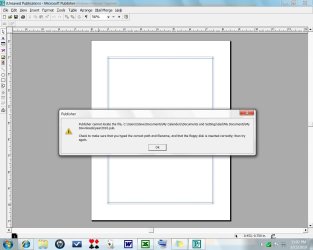
New computer with W7. I transferred over some files from my XP system that were on Microsoft Publisher. On my new computer with W7, some open up, some don't. Those that don't open, say I have the wrong 'path'. I looked at the 'path' for both those that work & those that don't and they appear to have the same paths.
Any suggestions?
 

My Computer

Computer type
PC/Desktop
Computer Manufacturer/Model Number
hp
OS
windows 7 Home Premium 32bit.
Antivirus
avast
Browser
ie, chrome
New computer with W7. I transferred over some files from my XP system that were on Microsoft Publisher. On my new computer with W7, some open up, some don't. Those that don't open, say I have the wrong 'path'. I looked at the 'path' for both those that work & those that don't and they appear to have the same paths.
Any suggestions?

Use Win7 search function to compare the path to the actual location. Are these shortcuts you are trying to open or???
 

My Computer

Computer Manufacturer/Model Number
Homebrew PC - "Alpha_Dawg"
OS
Windows 7 Ultimate 64 bit Steve Ballmer Signature Edition
CPU
Intel Core 2 Quad - Q9550 - 2.83GHz stock - OC'd to 3.6GHz
Motherboard
Gigabyte EP45-UD3P
Memory
4GB DDR2 800MHz (PC6400) OCZ Reaper
Graphics Card(s)
Nvidia GE Force 8800 GTS
Sound Card
Asus Xonar DX
Monitor(s) Displays
Samsung SyncMaster 2333HD
Screen Resolution
1920 x 1080
Hard Drives
WD Caviar Black 750GB - 7200RPM - 32MB cache
WD Caviar Green 1.5TB - 5400RPM - 64MB cache
WD Caviar Green 2.0TB - 5400RPM - 64MB cache
PSU
PC Power & Cooling Silencer 750
Case
Gigabyte 3D Aurora
Cooling
Case is Air - 5ea. 120mm fans (mix of Arctic and Xigmatec)
Keyboard
MS Natural Wireless KB
Mouse
MS Wireless Mouse
Internet Speed
50 mbps down/5 mbps up
Other Info
AVerMedia - AVerTVHD G2 Dual Tuner Card
New computer with W7. I transferred over some files from my XP system that were on Microsoft Publisher.

Actually based on the description of the problem...it sounds like (he) you just moved the files over without installing the actual Microsoft Publisher program???

If that's the case, (he'll) you'll need to install Publisher. It might also help to know which version of Publisher we're taliking about as it may no longer be compatible with W7.

However the confusing part is when he says some open, some don't. :confused:
 

My Computer

Computer type
PC/Desktop
Computer Manufacturer/Model Number
Custom built by me.
OS
Windows 10 Pro
CPU
Intel Core i7-4770K (3.5Ghz)
Motherboard
Gigabyte G1 Sniper 5 (F10 Bios)
Memory
32 gig Corsair Dominator Platinum (4x8Gig)
Graphics Card(s)
Sapphire Tri-X R9 Fury
Sound Card
Soundblaster ZXR
Monitor(s) Displays
NEC PA242W 24" LCD Monitor
Screen Resolution
1920 x 1200
Hard Drives
Primary - Samsung 850 Pro (512gig), Samsung 840 Pro (256gig), 2TB WD Caviar Black.
PSU
EVGA Supernova 1000 G2
Case
Cooler Master HAF X
Cooling
Corsair H100i with Corsair Air Series SP120 Quiet Fans
Keyboard
Logitech Wireless Wave
Mouse
Logitech Performance MX
Internet Speed
High Speed Cable
Antivirus
Norton Security
Browser
IE11
Other Info
Memory Timings - 1866MHz @ 9-9-9-27-1T @ 1.5 volts
New computer with W7. I transferred over some files from my XP system that were on Microsoft Publisher.

Actually based on the description of the problem...it sounds like (he) you just moved the files over without installing the actual Microsoft Publisher program???

If that's the case, (he'll) you'll need to install Publisher. It might also help to know which version of Publisher we're taliking about as it may no longer be compatible with W7.

However the confusing part is when he says some open, some don't. :confused:

How so... he said some open some dont...???

The OP probably grabbed some files and some shortcuts when he moved them to new HDD.
 

My Computer

Computer Manufacturer/Model Number
Homebrew PC - "Alpha_Dawg"
OS
Windows 7 Ultimate 64 bit Steve Ballmer Signature Edition
CPU
Intel Core 2 Quad - Q9550 - 2.83GHz stock - OC'd to 3.6GHz
Motherboard
Gigabyte EP45-UD3P
Memory
4GB DDR2 800MHz (PC6400) OCZ Reaper
Graphics Card(s)
Nvidia GE Force 8800 GTS
Sound Card
Asus Xonar DX
Monitor(s) Displays
Samsung SyncMaster 2333HD
Screen Resolution
1920 x 1080
Hard Drives
WD Caviar Black 750GB - 7200RPM - 32MB cache
WD Caviar Green 1.5TB - 5400RPM - 64MB cache
WD Caviar Green 2.0TB - 5400RPM - 64MB cache
PSU
PC Power & Cooling Silencer 750
Case
Gigabyte 3D Aurora
Cooling
Case is Air - 5ea. 120mm fans (mix of Arctic and Xigmatec)
Keyboard
MS Natural Wireless KB
Mouse
MS Wireless Mouse
Internet Speed
50 mbps down/5 mbps up
Other Info
AVerMedia - AVerTVHD G2 Dual Tuner Card
The OP probably grabbed some files and some shortcuts when he moved them to new HDD.

I would agree that that's a better probability than my assessment. We won't know till the OP posts back though.
 

My Computer

Computer type
PC/Desktop
Computer Manufacturer/Model Number
Custom built by me.
OS
Windows 10 Pro
CPU
Intel Core i7-4770K (3.5Ghz)
Motherboard
Gigabyte G1 Sniper 5 (F10 Bios)
Memory
32 gig Corsair Dominator Platinum (4x8Gig)
Graphics Card(s)
Sapphire Tri-X R9 Fury
Sound Card
Soundblaster ZXR
Monitor(s) Displays
NEC PA242W 24" LCD Monitor
Screen Resolution
1920 x 1200
Hard Drives
Primary - Samsung 850 Pro (512gig), Samsung 840 Pro (256gig), 2TB WD Caviar Black.
PSU
EVGA Supernova 1000 G2
Case
Cooler Master HAF X
Cooling
Corsair H100i with Corsair Air Series SP120 Quiet Fans
Keyboard
Logitech Wireless Wave
Mouse
Logitech Performance MX
Internet Speed
High Speed Cable
Antivirus
Norton Security
Browser
IE11
Other Info
Memory Timings - 1866MHz @ 9-9-9-27-1T @ 1.5 volts
publish.jpg

Here's what I'm getting.
 

My Computer

Computer type
PC/Desktop
Computer Manufacturer/Model Number
hp
OS
windows 7 Home Premium 32bit.
Antivirus
avast
Browser
ie, chrome
I don't believe any of the files are shortcuts.
Publisher is installed on my new W7 computer. It's working fine except for not being able to open most of the Publisher files I transferred over from XP computer.
The ones that do open, for whatever reason I don't remember now, I remember saving in a different location than the ones that don't open. But, as I look at the 'paths' of each, they appear to be the same.
What am I looking at wrong? Gotta be something.
Would it help if I posted the paths of both those that open and those that don't?
 

My Computer

Computer type
PC/Desktop
Computer Manufacturer/Model Number
hp
OS
windows 7 Home Premium 32bit.
Antivirus
avast
Browser
ie, chrome
Can you tell us how you "transfered" those files over from XP?

Are the original files still on the XP machine? If so, copy those files from the XP machine to a location of your choice, example - Documents, then open the file from that lcation.

Also, are you using "shortcuts" when trying to open the files that aren't opening? If so, the above statement applies as well.

If these are no brainer questions, sorry, we have to ask as we don't know your knowledge level.
 

My Computer

Computer type
PC/Desktop
Computer Manufacturer/Model Number
Custom built by me.
OS
Windows 10 Pro
CPU
Intel Core i7-4770K (3.5Ghz)
Motherboard
Gigabyte G1 Sniper 5 (F10 Bios)
Memory
32 gig Corsair Dominator Platinum (4x8Gig)
Graphics Card(s)
Sapphire Tri-X R9 Fury
Sound Card
Soundblaster ZXR
Monitor(s) Displays
NEC PA242W 24" LCD Monitor
Screen Resolution
1920 x 1200
Hard Drives
Primary - Samsung 850 Pro (512gig), Samsung 840 Pro (256gig), 2TB WD Caviar Black.
PSU
EVGA Supernova 1000 G2
Case
Cooler Master HAF X
Cooling
Corsair H100i with Corsair Air Series SP120 Quiet Fans
Keyboard
Logitech Wireless Wave
Mouse
Logitech Performance MX
Internet Speed
High Speed Cable
Antivirus
Norton Security
Browser
IE11
Other Info
Memory Timings - 1866MHz @ 9-9-9-27-1T @ 1.5 volts
If that's the case... the ones you transferred into one directory work and others dont...

Then search for all Publisher files... "*.pub" that will find every file with the .pub extension. Once you find them all copy to the directory that works.

Let us know how that works...

I also am assuming that you have confirmed that you have publisher docs in the directory you posted the screenie of... C:\Users\Steve\Documents\My Calendars\Documents and settings\Dad\My Documents\My Downloads\year2010.pub

BTW... that's a suspicious path... if these pub docs were in your dads profile in another machine, perhaps you should recreate that profile on your new machine then transfer those docs to his profile. Basically put everything that's in Dads folder above into C:\Users\Dad\Documents - - After creating his profile first!
 

My Computer

Computer Manufacturer/Model Number
Homebrew PC - "Alpha_Dawg"
OS
Windows 7 Ultimate 64 bit Steve Ballmer Signature Edition
CPU
Intel Core 2 Quad - Q9550 - 2.83GHz stock - OC'd to 3.6GHz
Motherboard
Gigabyte EP45-UD3P
Memory
4GB DDR2 800MHz (PC6400) OCZ Reaper
Graphics Card(s)
Nvidia GE Force 8800 GTS
Sound Card
Asus Xonar DX
Monitor(s) Displays
Samsung SyncMaster 2333HD
Screen Resolution
1920 x 1080
Hard Drives
WD Caviar Black 750GB - 7200RPM - 32MB cache
WD Caviar Green 1.5TB - 5400RPM - 64MB cache
WD Caviar Green 2.0TB - 5400RPM - 64MB cache
PSU
PC Power & Cooling Silencer 750
Case
Gigabyte 3D Aurora
Cooling
Case is Air - 5ea. 120mm fans (mix of Arctic and Xigmatec)
Keyboard
MS Natural Wireless KB
Mouse
MS Wireless Mouse
Internet Speed
50 mbps down/5 mbps up
Other Info
AVerMedia - AVerTVHD G2 Dual Tuner Card
If that's the case... the ones you transferred into one directory work and others dont...

Then search for all Publisher files... "*.pub" that will find every file with the .pub extension. Once you find them all copy to the directory that works.

Let us know how that works...

I also am assuming that you have confirmed that you have publisher docs in the directory you posted the screenie of... C:\Users\Steve\Documents\My Calendars\Documents and settings\Dad\My Documents\My Downloads\year2010.pub

BTW... that's a suspicious path... if these pub docs were in your dads profile in another machine, perhaps you should recreate that profile on your new machine then transfer those docs to his profile. Basically put everything that's in Dads folder above into C:\Users\Dad\Documents - - After creating his profile first!

I thought that weird too.

Good suggestion though to copy to one directory that works. :geek:
 

My Computer

Computer Manufacturer/Model Number
HP Pavilion dv7
OS
Windows 7
CPU
Core i7
Memory
8 GB
Graphics Card(s)
ATI FireGL
Monitor(s) Displays
Secondary is an HP L1940T
Screen Resolution
1680x1050
Hard Drives
160 GB SSD and 500 GB SATA
Keyboard
G11 Logitech
Mouse
G7 Logitech
Internet Speed
Fiber
Other Info
My rig smegging rules!
I'll try all your suggestions, be back in a couple days.
bty, i transferred them via usb
 

My Computer

Computer type
PC/Desktop
Computer Manufacturer/Model Number
hp
OS
windows 7 Home Premium 32bit.
Antivirus
avast
Browser
ie, chrome
Well I'm back. First let me say I tried everything you all suggested, but I couldn't get anything to work for me. And to further complicate matters, on my old XP computer, I deleted all files after I transferred them to my new W7 computer. Pretty much wiping it clean, so the thought of re-copying them was not an option.
Then, while surfing around on the W7 forum site, I came upon this suggestion, DiskDigger, it's a program that digs up deleted files, and dig them up it surely did. After it found the files I was looking for, I just dragged them from one hard drive to the other, and wha-la, I'm back in business, everything working just great.
Thanks to all who tried to help. ;););)
 

My Computer

Computer type
PC/Desktop
Computer Manufacturer/Model Number
hp
OS
windows 7 Home Premium 32bit.
Antivirus
avast
Browser
ie, chrome
Back
Top