Microsoft Really Getting Sneaky On Windows 10

FD611V

Banned
Local time
2:57 PM
Messages
19
Back in August I install Windows 10 on my HP p6750f desktop. After several months I couldn't get the handle on it...in others words frustrating to say the least. Anything, last week I decided to go back to Windows 7 Home....which I like very much as does what most people enjoy having a good OS.

Today, I check in with Windows updates, and it shows I had 32 updates ready to install. These five I "unchecked" due to they harbor the Windows 10. KB 3035583, KB 3102429, KB 2799926, KB 299226, and KB 3032655. They are connected to Windows 10 in someway to be installed.

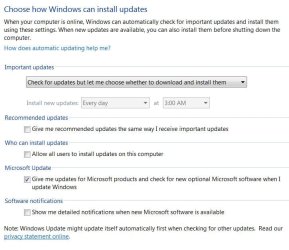
I have my Windows Update set as follows: "Check for update, but let me choose whether to download and install them." I click the ones that I wanted to install. After the installation went ok, the computer wanted a restart, which click ok. That is where Microsoft took control of my computer and "changed" my Update settings to "Automatically Install Updates", and with that they downloaded the five (5) updates ( as listed above) that I "unchecked". The Windows 10 logo showed up in my taskbar.

I immediately went to the control panel to have the five updates uninstalled. Which went smoothly.

So, it appears Microsoft is doing their best to have all computers to be with Windows 10.
 

My Computer

Computer type
PC/Desktop
Computer Manufacturer/Model Number
HP
OS
Windows 7 Home -64-bit
Hi,
Well I would also uncheck give me recommended updates the same way as important ones,
The only Important windows update to date has been kb ...2343
Of course I hid it
Everything else to date has been recommended which will show as important unless you uncheck the box as stated above or shown in the image ;)
But yes sneaky has started :)
update settings.JPG
 

My Computer

Computer type
PC/Desktop
Computer Manufacturer/Model Number
Custom assembled by me :}
OS
Win-7-Pro64bit 7-H-Prem-64bit
CPU
i7-5930K 2nd i9-9940x both water blocked VRM's too
Motherboard
ASUS SABERTOOTH X99 2nd ASUS x299 Apex
Memory
Trident-z 3200C14 2nd Trident-z 3600C16
Graphics Card(s)
EVGA 1080ti ftw3 2nd Titan Xp both water blocked
Sound Card
Built-in Realtek
Monitor(s) Displays
1-AOC G2460PG 24"G-Sync 144Hz/ 2nd 1-ASUS VG248QE 24" 144Hz
Screen Resolution
1920 x 1080 144Hz
Hard Drives
2-Samsung M.2 Evo & Evo Plus
2-Samsung 850 EVO 500GB SSD's/ 3-2.5 W.D. Black 1tb-&3-1tb/3-3.5 WD Black 1tb hdd's
PSU
EVGA SuperNOVA 1000-P2 2nd 1200-P2
Case
2-Corsair Obsidian Series 450D Black ATX Mid Tower
Cooling
Custom water loops
Keyboard
Logitech G710+/ 2nd Logitech G910
Mouse
2-RedDragon M901 Perdition 16400 dpi Gaming mouse = wired
Internet Speed
Comcast Ping 19ms 89.31mbps download speed 6.12mbps upload
Antivirus
Malwarebytes Pro/ Superantispyware Pro
Browser
FireFox & Pale moon
Other Info
2nd ASUS X299 Apex/Intel i9-9940x with Custom water loop/7H-Prem-x64/Corsair 450D case/Ram Trident-z 3600C16 4x8gb / Samsung970Evo plus 500gb SSD/Dual ssd EZ swap evo/PSU EVGA SuperNova 1200w-P2 80+Platinum/GPU Titan Xp /8-ML-140 on push-pull on 2-280GTX rads
I think it's best to choose "Never check for updates." Extreme times call for extreme measures. You need to go to the max in ensuring they do not take control of your computer. Do everything you can to protect yourself.
 

My Computer

Computer type
PC/Desktop
Computer Manufacturer/Model Number
Gateway GT5656
OS
Windows 7 x64 SP1
CPU
AMD Athlon 64 X2 6000+ / 3.0 GHz
Motherboard
NVIDIA GeForce 6150 SE
Memory
6 GB
Monitor(s) Displays
Lenovo LED
Screen Resolution
1920 X 1080
Hard Drives
Windows on 500 GB spinner; Ubuntu 16 on Sandisk 250GB SSD; Bodhi5 on Samsung 250GB SSD; another old spinner for fooling around.
PSU
Original that came with computer
Keyboard
Logitech wireless
Mouse
Logitech wireless
Antivirus
Microsoft Sec Essentials
Browser
Vivaldi
That is not a good idea or no where near time to go to that drastic measure :/

All it takes is simple research no more or less ;)
 

My Computer

Computer type
PC/Desktop
Computer Manufacturer/Model Number
Custom assembled by me :}
OS
Win-7-Pro64bit 7-H-Prem-64bit
CPU
i7-5930K 2nd i9-9940x both water blocked VRM's too
Motherboard
ASUS SABERTOOTH X99 2nd ASUS x299 Apex
Memory
Trident-z 3200C14 2nd Trident-z 3600C16
Graphics Card(s)
EVGA 1080ti ftw3 2nd Titan Xp both water blocked
Sound Card
Built-in Realtek
Monitor(s) Displays
1-AOC G2460PG 24"G-Sync 144Hz/ 2nd 1-ASUS VG248QE 24" 144Hz
Screen Resolution
1920 x 1080 144Hz
Hard Drives
2-Samsung M.2 Evo & Evo Plus
2-Samsung 850 EVO 500GB SSD's/ 3-2.5 W.D. Black 1tb-&3-1tb/3-3.5 WD Black 1tb hdd's
PSU
EVGA SuperNOVA 1000-P2 2nd 1200-P2
Case
2-Corsair Obsidian Series 450D Black ATX Mid Tower
Cooling
Custom water loops
Keyboard
Logitech G710+/ 2nd Logitech G910
Mouse
2-RedDragon M901 Perdition 16400 dpi Gaming mouse = wired
Internet Speed
Comcast Ping 19ms 89.31mbps download speed 6.12mbps upload
Antivirus
Malwarebytes Pro/ Superantispyware Pro
Browser
FireFox & Pale moon
Other Info
2nd ASUS X299 Apex/Intel i9-9940x with Custom water loop/7H-Prem-x64/Corsair 450D case/Ram Trident-z 3600C16 4x8gb / Samsung970Evo plus 500gb SSD/Dual ssd EZ swap evo/PSU EVGA SuperNova 1200w-P2 80+Platinum/GPU Titan Xp /8-ML-140 on push-pull on 2-280GTX rads
I would say, "one of those 27 updates that I left checked, would automatically change how I wanted updates to be downloaded and installed." With that one update, it would over-ride all others that I have unchecked and how I set my updates, and went into "auto" update by Microsoft.

Bill Gates needs a few more billions, and he know how to set the score. His plans on giving away Windows 10 free, is just a scheme to get paid later... billions
 

My Computer

Computer type
PC/Desktop
Computer Manufacturer/Model Number
HP
OS
Windows 7 Home -64-bit
... Bill Gates needs a few more billions, and he know how to set the score. His plans on giving away Windows 10 free, is just a scheme to get paid later... billions
Bill Gates hasn't had anything to do with running MS for quite a few years now.
 

My Computer

Computer type
PC/Desktop
Computer Manufacturer/Model Number
Home Built desktop, Dell G15 5511 Gaming laptop,MS Surface Pro 7 tablet
OS
W10 Pro desktop, W11 laptop, W11 Pro tablet (all 64-bit)
CPU
3.7Ghz 8700K i7, i7-11800H, i7-1065G7
Motherboard
ASUS TUF Z370-Pro Gaming in desktop
Memory
16G desktop, 16G laptop, 4G tablet
Graphics Card(s)
AMD Radeon RX580, RTX 3060, Intel Iris Plus
Sound Card
High Definition Audio (Built-in to mobo)
Monitor(s) Displays
Samsung U32J59 32" (2x), 15.6", 12"
Screen Resolution
3840x2160, 3840x2160, 1920x1080, 2160x1440
Hard Drives
500G SSD for OS; 2T, 10T & 15T HDDs for Data on Desktop, 1TB SSD laptop, 128G SSD tablet.
PSU
Corsair CX 750M
Case
Antec 100
Cooling
CM 212+
Keyboard
IBM Model M - used continuously since 1986
Mouse
Microsoft Pro IntelliMouse
Internet Speed
400M down 8M up
Antivirus
Windows Defender
Browser
FireFox
Other Info
Built my first computer (8Mhz 8088cpu, 640K RAM, 20MB HDD, 2 360K floppy drives) in 1985 and have been building them for myself, relatives and friends ever since.
I think it's best to choose "Never check for updates." Extreme times call for extreme measures. You need to go to the max in ensuring they do not take control of your computer. Do everything you can to protect yourself.
I must agree. I've checked manually for updates since XP in 2004 and I have never had a problem.
I'll check for updates on my schedule, not Microsoft's.
 

My Computer

Computer type
PC/Desktop
Computer Manufacturer/Model Number
Self-Built
OS
Win10 Pro 64-bit
CPU
AMD Ryzen 7 3800X
Motherboard
Gigabyte X570 UD
Memory
32 GB Kingston DDR4-2666
Graphics Card(s)
MSI nVidia GT 710 (2GB)
Sound Card
Creative Audigy FX 5.1
Monitor(s) Displays
ViewSonic VG2439Smh 24"
Screen Resolution
1920x1080
Hard Drives
3xWD1TB; 1xSeagate 1TB... all spinning rust
PSU
EVGA 100-W1-0500-KR (500w)
Case
SilverStone PS10 (modified)
Cooling
CPU:AMD Wraith Prism. Case:3x Noctua 120mm
Keyboard
Compaq Professional PS/2
Mouse
Microsoft Basic Optical Mouse 2.0
Internet Speed
Fiber 1Gbit/sec down/up
Antivirus
Avast Free
Browser
FF, Chrome
Other Info
2x LG GH24NSC0 DVD burners, Mackie CR3 monitor speakers

My Computer

Computer type
PC/Desktop
Computer Manufacturer/Model Number
HP
OS
Windows 7 Home -64-bit
I think it's best to choose "Never check for updates." Extreme times call for extreme measures. You need to go to the max in ensuring they do not take control of your computer. Do everything you can to protect yourself.
I must agree. I've checked manually for updates since XP in 2004 and I have never had a problem.
I'll check for updates on my schedule, not Microsoft's.

That's great, but, how do you know which one of those updates that show ready to upgrade that is the one that will change your settings, such as it did mine today.
 

My Computer

Computer type
PC/Desktop
Computer Manufacturer/Model Number
HP
OS
Windows 7 Home -64-bit
You are to read what every update does BEFORE you install it, we have been saying this for over a 1000 years.

We have been posting lists for Centuries.
 

My Computer

Computer type
PC/Desktop
Computer Manufacturer/Model Number
Skylake Special #666
OS
Windows 10 Pro x64
CPU
Intel Core i7 6700K
Motherboard
Asus Sabertooth Z170 Mark 1
Memory
GSkill TridentZ RGB 16GB 3600 16-16-16-36
Graphics Card(s)
EVGA GTX 980 Ti SC x2
Sound Card
Realtek High Definition
Monitor(s) Displays
AOC G2460PG
Screen Resolution
1920 x 1080 144Hz
Hard Drives
Samsung 860 Pro 256GB, Seagate Barracuda 4TB x2
PSU
EVGA 1000 P2, EVGA White Custom Braided Cables
Case
Corsair Vengeance C70 Gunmetal Black
Cooling
Corsair H100i v2, Corsair ML120 x2, Thermal Grizzly Kryonaut
Keyboard
Logitech G910 Orion Spectrum
Mouse
Logitech G700s
Internet Speed
Verizon Fios Quantum Gateway 75/75
Antivirus
Windows Defender, Malwarebytes Free 3.8.3
Browser
Chrome
Other Info
Corsair SP120 x4, LG Blu-ray Drive, Durabrand HT-395 100 Watt Dolby Digital Amp, Corsair H2100 Wireless 7.1 Headset
Dang how long was I napping :what:
 

My Computer

Computer type
PC/Desktop
Computer Manufacturer/Model Number
Custom assembled by me :}
OS
Win-7-Pro64bit 7-H-Prem-64bit
CPU
i7-5930K 2nd i9-9940x both water blocked VRM's too
Motherboard
ASUS SABERTOOTH X99 2nd ASUS x299 Apex
Memory
Trident-z 3200C14 2nd Trident-z 3600C16
Graphics Card(s)
EVGA 1080ti ftw3 2nd Titan Xp both water blocked
Sound Card
Built-in Realtek
Monitor(s) Displays
1-AOC G2460PG 24"G-Sync 144Hz/ 2nd 1-ASUS VG248QE 24" 144Hz
Screen Resolution
1920 x 1080 144Hz
Hard Drives
2-Samsung M.2 Evo & Evo Plus
2-Samsung 850 EVO 500GB SSD's/ 3-2.5 W.D. Black 1tb-&3-1tb/3-3.5 WD Black 1tb hdd's
PSU
EVGA SuperNOVA 1000-P2 2nd 1200-P2
Case
2-Corsair Obsidian Series 450D Black ATX Mid Tower
Cooling
Custom water loops
Keyboard
Logitech G710+/ 2nd Logitech G910
Mouse
2-RedDragon M901 Perdition 16400 dpi Gaming mouse = wired
Internet Speed
Comcast Ping 19ms 89.31mbps download speed 6.12mbps upload
Antivirus
Malwarebytes Pro/ Superantispyware Pro
Browser
FireFox & Pale moon
Other Info
2nd ASUS X299 Apex/Intel i9-9940x with Custom water loop/7H-Prem-x64/Corsair 450D case/Ram Trident-z 3600C16 4x8gb / Samsung970Evo plus 500gb SSD/Dual ssd EZ swap evo/PSU EVGA SuperNova 1200w-P2 80+Platinum/GPU Titan Xp /8-ML-140 on push-pull on 2-280GTX rads
The Microsoft world has changed and as of now we can't do much about it.

When it comes to Windows 7 Updates the old days of just putting in on auto and trust Microsoft is over and gone.

Many people now have to learn to do their own homework so they can select the Windows Updates they want.
One must just do a little research on this forum and the internet to get a idea whether they want a Update or not.

Not installing any Windows 7 Updates in my opinion is double down dumb. (DDD)
Most Windows 7 offered Updates are needed and should be installed.
We all just have to do our homework before installing Updates.

I would also suggest checking other programs on your system to see if any needed updates are available.

I have never use auto update anything. I do all updates of everything manually. That way I know what is installed and when on my computers.

I know this will be a new experience to those who just booted a computer every now and then and let auto update Windows, Google, Firefox, Chrome, Adobe, and many more programs run in the background and do the updating.
The old (set it and forget it) days are gone in my opinion.
In my opinion it's time for many to become more knowledgeable about their computers and start doing such things manually. It's not hard to learn and keeping things updated really doesn't take much time to do.
I know that just about anybody can do updates manually because I do it several time a day.
Remember I only have 3 working brain cells and it take 2 cups of coffee to get them working.
 

My Computer

Computer type
PC/Desktop
Computer Manufacturer/Model Number
Home made Desktop
OS
Windows 10 Pro. 64/ version 1709 Windows 7 Pro/64
CPU
Intel i7-6800K @ 4.3
Motherboard
ASUS X-99 Deluxe II
Memory
Corsair Platinum 16 gig @2400
Graphics Card(s)
EVGA GTX 1070 OC
Monitor(s) Displays
Asus 27" LED LCD/VE278Q
Screen Resolution
1920-1080 or 1280-720 HDMI
Hard Drives
INTEL SSD 730-240 Gb Sata 3.0/
PSU
EVGA Platium 1200W
Case
Phanteks Luxe Tempered Glass 8 fans/ one radiator
Cooling
XSPC/ Water Cooled CPU
Keyboard
Das 4 Professional
Mouse
Logitech M705/MX Anywhere 2-S
Internet Speed
100 mbits
Antivirus
Microsoft Security Essentials/ Malwarebytes Premium 3.0/ SAS
Browser
I.E. 11 default/Firefox/ ISP Time Warner Cable/Spectrum
Other Info
LG BluRay Burner/
Sound system-KLipsch-THX/
Icy Dock ssd Hot Swap bays.
Hey LB.
I thought it read "3 Brian cells"

That reminded me of "What does DNA stand for"?

National Dyslexic Association.
 

My Computer

Computer type
PC/Desktop
Computer Manufacturer/Model Number
Owner Builder
OS
Windows 7 Ultimate x64 SP1 OEM
CPU
Intel i7 3930K
Motherboard
Asus X79 Deluxe
Memory
Kingston Genesis KHX2133C11D3K4/32G
Graphics Card(s)
Asus RTX 2070 Ti Turbo fan series
Sound Card
Creative Sound Blaster ZXR
Monitor(s) Displays
Samsung U32J39 UHD
Screen Resolution
3840 x 2160
Hard Drives
Samsung 860 Pro 256 GB
OCZ Vertex 4 512GB
Western Digital Black 4TB
PSU
Corsair AX850
Case
Gigabyte
Cooling
Push - Pull 120 mm Noctua PWM, Scythe Big Shuriken 2 Rev. B
Keyboard
Logitech K800 Backlit
Mouse
Logitech MX2 Master
Internet Speed
NBN 25 Mbps
Antivirus
Kaspersky Internet Security
Browser
Mozilla FireFox
Other Info
TP-Link Archer VR600v
Sennheiser TR220 WiFi Head Phones.
Before the Preview of 10 and this whole debacle came along everything was honky dory, if you wanted to test out a new system you did it on your own terms.

I still don`t understand the logic behind MS giving away a free OS/upgrade whatever you want to call it.

I clearly remember the day when I turned on my system and it said your windows will now be upgraded.

Even knowing full well about Windows 10 and being an insider, I too was still snafooed, but that`s all in the past :shock: or is it.
 

My Computer

Computer type
PC/Desktop
Computer Manufacturer/Model Number
Skylake Special #666
OS
Windows 10 Pro x64
CPU
Intel Core i7 6700K
Motherboard
Asus Sabertooth Z170 Mark 1
Memory
GSkill TridentZ RGB 16GB 3600 16-16-16-36
Graphics Card(s)
EVGA GTX 980 Ti SC x2
Sound Card
Realtek High Definition
Monitor(s) Displays
AOC G2460PG
Screen Resolution
1920 x 1080 144Hz
Hard Drives
Samsung 860 Pro 256GB, Seagate Barracuda 4TB x2
PSU
EVGA 1000 P2, EVGA White Custom Braided Cables
Case
Corsair Vengeance C70 Gunmetal Black
Cooling
Corsair H100i v2, Corsair ML120 x2, Thermal Grizzly Kryonaut
Keyboard
Logitech G910 Orion Spectrum
Mouse
Logitech G700s
Internet Speed
Verizon Fios Quantum Gateway 75/75
Antivirus
Windows Defender, Malwarebytes Free 3.8.3
Browser
Chrome
Other Info
Corsair SP120 x4, LG Blu-ray Drive, Durabrand HT-395 100 Watt Dolby Digital Amp, Corsair H2100 Wireless 7.1 Headset
I think it's best to choose "Never check for updates." Extreme times call for extreme measures. You need to go to the max in ensuring they do not take control of your computer. Do everything you can to protect yourself.
I must agree. I've checked manually for updates since XP in 2004 and I have never had a problem.
I'll check for updates on my schedule, not Microsoft's.

I thought I'd add my agreement here as well. I have both my PC's to never check, so I manually check every couple weeks and look to see what each one is about before I accept them for installation. I hear of these reports of Updates changing people's settings too often!

John
 

My Computer

Computer type
Laptop
Computer Manufacturer/Model Number
Samsung
OS
Win 7 home perm. 64 bit
CPU
Intel(R) Core(TM) i3 CPU M 380 @ 2.53GHz
Motherboard
SAMSUNG ELECTRONICS CO., LTD. RV411/RV511/E3511/S3511/RV711/
Memory
8.00 GB
Graphics Card(s)
Intel(R) HD Graphics (Core i3)
Sound Card
(1) Realtek High Definition Audio (2) Intel(R) Display Aud
Hard Drives
ST500LM012 HN-M500MBB
Makes me wonder what MS will stoop to when they kick off their "big push" at the beginning of the year? I also wonder what things will be like once the free year upgrade is over? Will we be able to update in peace?
 

My Computer

Computer type
PC/Desktop
OS
Microsoft Windows 7 Professional 64-bit SP1
CPU
Intel(R) Core(TM) i5 CPU M 520 @ 2.40GHz
Motherboard
Dell Inc. 0K42JR
Memory
8.00 GB
Graphics Card(s)
NVIDIA NVS 3100M
Sound Card
(1) NVIDIA High Definition Audio (2) IDT High Definition A
Monitor(s) Displays
1
Screen Resolution
1440 x 900 x 32 bits (4294967296 colors) @ 59 Hz
Hard Drives
Samsung SSD 840 PRO Series ATA Device
My mother would never do any of this updating or backing up the computer. Not, that she couldn't do it. She, just wouldn't have the patience. I barely have the patience myself. Also, she is not into computers unlike me.
 

My Computer

Computer type
PC/Desktop
Computer Manufacturer/Model Number
Dell All in one Inspiron 2020
OS
W10 32 bit, XUbuntu 18.xx 64 bit
CPU
Intel(R) Celeron(R) CPU G1620T @ 2.40GHz, 2400 Mhz
Motherboard
Dell
Memory
4GB
Graphics Card(s)
Intel HD graphics
Sound Card
High Definition Audio Device
Monitor(s) Displays
20 inch Screen
Screen Resolution
W7=1280 x 720 & Linux Mint Xfce=1360 x 768
Hard Drives
500 GB hard drive
Keyboard
Usb
Mouse
Usb
Internet Speed
High-Speed
Antivirus
MSE
Browser
Main Browser Firefox
Other Info
I have done a clean install of Windows 7 using Dell re-installation disk (Dell sent me one). I also use Free Macrium reflect backup and restore.
You are to read what every update does BEFORE you install it, we have been saying this for over a 1000 years.

We have been posting lists for Centuries.

While nice in theory, there are a few problems with this in real life.

First problem is that there is little or just nothing to read. Within the Windows Update screen there is a short description of the selected update, but almost always is too generic and just vague to address what problem or benefit really it does. Unless going to the MS website, google for that specific update and carefully read the description it's pretty much impossible to know what it's changing in the computer. And that has been that way for over 1000 years too :p
Add that to the fact that Microsoft is purposely being deceitful with those malicious updates. No one says something like "This patch will show advertisements for Windows 10, download and install it", but instead continue to say something vague along the lines of "This provides an upgrade to the update service" (don't remember the exact quote, but the idea is that). There is a reason why virus writers call them "CoolPicture.jpg.exe" instead of "ThisWillDestroyYourComputer.exe".

Then list. Yes, there have been for centuries maybe, but the main problem to them is that they're scattered all over the place, without a single "authoritative" place to look for reference. They invariably end up buried in the middle of a 40 pages long thread, typically outdated within weeks and maybe contradictory in some cases. Everyone agrees that KB3035583 is the main offender (that deploys the GWX malware), but for most others there are diverging experiences.
Add that to the fact that MS is constantly republishing those bad updates so that the become "un-ignored" and people have a chance to be hit by them anyways.

Bottom line, doing your homework is always a good step, I agree, but on this is very difficult mainly because of the lack of reliable sources of information to prevent the malicious updates. If one really wants to avoid them like the plague, running Windows Update today is like walking in mined terrain, possible but highly risky. Even knowledgeable people has the chance to fall victim of those if not very careful.
 

My Computer

Computer type
Laptop
Computer Manufacturer/Model Number
Toshiba Sattelite A665-S6092
OS
Windows 7 Ultimate x64
CPU
Intel Core i7-740QM
Memory
8 GB DDR3
Graphics Card(s)
NVIDIA GeForce 330GT
Screen Resolution
1366x768
Hard Drives
Samsung 840 SSD 500GB
1TB USB3 external HD
Cooling
Coolermaster Notepal U3 notebook cooling pad
Internet Speed
3mbps ASDL
Antivirus
ClamWin 0.98.7
Browser
Opera 12.17 x86 (main), Firefox 38 (sec), IE11 (last resort)
I do agree Alejandro85, that finding enough information is close to impossible. The true source of the proper information would have to be Microsoft and they are not giving up much information.

Sometimes research brings little results no matter where one looks. At that point one has to roll the dice. Controlling what KB's are installed and when can help one figure out what KB caused a problem.
The average computer user will probably not go through the time to do such things and that is exactly what Microsoft depends on to spread their B/S.
As the old saying goes.
You throw enough B/S against the wall often enough some will have to stick.

It seem that is Microsoft new method of handing out Updates for Windows 7.
This method will entrap millions of unsuspecting users.
 

My Computer

Computer type
PC/Desktop
Computer Manufacturer/Model Number
Home made Desktop
OS
Windows 10 Pro. 64/ version 1709 Windows 7 Pro/64
CPU
Intel i7-6800K @ 4.3
Motherboard
ASUS X-99 Deluxe II
Memory
Corsair Platinum 16 gig @2400
Graphics Card(s)
EVGA GTX 1070 OC
Monitor(s) Displays
Asus 27" LED LCD/VE278Q
Screen Resolution
1920-1080 or 1280-720 HDMI
Hard Drives
INTEL SSD 730-240 Gb Sata 3.0/
PSU
EVGA Platium 1200W
Case
Phanteks Luxe Tempered Glass 8 fans/ one radiator
Cooling
XSPC/ Water Cooled CPU
Keyboard
Das 4 Professional
Mouse
Logitech M705/MX Anywhere 2-S
Internet Speed
100 mbits
Antivirus
Microsoft Security Essentials/ Malwarebytes Premium 3.0/ SAS
Browser
I.E. 11 default/Firefox/ ISP Time Warner Cable/Spectrum
Other Info
LG BluRay Burner/
Sound system-KLipsch-THX/
Icy Dock ssd Hot Swap bays.
After hours of searching and researching on how Windows 10 is sneaked into the updates to get downloaded. One has to go back and do some "old 2012 updates" we all preformed updates on our PC's. So, here's the research bit. When you read the update KB 3035583 on how it works, you will find there are several previous updates that has to be on your computer before it can be downloaded.

Here are those updates"
April 2014 update rollup for Windows RT. 8.1, Windows 8.1 & Windows Server 2012 RR (2919355). 2932096, 2937592, 2938439, 2934015, and 2959977.

I uninstalled all those above and set my computer to receive 'Automatic Updates." This morning I had 13 "new" updates and would you know... no KB3035583 is listed.
 
Last edited:

My Computer

Computer type
PC/Desktop
Computer Manufacturer/Model Number
HP
OS
Windows 7 Home -64-bit
Back
Top