Microsoft Secuirty Essentials

Orli155

New member
Local time
5:42 PM
Messages
30
Hello, I have Microsoft Security Essentials installed and the Action Center tells me I don't have any anti-virus installed. Windows Defender doesn't either. You would think that something made from the same company would show up on their own OS. Is it just me?
 

My Computer

Computer Manufacturer/Model Number
HAF X
OS
Windows 7 Pro 64 Bit
CPU
Intel Core i7 930 @ 3.52
Motherboard
GIGABYTE GA-X58A-UD3R
Memory
6GB G.SKILL PI Series (2x3GB)
Graphics Card(s)
XFX 5970 Black Edition
Monitor(s) Displays
Syncmaster XL2370
Screen Resolution
1920x1080
Hard Drives
2X OCZ Vertex 2 60GB RAID0
PSU
CORSAIR HX750
Case
HAF X
Cooling
Thermaltake Frio
Keyboard
Logitech G19
Mouse
Logitech VX Nano(Old)
Internet Speed
~300kbps Download :'(
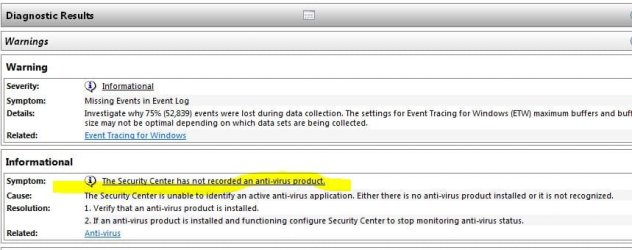
Not a solution, but a verification that you are protected. In run type perfmon/report
 

My Computer

Computer type
PC/Desktop
Computer Manufacturer/Model Number
Dell XPS 420
OS
Windows 10, Home Clean Install
CPU
Intel Core2 processsor Q8200(2.33Ghz 1333FSB) Quad Core Tech
Motherboard
Dell
Memory
6 gb
Graphics Card(s)
ATI Radeon 256MB HD3650
Sound Card
Intergrated 7.1 Channel Audio
Monitor(s) Displays
Dell SP2009W 20"
Hard Drives
640 GB Serial ATA Hard drive
Cooling
Fan
Keyboard
Dell USB Keyboard
Mouse
Dell Premium Optical USB
Internet Speed
DSL 2.85
The performance and reliability report tells me that I don't have anti-virus too.
 

My Computer

Computer Manufacturer/Model Number
HAF X
OS
Windows 7 Pro 64 Bit
CPU
Intel Core i7 930 @ 3.52
Motherboard
GIGABYTE GA-X58A-UD3R
Memory
6GB G.SKILL PI Series (2x3GB)
Graphics Card(s)
XFX 5970 Black Edition
Monitor(s) Displays
Syncmaster XL2370
Screen Resolution
1920x1080
Hard Drives
2X OCZ Vertex 2 60GB RAID0
PSU
CORSAIR HX750
Case
HAF X
Cooling
Thermaltake Frio
Keyboard
Logitech G19
Mouse
Logitech VX Nano(Old)
Internet Speed
~300kbps Download :'(
Unistall the antivirus and install again, I do not think that you are protected. But first make sure defender is off. It is not needed with MSE, both, together, causes conflicts. If you turn it off reboot and see if you are protected.
 

My Computer

Computer type
PC/Desktop
Computer Manufacturer/Model Number
Dell XPS 420
OS
Windows 10, Home Clean Install
CPU
Intel Core2 processsor Q8200(2.33Ghz 1333FSB) Quad Core Tech
Motherboard
Dell
Memory
6 gb
Graphics Card(s)
ATI Radeon 256MB HD3650
Sound Card
Intergrated 7.1 Channel Audio
Monitor(s) Displays
Dell SP2009W 20"
Hard Drives
640 GB Serial ATA Hard drive
Cooling
Fan
Keyboard
Dell USB Keyboard
Mouse
Dell Premium Optical USB
Internet Speed
DSL 2.85
Windows Defender automatically gets Turn Off, when you install Microsoft Security Essentials. Download from Microsoft site.
HTML:
http://www.microsoft.com/security_essentials/
 

My Computers

System One System Two

  • Computer type
    PC/Desktop
    Computer Manufacturer/Model Number
    PowerSpec G164
    OS
    WIN10
    CPU
    AMD Ryzen 5 3600 6-Core Processor 3.59 GHz
    Memory
    16.0 GB
    Internet Speed
    VERY FAST>>>!!!
  • Antivirus
    ESET Security Premium
In light of the problem, make sure that the system is working correctly; double check defender.
 

My Computer

Computer type
PC/Desktop
Computer Manufacturer/Model Number
Dell XPS 420
OS
Windows 10, Home Clean Install
CPU
Intel Core2 processsor Q8200(2.33Ghz 1333FSB) Quad Core Tech
Motherboard
Dell
Memory
6 gb
Graphics Card(s)
ATI Radeon 256MB HD3650
Sound Card
Intergrated 7.1 Channel Audio
Monitor(s) Displays
Dell SP2009W 20"
Hard Drives
640 GB Serial ATA Hard drive
Cooling
Fan
Keyboard
Dell USB Keyboard
Mouse
Dell Premium Optical USB
Internet Speed
DSL 2.85
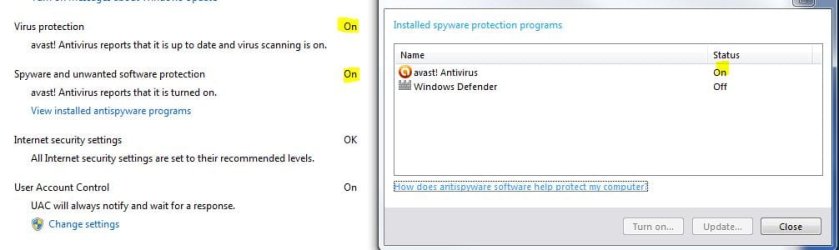
Ok, so I uninstalled it and then Action Center told me I wasn't protected anymore and told me to turn on Defender so I guess it was working. Defender was already off. Installed Security Essentials again and it tells me I'm protected. Performance and Reliability still tells me I'm not.
 

My Computer

Computer Manufacturer/Model Number
HAF X
OS
Windows 7 Pro 64 Bit
CPU
Intel Core i7 930 @ 3.52
Motherboard
GIGABYTE GA-X58A-UD3R
Memory
6GB G.SKILL PI Series (2x3GB)
Graphics Card(s)
XFX 5970 Black Edition
Monitor(s) Displays
Syncmaster XL2370
Screen Resolution
1920x1080
Hard Drives
2X OCZ Vertex 2 60GB RAID0
PSU
CORSAIR HX750
Case
HAF X
Cooling
Thermaltake Frio
Keyboard
Logitech G19
Mouse
Logitech VX Nano(Old)
Internet Speed
~300kbps Download :'(
Make sure you have installed the "real" Microsoft Security Essentials. There are a few fakes out there with very very similar names. Sometimes they even show up at the top of a Google search. I'm using MSE and the only time I've seen the "not protected" warning was when it updated to a new edition and even then it didn't last long. If you do have the real deal and it won't run you might be already infected with malware. There are some nasties out their that will disable your antivirus. Other hints that you are infected would be not being able to run regedit or msconfig. Might just be a glitch too, so reboot and maybe reinstall.
 

My Computer

Computer type
PC/Desktop
Computer Manufacturer/Model Number
Home Built
OS
Windows 10 Education 64 bit
CPU
AMD Phenom II X4 980 Black Edition Deneb 3.7GHz
Motherboard
Asus M4N68T-M V2 µATX Motherboard
Memory
8GB 4GBx2 Kingston PC10600 DDR3 1333 Memory
Graphics Card(s)
Zotac NVIDIA Geforce GT640 2 Gig DDR3 PCIe
Sound Card
VIA VT1708s High Definition Audio 8-channel Onboard
Monitor(s) Displays
22" LG E2242 1080p and 2 19" I-INC AG191D
Screen Resolution
1280x1024 - 1920x1080 - 1280x1024
Hard Drives
Crucial M100 256 GB SSD and 500 GB WD Blue SATA
PSU
Thermaltake TR 620
Case
Power Up Black ATX Mid-Tower Case
Cooling
Stock heatsink and fan
Keyboard
Logitech Wireless K350 Wave
Mouse
Logitech Wireless M570 Trackman Wheel
Internet Speed
80 Mbps Down 30 Mbps Up
Antivirus
Windows Defender
Browser
Internet Explorer 11
Other Info
HP DVD1040e Lightscribe - External USB2
Action center says protected?
 

My Computer

Computer type
PC/Desktop
Computer Manufacturer/Model Number
Dell XPS 420
OS
Windows 10, Home Clean Install
CPU
Intel Core2 processsor Q8200(2.33Ghz 1333FSB) Quad Core Tech
Motherboard
Dell
Memory
6 gb
Graphics Card(s)
ATI Radeon 256MB HD3650
Sound Card
Intergrated 7.1 Channel Audio
Monitor(s) Displays
Dell SP2009W 20"
Hard Drives
640 GB Serial ATA Hard drive
Cooling
Fan
Keyboard
Dell USB Keyboard
Mouse
Dell Premium Optical USB
Internet Speed
DSL 2.85
Well after the re-install. Action Center doesn't give me a warning anymore. And I installed it from the Microsoft site.
 

My Computer

Computer Manufacturer/Model Number
HAF X
OS
Windows 7 Pro 64 Bit
CPU
Intel Core i7 930 @ 3.52
Motherboard
GIGABYTE GA-X58A-UD3R
Memory
6GB G.SKILL PI Series (2x3GB)
Graphics Card(s)
XFX 5970 Black Edition
Monitor(s) Displays
Syncmaster XL2370
Screen Resolution
1920x1080
Hard Drives
2X OCZ Vertex 2 60GB RAID0
PSU
CORSAIR HX750
Case
HAF X
Cooling
Thermaltake Frio
Keyboard
Logitech G19
Mouse
Logitech VX Nano(Old)
Internet Speed
~300kbps Download :'(
To me it sounds like you are protected. I actually think that you were protected the first time, but I did not want to take a chance of you having problems.

Type services in search, bottom left, and then make sure it shows and is on.
 

My Computer

Computer type
PC/Desktop
Computer Manufacturer/Model Number
Dell XPS 420
OS
Windows 10, Home Clean Install
CPU
Intel Core2 processsor Q8200(2.33Ghz 1333FSB) Quad Core Tech
Motherboard
Dell
Memory
6 gb
Graphics Card(s)
ATI Radeon 256MB HD3650
Sound Card
Intergrated 7.1 Channel Audio
Monitor(s) Displays
Dell SP2009W 20"
Hard Drives
640 GB Serial ATA Hard drive
Cooling
Fan
Keyboard
Dell USB Keyboard
Mouse
Dell Premium Optical USB
Internet Speed
DSL 2.85
Installed Security Essentials again and it tells me I'm protected. Performance and Reliability still tells me I'm not.


If you're seeing that from perfmon -

perfmon.JPG

Don't worry about it. It's never detected that I've had an antivirus for as long as I've been using Windows 7 since the beta, and numerous installs. Go with what the action center tells you.

If you see this, you're fine.

Capture.JPG
 

My Computer

Computer type
PC/Desktop
Computer Manufacturer/Model Number
Airbot 2.0
OS
Windows 7 Ultimate x64 SP1
CPU
Core i7 920 (D0) @ 4Ghz, *26c idle *65c full load on air
Motherboard
Asus P6X58D Premium - Sata 6Gb/s - USB 3.0
Memory
12GB DDR3 Corsair Dominator -CMD12GX3M6A1600C8 at 1600MHz
Graphics Card(s)
Zotac Geforce GTX 770
Sound Card
ASUS Xonar D2X
Monitor(s) Displays
1 LG 24" Flatron W2453V-PF 1 Samsung 24" P2450H both 2ms RT
Screen Resolution
1920x1080@60hz
Hard Drives
1 Samsung 250GB 840 Evo SSD
1 OCZ Vertex2 180GB SSD
1 TB Samsung Spinpoint F1 7200RPM 32MB cache
2 500GB WD Caviar Blacks 7200RPM 32MB cache (WD5001AALS)

Pioneer DVD Burner DVR-S18M
PSU
Corsair HX1000W
Case
Cooler Master HAF 932
Cooling
Case Fans *3 230mm, *1 140mm/CPU - *Tuniq Tower 120 Extreme
Keyboard
Logitech Wireless MK700
Mouse
Logitech Wireless MK700
Internet Speed
DL 15 Mbps UL 0.98 Mbps
Antivirus
None
Browser
Firefox Nightly
Other Info
Processor-7.7 *RAM- 7.9 *Graphics-7.9 *Gaming Graphics- 7.9 *SSD- 7.8 W.E.I final score= 7.7
*Phone- LG Nexus 5
I typed services and it took me to "Component Services"? Is that the right place? What do I look for? I didn't find anything like it there.
 

My Computer

Computer Manufacturer/Model Number
HAF X
OS
Windows 7 Pro 64 Bit
CPU
Intel Core i7 930 @ 3.52
Motherboard
GIGABYTE GA-X58A-UD3R
Memory
6GB G.SKILL PI Series (2x3GB)
Graphics Card(s)
XFX 5970 Black Edition
Monitor(s) Displays
Syncmaster XL2370
Screen Resolution
1920x1080
Hard Drives
2X OCZ Vertex 2 60GB RAID0
PSU
CORSAIR HX750
Case
HAF X
Cooling
Thermaltake Frio
Keyboard
Logitech G19
Mouse
Logitech VX Nano(Old)
Internet Speed
~300kbps Download :'(
I would just go with Airbot, I agree 100%, and as I said, I think that you are protected.

TY Aaron
 

My Computer

Computer type
PC/Desktop
Computer Manufacturer/Model Number
Dell XPS 420
OS
Windows 10, Home Clean Install
CPU
Intel Core2 processsor Q8200(2.33Ghz 1333FSB) Quad Core Tech
Motherboard
Dell
Memory
6 gb
Graphics Card(s)
ATI Radeon 256MB HD3650
Sound Card
Intergrated 7.1 Channel Audio
Monitor(s) Displays
Dell SP2009W 20"
Hard Drives
640 GB Serial ATA Hard drive
Cooling
Fan
Keyboard
Dell USB Keyboard
Mouse
Dell Premium Optical USB
Internet Speed
DSL 2.85
Ok, that's exactly how I see it. Thanks for the help. Didn't see his post the first time.
 

My Computer

Computer Manufacturer/Model Number
HAF X
OS
Windows 7 Pro 64 Bit
CPU
Intel Core i7 930 @ 3.52
Motherboard
GIGABYTE GA-X58A-UD3R
Memory
6GB G.SKILL PI Series (2x3GB)
Graphics Card(s)
XFX 5970 Black Edition
Monitor(s) Displays
Syncmaster XL2370
Screen Resolution
1920x1080
Hard Drives
2X OCZ Vertex 2 60GB RAID0
PSU
CORSAIR HX750
Case
HAF X
Cooling
Thermaltake Frio
Keyboard
Logitech G19
Mouse
Logitech VX Nano(Old)
Internet Speed
~300kbps Download :'(

My Computer

Computer type
PC/Desktop
Computer Manufacturer/Model Number
Dell XPS 420
OS
Windows 10, Home Clean Install
CPU
Intel Core2 processsor Q8200(2.33Ghz 1333FSB) Quad Core Tech
Motherboard
Dell
Memory
6 gb
Graphics Card(s)
ATI Radeon 256MB HD3650
Sound Card
Intergrated 7.1 Channel Audio
Monitor(s) Displays
Dell SP2009W 20"
Hard Drives
640 GB Serial ATA Hard drive
Cooling
Fan
Keyboard
Dell USB Keyboard
Mouse
Dell Premium Optical USB
Internet Speed
DSL 2.85
Ok Thanks :D
 

My Computer

Computer Manufacturer/Model Number
HAF X
OS
Windows 7 Pro 64 Bit
CPU
Intel Core i7 930 @ 3.52
Motherboard
GIGABYTE GA-X58A-UD3R
Memory
6GB G.SKILL PI Series (2x3GB)
Graphics Card(s)
XFX 5970 Black Edition
Monitor(s) Displays
Syncmaster XL2370
Screen Resolution
1920x1080
Hard Drives
2X OCZ Vertex 2 60GB RAID0
PSU
CORSAIR HX750
Case
HAF X
Cooling
Thermaltake Frio
Keyboard
Logitech G19
Mouse
Logitech VX Nano(Old)
Internet Speed
~300kbps Download :'(
It is a known bug that it doesn't show in perfmon.
 

My Computer

OS
Windows 7 & Windows Vista Ultimate
Back
Top