
Microsoft Security Bulletin Summary for July 12th 2016

Hi,
You can install the newest update client KB3161608 anytime you want too
Just make sure you switch the update settings to never check for updates first and restart the machine.


So it has to be "manually installed"? I've never done that and I don't know how it's done, unless it the following.... Is this what it takes?

KB3161608
https://www.microsoft.com/en-us/download/details.aspx?id=52974
To start the download, click the Download buttonand then do one of the following, or select another language from ChangeLanguage and then click Change.
Click Run to start the installation immediately.

Sorry for all the questions, just didn't want to start pressing buttons till I knew I was doing the right thing. LOL
 
Last edited:

My Computer My Computer

At a glance

Windows 7 Pro x64Intel I7 6700 3.40 GHz8GB
Computer type
PC/Desktop
Computer Manufacturer/Model Number
HP ProDesk 400 G3
OS
Windows 7 Pro x64
CPU
Intel I7 6700 3.40 GHz
Memory
8GB
Monitor(s) Displays
Samsung 21.5" LED
Hard Drives
1 TB
Keyboard
Ducky mechanical with PBT double shot keycaps.
Dallas, you'll have to install the April 2015 servicing stack update before you can install the rollup or it will fail.
https://support.microsoft.com/en-gb/kb/3020369

Also, don't expect this to be a permanent fix for slow updates, even though MS states it. My VM's have gone back to slow updates again even with that update installed. Worked well for a day or two but then went back to being slow again.

If you're doing manual checks for updates, it's more about luck and timing and hitting the servers at the right time.
 

My Computer My Computer

At a glance

Win 7 Ultimate, Win 8.1 Pro, Linux Mint 19 Ci...Intel i5 4690KCorsair Vengeance LP 32GB DDR3MSI GTX 1060 GAMING X 6GB
Computer type
PC/Desktop
Computer Manufacturer/Model Number
Custom Build
OS
Win 7 Ultimate, Win 8.1 Pro, Linux Mint 19 Cinnamon (All 64-Bit)
CPU
Intel i5 4690K
Motherboard
Gigabyte Z97X-UD3H
Memory
Corsair Vengeance LP 32GB DDR3
Graphics Card(s)
MSI GTX 1060 GAMING X 6GB
Sound Card
Onboard
Hard Drives
Samsung 850 EVO 250GB SSD (x2)
Samsung 860 EVO 1TB SSD (x2)
Crucial MX300 525GB SSD
WD Blue 2TB 5400rpm Intellipark Disabled (x2)
PSU
Corsair HX750i
Case
Phanteks Enthoo Pro
Cooling
CM Hyper 212 EVO on CPU, Noctua Redux NF-P14S 1500rpm (x6)
Keyboard
Corsair K70 RGB LUX
Mouse
Corsair Sabre RGB
Antivirus
Avast Free, MalwareBytes, SAS & CryptoPrevent
Browser
Chrome
Other Info
StarTech PEXESAT322I 2 Port PCI-E SATA Card
ASUS PCE-AC56 Dual-band AC1300 Wireless Card
Akasa FC.Six Manual Fan Controller
And a Partridge in a Pear Tree!
Yeah well My wife's lap top just finished a full 12 hour search for updates. Unbelievable.
 

My Computer My Computer

At a glance

Windows 7 Pro x64Intel I7 6700 3.40 GHz8GB
Computer type
PC/Desktop
Computer Manufacturer/Model Number
HP ProDesk 400 G3
OS
Windows 7 Pro x64
CPU
Intel I7 6700 3.40 GHz
Memory
8GB
Monitor(s) Displays
Samsung 21.5" LED
Hard Drives
1 TB
Keyboard
Ducky mechanical with PBT double shot keycaps.
Strange. I've never had to wait more than 30 minutes and it is usually a lot less.
 

My Computer My Computer

At a glance

Microsoft Windows 7 Home Premium 64-bit Servi...Intel(R) Core(TM) i3 CPU M 330 @ 2.13GHz8 GB DDR3Intel(R) HD Graphics
Computer type
Laptop
Computer Manufacturer/Model Number
Hewlett-Packard/G62-107SA Notebook
OS
Microsoft Windows 7 Home Premium 64-bit Service Pack 1
CPU
Intel(R) Core(TM) i3 CPU M 330 @ 2.13GHz
Motherboard
Hewlett-Packard 1425
Memory
8 GB DDR3
Graphics Card(s)
Intel(R) HD Graphics
Sound Card
Realtek High Definition Audio
Monitor(s) Displays
Builtin
Screen Resolution
1366 x 768 x 32 bits (4294967296 colors) @ 60 Hz
Hard Drives
250 GB SATA Hard Disk Drive 7200 rpm
2TB Seagate GoFlex USB 2 Drive
1TB Iomega Prestige USB 2 Drive
1.5TB Iomega Prestige USB 2 Drive (Samsung)
2TB WD MyBook Live NAS.
Mouse
Logitech Anywhere MX
Internet Speed
152 Mbs download 10 Mbs upload
Antivirus
Norton 360
Browser
Chrome
Yeah well My wife's lap top just finished a full 12 hour search for updates. Unbelievable.

12 hours!? :banghead: :banghead: :banghead:
 

My Computer My Computer

At a glance

Win 7 Ultimate, Win 8.1 Pro, Linux Mint 19 Ci...Intel i5 4690KCorsair Vengeance LP 32GB DDR3MSI GTX 1060 GAMING X 6GB
Computer type
PC/Desktop
Computer Manufacturer/Model Number
Custom Build
OS
Win 7 Ultimate, Win 8.1 Pro, Linux Mint 19 Cinnamon (All 64-Bit)
CPU
Intel i5 4690K
Motherboard
Gigabyte Z97X-UD3H
Memory
Corsair Vengeance LP 32GB DDR3
Graphics Card(s)
MSI GTX 1060 GAMING X 6GB
Sound Card
Onboard
Hard Drives
Samsung 850 EVO 250GB SSD (x2)
Samsung 860 EVO 1TB SSD (x2)
Crucial MX300 525GB SSD
WD Blue 2TB 5400rpm Intellipark Disabled (x2)
PSU
Corsair HX750i
Case
Phanteks Enthoo Pro
Cooling
CM Hyper 212 EVO on CPU, Noctua Redux NF-P14S 1500rpm (x6)
Keyboard
Corsair K70 RGB LUX
Mouse
Corsair Sabre RGB
Antivirus
Avast Free, MalwareBytes, SAS & CryptoPrevent
Browser
Chrome
Other Info
StarTech PEXESAT322I 2 Port PCI-E SATA Card
ASUS PCE-AC56 Dual-band AC1300 Wireless Card
Akasa FC.Six Manual Fan Controller
And a Partridge in a Pear Tree!

My Computer My Computer

At a glance

Windows 7 Pro x64Intel I7 6700 3.40 GHz8GB
Computer type
PC/Desktop
Computer Manufacturer/Model Number
HP ProDesk 400 G3
OS
Windows 7 Pro x64
CPU
Intel I7 6700 3.40 GHz
Memory
8GB
Monitor(s) Displays
Samsung 21.5" LED
Hard Drives
1 TB
Keyboard
Ducky mechanical with PBT double shot keycaps.
Nightmare! My only advice is to disable Windows update while you install Windows. After you have it set up how you want, install the latest Windows update client and then do a check: https://support.microsoft.com/en-gb/kb/3138612

While it doesn't work miracles, it certainly improves it. But still be prepared to wait for at least an hour. It's better to just leave it running and go off and do something else. Waiting for it to pick up the updates is like rolling a dice these days. You can never guess what the outcome will be!
 

My Computer My Computer

At a glance

Win 7 Ultimate, Win 8.1 Pro, Linux Mint 19 Ci...Intel i5 4690KCorsair Vengeance LP 32GB DDR3MSI GTX 1060 GAMING X 6GB
Computer type
PC/Desktop
Computer Manufacturer/Model Number
Custom Build
OS
Win 7 Ultimate, Win 8.1 Pro, Linux Mint 19 Cinnamon (All 64-Bit)
CPU
Intel i5 4690K
Motherboard
Gigabyte Z97X-UD3H
Memory
Corsair Vengeance LP 32GB DDR3
Graphics Card(s)
MSI GTX 1060 GAMING X 6GB
Sound Card
Onboard
Hard Drives
Samsung 850 EVO 250GB SSD (x2)
Samsung 860 EVO 1TB SSD (x2)
Crucial MX300 525GB SSD
WD Blue 2TB 5400rpm Intellipark Disabled (x2)
PSU
Corsair HX750i
Case
Phanteks Enthoo Pro
Cooling
CM Hyper 212 EVO on CPU, Noctua Redux NF-P14S 1500rpm (x6)
Keyboard
Corsair K70 RGB LUX
Mouse
Corsair Sabre RGB
Antivirus
Avast Free, MalwareBytes, SAS & CryptoPrevent
Browser
Chrome
Other Info
StarTech PEXESAT322I 2 Port PCI-E SATA Card
ASUS PCE-AC56 Dual-band AC1300 Wireless Card
Akasa FC.Six Manual Fan Controller
And a Partridge in a Pear Tree!
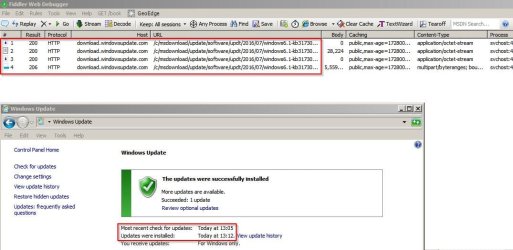
Hmm. Just ran a manual update check. Took less than a minute. Downloaded and installed an unwanted update just as a test.

Result:

Fiddler Web Debugger.jpg

Time is currently 1.24 pm in UK
 

My Computer My Computer

At a glance

Microsoft Windows 7 Home Premium 64-bit 7601 ...AMD C-60 APU with Radeon(tm) HD Graphics4.00 GBAMD Radeon HD 6290 Graphics
Computer type
Laptop
Computer Manufacturer/Model Number
ASUS
OS
Microsoft Windows 7 Home Premium 64-bit 7601 Multiprocessor Free Service Pack 1
CPU
AMD C-60 APU with Radeon(tm) HD Graphics
Motherboard
ASUSTeK COMPUTER INC. X501U
Memory
4.00 GB
Graphics Card(s)
AMD Radeon HD 6290 Graphics
Sound Card
(1) AMD High Definition Audio Device (2) Realtek High Defi
Screen Resolution
1366 x 768 x 32 bits (4294967296 colors) @ 60 Hz
Hard Drives
Hitachi HTS545050A7E380 SATA Disk Device
Antivirus
Comodo CIS & FW, SecureAplus App Whitelisting, Threatfire
Browser
Cyberfox 64bit, Opera 64bit, Airfox
Other Info
Spy-The-Spy, HitmanPro.Alert, Norton Connect Safe, MJRegWatcher, BitDefender TrafficLight, Voodoo Shield, Zemana AntiMalware
Hi,
You can install the newest update client KB3161608 anytime you want too
Just make sure you switch the update settings to never check for updates first and restart the machine.


So it has to be "manually installed"? I've never done that and I don't know how it's done, unless it the following.... Is this what it takes?

KB3161608
https://www.microsoft.com/en-us/download/details.aspx?id=52974
To start the download, click the Download buttonand then do one of the following, or select another language from ChangeLanguage and then click Change.
Click Run to start the installation immediately.

Sorry for all the questions, just didn't want to start pressing buttons till I knew I was doing the right thing. LOL
Hi,
That is the correct version for your 64 bit system
KB3020369 was released in 2015 so it would be odd if it weren't already installed so if KB3161608 fails to install you would need to do KB3020369 first
64 bit KB3020369
https://www.microsoft.com/en-us/download/details.aspx?id=46817

How to manually install an update,
You must change your windows update setting to Never check for updates first and restart the machine.
http://www.sevenforums.com/tutorials/2797-windows-update-settings-change.html

Once you change your settings and restart go to the link you quoted and download it to your downloads folder and run it from there basically just click on it like any exe file and it will offer a user account control warning to continue.... agree and it will have it's own search so that is why you have to turn off the machines update setting so the searches will not conflict with each other

Once it has finished it's search it will ask to install
After the install it will ask to restart the machine.
Then your pretty much done with the manual install.

Then just change your update setting back to what they were before and if windows does start searching again automatically do a manual search for updates to get any other updates you might need or haven't been offered yet.
 

My Computer My Computer

At a glance

Win-7-Pro64bit 7-H-Prem-64biti7-5930K 2nd i9-9940x both water blocked VRM'...Trident-z 3200C14 2nd Trident-z 3600C16EVGA 1080ti ftw3 2nd Titan Xp both water blocked
Computer type
PC/Desktop
Computer Manufacturer/Model Number
Custom assembled by me :}
OS
Win-7-Pro64bit 7-H-Prem-64bit
CPU
i7-5930K 2nd i9-9940x both water blocked VRM's too
Motherboard
ASUS SABERTOOTH X99 2nd ASUS x299 Apex
Memory
Trident-z 3200C14 2nd Trident-z 3600C16
Graphics Card(s)
EVGA 1080ti ftw3 2nd Titan Xp both water blocked
Sound Card
Built-in Realtek
Monitor(s) Displays
1-AOC G2460PG 24"G-Sync 144Hz/ 2nd 1-ASUS VG248QE 24" 144Hz
Screen Resolution
1920 x 1080 144Hz
Hard Drives
2-Samsung M.2 Evo & Evo Plus
2-Samsung 850 EVO 500GB SSD's/ 3-2.5 W.D. Black 1tb-&3-1tb/3-3.5 WD Black 1tb hdd's
PSU
EVGA SuperNOVA 1000-P2 2nd 1200-P2
Case
2-Corsair Obsidian Series 450D Black ATX Mid Tower
Cooling
Custom water loops
Keyboard
Logitech G710+/ 2nd Logitech G910
Mouse
2-RedDragon M901 Perdition 16400 dpi Gaming mouse = wired
Internet Speed
Comcast Ping 19ms 89.31mbps download speed 6.12mbps upload
Antivirus
Malwarebytes Pro/ Superantispyware Pro
Browser
FireFox & Pale moon
Other Info
2nd ASUS X299 Apex/Intel i9-9940x with Custom water loop/7H-Prem-x64/Corsair 450D case/Ram Trident-z 3600C16 4x8gb / Samsung970Evo plus 500gb SSD/Dual ssd EZ swap evo/PSU EVGA SuperNova 1200w-P2 80+Platinum/GPU Titan Xp /8-ML-140 on push-pull on 2-280GTX rads
Ahh! Great explanation Thrash! Thanks for your help.
 

My Computer My Computer

At a glance

Windows 7 Pro x64Intel I7 6700 3.40 GHz8GB
Computer type
PC/Desktop
Computer Manufacturer/Model Number
HP ProDesk 400 G3
OS
Windows 7 Pro x64
CPU
Intel I7 6700 3.40 GHz
Memory
8GB
Monitor(s) Displays
Samsung 21.5" LED
Hard Drives
1 TB
Keyboard
Ducky mechanical with PBT double shot keycaps.
Hi,
You can install the newest update client KB3161608 anytime you want too
Just make sure you switch the update settings to never check for updates first and restart the machine.


So it has to be "manually installed"? I've never done that and I don't know how it's done, unless it the following.... Is this what it takes?

KB3161608
https://www.microsoft.com/en-us/download/details.aspx?id=52974
To start the download, click the Download buttonand then do one of the following, or select another language from ChangeLanguage and then click Change.
Click Run to start the installation immediately.

Sorry for all the questions, just didn't want to start pressing buttons till I knew I was doing the right thing. LOL
Hi,
That is the correct version for your 64 bit system
KB3020369 was released in 2015 so it would be odd if it weren't already installed so if KB3161608 fails to install you would need to do KB3020369 first
64 bit KB3020369
https://www.microsoft.com/en-us/download/details.aspx?id=46817

How to manually install an update,
You must change your windows update setting to Never check for updates first and restart the machine.
http://www.sevenforums.com/tutorials/2797-windows-update-settings-change.html

Once you change your settings and restart go to the link you quoted and download it to your downloads folder and run it from there basically just click on it like any exe file and it will offer a user account control warning to continue.... agree and it will have it's own search so that is why you have to turn off the machines update setting so the searches will not conflict with each other

Once it has finished it's search it will ask to install
After the install it will ask to restart the machine.
Then your pretty much done with the manual install.

Then just change your update setting back to what they were before and if windows does start searching again automatically do a manual search for updates to get any other updates you might need or haven't been offered yet.

Thrash the laptop didn't have KB3020369 because of the full recovery I did. It came with SP1 so that was my starting point. I followed all your instructions and manually installed KB3020369, then 3161608, then 3161664.
I'm very happy to report that now it is searching, downloading and installing like a champ, it was like magic! Went from a 12 hour update search to perfectly normal speed!
Thank you very much for your assistance and patience, you were a great help. :D
 
Last edited:

My Computer My Computer

At a glance

Windows 7 Pro x64Intel I7 6700 3.40 GHz8GB
Computer type
PC/Desktop
Computer Manufacturer/Model Number
HP ProDesk 400 G3
OS
Windows 7 Pro x64
CPU
Intel I7 6700 3.40 GHz
Memory
8GB
Monitor(s) Displays
Samsung 21.5" LED
Hard Drives
1 TB
Keyboard
Ducky mechanical with PBT double shot keycaps.
Back
Top