Microsoft Security Essentials disappeared - please help !

sushiman

New member
Member
Local time
8:26 AM
Messages
65
Discovered this morning that MSE is no longer installed on my computer . Got an error message - explorer.exe ( couldn't open My Pictures , Control Panel , etc...although I can now after re-starting computer ) - and thought I'd better do a virus scan - which is when I found out Essentials had disappeared . Not PC savvy by any means , so am hoping that someone can advise me on how to proceeed . I'm using Windows 7 / 64 bit .
 

My Computer

OS
Windows 7 Premium
Hi Sushiman,
For starters can you download/run
Malwarebytes free, uncheck the trial option, but in dashboard settings enable rootkit detection.
MSE can "dissappear" if another AV has been installed!

Then ESET on-line.

Report the findings.

Roy
 

My Computer

Computer type
PC/Desktop
Computer Manufacturer/Model Number
medionl/Aspire 6930G/acer x55a
OS
W7 home premium 32bit/W7HP 64bit/w10 tp insider ring
CPU
E5300 dual core
Motherboard
medion MS7366
Memory
3gb
Graphics Card(s)
Nvidia Geforce 7100 Nforce 630i
Monitor(s) Displays
avixc
Internet Speed
n (isp resticted to 72)
Antivirus
mse/pands
Browser
palemoon
Other Info
Belkin Fd7050 n USB using Railink RT2870 drivers, more upto date
Hello,

First reboot into Safe Mode with Networking.
http://www.sevenforums.com/tutorials/69585-safe-mode.html

Go to Control Panel, Uninstall a Program. Check to see if MSE appears in the list. If it does uninstall it. Close Window.

Open Browser and download free 30-day trial of Norton 360, update and run a full scan. When offered to activate the other features of Norton, just click on remind later. I don't know your location or ISP, but Comcast provides Norton 360 free with subscription to their service.
Best Free Antivirus - Download Norton 360 Free Trial Software

If you have trouble running Norton in Normal Mode, the reboot back into Safe Mode with Networking and run it.

While still in Safe mode with Networking download JRT, Save As, to your Desktop. Don't run yet.
https://www.malwarebytes.com/junkwareremovaltool/

Next download Adwcleaner, Save As, to your Desktop. Don't run yet.
https://toolslib.net/downloads/viewdownload/1-adwcleaner/

Reboot into Normal Mode and run each of these cleaners.

Finally, download CCleaner, repeat running scans until it doesn't find anything to remove. Be sure to use the Back Up feature when cleaning the registry.
http://www.sevenforums.com/tutorials/306648-ccleaner-delete-junk-files.html

Afterwards go back into "Uninstall a Program" and make sure MSE is removed. Or it may conflict with Norton.

Let us know how you Computer is running afterwards.

If you don't want Norton after the cleaning is done. Download the Norton 360 removal tool.
Norton Removal Tool Download

Then go download a new copy of MSE.
https://www.microsoft.com/en-us/download/details.aspx?id=5201

Also, download and install the free version of Malwarebytes and run a full scan.
https://www.malwarebytes.com/mwb-download/

Hope this helps'
John

 

My Computers

System One System Two

  • Computer type
    PC/Desktop
    Computer Manufacturer/Model Number
    HP Pavilion 6751c
    OS
    Win7, Win10, Win11
    Internet Speed
    100 Mbps
    Antivirus
    Norton 360
    Browser
    IE 11
  • Computer type
    PC/Desktop
    System Manufacturer/Model Number
    HP ENVY 750-514 & Dell XPS 8960
    OS
    Win7, Win10, Win11
    Antivirus
    Norton 360
Thank you AmericanPharaoh and torchwood .

I neglected to mention that I am using a Dell purchased in Japan , where I live , so just about everything is in Japanese . I can read a lot of it , but not everything .

AmericanPharaoh : MSE is definitely not in the list of programs .

torchwood : You mentioned that if another AV was installed that MSE could disappear , so I took another look at my programs and discovered that when we moved to Kumamoto City in May , and had NTT install optical fiber high speed internet , that an NTT security program was automatically installed ( not enabled yet , though ) in my PC . I'm thinking this is what caused the disappearance of MSE . My daughter - who is bi-linqual - will visit this weekend so what I am thinking of doing is uninstalling the NTT security program(s) and then try re-installing Microsoft Security Essentials . I think I may have a virus or some malware because I've had a few strange things happen recently . Since I've unknowingly been using the computer for months without any anti-virus protection the chances are high that I do . Will I be able to remove the virus or malware with MSE after I do a scan , or should I download malwarebytes
 

My Computer

OS
Windows 7 Premium
One other thing. Are you particularly keen on sticking with MSE? This might be a good opportunity to consider, in my opinion, superior alternatives such as Panda and Avira? Panda would be my choice:

Download Panda Free Antivirus 17.0.1 - FileHippo.com

Just click on the green box 'Download Latest Version'.

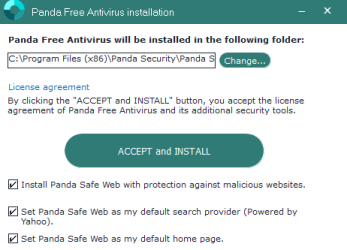
Once it's downloaded, just double click on it and follow the instructions, remembering to uncheck the 3 boxes before clicking on 'ACCEPT And INSTALL' (details in my next post below).
 
Last edited:

My Computer

Computer type
Laptop
Computer Manufacturer/Model Number
Acer Aspire 6930G
OS
W7 Home Premium x86 SP1 Build 7601
CPU
Intel Mobile Core 2 Duo P7450 @ 2.13GHz
Motherboard
Acer Makalu U2E1
Memory
4.00GB Dual-Channel DDR2 @ 332MH
Graphics Card(s)
1024MB NVIDIA GeForce 9600M GT
Monitor(s) Displays
Generic PnP
Screen Resolution
1024x768@60Hz
Hard Drives
298GB Western Digital WDC WD3200BEVT-22ZCT0 (SATA)
Antivirus
Kaspersky Security Cloud Free / VoodooShield
Browser
Brave / Firefox
Other Info
uBlockOrigin / Bidefender Trafficlight / HitmanPro
One other thing. Are you particularly keen on sticking with MSE? This might be a good opportunity to consider, in my opinion, superior alternatives such as Panda and Avira? Panda would be my choice:

The lightest free antivirus - Panda Security

On installation I recommend unchecking the 3 boxes that install Panda's toolbar and change your search engine.

Thanks for that info . I was totally unaware of both . :o
 

My Computer

OS
Windows 7 Premium
In my opinion Panda Free antivirus is a significant improvement on MSE which has performed poorly for some time now. Panda is very easy to use. Once it's installed you can pretty much forget about it - it updates automatically about every 15 minutes and generally looks after itself, and gives much better protection than MSE.

If you decide to install Panda, make sure there are no other antiviruses on your computer. If there are, uninstall them, which I think you said you would do this weekend.

To install Panda, just download the installer from the FileHippo link in my previous post, then double click on it to open it. During installation you will come to the page shown below:

Panda uncheck.PNG

As I said in my previous post, I strongly recommend, before you click on ACCEPT and INSTALL, you uncheck the 3 boxes, which are checked by default. Only click on ACCEPT and INSTALL after the ticks from those 3 boxes have been removed.

Any problems just post back here. Good luck.
 
Last edited:

My Computer

Computer type
Laptop
Computer Manufacturer/Model Number
Acer Aspire 6930G
OS
W7 Home Premium x86 SP1 Build 7601
CPU
Intel Mobile Core 2 Duo P7450 @ 2.13GHz
Motherboard
Acer Makalu U2E1
Memory
4.00GB Dual-Channel DDR2 @ 332MH
Graphics Card(s)
1024MB NVIDIA GeForce 9600M GT
Monitor(s) Displays
Generic PnP
Screen Resolution
1024x768@60Hz
Hard Drives
298GB Western Digital WDC WD3200BEVT-22ZCT0 (SATA)
Antivirus
Kaspersky Security Cloud Free / VoodooShield
Browser
Brave / Firefox
Other Info
uBlockOrigin / Bidefender Trafficlight / HitmanPro
HI,
Yep I'm liking Panda free
And no you don't have to associate a email address when it asks too just keep click do this later link.

Panda news can also be turned off as well very easily along with usb scanning... if one wishes too which I do I only use my own devices so no need to scan them all when connected.
 

My Computer

Computer type
PC/Desktop
Computer Manufacturer/Model Number
Custom assembled by me :}
OS
Win-7-Pro64bit 7-H-Prem-64bit
CPU
i7-5930K 2nd i9-9940x both water blocked VRM's too
Motherboard
ASUS SABERTOOTH X99 2nd ASUS x299 Apex
Memory
Trident-z 3200C14 2nd Trident-z 3600C16
Graphics Card(s)
EVGA 1080ti ftw3 2nd Titan Xp both water blocked
Sound Card
Built-in Realtek
Monitor(s) Displays
1-AOC G2460PG 24"G-Sync 144Hz/ 2nd 1-ASUS VG248QE 24" 144Hz
Screen Resolution
1920 x 1080 144Hz
Hard Drives
2-Samsung M.2 Evo & Evo Plus
2-Samsung 850 EVO 500GB SSD's/ 3-2.5 W.D. Black 1tb-&3-1tb/3-3.5 WD Black 1tb hdd's
PSU
EVGA SuperNOVA 1000-P2 2nd 1200-P2
Case
2-Corsair Obsidian Series 450D Black ATX Mid Tower
Cooling
Custom water loops
Keyboard
Logitech G710+/ 2nd Logitech G910
Mouse
2-RedDragon M901 Perdition 16400 dpi Gaming mouse = wired
Internet Speed
Comcast Ping 19ms 89.31mbps download speed 6.12mbps upload
Antivirus
Malwarebytes Pro/ Superantispyware Pro
Browser
FireFox & Pale moon
Other Info
2nd ASUS X299 Apex/Intel i9-9940x with Custom water loop/7H-Prem-x64/Corsair 450D case/Ram Trident-z 3600C16 4x8gb / Samsung970Evo plus 500gb SSD/Dual ssd EZ swap evo/PSU EVGA SuperNova 1200w-P2 80+Platinum/GPU Titan Xp /8-ML-140 on push-pull on 2-280GTX rads
Glad it's working well ThrashZone. Sushiman said he wasn't that computer savvy so I didn't mention anything else - the priority imo is to uncheck those 3 boxes before installing. I was using Panda for about 2 years before I won an Eset license recently and it's the best free AV I've used by some margin. Super light, maintenance free once installed so perfect for basic users, and has been getting great scores in independent tests for the last 2-3 years.

I'd had problems with most of the other free ones apart from Avira. Avast has become more and more bloated and resource heavy over the years, and quite a few settings so not ideal for basic users, and eventually it stopped updating automatically for me - it's also not that straightforward to uninstall, often requring additional removal tools.

Comodo Internet Security - good protection but I nearly had a nervous breakdown every time I tried to clean install a new version.

AVG - always resource heavy and not great protection.

Avira is the best of the rest for me but not as light as Panda and more complex and less intuitive.
 

My Computer

Computer type
Laptop
Computer Manufacturer/Model Number
Acer Aspire 6930G
OS
W7 Home Premium x86 SP1 Build 7601
CPU
Intel Mobile Core 2 Duo P7450 @ 2.13GHz
Motherboard
Acer Makalu U2E1
Memory
4.00GB Dual-Channel DDR2 @ 332MH
Graphics Card(s)
1024MB NVIDIA GeForce 9600M GT
Monitor(s) Displays
Generic PnP
Screen Resolution
1024x768@60Hz
Hard Drives
298GB Western Digital WDC WD3200BEVT-22ZCT0 (SATA)
Antivirus
Kaspersky Security Cloud Free / VoodooShield
Browser
Brave / Firefox
Other Info
uBlockOrigin / Bidefender Trafficlight / HitmanPro
Hi,
Yep well just like Panda - Avast also is redirected to CNet where they add stuff to every download :mad2:
 

My Computer

Computer type
PC/Desktop
Computer Manufacturer/Model Number
Custom assembled by me :}
OS
Win-7-Pro64bit 7-H-Prem-64bit
CPU
i7-5930K 2nd i9-9940x both water blocked VRM's too
Motherboard
ASUS SABERTOOTH X99 2nd ASUS x299 Apex
Memory
Trident-z 3200C14 2nd Trident-z 3600C16
Graphics Card(s)
EVGA 1080ti ftw3 2nd Titan Xp both water blocked
Sound Card
Built-in Realtek
Monitor(s) Displays
1-AOC G2460PG 24"G-Sync 144Hz/ 2nd 1-ASUS VG248QE 24" 144Hz
Screen Resolution
1920 x 1080 144Hz
Hard Drives
2-Samsung M.2 Evo & Evo Plus
2-Samsung 850 EVO 500GB SSD's/ 3-2.5 W.D. Black 1tb-&3-1tb/3-3.5 WD Black 1tb hdd's
PSU
EVGA SuperNOVA 1000-P2 2nd 1200-P2
Case
2-Corsair Obsidian Series 450D Black ATX Mid Tower
Cooling
Custom water loops
Keyboard
Logitech G710+/ 2nd Logitech G910
Mouse
2-RedDragon M901 Perdition 16400 dpi Gaming mouse = wired
Internet Speed
Comcast Ping 19ms 89.31mbps download speed 6.12mbps upload
Antivirus
Malwarebytes Pro/ Superantispyware Pro
Browser
FireFox & Pale moon
Other Info
2nd ASUS X299 Apex/Intel i9-9940x with Custom water loop/7H-Prem-x64/Corsair 450D case/Ram Trident-z 3600C16 4x8gb / Samsung970Evo plus 500gb SSD/Dual ssd EZ swap evo/PSU EVGA SuperNova 1200w-P2 80+Platinum/GPU Titan Xp /8-ML-140 on push-pull on 2-280GTX rads
Yes. If possible I never download anything via CNET. I think it's actually better to download the Panda installer from FileHippo instead of from Panda's own site to avoid nag screens to upgrade to the Pro version and other nonsense. FileHippo went through their own 'CNET' phase a while ago when they started bundling some of their downloads with PUPs but they seem to have cleaned up their act.
 
Last edited:

My Computer

Computer type
Laptop
Computer Manufacturer/Model Number
Acer Aspire 6930G
OS
W7 Home Premium x86 SP1 Build 7601
CPU
Intel Mobile Core 2 Duo P7450 @ 2.13GHz
Motherboard
Acer Makalu U2E1
Memory
4.00GB Dual-Channel DDR2 @ 332MH
Graphics Card(s)
1024MB NVIDIA GeForce 9600M GT
Monitor(s) Displays
Generic PnP
Screen Resolution
1024x768@60Hz
Hard Drives
298GB Western Digital WDC WD3200BEVT-22ZCT0 (SATA)
Antivirus
Kaspersky Security Cloud Free / VoodooShield
Browser
Brave / Firefox
Other Info
uBlockOrigin / Bidefender Trafficlight / HitmanPro
Hi Sushiman,
Please run Malwarebytes free, (uncheck the trial/enable rootkit detection in the dashboard settings)
malwarebytes runs perfectly well with any AV that i know of, and its a great backup for them.

Roy
 

My Computer

Computer type
PC/Desktop
Computer Manufacturer/Model Number
medionl/Aspire 6930G/acer x55a
OS
W7 home premium 32bit/W7HP 64bit/w10 tp insider ring
CPU
E5300 dual core
Motherboard
medion MS7366
Memory
3gb
Graphics Card(s)
Nvidia Geforce 7100 Nforce 630i
Monitor(s) Displays
avixc
Internet Speed
n (isp resticted to 72)
Antivirus
mse/pands
Browser
palemoon
Other Info
Belkin Fd7050 n USB using Railink RT2870 drivers, more upto date
Hi Sushiman,

If NTT's AV is on your system but NOT activated, then you currently are possibly unprotected.
go to ActionCentre and check your security screen it will tell you whats currently active or not!.

Roy
 

My Computer

Computer type
PC/Desktop
Computer Manufacturer/Model Number
medionl/Aspire 6930G/acer x55a
OS
W7 home premium 32bit/W7HP 64bit/w10 tp insider ring
CPU
E5300 dual core
Motherboard
medion MS7366
Memory
3gb
Graphics Card(s)
Nvidia Geforce 7100 Nforce 630i
Monitor(s) Displays
avixc
Internet Speed
n (isp resticted to 72)
Antivirus
mse/pands
Browser
palemoon
Other Info
Belkin Fd7050 n USB using Railink RT2870 drivers, more upto date
Hi Sushiman,

If NTT's AV is on your system but NOT activated, then you currently are possibly unprotected.
go to ActionCentre and check your security screen it will tell you whats currently active or not!.

Roy

First let me thank everyone for your suggestions / help .

I had my daughter check the computer on Sunday and she said ( she can read and speak both English and Japanese fluently ) that NTT's AV ( Trend Micro ) automatically installed when we connected to NTT's optical fiber internet back in June . Now that I have seen a photo of their auto scan I do remember seeing it pop up a couple of times between June and now but wasn't sure what it was then as I assumed MES was still installed . Anyway , I think I'll keep the Trend Micro for now . Apparently it is a very decent AV . Thanks again to all !
 

My Computer

OS
Windows 7 Premium
Back
Top