
Solved Microsoft Security Essentials Issues

SlasherIT

Slashing problems...
Guru
Local time
2:29 AM
Messages
1,375
Hi,

I've been using Microsoft Security Essentials since it came out, and it always worked fine and well, giving me no problems whatsoever. But recently, I keep getting errors and issues with MSE. First off, when I boot up the computer it seems to be completely fine, but after a while, something changes. It suddenly starts saying that Real-time protection is turned off, and it should be turned on.
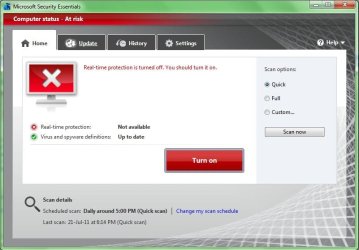
Capture1.JPG

So when I click Turn on, it attempts do so and then suddenly gives an error.
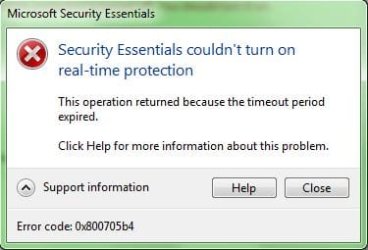
Capture.JPG

Help would be greatly appreciated.

Thanks,
Slasher
 

My Computer

Computer Manufacturer/Model Number
HP Pavilion dv6-2020ev
OS
Ubuntu 12.10
CPU
Intel Core i7 720QM
Motherboard
Its a HP secret...
Memory
4GB RAM
Graphics Card(s)
NVIDIA GeForce 230M
Sound Card
IDT
Screen Resolution
1366x768
Hard Drives
500 GB
Mouse
HP
Internet Speed
4 Mbps
I'm just wondering whether your computer has been hit by a virus.

The screenshot of MSE on my computer gives a different warning about real-time scanning.

MSE.PNG

On yours, you're informed that realtime protection is not available. On mine, I'm informed that realtime protection is turned off.

Time for a virus scan in Safe Mode?
 

My Computer

Computer Manufacturer/Model Number
HP Pavilion Elite 495UK
OS
Windows 7 Ultimate SP1 64-Bit
CPU
Intel Core i7 870 @ 2.93GHz
Motherboard
MSI 2A9C (CPU1)
Memory
8Gb Dual-Channel DDR3 @ 664MHz
Graphics Card(s)
nVidia GeForce GTX 460 1024MB dedicated RAM
Sound Card
Realtek HD Audio
Monitor(s) Displays
HP2310i
Screen Resolution
1920 x 1080
Hard Drives
1x1954GB Hitachi HDS22020ALA 330 (RAID), 1x1954GB Hitachi External for backup and storage
PSU
460W
Case
HP Elite
Cooling
Air cooled
Keyboard
Logitech K750 solar-powered keyboard
Mouse
Logitech Wireless M180 mouse
Internet Speed
2Mb
Other Info
Pure Avanti Flow Internet Radio with iPod Dock, 64Gb iPod, HP USB Speakers, Sony MDR-V500 Headphones, Sony Vaio F-Series Laptop
Seriously? I doubt its a virus... And just so you know, I am running MSE 2.1 (not available on auto update yet).
 

My Computer

Computer Manufacturer/Model Number
HP Pavilion dv6-2020ev
OS
Ubuntu 12.10
CPU
Intel Core i7 720QM
Motherboard
Its a HP secret...
Memory
4GB RAM
Graphics Card(s)
NVIDIA GeForce 230M
Sound Card
IDT
Screen Resolution
1366x768
Hard Drives
500 GB
Mouse
HP
Internet Speed
4 Mbps
Have you scanned with anything other then MSE? Like MBAM or HMP?
 

My Computer

OS
Windows 7 Home Premium x64 SP1
Nope, never needed to really.
 

My Computer

Computer Manufacturer/Model Number
HP Pavilion dv6-2020ev
OS
Ubuntu 12.10
CPU
Intel Core i7 720QM
Motherboard
Its a HP secret...
Memory
4GB RAM
Graphics Card(s)
NVIDIA GeForce 230M
Sound Card
IDT
Screen Resolution
1366x768
Hard Drives
500 GB
Mouse
HP
Internet Speed
4 Mbps
Nope, never needed to really.

1. If you use Manual update method, go to Windows Update application and see if there is optional update waiting.
If it says no, click Check for updates to make sure.

2. Run Malwarebytes in full scan.
Malwarebytes : Malwarebytes Anti-Malware is a free download that removes viruses and malware from your computer
Pick the Free version download.
After install, click Update tab > Check for Updates > after updated, click Scanner tab > select Perform full scan > click Scan.

Takes about hour and a half at least.
 

My Computer

Computer Manufacturer/Model Number
Acer Aspire 7741Z
OS
Windows 7 Home Premium 64-bit, SP1
CPU
Intel Pentium P6200, Cores 2, 2.13 GHz
Memory
4 GB
Graphics Card(s)
Intel HD
Sound Card
unknown
Monitor(s) Displays
17.3 inches
Screen Resolution
1600 x 900
Hard Drives
640 GB, 5400 PRM
Ok I'll do a full system scan with MBAM. I'll post back when done... Usually a couple of hours.
 

My Computer

Computer Manufacturer/Model Number
HP Pavilion dv6-2020ev
OS
Ubuntu 12.10
CPU
Intel Core i7 720QM
Motherboard
Its a HP secret...
Memory
4GB RAM
Graphics Card(s)
NVIDIA GeForce 230M
Sound Card
IDT
Screen Resolution
1366x768
Hard Drives
500 GB
Mouse
HP
Internet Speed
4 Mbps
Ok I'll do a full system scan with MBAM. I'll post back when done... Usually a couple of hours.

Finish off MBAM with: Downloads - SurfRight HMP is probably the best final judge, but it doesn't remove infections for free like MBAM. If it does find something, you get a free 30 day trial to activate its cleaning tool.
 

My Computer

OS
Windows 7 Home Premium x64 SP1
Ok MBAM removed two viruses :) (can't believe MSE didn't detect them) but I'm not sure if its false positives or not, but whatever.

Anyways, I'm still having the same problem, but also when trying to update I get another error (this was happening sometimes, not always).

Capture.JPG

Help would be appreciated, I can't continue to browse the net without protection :(.
 

My Computer

Computer Manufacturer/Model Number
HP Pavilion dv6-2020ev
OS
Ubuntu 12.10
CPU
Intel Core i7 720QM
Motherboard
Its a HP secret...
Memory
4GB RAM
Graphics Card(s)
NVIDIA GeForce 230M
Sound Card
IDT
Screen Resolution
1366x768
Hard Drives
500 GB
Mouse
HP
Internet Speed
4 Mbps
I would say uninstall run ccleaner, reinstall MSE and then perhaps another MBAM scan for good measure - dont take precautions when a virus is going trigger happy on your sys files
 

My Computer

Computer Manufacturer/Model Number
Self Made
OS
Windows 7 Ultimate x64
CPU
Core 2 quad Q9550 2.93Ghz OC'd to 4.2
Motherboard
XFX 790i Ultra (tri SLI)
Memory
8GB Gskill DDR3 1600Mhz
Graphics Card(s)
2x Gtx 280 (SLI) Asus
Sound Card
Creative Xi-Fi Titanium Fatality 1 Ty
Monitor(s) Displays
Alienware 120Hz 23'' 1920x1080, 2x Benq G2420 1920x1080 24"
Screen Resolution
1920x1080 *3
Hard Drives
2x Samsung Spinpoint F1's 750GB HDD
1x Samsung Spinpoint 2TB
PSU
Antec 850 watt
Case
Cooler Master Centurion
Cooling
8x 8'' Fans, Coolermaster CPU Cooler.
Keyboard
Logitech G19, Logitech Dinovo Edge, Logitech Dinovo Mini
Mouse
Logitech G9x and Logitech G7
Internet Speed
13Mb Down, 1.3 Mb Up
Other Info
Logitech Z5500 5.1 Surround Speakers,
Nvidia 3D Vision
...Anyone agree with him?
 

My Computer

Computer Manufacturer/Model Number
HP Pavilion dv6-2020ev
OS
Ubuntu 12.10
CPU
Intel Core i7 720QM
Motherboard
Its a HP secret...
Memory
4GB RAM
Graphics Card(s)
NVIDIA GeForce 230M
Sound Card
IDT
Screen Resolution
1366x768
Hard Drives
500 GB
Mouse
HP
Internet Speed
4 Mbps
Reinstalling MSE may give you a insight, because if certain viruses are present, it won't install. In addition, the virus could have corrupted MSE in a way that it won't engage fully.

First of all, did this happen recently enough so that you can do a system restore 2 or 3 points past where the trouble started?

Other options you can try:

D/L the MSE definitions manually and install them, this may remedy the problem.

Install the latest Microsoft Security Essentials definition updates - Get the latest definitions - Microsoft Malware Protection Center

Norton Power Eraser (to make sure you got it all)

Norton Rescue Tools

Because Norton Power Eraser uses aggressive methods to detect threats, there is a risk that it can select some legitimate programs for removal. You should use this tool very carefully.
 

My Computer

Computer type
PC/Desktop
Computer Manufacturer/Model Number
Dell Hell oh Well
OS
Win 7 32 Home Premium, Win 7 64 Pro, Win 8.1, Win 10
CPU
Intel Core 2 Duo 2.93GHz
Memory
Not much with my ADHD
Graphics Card(s)
ATI Radeon HD 4350
Monitor(s) Displays
24" HDTV/Monitor
Screen Resolution
Blurry after a Scotch or 2
Hard Drives
1 HDD 250 GB, 1 HDD 1 TB, 3 - 1 TB Externals
Case
Don't get on my case...man :D
Cooling
I have an Air Conditioner & Diet Pepsi
Keyboard
Saitek Cyborg
Mouse
10 yr old MS optical mouse that still works
Internet Speed
Never fast enough
Antivirus
Various
Browser
Various
Did you finish with a HitMan Pro scan? If so, was it clean? If not, do that immediately, also Norton Power Eraser is a good free tool too, just make sure you google any results BEFORE you remove anything.

Once you are verified clean by all of the scanners, I would download and save to your desktop the MSE uninstaller found here: http://www.cloudantivirus.com/forum/thread.jspa?threadID=51755&tstart=0 then uninstall MSE, and reboot. Once rebooted, run the MSE removal tool, reboot, and then install the free AV of your choice.

I would highly recommend avast! free, Panda Cloud or Comodo (if you understand the pop-ups) before MSE. Also look into Sandboxie Free which will all but eliminate online infections, but it takes some patience to learn how to setup and use. There are plenty of videos on YouTube to help you with that.
 

My Computer

OS
Windows 7 Home Premium x64 SP1
I'll re-install MSE, and try the manual definitions. I can't do or use a System Restore because it doesn't work. I am not going to change from MSE so please don't tell me to do so because I won't. Anyways, I don't really think a virus did this to MSE, so I'm just gonna use Revo to uninstall, install MSE again and hope it works.
 

My Computer

Computer Manufacturer/Model Number
HP Pavilion dv6-2020ev
OS
Ubuntu 12.10
CPU
Intel Core i7 720QM
Motherboard
Its a HP secret...
Memory
4GB RAM
Graphics Card(s)
NVIDIA GeForce 230M
Sound Card
IDT
Screen Resolution
1366x768
Hard Drives
500 GB
Mouse
HP
Internet Speed
4 Mbps
Ok MBAM removed two viruses :) (can't believe MSE didn't detect them) but I'm not sure if its false positives or not, but whatever.

Anyways, I'm still having the same problem, but also when trying to update I get another error (this was happening sometimes, not always).

View attachment 166296

Help would be appreciated, I can't continue to browse the net without protection :(.

MSE is not virus proof, No it will not protect you against every virus, this is why its always better to have a second defense, but you dont want to take the advice of others, and your still going to use MSE after it has failed you miserably. Good luck:zip:


Also you should look into Backing up your OS and any important files you may have to an external drive, you dont have any backups, what are you going to do if your HD fails? after all you would not be in this predicament if you had a backup to restore to. I Image my OS once a week so if I run into a problem and I cant fix it with repairs I always have a backup image to rely on.
 
Last edited:

My Computer

Computer Manufacturer/Model Number
Custom Machine.
OS
7 Home Premium x64 SP1
CPU
FX 4100 Black Edition 3.6GHz Quad-Core Socket AM3+
Motherboard
ASUS M5A78L-M LX PLUS (AM3R2)
Memory
Kingston HyperX blu 8GB DDR3-1333
Graphics Card(s)
ATI Radeon HD 4650 1GB DDR2 HDMI
Sound Card
Realtek ALC887 8-channel high definition audio
Monitor(s) Displays
HP 2159m 21.5-inch 1080p HDMI LCD Monitor
Screen Resolution
1920x1080
PSU
Cooler Master eXtreme Power Plus 500 Watt
Case
Thermaltake V3 Black Edition ATX Mid Tower
Cooling
CoolerMaster Hyper 212 Plus
@Warlockz - If MSE is not virus proof, please tell me what anti-virus is? There is no such thing as a virus proof program. I will still use MSE and then MBAM once a week. MSE failed me miserably? Did I say that? No. MSE is still a very good program, and just because I am getting an error message, doesn't mean I can't fix it. All AV programs have issues and are not bug proof. They are created by humans, who make mistakes, what did you expect?

I already do backup my OS, again, did I tell you that I don't backup my OS? All my important files are on an external HDD, so if anything happens to my computer I am not at loss. I don't find this issue big enough of an excuse to restore from a System Image.

Please stop trying to pretend you know how I use and what I do and have done with my computer alright? :).
 

My Computer

Computer Manufacturer/Model Number
HP Pavilion dv6-2020ev
OS
Ubuntu 12.10
CPU
Intel Core i7 720QM
Motherboard
Its a HP secret...
Memory
4GB RAM
Graphics Card(s)
NVIDIA GeForce 230M
Sound Card
IDT
Screen Resolution
1366x768
Hard Drives
500 GB
Mouse
HP
Internet Speed
4 Mbps
Well, I've gone ahead and used Revo Uninstaller to completely remove every trace of MSE on my computer, rebooted, then installed MSE 2.1 again. Everything seems to be fine again. I'll report back if I get any issues.
 

My Computer

Computer Manufacturer/Model Number
HP Pavilion dv6-2020ev
OS
Ubuntu 12.10
CPU
Intel Core i7 720QM
Motherboard
Its a HP secret...
Memory
4GB RAM
Graphics Card(s)
NVIDIA GeForce 230M
Sound Card
IDT
Screen Resolution
1366x768
Hard Drives
500 GB
Mouse
HP
Internet Speed
4 Mbps
For future info, don't use Revo to uninstall a antivirus. Most, if not all AVs need to be rebooted with a specific Registry key still active to do what they need to do on reboot. Always use the AV manufactures uninstall tool after you do a regular uninstall through programs and features as there are drivers that are often left behind that can interfere with other AVs. In the link I provided, you could've used Microsoft's uninstall tool for a 100% clean uninstall................I'm glad you're happy with MSE
 

My Computer

OS
Windows 7 Home Premium x64 SP1
Your 'uninstall tool' link is just a link to the Panda Cloud AV website... Besides, there is no official MSE uninstall tool, the OneLive uninstall tool works but...
 

My Computer

Computer Manufacturer/Model Number
HP Pavilion dv6-2020ev
OS
Ubuntu 12.10
CPU
Intel Core i7 720QM
Motherboard
Its a HP secret...
Memory
4GB RAM
Graphics Card(s)
NVIDIA GeForce 230M
Sound Card
IDT
Screen Resolution
1366x768
Hard Drives
500 GB
Mouse
HP
Internet Speed
4 Mbps
Back
Top