Microsoft Security Essentials

hubris

New member
Power User
Local time
8:11 PM
Messages
272
Location
AUS

My Computer

Computer Manufacturer/Model Number
Self
OS
W7, Xp Pro
CPU
AMD Sempron 2600+
Motherboard
K8V-MX
Memory
1GB
Graphics Card(s)
Radeon HD3650
Sound Card
Soundmax
Monitor(s) Displays
17" HP CRT
Screen Resolution
1024x768
Hard Drives
1x WDC WD800BB
1x HDS728080
PSU
? 460W
Case
Coolermaster
Cooling
enough
Keyboard
M$S
Mouse
Optical
Internet Speed
1500kbs
Other Info
OLD!!! does the job i need.
My Computer

Computer Manufacturer/Model Number
Sony Vaio Z46GDU
OS
Windows 7 Ultimate x86-64
CPU
[email protected] 1066MHz FSB
Motherboard
Sony branded
Memory
6GB DDR3 1066MHz
Graphics Card(s)
9300M GS 256MB Dedicated (Speed) + Intel4500MHD (Stamina)
Sound Card
Realtek HD Audio
Monitor(s) Displays
13.1' WXGA
Screen Resolution
1600x900
Hard Drives
320GB 7200RPM w/ 16MB cache
Internet Speed
1MB/s

Attachments

  • Untitled.jpg
    Untitled.jpg
    128.1 KB · Views: 129

My Computer

Computer Manufacturer/Model Number
Self
OS
W7, Xp Pro
CPU
AMD Sempron 2600+
Motherboard
K8V-MX
Memory
1GB
Graphics Card(s)
Radeon HD3650
Sound Card
Soundmax
Monitor(s) Displays
17" HP CRT
Screen Resolution
1024x768
Hard Drives
1x WDC WD800BB
1x HDS728080
PSU
? 460W
Case
Coolermaster
Cooling
enough
Keyboard
M$S
Mouse
Optical
Internet Speed
1500kbs
Other Info
OLD!!! does the job i need.
That looks like the preview release. Carry on.
 

My Computer

Computer Manufacturer/Model Number
Sony Vaio Z46GDU
OS
Windows 7 Ultimate x86-64
CPU
[email protected] 1066MHz FSB
Motherboard
Sony branded
Memory
6GB DDR3 1066MHz
Graphics Card(s)
9300M GS 256MB Dedicated (Speed) + Intel4500MHD (Stamina)
Sound Card
Realtek HD Audio
Monitor(s) Displays
13.1' WXGA
Screen Resolution
1600x900
Hard Drives
320GB 7200RPM w/ 16MB cache
Internet Speed
1MB/s
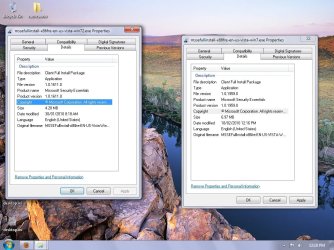
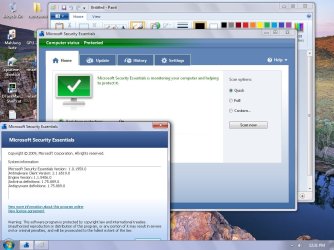
New version released today! Existing users of MSE should may check for upgrade within the program. If it's not offered to you yet, and you wish to use a new program version, download from above link.

Download details: Microsoft Security Essentials

Thanks to Donna from > Calendar Of Updates Calendar


You don't have to uninstall and or reinstall.
Just open MSE and open the help menu at the top right of the main screen and select UPGRADE.
This is differenet from UPDATING definitions.
Worked for me.

Thanks
 
Last edited:

My Computer

Computer type
PC/Desktop
Computer Manufacturer/Model Number
Self Built
OS
Windows 10 Pro
CPU
Intel i5
Motherboard
I have a fatherboard
Memory
I'm old and lost a few chips
Graphics Card(s)
Yup
Sound Card
Yup
Monitor(s) Displays
Samsung 32" UHD
Screen Resolution
3840 x 2160
Hard Drives
Samsung 860 EVO drives
PSU
450 Watt and some fans that blow
Case
Small tower
Cooling
Yes I am cool. lol
Keyboard
Who needs a keyboard?
Mouse
Logitech Laser G7 wireless
Internet Speed
Zippy fast UP and DOWN
Antivirus
I got a shot
Browser
The new Improved EDGE 2020
Well, seems ok. went to upgrade from inside mse.help.upgrade and it said already current?
so i ran install from new download and it upgraded, reboot and did a quick scan. no wukkas!
 

Attachments

  • upgrade pic.jpg
    upgrade pic.jpg
    103.1 KB · Views: 136

My Computer

Computer Manufacturer/Model Number
Self
OS
W7, Xp Pro
CPU
AMD Sempron 2600+
Motherboard
K8V-MX
Memory
1GB
Graphics Card(s)
Radeon HD3650
Sound Card
Soundmax
Monitor(s) Displays
17" HP CRT
Screen Resolution
1024x768
Hard Drives
1x WDC WD800BB
1x HDS728080
PSU
? 460W
Case
Coolermaster
Cooling
enough
Keyboard
M$S
Mouse
Optical
Internet Speed
1500kbs
Other Info
OLD!!! does the job i need.
Thanks for the update on MSE. Downloaded and installing the latest version in a few moments. ;)
 

My Computer

Computer Manufacturer/Model Number
D3f's Customs
OS
Win 7 Ultimate SP1 x64
CPU
Intel Pentium Dual Core E5300 OC'd @ 3GHz
Motherboard
Asus P5G41-M LE
Memory
Kingston 2x2GB DDR2-800 Dual Channel SDRAM
Graphics Card(s)
Integrated Intel GMA X4500
Sound Card
Realtek 5.1 HD Audio (ALC887)
Monitor(s) Displays
LG Flatron W1943S @ 60Hz
Screen Resolution
1360 x 768
Hard Drives
Internal - WD Caviar Blue 500GB, External - WD My Passport Essential 500GB
PSU
Headway 450w PSU
Case
Pixxo Slim Black mATX Case
Cooling
Stock Cpu Fan, 1 x Top Case Fan
Keyboard
Logitech K120
Mouse
Logitech LS1 Laser Mouse
Internet Speed
17.66Mb/s Down, 0.82Mb/s Up
Other Info
Creative SBS A300 2.1 Speaker System, LG GH22NS50 22x Internal Super-Multi DVD-RW, 2Wire 5012NV Wireless Modem Router
Having just done a reinstall of 7, I decided to try M.S.E as people on here have recommended it before, and I'm quite impressed so far.
 

My Computer

Computer Manufacturer/Model Number
Sony Vaio FZ21Z
OS
Windows 7 Ultimate x64 ®™
CPU
Intel Core 2 Duo (2.2 GHz)
Motherboard
Sony (Intel Chipset)
Memory
2x 2GB Corsair (667 MHz)
Graphics Card(s)
NVIDIA 8600M GS (256MB)
Sound Card
Sigmatel
Monitor(s) Displays
15.4" TFT X-Black
Screen Resolution
1280x800
Hard Drives
Western Digital 300GB Scorpio Black (7200rpm)
Mouse
Logitech Anywhere MX
Internet Speed
Sky 5MB
Decided to give it a try...

Two problems.

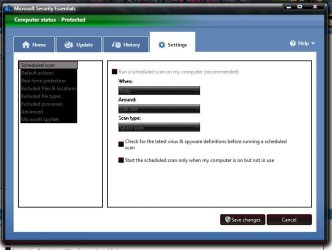
1) Don't see an option to setup more then one scan. (I always setup my anti-virus scans every Monday and Thursday.)

2) Don't see an option to have it automatically update definitions daily.

Anyone have a remedy?
 

My Computer

Computer Manufacturer/Model Number
Custom builds... I build my own.
OS
Windows 7 Ultimate x86 & x64
CPU
Core i7-860, AMD Phenom II X4 955, AMD Athlon II X2 250
Motherboard
ASUS
Memory
Kingston HyperX
Graphics Card(s)
EVGA GeForce 9800 GTX, SAPPHIRE Radeon HD 5870
Sound Card
HT | OMEGA
Monitor(s) Displays
LCD
Hard Drives
Western Digital
PSU
OCZ Technology
Case
COOLER MASTER Storm Sniper, Storm Scout, Antec Skeleton
Internet Speed
DSL
Decided to give it a try...

Two problems.

1) Don't see an option to setup more then one scan. (I always setup my anti-virus scans every Monday and Thursday.)

2) Don't see an option to have it automatically update definitions daily.

Anyone have a remedy?
You can only set one scheduled scan once a week or on a daily basis with MSE. To update definitions, you have to do it manually or set it to auto before running a schedule scan. :)
 

Attachments

  • Untitled.jpg
    Untitled.jpg
    46.5 KB · Views: 10

My Computer

Computer Manufacturer/Model Number
D3f's Customs
OS
Win 7 Ultimate SP1 x64
CPU
Intel Pentium Dual Core E5300 OC'd @ 3GHz
Motherboard
Asus P5G41-M LE
Memory
Kingston 2x2GB DDR2-800 Dual Channel SDRAM
Graphics Card(s)
Integrated Intel GMA X4500
Sound Card
Realtek 5.1 HD Audio (ALC887)
Monitor(s) Displays
LG Flatron W1943S @ 60Hz
Screen Resolution
1360 x 768
Hard Drives
Internal - WD Caviar Blue 500GB, External - WD My Passport Essential 500GB
PSU
Headway 450w PSU
Case
Pixxo Slim Black mATX Case
Cooling
Stock Cpu Fan, 1 x Top Case Fan
Keyboard
Logitech K120
Mouse
Logitech LS1 Laser Mouse
Internet Speed
17.66Mb/s Down, 0.82Mb/s Up
Other Info
Creative SBS A300 2.1 Speaker System, LG GH22NS50 22x Internal Super-Multi DVD-RW, 2Wire 5012NV Wireless Modem Router
Decided to give it a try...

Two problems.

1) Don't see an option to setup more then one scan. (I always setup my anti-virus scans every Monday and Thursday.)

2) Don't see an option to have it automatically update definitions daily.

Anyone have a remedy?

Hi there
Updates come automatically via Windows Update (currently although this can change in the future) both for the program itself and the definitions.

You should be able to set the scanning time in one of the options

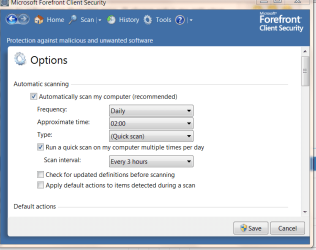
I'm using Forefront Client Security which is very similar (it's only the Corporate version of MSE with a few extras in it)

I don't think you get a twice weekly option but you can set it to run on a specifiv day.

Since the resources consumed by this program are so few I set mine to scan daily at 02.00 and also when I'm online to scan every 3 hours

I hardly notice when the scan is running --unlike some other AV products I've tried .

Cheers
jimbo
 

Attachments

  • scanoptions.png
    scanoptions.png
    25 KB · Views: 7

My Computer

Computer type
PC/Desktop
Computer Manufacturer/Model Number
Custom built, several laptops HP/ASUS
OS
Linux CENTOS 7 / various Windows OS'es and servers
CPU
Intel i7 Intel i5
Memory
8GB, 16GB
Graphics Card(s)
On Motherboard
Sound Card
Realtek HD audio
Monitor(s) Displays
Apple Cinema display, Samsung LCD
Screen Resolution
1920 X 1080
Hard Drives
4 X 1TB SATA
Mouse
Toshiba wireless laser
Internet Speed
> 20MB up
You can only set one scheduled scan once a week or on a daily basis with MSE. To update definitions, you have to do it manually or set it to auto before running a schedule scan. :)

So basically if I want to keep it up to date. I have to set it to scan everyday or remember to click the update button everyday...

They need to change that.
 

My Computer

Computer Manufacturer/Model Number
Custom builds... I build my own.
OS
Windows 7 Ultimate x86 & x64
CPU
Core i7-860, AMD Phenom II X4 955, AMD Athlon II X2 250
Motherboard
ASUS
Memory
Kingston HyperX
Graphics Card(s)
EVGA GeForce 9800 GTX, SAPPHIRE Radeon HD 5870
Sound Card
HT | OMEGA
Monitor(s) Displays
LCD
Hard Drives
Western Digital
PSU
OCZ Technology
Case
COOLER MASTER Storm Sniper, Storm Scout, Antec Skeleton
Internet Speed
DSL
Hi there
Updates come automatically via Windows Update (currently although this can change in the future) both for the program itself and the definitions.

You should be able to set the scanning time in one of the options

I'm using Forefront Client Security which is very similar (it's only the Corporate version of MSE with a few extras in it)

I don't think you get a twice weekly option but you can set it to run on a specifiv day.

Since the resources consumed by this program are so few I set mine to scan daily at 02.00 and also when I'm online to scan every 3 hours

I hardly notice when the scan is running --unlike some other AV products I've tried .

Cheers
jimbo

I usually set up anti-virus, disk defrags, and other Maintenance/security programs to run twice-to-three times a week.

Never felt the need to run scans everyday, and once a week is, in my opinion, not enough to safe guard against viruses and the like...
 

My Computer

Computer Manufacturer/Model Number
Custom builds... I build my own.
OS
Windows 7 Ultimate x86 & x64
CPU
Core i7-860, AMD Phenom II X4 955, AMD Athlon II X2 250
Motherboard
ASUS
Memory
Kingston HyperX
Graphics Card(s)
EVGA GeForce 9800 GTX, SAPPHIRE Radeon HD 5870
Sound Card
HT | OMEGA
Monitor(s) Displays
LCD
Hard Drives
Western Digital
PSU
OCZ Technology
Case
COOLER MASTER Storm Sniper, Storm Scout, Antec Skeleton
Internet Speed
DSL
So basically if I want to keep it up to date. I have to set it to scan everyday or remember to click the update button everyday...

They need to change that.
I click the update button every time i switch on my PC. :p Run a scan manually once a week. Let's just hope MS will have an option to set the definition downloads to "automatic" on their next version. :D
 

My Computer

Computer Manufacturer/Model Number
D3f's Customs
OS
Win 7 Ultimate SP1 x64
CPU
Intel Pentium Dual Core E5300 OC'd @ 3GHz
Motherboard
Asus P5G41-M LE
Memory
Kingston 2x2GB DDR2-800 Dual Channel SDRAM
Graphics Card(s)
Integrated Intel GMA X4500
Sound Card
Realtek 5.1 HD Audio (ALC887)
Monitor(s) Displays
LG Flatron W1943S @ 60Hz
Screen Resolution
1360 x 768
Hard Drives
Internal - WD Caviar Blue 500GB, External - WD My Passport Essential 500GB
PSU
Headway 450w PSU
Case
Pixxo Slim Black mATX Case
Cooling
Stock Cpu Fan, 1 x Top Case Fan
Keyboard
Logitech K120
Mouse
Logitech LS1 Laser Mouse
Internet Speed
17.66Mb/s Down, 0.82Mb/s Up
Other Info
Creative SBS A300 2.1 Speaker System, LG GH22NS50 22x Internal Super-Multi DVD-RW, 2Wire 5012NV Wireless Modem Router
Why do you need it to update on a day that it isnt scheduled to scan?
 

My Computer

Computer Manufacturer/Model Number
Self Build
OS
Vista Business x64
CPU
AMD Phenom II x3 720be @3.15ghz
Motherboard
Asus M4A77D
Memory
2x2GB A-Data DDR2 pc6400
Graphics Card(s)
Nvidia EVGA 8800gts (640MB,320bit)
Sound Card
Creative Sound Blaster
Monitor(s) Displays
Samsung 226bw
Screen Resolution
1680x1050
Hard Drives
Seagate 320gig, WD 80gig
PSU
Rosewill 500watt
Case
Dynex
Cooling
Thermaltake V1
Keyboard
G15
Mouse
Razor DeathAdder
Internet Speed
10.0Mb/896Kb
Why do you need it to update on a day that it isnt scheduled to scan?
IDK. Just my habit to update my AV definitions daily. Including malwarebytes too. ;)
 

My Computer

Computer Manufacturer/Model Number
D3f's Customs
OS
Win 7 Ultimate SP1 x64
CPU
Intel Pentium Dual Core E5300 OC'd @ 3GHz
Motherboard
Asus P5G41-M LE
Memory
Kingston 2x2GB DDR2-800 Dual Channel SDRAM
Graphics Card(s)
Integrated Intel GMA X4500
Sound Card
Realtek 5.1 HD Audio (ALC887)
Monitor(s) Displays
LG Flatron W1943S @ 60Hz
Screen Resolution
1360 x 768
Hard Drives
Internal - WD Caviar Blue 500GB, External - WD My Passport Essential 500GB
PSU
Headway 450w PSU
Case
Pixxo Slim Black mATX Case
Cooling
Stock Cpu Fan, 1 x Top Case Fan
Keyboard
Logitech K120
Mouse
Logitech LS1 Laser Mouse
Internet Speed
17.66Mb/s Down, 0.82Mb/s Up
Other Info
Creative SBS A300 2.1 Speaker System, LG GH22NS50 22x Internal Super-Multi DVD-RW, 2Wire 5012NV Wireless Modem Router
Why do you need it to update on a day that it isnt scheduled to scan?

Although the anti-virus isn't scanning everyday. Most anti-viruses have a guard that scans files automatically as they are downloaded to the pc.

As to why you want to update definitions everyday. On any given day a new virus can be discovered. So it's recommended that you update your definitions everyday in order to protect your PC.
 

My Computer

Computer Manufacturer/Model Number
Custom builds... I build my own.
OS
Windows 7 Ultimate x86 & x64
CPU
Core i7-860, AMD Phenom II X4 955, AMD Athlon II X2 250
Motherboard
ASUS
Memory
Kingston HyperX
Graphics Card(s)
EVGA GeForce 9800 GTX, SAPPHIRE Radeon HD 5870
Sound Card
HT | OMEGA
Monitor(s) Displays
LCD
Hard Drives
Western Digital
PSU
OCZ Technology
Case
COOLER MASTER Storm Sniper, Storm Scout, Antec Skeleton
Internet Speed
DSL
Hi there
I think there is a litle MISUNDERSTANDING here.

1) The UPDATES are part of Windows update so if you set your windows updates to update automatically or even do it manually you'll get the updated definitions via normal windows update.

2) the 3 hourly scan I've set is what's known as a QUICK scan -- this is just a quick superficial scan that consumes very few resources and is complementary to the REAL TIME protection option -- It's no good finding out DAYS later your computer is infected - you need to know ASAP.

3) The FULL scan can be set to run daily or on a specific day -- I don't have any problem with doing a full scan at least on the "C" drive every day at 2.00 AM when I'm not using the computer.

This software is NOT AT ALL a resource hog and it gives more than adequate REAL TIME protection if you allow it to do its job.

You need to protect your computer against far more than merely downloading files that *might* or *might not* have a virus in them.

Cheers
jimbo
 

My Computer

Computer type
PC/Desktop
Computer Manufacturer/Model Number
Custom built, several laptops HP/ASUS
OS
Linux CENTOS 7 / various Windows OS'es and servers
CPU
Intel i7 Intel i5
Memory
8GB, 16GB
Graphics Card(s)
On Motherboard
Sound Card
Realtek HD audio
Monitor(s) Displays
Apple Cinema display, Samsung LCD
Screen Resolution
1920 X 1080
Hard Drives
4 X 1TB SATA
Mouse
Toshiba wireless laser
Internet Speed
> 20MB up
Hi there
I think there is a litle MISUNDERSTANDING here.

1) The UPDATES are part of Windows update so if you set your windows updates to update automatically or even do it manually you'll get the updated definitions via normal windows update.

2) the 3 hourly scan I've set is what's known as a QUICK scan -- this is just a quick superficial scan that consumes very few resources and is complementary to the REAL TIME protection option -- It's no good finding out DAYS later your computer is infected - you need to know ASAP.

3) The FULL scan can be set to run daily or on a specific day -- I don't have any problem with doing a full scan at least on the "C" drive every day at 2.00 AM when I'm not using the computer.

This software is NOT AT ALL a resource hog and it gives more than adequate REAL TIME protection if you allow it to do its job.

You need to protect your computer against far more than merely downloading files that *might* or *might not* have a virus in them.

Cheers
jimbo

I believe the miscommunication is result that your version, which is a corporate version, has additional options that the non-corporate version does not have. Especially in reference to 1) and 2).
 

My Computer

Computer Manufacturer/Model Number
Custom builds... I build my own.
OS
Windows 7 Ultimate x86 & x64
CPU
Core i7-860, AMD Phenom II X4 955, AMD Athlon II X2 250
Motherboard
ASUS
Memory
Kingston HyperX
Graphics Card(s)
EVGA GeForce 9800 GTX, SAPPHIRE Radeon HD 5870
Sound Card
HT | OMEGA
Monitor(s) Displays
LCD
Hard Drives
Western Digital
PSU
OCZ Technology
Case
COOLER MASTER Storm Sniper, Storm Scout, Antec Skeleton
Internet Speed
DSL
What is the new version # ?
 

My Computer

Computer Manufacturer/Model Number
Myself
OS
Windows 7 Ultimate 64Bit
CPU
C2D E8200
Motherboard
XFX 750i
Memory
8GB PNY PC2-6400
Graphics Card(s)
BFG 9600GT x 2
Sound Card
Stock XFX Optical
Monitor(s) Displays
Gateway 22" HD Display
Hard Drives
C: 1 TB G: 500 GB H: 500 GB
PSU
Ultra LSP 550 Pro Lifetime Series
Case
Xion2
Cooling
ThermalTake
Back
Top