Cheesysocks
New member
- Local time
- 5:42 AM
- Messages
- 6
Hi everyone.
I have googled for this and found a couple of threads on the subject, but they skim over the actions needed to do what they suggest. Can anyone please fill in the gaps in English that a 10 year old can understand? :/
http://www.sevenforums.com/gaming/87637-sidewinder-force-feedback-wheel-usb.html
"...some threads I've seen have recommended software solutions to get Force Feedback working. Try PPJoy or GlovePIE and let me know if either one helps."
PPJoy - Parallel Port joystick driver for Windows 98/Me/2000/XP
http://www.sevenforums.com/hardware-devices/81070-say-its-not-so-sidewinder.html#post706507
"Hmmm.... I just plugged mine in and Win 7 (x64) installed the drivers and it appears to be in working order, though I've yet to try it with a game."
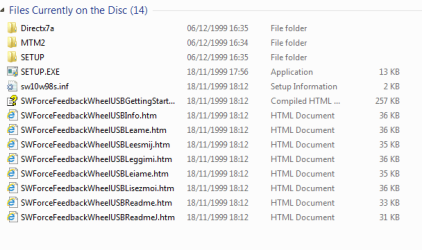
I plug mine in and it doesn't do anything. At first it brought up the autorun from the disc and that just gives an error message saying "The version of this file isn't compatibile with the version of windows you are using..." But above he said it installed... what was the difference?
"I was able to calibrate my USB force feedback wheel and it works fine..."
"this solution actually worked for me. running in compability mode for xp service pack 2."
I have tried to run compatability mode but I can't find in the "D" drive properties. Where else would I look?
I could carry on, but can anyone help with a solution that works please?:sarc:
Mike.
I have googled for this and found a couple of threads on the subject, but they skim over the actions needed to do what they suggest. Can anyone please fill in the gaps in English that a 10 year old can understand? :/
http://www.sevenforums.com/gaming/87637-sidewinder-force-feedback-wheel-usb.html
"...some threads I've seen have recommended software solutions to get Force Feedback working. Try PPJoy or GlovePIE and let me know if either one helps."
PPJoy - Parallel Port joystick driver for Windows 98/Me/2000/XP
Glovepie - cannot display the webpage
http://www.sevenforums.com/hardware-devices/81070-say-its-not-so-sidewinder.html#post706507
"Hmmm.... I just plugged mine in and Win 7 (x64) installed the drivers and it appears to be in working order, though I've yet to try it with a game."
I plug mine in and it doesn't do anything. At first it brought up the autorun from the disc and that just gives an error message saying "The version of this file isn't compatibile with the version of windows you are using..." But above he said it installed... what was the difference?
"I was able to calibrate my USB force feedback wheel and it works fine..."
"this solution actually worked for me. running in compability mode for xp service pack 2."
I have tried to run compatability mode but I can't find in the "D" drive properties. Where else would I look?
I could carry on, but can anyone help with a solution that works please?:sarc:
Mike.
My Computer
At a glance
Windows 7 Ultimate 32bit
- Computer Manufacturer/Model Number
- Homebuilt
- OS
- Windows 7 Ultimate 32bit