Microsoft to switch off AutoPlay in Windows 7

raj11650

New member
Pro User
VIP
Local time
3:46 AM
Messages
851
Location
India ,Chennai
Microsoft has announced that it will close off a component in Windows which is notorious for allowing covert malware attacks.
The company will modify the AutoPlay feature in Windows 7 to prevent external components such as USB drives automatically executing code when plugged into a PC.

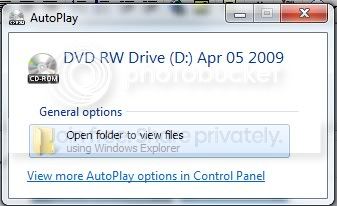
The new operating system will no longer present the option to install or run programs installed on the drive, instead allowing the user to open them within Windows Explorer.
Microsoft's decision follows a string of malicious applications that exploited the component to install malware automatically.
The malware was disguised with a common name and icon option, such as 'Open folder to view files', which could then be selected by the user to run as AutoPlay, thereby launching the malware attacks.
Microsoft said that several malicious applications, including Conficker, had been exploiting the component. The attacks stem from similar techniques used by some of the earliest computer viruses to infect floppy disks.

The AutoPlay change will only apply to removable drives. Optical media, such as CDs and DVDs, will still be able to access the feature for operations such as launching game files.

Read More
 

My Computer My Computer

Computer Manufacturer/Model Number
Custom Build
OS
win 7 build 7600.16385 x64
CPU
AMD Athlon Dual core 7750 2.7GHz
Motherboard
Gigabyte GA78MA s2h
Memory
4GB 800Mhz
Graphics Card(s)
ATI HD 3200 IGP
Monitor(s) Displays
Acer 15 inch
Screen Resolution
1280x720
Hard Drives
Seagate 1 TB
Keyboard
Logitech
Mouse
Logitech
Internet Speed
Airtel DSL 2Mbps
I can see why, but itl just be inconvenient.
 

My Computer My Computer

Computer Manufacturer/Model Number
self built
OS
Windows 7 Professional 64-bit
CPU
Intel E8400 3GHz
Motherboard
Intel DX48BT2
Memory
Kingston PC3-10700H 4Gb
Graphics Card(s)
XFX Radeon HD 5850 BlackEd.
Sound Card
Asus Xonar DG
Monitor(s) Displays
2x Samsung SM-T220HD 22"
Screen Resolution
1680x1050 on two monitors
Hard Drives
OCZ Vertex 2 120gb 3.5" (OS)
Seagate Momentus XT 500gb
Samsung F3 1Tb (games)
2x Samsung F1 1Tb
PSU
Thermaltake ToughPower 850w
Case
Thermaltake Armor
Cooling
Scythe Mugen II
Keyboard
Microsoft Comfort Curve USB
Mouse
Razer Diamondback 3G
Internet Speed
8128/443
At least newbies will now need to learn that "My computer" exists.
 

My Computer My Computer

OS
Win7 64 bits FR
CPU
2500K @ 4.5 GHz
Motherboard
Asrock Z68 Gen3 Extreme3
Memory
4x4GB 1600MHz GSkill CL9.
Graphics Card(s)
HD6850 Powercolor stock
Sound Card
Integrated
Monitor(s) Displays
Samsung 2343 + Dell 20in 4/3
Screen Resolution
2048x1152, 1600x1200
Hard Drives
OCZ Vertex LE SSD, 50GB
OCZ Solid 3 120GB
OCZ Vertex 2 240GB
Western Digital Scorpio 320GB 5400 rpm
PSU
KingWin Lazer Platinum (90+) 550Watts
Case
HAF912
Cooling
CPU: OCZ Vendetta 2
Keyboard
MX5500 revolution bluetooth
Mouse
MX5500 revolution bluetooth
Internet Speed
Cable 7 Mbps
Doesn't really bother me one way or another. A bit inconvinient maybe, but they're right in that it makes it more secure I suppose.
 

My Computer My Computer

Computer Manufacturer/Model Number
Home Built
OS
Windows 7 (Windows XP Dual Boot)
CPU
Intel Core 2 Quad Q9650
Motherboard
DFI Lanparty DK X48
Memory
8GB DDR2 800Mhz Corsair
Graphics Card(s)
XFX ATI HD4870 1024MB
Sound Card
Onboard Realtek Surround Sound 5.1
Monitor(s) Displays
2x LG Flatron 17 inch
Screen Resolution
1280x1024
Hard Drives
2x 640GB WD Caviar Black
1x 1TB Seagate 7200.11
1x 500GB Seagate 7200.10
PSU
Zalman HP750W Silent PSU
Case
Thermaltech Tsunami Dream Glossy Black
Cooling
2x 12cm Case Fans & Zalman HSF
Keyboard
Logitech Media 600 USB
Mouse
Logitech G5 Gaming Mouse
Internet Speed
8mb BT Broadband on Netgear Router
At least newbies will now need to learn that "My computer" exists.

Yep now you will get all those people who are pissed because of there device is "not working" lol...

They will have to be told to click on "computer".
 

My Computer My Computer

Computer Manufacturer/Model Number
Asus 15.4" laptop
OS
Windows 7 7100 build
CPU
Intel Core 2 Duo 2.5
Motherboard
Asus
Memory
4gig
Graphics Card(s)
Nvidia 9500 512mb mobile
Monitor(s) Displays
External 26" Samsung TOC (very nice!!)
Screen Resolution
19200 by 1200
Hard Drives
1 320gig 7200 rpm
Good thing ano no. As some said, the n00bs will be the first to cry about it. BUT! I'm pretty sure there is a way to still help people with it.

1. Still do the plug in/plug off sound
2. Create a shortcut on the desktop and Start Menu.
3. Once step 1 and 2 are done, just show an informative message box that will say "Your device has been succesfully detected by Windows. A shortcut has been placed on the desktop and in the Start Menu - (checkbox) Never show this again - (OK button)"

Like that, no code will be run on the USB drive. ;)
 

My Computer My Computer

Computer type
PC/Desktop
Computer Manufacturer/Model Number
Custom build
OS
Windows 10 Professional 64-bit
CPU
Ryzen 9 5900X
Motherboard
Gigabyte X570 Aorus Master
Memory
G.Skill 3600Mhz CL16 16GB × 4
Graphics Card(s)
EVGA GeForce RTX 3070 Ti FTW3 Ultra Gaming
Sound Card
On-board
Monitor(s) Displays
Dell Alienware AW3418DW
Screen Resolution
3440x1440
Hard Drives
1×Sabrent Rocket 4 Plus 2TB nvme SSD (System, internal)
2x4TB Western Digital Blue (Internal)
1x4TB HDST 7200RPM (Internal)
PSU
Seasonic Focus Plus 850W Platinum
Case
Corsair 680X
Cooling
Stock fans + 3× Corsair QL120, Corsair H100i Platinum
Keyboard
Logitech K350
Mouse
Logitech M510
Internet Speed
120Mbits dl - 20Mbits up
Antivirus
ESET NOD32 Antivirus
Browser
Firefox (latest version)
Other Info
Headphones : Audio-Technica ATH-M50x
Scanner : Canon Canoscan LiDE 220 + Plustek OptiBook 4800
With the release of 7, M$ seems to be finally getting things right.
 

My Computer My Computer

Computer Manufacturer/Model Number
This and that with a bit more of this.
OS
Slackware / Windows 7 x64 7100
CPU
AMD X2 5200+ Windsor
Motherboard
ECS (Yeah, I was broke)
Memory
4GB DDR2 PC5300
Graphics Card(s)
GeForce 7300 GS 256MB
Sound Card
Realtek HD
Monitor(s) Displays
Westinghouse 22 in LCD
Screen Resolution
1680 x 1050
Hard Drives
WD 320 GB
WD 500 GB x2
Maxtor OneTouch 4 Mini 250GB
PSU
Antec 450W
Case
Generic
Cooling
Lots.......sounds like an F-18
Keyboard
Logitech S510 combo
Mouse
Logitech S510 Combo
Internet Speed
Fast
You still get the choice

Autoplaychoice.jpg
 

My Computer My Computer

Computer type
PC/Desktop
Computer Manufacturer/Model Number
Bruce ... somewhere in his 40's
OS
Windows 7 Ultimate 32bit SP1
CPU
Intel(R) Core(TM)2 Quad CPU @ 2.40GHz, 2400 MHz
Motherboard
INTEL/D975XBX2
Memory
4 GB
Graphics Card(s)
ATI Radeon HD 2600 Pro
Monitor(s) Displays
Samsung SyncMaster 914v
Screen Resolution
1280 x 1024
Hard Drives
2/500GB each ... ST3500630AS ATA Device.
One is not connected
PSU
Rocketfish 700 W
Case
G.Skill Gigabyte Chassis
Keyboard
Standard PS/2 Keyboard
Mouse
Microsoft PS/2 Mouse
Internet Speed
DSL
Antivirus
Avira Internet Security
Browser
IE 11
Other Info
ATI HDMI Audio
I don't care about autoplay but what would be good if Microsoft would start to activate more default desktop items.
 

My Computer My Computer

Computer Manufacturer/Model Number
hp
OS
win7.7100x64
CPU
core2duo t5870
Memory
4gb
Monitor(s) Displays
l2245w
You still get the choice

Autoplaychoice.jpg


Microsoft changed Windows 7 so that the AutoPlay dialog no longer lets users run programs -- except when the device is a nonremovable optical drive, in other words, a CD or DVD drive. A flash drive connected to a Windows 7 PC, for instance, will only let the user open a folder to browser a list of files. "The new changes will no longer expose the AutoRun entries in the dialog unless it is removable optical media (CD/DVDs)," said Jimmy Kuo and Huzefa Mogri, two security researchers at Microsoft's malware protection center. "So, if a USB drive is inserted into a machine, the AutoRun choice will no longer be shown."

Source:
 

My Computer My Computer

Computer Manufacturer/Model Number
Custom Build
OS
win 7 build 7600.16385 x64
CPU
AMD Athlon Dual core 7750 2.7GHz
Motherboard
Gigabyte GA78MA s2h
Memory
4GB 800Mhz
Graphics Card(s)
ATI HD 3200 IGP
Monitor(s) Displays
Acer 15 inch
Screen Resolution
1280x720
Hard Drives
Seagate 1 TB
Keyboard
Logitech
Mouse
Logitech
Internet Speed
Airtel DSL 2Mbps
im so disapointed:( how will people survive?:)
man,it was state of the art feature:)
i love it, too bad, ill stay with the rc forever:)
oh well
now its 100% secure
good call:)
 

My Computer My Computer

OS
seven
You can always re-enable/disable it in the group policy editor, I've already disabled it on my computer for the same reason Microsoft is.

FYI, if you want to get to the group policy editor just type in "gpedit.msc" in a the "Run" command box.
 
I checked my settings for autoplay in the control panel but i don't get any autoplay windows for CD or DVDs? I havent changed anything in the group policy editor either.
Any solution for this? I'm using a clean RC1 install.
 

My Computer My Computer

Computer Manufacturer/Model Number
hp
OS
win7.7100x64
CPU
core2duo t5870
Memory
4gb
Monitor(s) Displays
l2245w
I checked my settings for autoplay in the control panel but i don't get any autoplay windows for CD or DVDs? I havent changed anything in the group policy editor either.
Any solution for this? I'm using a clean RC1 install.

In the start menu there is a link for "Default Programs". If you click on that you'll see a list of four different setting you can customize including the autoplay feature, I believe you'll find what your looking for in that section.
 
that's what i meant with control panel. every item is checked on: ask every time

but as I said, no pop up appears with cd or dvds
 

My Computer My Computer

Computer Manufacturer/Model Number
hp
OS
win7.7100x64
CPU
core2duo t5870
Memory
4gb
Monitor(s) Displays
l2245w
Back
Top