Microsoft Virtual PC 2007? (x86)

TheAnonymity

New member
Local time
1:33 PM
Messages
79
So I just tried to install MS VPC 07, and it seemed successful. I then shut down my computer, but it hung on "Shutting down...". I finally had to manually shut it off, and then I booted back up to look for a solution. But I couldn't connect to my wireless network. I clicked the "Connect to a network" button, and nothing happened. I couldn't even view the list of in-range wireless networks. So I shut down again, and it hung again. I shut it off manually. I then rebooted, and tried to uninstall MS VPC 07. The uninstall hung. I then canceled it, and did a system restore. I tried shutting down, and it didn't hang. I could then connect to my wireless network. I tried to reinstall MS VPC 07, and the same thing happened. I'm now thinking I should just ditch MS VPC, and go find some other 3rd party VPC client. Unless of course, there's a way I can fix this. Any help would be appreciated. Thanks...

~TA
 

My Computer

Computer Manufacturer/Model Number
Dell Inspiron 1501
OS
Windows 7 Ultimate x86 7600.16385
CPU
AMD Turion 64 Mobile Technology MK-36 2.00 GHz
Motherboard
Dell UW953
Memory
1.00 GB (894 MB usable)
Graphics Card(s)
ATI Radeon XPRESS 128MB
Sound Card
Dunno
Monitor(s) Displays
15"
Screen Resolution
1280 x 800
Hard Drives
Fujitsu MJA2080BH G2 ATA Device (80 GB, 5400 RPM)
Cooling
Laptop fans ftw.
Keyboard
Laptop Keyboard..
Mouse
Laptop touchpad..
Internet Speed
16.45 Mb/s download, 3.84 Mb/s upload
Other Info
My computer sucks.

My Computer

Computer Manufacturer/Model Number
Dell XPS420
OS
Vista Ult 64 bit Seven Ult RTM x64
CPU
Intel Core2 Quad Q6600 2.40 gigahertz
Memory
Crucial Ballistix 4x2GB PC2 6400
Graphics Card(s)
NVIDIA GeForce 8600 GTS 256 MB
Sound Card
Creative SB X-Fi audio
Monitor(s) Displays
HP w2207 + HPvs15
Screen Resolution
1680x1050 + 1024x768
Hard Drives
2-WD5000AAKS-500 GB
WD5000AAV-500 GB external
Keyboard
Microsoft Comfort Curve
Mouse
MX Revolution
Other Info
Wacom Intuos 2 Graphics Tablet
Experience Index=5.5
There's no problem installing it. Shortly after I posted this, I downloaded and installed VirtualBox. It did the same exact thing. I had to system restore again.
 

My Computer

Computer Manufacturer/Model Number
Dell Inspiron 1501
OS
Windows 7 Ultimate x86 7600.16385
CPU
AMD Turion 64 Mobile Technology MK-36 2.00 GHz
Motherboard
Dell UW953
Memory
1.00 GB (894 MB usable)
Graphics Card(s)
ATI Radeon XPRESS 128MB
Sound Card
Dunno
Monitor(s) Displays
15"
Screen Resolution
1280 x 800
Hard Drives
Fujitsu MJA2080BH G2 ATA Device (80 GB, 5400 RPM)
Cooling
Laptop fans ftw.
Keyboard
Laptop Keyboard..
Mouse
Laptop touchpad..
Internet Speed
16.45 Mb/s download, 3.84 Mb/s upload
Other Info
My computer sucks.
/bump
 

My Computer

Computer Manufacturer/Model Number
Dell Inspiron 1501
OS
Windows 7 Ultimate x86 7600.16385
CPU
AMD Turion 64 Mobile Technology MK-36 2.00 GHz
Motherboard
Dell UW953
Memory
1.00 GB (894 MB usable)
Graphics Card(s)
ATI Radeon XPRESS 128MB
Sound Card
Dunno
Monitor(s) Displays
15"
Screen Resolution
1280 x 800
Hard Drives
Fujitsu MJA2080BH G2 ATA Device (80 GB, 5400 RPM)
Cooling
Laptop fans ftw.
Keyboard
Laptop Keyboard..
Mouse
Laptop touchpad..
Internet Speed
16.45 Mb/s download, 3.84 Mb/s upload
Other Info
My computer sucks.

My Computer

Computer Manufacturer/Model Number
Dell XPS420
OS
Vista Ult 64 bit Seven Ult RTM x64
CPU
Intel Core2 Quad Q6600 2.40 gigahertz
Memory
Crucial Ballistix 4x2GB PC2 6400
Graphics Card(s)
NVIDIA GeForce 8600 GTS 256 MB
Sound Card
Creative SB X-Fi audio
Monitor(s) Displays
HP w2207 + HPvs15
Screen Resolution
1680x1050 + 1024x768
Hard Drives
2-WD5000AAKS-500 GB
WD5000AAV-500 GB external
Keyboard
Microsoft Comfort Curve
Mouse
MX Revolution
Other Info
Wacom Intuos 2 Graphics Tablet
Experience Index=5.5
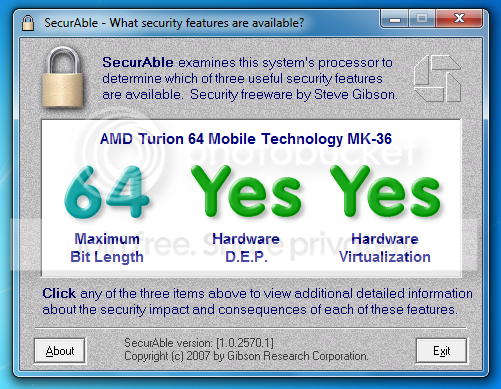
According to SecurAble -
VM.png


Also, in case you didn't know what I mean...
VM2.png

It stays like that ^ and when I click it, nothing happens. Therefore, I have no internet connection.
 

My Computer

Computer Manufacturer/Model Number
Dell Inspiron 1501
OS
Windows 7 Ultimate x86 7600.16385
CPU
AMD Turion 64 Mobile Technology MK-36 2.00 GHz
Motherboard
Dell UW953
Memory
1.00 GB (894 MB usable)
Graphics Card(s)
ATI Radeon XPRESS 128MB
Sound Card
Dunno
Monitor(s) Displays
15"
Screen Resolution
1280 x 800
Hard Drives
Fujitsu MJA2080BH G2 ATA Device (80 GB, 5400 RPM)
Cooling
Laptop fans ftw.
Keyboard
Laptop Keyboard..
Mouse
Laptop touchpad..
Internet Speed
16.45 Mb/s download, 3.84 Mb/s upload
Other Info
My computer sucks.
Even though your CPU supports virtualization, it must be BIOS enabled. Often the default position, IF your BIOS supports it is disabled.

That said, I installed Sun VBox without first BIOS enabling virtualization, so that may only be a requirement for MS VPC.

My needs are simple (I don't need to run multiple other OSs in my virtual machine) and VBox crashed hard repeatedly over USB issues, so XPMode works fine for me (so far). More seamlessly integrated also IMO.
 

My Computer

Computer type
PC/Desktop
Computer Manufacturer/Model Number
Custom
OS
7 x64 Ultimate
CPU
AMD Ryzen 5
Motherboard
Gigabyte GA-AB350-Gaming
Memory
16GB DDR4
Graphics Card(s)
Radeon R7 360
Monitor(s) Displays
2 x Dell U2518D
Screen Resolution
2560x1440 2560x1440
Hard Drives
WD 500GB x2
Samsung SSD 128MB (OS)
XPG SX8200 Pro M.2 2280 1TB
PSU
Antec 500
Cooling
Hyper 212 EVO
Keyboard
Logitech cordless K800
Mouse
Logitech M510
Antivirus
Avira
I failed to mention, I'm not using this for XP mode. I actually just want to test a couple different OS's. I can still use virtualization. I fixed the shutdown hang, and now the only problem is the network connectivity. I figure I'll just install VirtualBox without the network config. Thanks for the help anyway.
 

My Computer

Computer Manufacturer/Model Number
Dell Inspiron 1501
OS
Windows 7 Ultimate x86 7600.16385
CPU
AMD Turion 64 Mobile Technology MK-36 2.00 GHz
Motherboard
Dell UW953
Memory
1.00 GB (894 MB usable)
Graphics Card(s)
ATI Radeon XPRESS 128MB
Sound Card
Dunno
Monitor(s) Displays
15"
Screen Resolution
1280 x 800
Hard Drives
Fujitsu MJA2080BH G2 ATA Device (80 GB, 5400 RPM)
Cooling
Laptop fans ftw.
Keyboard
Laptop Keyboard..
Mouse
Laptop touchpad..
Internet Speed
16.45 Mb/s download, 3.84 Mb/s upload
Other Info
My computer sucks.
Even though your CPU supports virtualization, it must be BIOS enabled. Often the default position, IF your BIOS supports it is disabled.

That said, I installed Sun VBox without first BIOS enabling virtualization, so that may only be a requirement for MS VPC.

My needs are simple (I don't need to run multiple other OSs in my virtual machine) and VBox crashed hard repeatedly over USB issues, so XPMode works fine for me (so far). More seamlessly integrated also IMO.
I've heard that you should still enable virtualization even though you don't have to with VBox or VMware because it makes it faster though I'm not sure if the crashes had anything to do with it.
 

My Computer

Computer Manufacturer/Model Number
Cyberpower, Inc.
OS
Windows 7 Professional (x64)
CPU
AMD Phenom II X4 955 Black Edition
Motherboard
Gigabyte AMD MA770T-UD3P AM3 DDR3 1666+/1333/1066
Memory
6GB (3 x 2GB) Kingston DDR3 1333 SDRAM
Graphics Card(s)
NVIDIA GeForce GTX 260
Sound Card
Onboard 7.1 Sound
Monitor(s) Displays
Samsung 24" SyncMaster 2422
Screen Resolution
1920 x 1200
Hard Drives
500GB Sata II 3.0GB 16MB 7200RPM,
Western Digital 1TB USB 2.0 External Hard Drive
PSU
Kingwin 700 Watt Power Supply
Case
Silver X-Cruiser 2 Mid No Power
Cooling
Asetek 120MM Watercooler
Keyboard
HTK-1001
Mouse
Razer Viper
Internet Speed
Incoming: 2496 kbps, Outgoing: 512 kbps
I've heard that you should still enable virtualization even though you don't have to with VBox or VMware because it makes it faster though I'm not sure if the crashes had anything to do with it.

No, I read elsewhere that the latest version of Sun VBox has a major USB issue. It ran fine for me on the old BIOS, but since I needed the USB to work, I didn't experiment further with it. So far, XPMode does all I need.
 

My Computer

Computer type
PC/Desktop
Computer Manufacturer/Model Number
Custom
OS
7 x64 Ultimate
CPU
AMD Ryzen 5
Motherboard
Gigabyte GA-AB350-Gaming
Memory
16GB DDR4
Graphics Card(s)
Radeon R7 360
Monitor(s) Displays
2 x Dell U2518D
Screen Resolution
2560x1440 2560x1440
Hard Drives
WD 500GB x2
Samsung SSD 128MB (OS)
XPG SX8200 Pro M.2 2280 1TB
PSU
Antec 500
Cooling
Hyper 212 EVO
Keyboard
Logitech cordless K800
Mouse
Logitech M510
Antivirus
Avira
Back
Top