
Microsoft Virtual WiFi Miniport Adapter

Firestrider

New member
Power User
VIP
Local time
4:59 AM
Messages
333
I recently found this in my network connections and I'm curious to what it is used for...
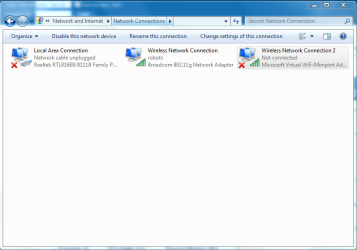
virtualwifi.PNG

Anyone have an idea?
 

My Computer

Computer Manufacturer/Model Number
Intel WBIBX10J
OS
Linux (Debian, Android)
CPU
Intel Core i7 860
Motherboard
Intel DP55WB
Memory
2x 2GB Kingston DDR3-1333
Graphics Card(s)
AMD Radeon HD 5750
Sound Card
Realtek ALC888
Monitor(s) Displays
2x Dell Inc. E248WFP
Screen Resolution
3840x1200
Hard Drives
Intel X25-V
Samsung HD103SJ
PSU
Corsair CX400
Case
Silverstone GD05
Cooling
Stock
Keyboard
Dell Inc. Bluetooth Wireless
Internet Speed
30 Mbps
It creates a virtual wireless card, making windows think that instead of one, you have two or more cards installed on your system. Keep in mind though, that the maximum bandwidth of your wireless card will be splitt when using this. It lets you connect to more then one wireless network at a time. For instance, an Ad-Hoc network and an Access Point at the same time. An access point and a wireless printer at the same time.
 

My Computer

Computer Manufacturer/Model Number
Custom Built
OS
Windows 7 Rc Build 7264 x86, Ubuntu
CPU
Intel Q8200 Quad Core
Motherboard
Asus P5QL
Memory
2 Gb
Graphics Card(s)
nVidia 8400GS
Sound Card
Stock Realtek HD Audio
Monitor(s) Displays
Hp 2207h and LG 42in LCD
Screen Resolution
1680 x 1050, 1360 x 768
Hard Drives
250 Gb seagate internal, (2) Western Digital 1 Tb external
PSU
Corsair 550W
Case
Thermaltake DH 102
Cooling
Unmodified
Keyboard
Microsoft Wireless
Mouse
Microsoft Wireless
Internet Speed
Time Warner - 15mb\s
Other Info
4 ATI Digital Cable Tuners, 1 XBox 360, Life|Ware home automation,Yamaha RX-V765, Harmony 1000 Remote
Do you know why this keeps coming back every time I restart my computer after uninstalling it in device manager? As far as I know I'm not using it for anything.
 

My Computer

Computer Manufacturer/Model Number
Intel WBIBX10J
OS
Linux (Debian, Android)
CPU
Intel Core i7 860
Motherboard
Intel DP55WB
Memory
2x 2GB Kingston DDR3-1333
Graphics Card(s)
AMD Radeon HD 5750
Sound Card
Realtek ALC888
Monitor(s) Displays
2x Dell Inc. E248WFP
Screen Resolution
3840x1200
Hard Drives
Intel X25-V
Samsung HD103SJ
PSU
Corsair CX400
Case
Silverstone GD05
Cooling
Stock
Keyboard
Dell Inc. Bluetooth Wireless
Internet Speed
30 Mbps
From what I understand, it is part of the driver for your wireless card and cannot be removed without removing your exsisting wireless card. But with that being said, maybe you can try an older version of your wireless driver, one without the added support for VWIFI, and see if that works for you.

One thing to keep in mind though, it isn't using any measurable amount of rescources if any, and it may be nice to have on hand.
 

My Computer

Computer Manufacturer/Model Number
Custom Built
OS
Windows 7 Rc Build 7264 x86, Ubuntu
CPU
Intel Q8200 Quad Core
Motherboard
Asus P5QL
Memory
2 Gb
Graphics Card(s)
nVidia 8400GS
Sound Card
Stock Realtek HD Audio
Monitor(s) Displays
Hp 2207h and LG 42in LCD
Screen Resolution
1680 x 1050, 1360 x 768
Hard Drives
250 Gb seagate internal, (2) Western Digital 1 Tb external
PSU
Corsair 550W
Case
Thermaltake DH 102
Cooling
Unmodified
Keyboard
Microsoft Wireless
Mouse
Microsoft Wireless
Internet Speed
Time Warner - 15mb\s
Other Info
4 ATI Digital Cable Tuners, 1 XBox 360, Life|Ware home automation,Yamaha RX-V765, Harmony 1000 Remote
Could this have to do with this computer being the creator of a HomeGroup that others joined?
 

My Computer

Computer Manufacturer/Model Number
Intel WBIBX10J
OS
Linux (Debian, Android)
CPU
Intel Core i7 860
Motherboard
Intel DP55WB
Memory
2x 2GB Kingston DDR3-1333
Graphics Card(s)
AMD Radeon HD 5750
Sound Card
Realtek ALC888
Monitor(s) Displays
2x Dell Inc. E248WFP
Screen Resolution
3840x1200
Hard Drives
Intel X25-V
Samsung HD103SJ
PSU
Corsair CX400
Case
Silverstone GD05
Cooling
Stock
Keyboard
Dell Inc. Bluetooth Wireless
Internet Speed
30 Mbps
Nope. Has to do with it being Windows 7. This is something new that Microsoft has introduced in this OS.
 

My Computer

Computer Manufacturer/Model Number
Custom Built
OS
Windows 7 Rc Build 7264 x86, Ubuntu
CPU
Intel Q8200 Quad Core
Motherboard
Asus P5QL
Memory
2 Gb
Graphics Card(s)
nVidia 8400GS
Sound Card
Stock Realtek HD Audio
Monitor(s) Displays
Hp 2207h and LG 42in LCD
Screen Resolution
1680 x 1050, 1360 x 768
Hard Drives
250 Gb seagate internal, (2) Western Digital 1 Tb external
PSU
Corsair 550W
Case
Thermaltake DH 102
Cooling
Unmodified
Keyboard
Microsoft Wireless
Mouse
Microsoft Wireless
Internet Speed
Time Warner - 15mb\s
Other Info
4 ATI Digital Cable Tuners, 1 XBox 360, Life|Ware home automation,Yamaha RX-V765, Harmony 1000 Remote
I have the virtual WiFi card active as well, and I'm trying to figure out how I can actually use it. At the moment, I can only connect to one network at a time and I cannot do any sort of "splits" or anything. Any ideas on how to actually make USE of this virtual card?
 

My Computer

OS
Windows 7 32bit 7077
Recently had an issue where no matter what I tried, my Notebook would not resolve DNS. Tried assigning DNS servers via DHCP as well as configuring the network card for DNS servers. Could ping the DNS servers at all times, LAN connectivity was fine, Internet connectivity was fine (could ping IPs on Internet), could not ping the URLs.
Disabling the Microsoft Virtual WiFi Miniport Adapter resolved the issue straight away.
 

My Computer

OS
Windows 7
Last edited:

My Computer

Computer type
PC/Desktop
Computer Manufacturer/Model Number
Custom Build
OS
Windows 7 Professional SP1 - x64 [Non-UEFI Boot]
CPU
Ivy Bridge Core i5 3570K (Delidded)
Motherboard
Asus P8Z77-V LE PLUS
Memory
G.Skill "Ares" DDR3 PC3-12800 - 1600MHz (16Gb)
Graphics Card(s)
Asus Dual-RX480-O4G
Sound Card
Creative Sound Blaster Z w/5.1 sound system
Monitor(s) Displays
Asus IPS 23"
Screen Resolution
16/9
Hard Drives
Internal:
500Go Sata 6Gb/s (x2)
500Go Sata 3Gb/s (x2)
SSD 60Go Sata 6Gb/s
PSU
In Win C 900W Series 80+ Platinum
Case
Thermaltake Chaser A71
Cooling
Custom Water Cooling Loop
Keyboard
Cooler Master QuickFire XTi
Mouse
Razer Imperator 2012 (4G)
Antivirus
MSE
Browser
IE 11.0.xxx Rtm
Other Info
"Raid0" with Intel Smart Response Technology (HDD/SSD)
Firestrider, YOU MUST HAVE SET UP A WIRELESS AD HOC.

IT'S KIND OF VIRTUAL WIRELESS NETWORK, WHICH HELPS YOU TO CONNECT WITH ANOTHER WIRELESS ENABLED LAPTOP.

AFTER YOU CREATE WIRELESS AD HOC, THIS DRIVER GET INSTALLED AND IT WONT BE REMOVED AT ALL IF YOU REMOVE THE WIRELESS AD HOC THAT YOU CREATED RECENTLY.

VISHAL VODRO
 

My Computer

OS
Windows-7
I recently found this in my network connections and I'm curious to what it is used for...

View attachment 15826

Anyone have an idea?

Do you know why this keeps coming back every time I restart my computer after uninstalling it in device manager? As far as I know I'm not using it for anything.

You might have accidently turned on ICS for your wifi adaptor which will make the msoft mini port adaptor active. You can right click the wirless connection and go to properties and then the sharing tab to turn off ICS.

The wifi mini port is used for sharing your connection by turning it into a wireless AP for others to connect too.
 

My Computer

Computer type
PC/Desktop
Computer Manufacturer/Model Number
Home built
OS
Windows 7 Ult, Windows 8.1 Pro,
CPU
Q9650-4.275GHz, E8600 4.5GHz, E6750-3.8GHz
Motherboard
Evga 780i FTW
Memory
G.Skill PC2 9600 1200Mhz 5 5 5 15 2T
Graphics Card(s)
GTX480
Sound Card
Asus Xonar D2
Monitor(s) Displays
HannsG
Screen Resolution
1680X1050
Hard Drives
GSkill Phoenix Pro 120GB SSD
PSU
ThermalTake Toughpower 1000Watt modular
Case
ThermalTake XaserV
Cooling
Xigmatek S1283
Keyboard
Logitech G15
Mouse
Logitech G9
Internet Speed
T1
where can i find the passphrase for this adapter? in trying to connect my phone to my laptop wirelessly, but wen i pick my laptop up and try to connect it askes me for a passphrase?
 

My Computer

OS
windows 7 home premium 64bit
where can i find the passphrase for this adapter? in trying to connect my phone to my laptop wirelessly, but wen i pick my laptop up and try to connect it askes me for a passphrase?

Welcome to SevenForums,

the command lines are:

Start:
netsh wlan start hostednetwork

Stop:
netsh wlan stop hostednetwork

Show
netsh wlan show hostednetwork
 

My Computer

Computer type
PC/Desktop
Computer Manufacturer/Model Number
Custom Build
OS
Windows 7 Professional SP1 - x64 [Non-UEFI Boot]
CPU
Ivy Bridge Core i5 3570K (Delidded)
Motherboard
Asus P8Z77-V LE PLUS
Memory
G.Skill "Ares" DDR3 PC3-12800 - 1600MHz (16Gb)
Graphics Card(s)
Asus Dual-RX480-O4G
Sound Card
Creative Sound Blaster Z w/5.1 sound system
Monitor(s) Displays
Asus IPS 23"
Screen Resolution
16/9
Hard Drives
Internal:
500Go Sata 6Gb/s (x2)
500Go Sata 3Gb/s (x2)
SSD 60Go Sata 6Gb/s
PSU
In Win C 900W Series 80+ Platinum
Case
Thermaltake Chaser A71
Cooling
Custom Water Cooling Loop
Keyboard
Cooler Master QuickFire XTi
Mouse
Razer Imperator 2012 (4G)
Antivirus
MSE
Browser
IE 11.0.xxx Rtm
Other Info
"Raid0" with Intel Smart Response Technology (HDD/SSD)
I have a problem with this virtual wifi and Windows 7 was unable to dowload new drivers to resolve this. Has anyone got any suggestions please. I am running Window 7 64 bit.

Thanks, Steve.
 

My Computer

Computer Manufacturer/Model Number
Hand built
OS
windows 6 64 bit
CPU
Intel i5 660 3.3
Motherboard
Gigabyte
Memory
8 mb RAM
Graphics Card(s)
1 GB
Sound Card
Nvidia
Monitor(s) Displays
CRT
Hard Drives
Seagate 1TB
PSU
Maplins
Case
Cool?
Cooling
120 mm fan
Well I found the answer. You cant uninstall it but you can disable it and its gone from device manger. First open up Command Prompt in admin(by right clicking it and select run as admin in windows 7,vista). Stop it by typing this without quotes "netsh wlan stop hostednetwork" then disable it
"netsh wlan set hostednetwork mode=disallow".
Now rejoice in not having it in device manger.
 

My Computer

OS
Windows 7 Home Premium x64
I don't want to use the virtual wifi adapter, all I want to do is remove it and having played around enough with my wifi drivers I would like another way to remove it :confused:
 

My Computer

Computer Manufacturer/Model Number
Advent 9215
OS
Windows 7 Home Premium 32bit
CPU
Intel Pentium Dual-Core T2330 (1.6GHz)
Memory
2GB DDR2
Graphics Card(s)
Intel 965GM (up to 358MB)
Sound Card
Realtek ALC883 High Definition Audio
Monitor(s) Displays
15.4" widescreen TFT
Screen Resolution
1280x800
Hard Drives
Western Digital 250GB
Keyboard
Standard Keyboard
Mouse
Synaptics TouchPad
Internet Speed
54Mbps
Well I found the answer. You cant uninstall it but you can disable it and its gone from device manger. First open up Command Prompt in admin(by right clicking it and select run as admin in windows 7,vista). Stop it by typing this without quotes "netsh wlan stop hostednetwork" then disable it
"netsh wlan set hostednetwork mode=disallow".
Now rejoice in not having it in device manger.

Why is doing this so necassary??? :sarc:
None the less, doing this does appear to massively help the situation,
Thank you, tylerprogeek ;)
 

My Computer

Computer Manufacturer/Model Number
Advent 9215
OS
Windows 7 Home Premium 32bit
CPU
Intel Pentium Dual-Core T2330 (1.6GHz)
Memory
2GB DDR2
Graphics Card(s)
Intel 965GM (up to 358MB)
Sound Card
Realtek ALC883 High Definition Audio
Monitor(s) Displays
15.4" widescreen TFT
Screen Resolution
1280x800
Hard Drives
Western Digital 250GB
Keyboard
Standard Keyboard
Mouse
Synaptics TouchPad
Internet Speed
54Mbps
Well I found the answer. You cant uninstall it but you can disable it and its gone from device manger. First open up Command Prompt in admin(by right clicking it and select run as admin in windows 7,vista). Stop it by typing this without quotes "netsh wlan stop hostednetwork" then disable it
"netsh wlan set hostednetwork mode=disallow".
Now rejoice in not having it in device manger.

Why is doing this so necassary??? :sarc:
None the less, doing this does appear to massively help the situation,
Thank you, tylerprogeek ;)
Thanks. What it is doing is first you stop the service, then you are stopping it from turning on. Hope that helps.
 

My Computer

OS
Windows 7 Home Premium x64
Many people are missing the simplest of explanations. :banghead:
This driver is most likely to appear if you add, or have built in Bluetooth.
This driver is necessary so that you can have your network/internet connection AND the Bluetooth connections simultaneously.
Most people that complain of this driver "suddenly appearing" don't realize (until you point it out) that they either recently installed or recently enabled the Bluetooth on their systems.

It's not hurting anything, leave it alone! LOL! :D
 

My Computer

Computer Manufacturer/Model Number
SuperTech-IT.com MegaBeast 7
OS
Windows 7 Ultimate X64, Windows 8 Customer Preview X64
CPU
AMD FX 8 core @ 4000MHz per core
Motherboard
MSI 970A-G45
Memory
Transcend 8G DDR3 AxeRam @ 1866MHz
Graphics Card(s)
ATI HD6450 (I'm not a gamer)
Sound Card
AMD On Board High definition
Monitor(s) Displays
Acer AL2216W converted to touchscreen and Privé 34" HDMI LCD
Screen Resolution
1680 X 1050 and 1920 X 1080 respectively
Hard Drives
3 X Seagate 500GB in striped RAID as single 1.5 TB Boot drive,
2 X Seagate 2TB,
1X Western Digital 1TB
PSU
COOLMAX 600W Modular Supply
Case
Power Up Executive Mid Tower. 6 int 3½, 4 ext 5¼, 1 ext 3½
Cooling
Air (if you do it right, it's all you need!)
Keyboard
Onn Slim Multimedia
Mouse
Compaq/Logitech 2 button
Internet Speed
8M
Other Info
2X LG DVD burner, 1X Pioneer Blu-Ray burner, Adaptec 29320LPE U320 SCSI, VIA 1394 FireWire, 2X Jmicron JMB36X IDE/SATA cards, Linksys Rangeplus Wireless, Generic Bluetooth adapter, ZS211 webcam, HP OfficeJet 6500 printer, USB Floppy
to SPEAR:
Your laptop likely wants the pairing pass-phrase for (again) the Bluetooth wireless connection.
By default, this is 0000 (four zeros)
 

My Computer

Computer Manufacturer/Model Number
SuperTech-IT.com MegaBeast 7
OS
Windows 7 Ultimate X64, Windows 8 Customer Preview X64
CPU
AMD FX 8 core @ 4000MHz per core
Motherboard
MSI 970A-G45
Memory
Transcend 8G DDR3 AxeRam @ 1866MHz
Graphics Card(s)
ATI HD6450 (I'm not a gamer)
Sound Card
AMD On Board High definition
Monitor(s) Displays
Acer AL2216W converted to touchscreen and Privé 34" HDMI LCD
Screen Resolution
1680 X 1050 and 1920 X 1080 respectively
Hard Drives
3 X Seagate 500GB in striped RAID as single 1.5 TB Boot drive,
2 X Seagate 2TB,
1X Western Digital 1TB
PSU
COOLMAX 600W Modular Supply
Case
Power Up Executive Mid Tower. 6 int 3½, 4 ext 5¼, 1 ext 3½
Cooling
Air (if you do it right, it's all you need!)
Keyboard
Onn Slim Multimedia
Mouse
Compaq/Logitech 2 button
Internet Speed
8M
Other Info
2X LG DVD burner, 1X Pioneer Blu-Ray burner, Adaptec 29320LPE U320 SCSI, VIA 1394 FireWire, 2X Jmicron JMB36X IDE/SATA cards, Linksys Rangeplus Wireless, Generic Bluetooth adapter, ZS211 webcam, HP OfficeJet 6500 printer, USB Floppy
Back
Top