microsoft visual c++ 2005 redistributable (x64) error 1305

frodi

New member
Member
VIP
Local time
7:06 AM
Messages
199
I have a problem installing microsoft visual c++ 2005 redistributable (x64). I have tried installing it as administrator, but that does not work.
 

My Computer

Computer type
PC/Desktop
Computer Manufacturer/Model Number
Custom Built
OS
Windows 7 Home Premium 64 bit
CPU
3.20 gigahertz Intel Core i7-3930K
Motherboard
Board: ASUS P9X79 PRO Rev 1.xx
Memory
16.0 GB
Graphics Card(s)
NVIDIA GeForce GTX 680 2GB
Sound Card
NVIDIA High Definition Audio
Monitor(s) Displays
CMO CMC 22 W
Screen Resolution
1680x1050
Hard Drives
ATA SanDisk SDSSDX12 SCSI Disk Device (120.03 GB)
ATA ST2000DM001-1CH1 SCSI Disk Device (2000.40 GB)
Case
Coolermaster HAF XM Case with Window
Cooling
Coolermaster Hyper 212 EVO CPU Cooler
Keyboard
Microsoft
Mouse
Microsoft
Supported operating systems: Windows 2000 Service Pack 3, Windows 98, Windows 98 Second Edition, Windows ME, Windows Server 2003, Windows XP Service Pack 2

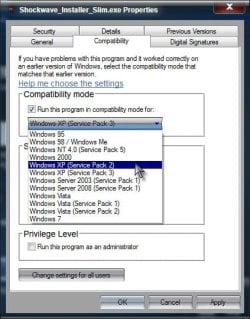
It's not officially supported even for Vista. Have you tried installing it in compatibility mode for XP SP2?

Right click the installer> Properties> Compatibility tab> Check next to Run this program in compatibility mode for:> Choose Windows XP (Service pack 2)> Apply and OK your way out

Comp.jpg

A Guy
 

My Computer

Computer type
PC/Desktop
OS
Windows 10 Home x64
CPU
INTEL Core i5-750 Quad-Core 3.37GHz
Motherboard
ASUS P7P55D
Memory
HyperX Fury Black Series 8GB (2 x 4GB) 1866Mhz
Graphics Card(s)
EVGA GeForce GTX 750 Superclocked 1GB 128-Bit GDDR5
Monitor(s) Displays
LG 32MA68HY 32" IPS
Screen Resolution
1920 x 1080
Hard Drives
Samsung 840 Evo 120GB, SEAGATE 500GB Barracuda® 7200.12, SATA 3 Gb/s, 7200 RPM, 16MB cache
PSU
ANTEC TruePower New TP-550, 80 PLUS, 550W
Case
ANTEC Three Hundred Illusion
Cooling
COOLER MASTER Hyper 212 Plus, 4 x 120mm 1 x 140mm Noctua's
Internet Speed
85 + Mbps
Antivirus
Avast
Browser
Vivaldi
Thanks A Guy, I have only the installer and when I right click, compatibility mode, it is not available, greyed out. Might try again after a restart.
 

My Computer

Computer type
PC/Desktop
Computer Manufacturer/Model Number
Custom Built
OS
Windows 7 Home Premium 64 bit
CPU
3.20 gigahertz Intel Core i7-3930K
Motherboard
Board: ASUS P9X79 PRO Rev 1.xx
Memory
16.0 GB
Graphics Card(s)
NVIDIA GeForce GTX 680 2GB
Sound Card
NVIDIA High Definition Audio
Monitor(s) Displays
CMO CMC 22 W
Screen Resolution
1680x1050
Hard Drives
ATA SanDisk SDSSDX12 SCSI Disk Device (120.03 GB)
ATA ST2000DM001-1CH1 SCSI Disk Device (2000.40 GB)
Case
Coolermaster HAF XM Case with Window
Cooling
Coolermaster Hyper 212 EVO CPU Cooler
Keyboard
Microsoft
Mouse
Microsoft
--> My 2 questions are in points 1. + 2.... Thank you very much in advance!

Experiencing the same problem in 2014 and have searched on many internet pages, that showed the same problem, but without results... I can't download another C++ program because the game (Total War Shogun 2 on Steam platform) demands C++ 2005. But it is a Windows problem in my own opinion, although i'm not a specialist...

My problem is: "Error 1305. "C:\user\(ADMIN session)\Appdata\Local\Temp\IXP001.TMP\vcredist.msi File is missing or verify that you have access to it" (french traduction)

1. In my case, file is not missing when i launch the setup. Nevetheless I have tried to install this particular .msi file separately in the TEMP folder, but I can't find it on the internet alone. Is it possible to install with the .msi file already in TEMP file?


I have formated Windows 7 x64 recently, so the registry is clean. Have tried to launch the downloaded setup file in Win XP SP2 and in SP3 compatibility modes, as said above. I have tried to deactivate my firewall + antivirus, to restart Windows, to desinstall the other C++ 2010 installed on my PC (what is actually impossible).
I ask myself if Microsoft have obviously denied this particular problem with C++ 2005, because there has been no demanded setup from Windows Update for C++ 2005 (only an update for C++ 2010)...

2. "Verify that you have access to it": In my case, the only problem I could find clearly is the parameters of my 2 Windows sessions (with an Admin session + a normal "user"), because i have restricted the access for my simple "User" session and modified some in my admin session for 2 partition disks. BUT i didn't do that on my OS (C:) session! Nevertheless, it could be related, so my question: How can i guarantee TOTAL access to a file like vcredist.msi, which is a TEMP setup file (that mean: not present in my PC before the install)?
PS: already tried to run in administrator mode...

 

My Computer

Computer type
PC/Desktop
Computer Manufacturer/Model Number
-
OS
Windows Home Premium 64-bit
CPU
Intel Core 2 Duo E6850 3GHz
Motherboard
Gigabyte
Memory
6GB DDR2
Graphics Card(s)
AMD Radeon HD 4890
Antivirus
AVG Antivirus 2014
Browser
Firefox
Back
Top