Microsoft Visual C++ Redistributable Difficulties

niotic

New member
Member
Local time
3:03 PM
Messages
52
Hello everyone,

This problem has been haunting me for awhile and I've finally decided to address it. My Microsoft Visual C++ Redistributable has been giving me difficulties mainly when attempting to install programs. I receive an error about V C++ being missing and being prompted to install it via CD, considering I don't have the CD I cannot install it. Upon trying to install it via software downloaded from Microsoft themselves nothing happens, the software prepares for installation then promptly disappears. When I try to uninstall it via Add or Remove Programs I am prompted AGAIN to insert the CD for the software.

Can anyone please help me solve this tediously annoying issue before I go insane?

Thank you to all in advance!
 

My Computer

Computer type
Laptop
Computer Manufacturer/Model Number
HP/g6-1d11dx
OS
Windows 7 Home Premium 64-bit
CPU
AMD A6-3420M APU with Radeon(tm) HD Graphics
Motherboard
Hewlett-Packard 169B
Memory
8.00 GB
Graphics Card(s)
AMD Radeon(TM) HD 6520G
Sound Card
(1) AMD High Definition Audio Device (2) IDT High Definiti
Monitor(s) Displays
Stock 15.6" HD Display
Screen Resolution
1366 x 768
Hard Drives
ST950032 5AS SATA Disk Device
Cooling
Rosewill 15" Laptop stand w/ cooling fan
Internet Speed
54.0 Mbps
Antivirus
Microsoft Security Essentials
Browser
Google Chrome
Which one in particular?

Since you have 64bit Windows, download and install both x86 and x64 service packed versions (if applicable) of:
- 2005
- 2008
- 2010
- 2012
- 2013

VC Redist don't have much of an installation, do they appear in programs and features? should be lots of them when you install all I listed
 

My Computer

Computer type
PC/Desktop
Computer Manufacturer/Model Number
Custom Build
OS
Windows 7 Ultimate x64 SP1
CPU
AMD Phenom 2 1090T
Motherboard
Gigabyte GA-890FXA-UD5
Memory
2x8GB Kingston HyperX Fury Black 1600Mhz Unganged
Graphics Card(s)
MSI GTX 970 Gaming 4G
Sound Card
Realtek On-Board HD 7.1 Audio / Logitech G35
Monitor(s) Displays
3xAcer GD245HQ
Screen Resolution
1920x1080
Hard Drives
Samsung 850 Pro 512GB SSD - OS /
WD Caviar Black SATA 3 - 1 TBx2 - Dynamic RAID 0 /
WD Caviar Green SATA 2 - 640GBx2 - Dynamic RAID 0 /
WD Caviar Green SATA 2 - 640GB - Internal Backup /
Seagate Barracude SATA 3 - 3TB - External Backup/ Sync
PSU
HighPower 1000W
Case
Cooler Master HAF 932
Cooling
Noctua NH-D14
Keyboard
Logitech G19
Mouse
Logitech G500
Internet Speed
100/4 Mbit Cable (100GB quota)
Antivirus
ZoneAlarm Extreme Security / MBAM Pro / MBAE Free / SAS Free
Browser
IE 11 - Firefox - Chrome
Other Info
Logitech F710/ G27/ G940/ Z5500 // TrackIR 5 // Nvidia 3D Surround Vision
So, it seems that 2005 successfully installed and when I ran 2008 it only gave an option to repair and uninstall. So I tried the repair and and I'm guessing it worked. The 2010 just told me that I have a newer version of it installed. Finally, I can't get 2012 or 2013 to download from Microsoft's website.

When I go to add or remove programs it shows that 2005, 2008 and 2010 are installed. I'm not sure what to do about the last two versions though. Do you know of any alternative safe mirrors where I can download them?
 

My Computer

Computer type
Laptop
Computer Manufacturer/Model Number
HP/g6-1d11dx
OS
Windows 7 Home Premium 64-bit
CPU
AMD A6-3420M APU with Radeon(tm) HD Graphics
Motherboard
Hewlett-Packard 169B
Memory
8.00 GB
Graphics Card(s)
AMD Radeon(TM) HD 6520G
Sound Card
(1) AMD High Definition Audio Device (2) IDT High Definiti
Monitor(s) Displays
Stock 15.6" HD Display
Screen Resolution
1366 x 768
Hard Drives
ST950032 5AS SATA Disk Device
Cooling
Rosewill 15" Laptop stand w/ cooling fan
Internet Speed
54.0 Mbps
Antivirus
Microsoft Security Essentials
Browser
Google Chrome
Can you list all Microsoft Visual C++ Redistributable packages that show up as installed? Some of them you get via windows updates and some are installed by third party software.

Also there should be two entries for each version. One of those is the service pack.

As far as I know it's best to download the required packages (file names are confusing as the setup files for the package and service pack usually have the same name) then remove existing versions berfore rebooting and running Ccleaner then clean installing the downloaded versions.

If you want to try auto updating then see this post:

http://www.sevenforums.com/software...ration-incorrect-post3048325.html#post3048325

Here's a list of download links too: TMurgent Technologies

Note: If you're installing software that needs a different version installed then it should either be included in the program's installer or else the program should offer to download and install the required version for you.
 

My Computer

Computer type
Laptop
Computer Manufacturer/Model Number
ASUS
OS
Microsoft Windows 7 Home Premium 64-bit 7601 Multiprocessor Free Service Pack 1
CPU
AMD C-60 APU with Radeon(tm) HD Graphics
Motherboard
ASUSTeK COMPUTER INC. X501U
Memory
4.00 GB
Graphics Card(s)
AMD Radeon HD 6290 Graphics
Sound Card
(1) AMD High Definition Audio Device (2) Realtek High Defi
Screen Resolution
1366 x 768 x 32 bits (4294967296 colors) @ 60 Hz
Hard Drives
Hitachi HTS545050A7E380 SATA Disk Device
Antivirus
Comodo CIS & FW, SecureAplus App Whitelisting, Threatfire
Browser
Cyberfox 64bit, Opera 64bit, Airfox
Other Info
Spy-The-Spy, HitmanPro.Alert, Norton Connect Safe, MJRegWatcher, BitDefender TrafficLight, Voodoo Shield, Zemana AntiMalware
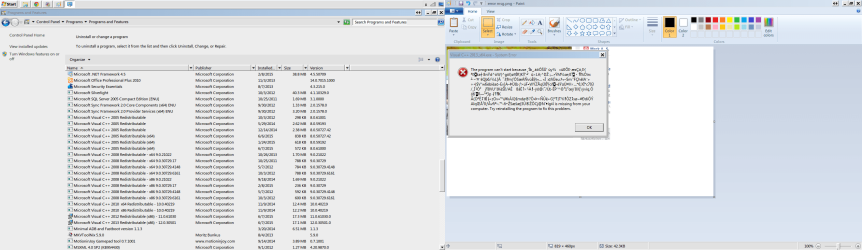
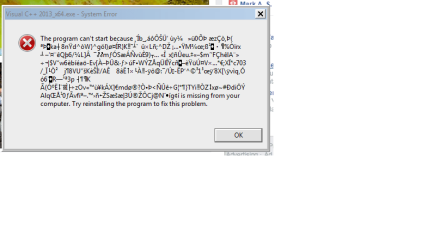
So I did as you suggest Callender and used UVK to install/repair all the VC++ files. I've attached an image of the installed VC++ files after running UVK. However, while running I received an error message for VC++ 2013. I've also attached a picture for this as well.

What is my next move?
 

Attachments

  • VC++ after.png
    VC++ after.png
    128.3 KB · Views: 8
  • error msg.png
    error msg.png
    15.7 KB · Views: 2

My Computer

Computer type
Laptop
Computer Manufacturer/Model Number
HP/g6-1d11dx
OS
Windows 7 Home Premium 64-bit
CPU
AMD A6-3420M APU with Radeon(tm) HD Graphics
Motherboard
Hewlett-Packard 169B
Memory
8.00 GB
Graphics Card(s)
AMD Radeon(TM) HD 6520G
Sound Card
(1) AMD High Definition Audio Device (2) IDT High Definiti
Monitor(s) Displays
Stock 15.6" HD Display
Screen Resolution
1366 x 768
Hard Drives
ST950032 5AS SATA Disk Device
Cooling
Rosewill 15" Laptop stand w/ cooling fan
Internet Speed
54.0 Mbps
Antivirus
Microsoft Security Essentials
Browser
Google Chrome
Okay I'll look at it later.
 

My Computer

Computer type
Laptop
Computer Manufacturer/Model Number
ASUS
OS
Microsoft Windows 7 Home Premium 64-bit 7601 Multiprocessor Free Service Pack 1
CPU
AMD C-60 APU with Radeon(tm) HD Graphics
Motherboard
ASUSTeK COMPUTER INC. X501U
Memory
4.00 GB
Graphics Card(s)
AMD Radeon HD 6290 Graphics
Sound Card
(1) AMD High Definition Audio Device (2) Realtek High Defi
Screen Resolution
1366 x 768 x 32 bits (4294967296 colors) @ 60 Hz
Hard Drives
Hitachi HTS545050A7E380 SATA Disk Device
Antivirus
Comodo CIS & FW, SecureAplus App Whitelisting, Threatfire
Browser
Cyberfox 64bit, Opera 64bit, Airfox
Other Info
Spy-The-Spy, HitmanPro.Alert, Norton Connect Safe, MJRegWatcher, BitDefender TrafficLight, Voodoo Shield, Zemana AntiMalware
Okay so get the x64 (64bit) Microsoft Visual C++ Redistributable 2012 x64 packages from here:

Download Visual C++ Redistributable for Visual Studio 2012 Update 4 from Official Microsoft Download Center

and get the x64 (64bit) Microsoft Visual C++ Redistributable 2013 x64 from here:

Download Visual C++ Redistributable Packages for Visual Studio 2013 from Official Microsoft Download Center

You're missing those. Can you provide any information on the software that you are trying to install?

Program name, file name, version, bitness (32bit or 64bit)
 

My Computer

Computer type
Laptop
Computer Manufacturer/Model Number
ASUS
OS
Microsoft Windows 7 Home Premium 64-bit 7601 Multiprocessor Free Service Pack 1
CPU
AMD C-60 APU with Radeon(tm) HD Graphics
Motherboard
ASUSTeK COMPUTER INC. X501U
Memory
4.00 GB
Graphics Card(s)
AMD Radeon HD 6290 Graphics
Sound Card
(1) AMD High Definition Audio Device (2) Realtek High Defi
Screen Resolution
1366 x 768 x 32 bits (4294967296 colors) @ 60 Hz
Hard Drives
Hitachi HTS545050A7E380 SATA Disk Device
Antivirus
Comodo CIS & FW, SecureAplus App Whitelisting, Threatfire
Browser
Cyberfox 64bit, Opera 64bit, Airfox
Other Info
Spy-The-Spy, HitmanPro.Alert, Norton Connect Safe, MJRegWatcher, BitDefender TrafficLight, Voodoo Shield, Zemana AntiMalware
Hi, I am glad I found this thread as I am having the exact same problem except with the 2015 redist package. Tearing my hair out trying to find a solution. Have tried CCcleaner, resintalling Windows to no avail. The two VC++ 2015 packages for x86 and x64 are in my programs list, but just about every game I open up tries to install these over and over again from CDRom.

Any help appreciated.
 

My Computer

Computer type
PC/Desktop
Computer Manufacturer/Model Number
Custom
OS
Windows 7 64 bit
CPU
Intel i5 750
Motherboard
Gigabyte P55-UD3
Memory
8GB
Graphics Card(s)
Radeon 390x
Back
Top