
Microsoft Visual C++ Redistributable

BJB

Useful sometimes
Power User
Local time
7:33 PM
Messages
188
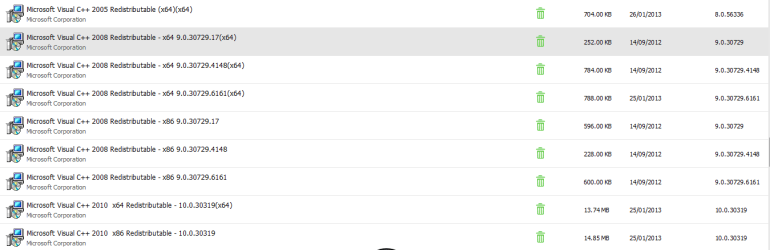
I have no idea what this feature does but my ThinkPad has 9 versions of it, see attached pic. Is this normal? Are they all required? I ask because my Win 7 is very slow to fire up, though fine once up and running, and I'm going through the whole repertoire here - checking startups, checking errors in event viewer, updating drivers etc, so far without much sign of improvement.
 

Attachments
  • Capture.PNG
    Capture.PNG
    23.2 KB · Views: 3

My Computer

Computer type
PC/Desktop
Computer Manufacturer/Model Number
PC Specialist Custom
OS
Windows 7 Pro 64 bit
CPU
Intel i5
Motherboard
ASUS® H81M-PLUS
Memory
8GB KINGSTON DUAL-DDR3 1600MHz
Graphics Card(s)
2GB AMD RADEON™ R7 250
Hard Drives
120GB KINGSTON V300 SSD
1TB WD CAVIAR BLACK WD1003FZEX
It is normal to have multiple versions. Windows adds them to the WinSxS folder and the application picks the version it needs

Each has its own runtime libraries. Each is independent and the various programs needing them will call the one needed. These are not the reason for your slowdown. If you haven't seen these already:

http://www.sevenforums.com/tutorials/11728-optimize-windows-7-a.html

http://www.sevenforums.com/tutorials/174750-boot-times-monitor-event-viewer.html

http://www.sevenforums.com/tutorials/220165-troubleshooting-steps-windows-7-a.html

A Guy
 

My Computer

Computer type
PC/Desktop
OS
Windows 10 Home x64
CPU
INTEL Core i5-750 Quad-Core 3.37GHz
Motherboard
ASUS P7P55D
Memory
HyperX Fury Black Series 8GB (2 x 4GB) 1866Mhz
Graphics Card(s)
EVGA GeForce GTX 750 Superclocked 1GB 128-Bit GDDR5
Monitor(s) Displays
LG 32MA68HY 32" IPS
Screen Resolution
1920 x 1080
Hard Drives
Samsung 840 Evo 120GB, SEAGATE 500GB Barracuda® 7200.12, SATA 3 Gb/s, 7200 RPM, 16MB cache
PSU
ANTEC TruePower New TP-550, 80 PLUS, 550W
Case
ANTEC Three Hundred Illusion
Cooling
COOLER MASTER Hyper 212 Plus, 4 x 120mm 1 x 140mm Noctua's
Internet Speed
85 + Mbps
Antivirus
Avast
Browser
Vivaldi
Thank you. I will study all of that. I see that my ThinkPad has a load of Lenovo utilities built in which I suspect are contributing to the startup problem. I know they are not essential as I also installed 8.1 on this same machine and it boots in no time at all and doesn't have any of the pre-installed Lenovo stuff. However the last time I tried removing it the system had problems and I had to restore an image. Any advice on that?
 

My Computer

Computer type
PC/Desktop
Computer Manufacturer/Model Number
PC Specialist Custom
OS
Windows 7 Pro 64 bit
CPU
Intel i5
Motherboard
ASUS® H81M-PLUS
Memory
8GB KINGSTON DUAL-DDR3 1600MHz
Graphics Card(s)
2GB AMD RADEON™ R7 250
Hard Drives
120GB KINGSTON V300 SSD
1TB WD CAVIAR BLACK WD1003FZEX
Hi there .. Can you remember which Lenovo products you had problems with when you removed them ? I have an Lenovo too though not the same Model as yours .. The only software i have is the Lenovo Energy and Boot Optimizer .. Maybe you have a lot more Bloatware than i had .. They seems to dish out more and more each year ...
 

My Computer

Computer Manufacturer/Model Number
W530-3630QM1
OS
windows 7 home 64bit
CPU
INTEL-CORE I7
Memory
16GB
Hard Drives
750GB
Browser
Chrome
Far as I can recollect I uninstalled all the Lenovo software in one session. There were problems afterwards but it was over a year ago and I can't now remember just what. I restored an image and here's what the system has now. I've probably already dumped some stuff.

Lenovo Auto Scroll Utility x64
Lenovo Bluetooth with Enhanced Data Rate Technology
Lenovo patch Utility (32 and 64 bit)
Lenovo Power Management Driver x64
Lenovo Registration
Lenovo Solution Center x64
Lenovo System Update
Lenovo User Guide
Lenovo Warranty Information
Lenovo Welcome
Message Center Plus
On Screen Display x64
Power Manager
RapidBoot HDD Accelerator - ha ha
RapidBoot Shield x64
Rescue and Recovery (the factory restore system, not needed)
ThinkVantage Access Connections
ThinkVantage Active Protection System x64
ThinkVantage Communications Utility x64

Quite some list isn't it? Many of these obviously I can just dump but it's knowing which ones it's best to leave. When I look in CCleaner there are also other Lenovo startups, such as tpshocks.exe and TPKNRRES.exe which I have no idea about at all.

I'll most likely not rush it and just take em out one at a time, especially as I'm simultaneously updating over 20 drivers DriverMax has updates for. Macrium is going to be kept busy ;)
 

My Computer

Computer type
PC/Desktop
Computer Manufacturer/Model Number
PC Specialist Custom
OS
Windows 7 Pro 64 bit
CPU
Intel i5
Motherboard
ASUS® H81M-PLUS
Memory
8GB KINGSTON DUAL-DDR3 1600MHz
Graphics Card(s)
2GB AMD RADEON™ R7 250
Hard Drives
120GB KINGSTON V300 SSD
1TB WD CAVIAR BLACK WD1003FZEX
Hi there
There are a few .NET applications and perhaps others that make use of the visual C++ re-distributable modules. For instance some versions of NERO / WINAMP etc etc. Almost anything that puts popup windows on your screen will use this. (Maybe applications today might not but certainly 2013 and earlier). (By POPUP here I'm not talking about commercials / advertisements but often boxes presenting you with a checkbox and the OK / Cancel buttons).

Later versions of the C++ redistributable package may supplant / replace earlier versions such as the fairly ubiquitous 2005 version but they can co-exist together. The install will sort out any requirements automatically.

I'd also stick well clear of sites like DRIVERMAX - a lot of ad / spy / trialware gets installed via sites like these. It's easier these days to search manually for what you need.

Cheers
jimbo
 

My Computer

Computer type
PC/Desktop
Computer Manufacturer/Model Number
Custom built, several laptops HP/ASUS
OS
Linux CENTOS 7 / various Windows OS'es and servers
CPU
Intel i7 Intel i5
Memory
8GB, 16GB
Graphics Card(s)
On Motherboard
Sound Card
Realtek HD audio
Monitor(s) Displays
Apple Cinema display, Samsung LCD
Screen Resolution
1920 X 1080
Hard Drives
4 X 1TB SATA
Mouse
Toshiba wireless laser
Internet Speed
> 20MB up
Nothing in the list seems much good .. The only reason i kept the Power Management is it controls the Function Keys and i like the Battery Care .. As for TPKNRRES.exe its a communications controller and uses a lot of the CPU not needed .. Also the tpshocks.exe is a core process of the ThinkPad active protection program and no, you don't want or need it with an SSD. The program can be uninstalled
 

My Computer

Computer Manufacturer/Model Number
W530-3630QM1
OS
windows 7 home 64bit
CPU
INTEL-CORE I7
Memory
16GB
Hard Drives
750GB
Browser
Chrome
tpshocks.exe is a core process of the ThinkPad active protection program and no, you don't want or need it with an SSD. The program can be uninstalled
No SSD, much as I'd like one, so I think I'll retain the active protection system. Thanks.
 

My Computer

Computer type
PC/Desktop
Computer Manufacturer/Model Number
PC Specialist Custom
OS
Windows 7 Pro 64 bit
CPU
Intel i5
Motherboard
ASUS® H81M-PLUS
Memory
8GB KINGSTON DUAL-DDR3 1600MHz
Graphics Card(s)
2GB AMD RADEON™ R7 250
Hard Drives
120GB KINGSTON V300 SSD
1TB WD CAVIAR BLACK WD1003FZEX
Back
Top