Microsoft Visual C++ Runtime Error! R6034

Caamdaddy

New member
Local time
8:59 AM
Messages
4
First of all, here is the error I'm getting after installation: Screenshot by Lightshot
I've previously installed the disk version of GTA IV and I got this error before but I just clicked okay and was on my way, but when I tried to add a particular mod to my game, it wouldn't work. I narrowed it down to this error because I installed the exact same game/mod to my brothers computer and he didn't get this error and the mod worked fine for him. This Runtime Error comes up right after I install the second disk, I've tried Google but it all doesn't make sense to me, I'm not an idiot but I don't know what "rebuilding my application with a manifest" is... Running on Windows 7. Any help appreciated, thanks in advance.
 

My Computer

Computer type
PC/Desktop
Computer Manufacturer/Model Number
Custom Build
OS
Windows 7 Home Premium x64
CPU
i7 - 3770K
Motherboard
AsRock Extreme4
Memory
16gb Corsair
Graphics Card(s)
Sapphire 7970 OC
Hard Drives
2TB Seagate, 128gb Samsung 840 SSD
Browser
Google Chrome
Might be a corrupted library. Can you check from Programs and Features what Visual C++ Runtime libraries you have installed and then uninstall and reinstall them again from the source?
This should be the right one, but maybe you need the 2008 one as well.
 

My Computer

Computer type
PC/Desktop
Computer Manufacturer/Model Number
custom built
OS
Win 7 Pro 64-bit 7601
CPU
AMD Phenom 9650 QuadCore, revision DR-B3
Motherboard
ASUS M4A78
Memory
5 GB yes I run 2x 2GB and 1x 1GB, different brand, spank me.
Graphics Card(s)
NVIDIA GeForce 9800 GT 512 Mb, unknown manufacturer.
Sound Card
Crappy Realtek Integrated Audio
Monitor(s) Displays
Fujitsu Siemens P19-3P
Screen Resolution
1280 x 1024 x 32 bits @ 60 Hz Oh yeah, 4:3 rocks!
Hard Drives
(1) MAXTOR S TM3320613AS SATA Disk Device (2) STM35004 18AS SATA Disk Device (3) TOSHIBA USB 2.5"-HDD
PSU
whatever, around 450w
Case
Scavenged from old company PC, 10+ years old
Cooling
CPU fan, GPU fan, case fan, nothing fancy
Keyboard
Microsoft, PS/2, white.
Mouse
Optical, logitec.
Internet Speed
effective max speeds: 70-ish kB/s down 30-ish kB/s up
Antivirus
Avira, free edition.
Browser
Firefox with FXChrome to make it look like Google Chrome :P
Other Info
Was discarded by previous owner due to "horrible performance".
Was running Win Xp from a IDE drive. Yeah. Was a pain.
SATA II drive and Win7 and it zips away! Yay!
These are the only ones I have installed currently ( Screenshot by Lightshot ), I had a lot more before that but I uninstalled them all and tried to install different ones. When you say uninstall and re-install them again from the source what do you mean by that? Should I download that one you recommended and search for the 2008 version too? Thanks man :)
 

My Computer

Computer type
PC/Desktop
Computer Manufacturer/Model Number
Custom Build
OS
Windows 7 Home Premium x64
CPU
i7 - 3770K
Motherboard
AsRock Extreme4
Memory
16gb Corsair
Graphics Card(s)
Sapphire 7970 OC
Hard Drives
2TB Seagate, 128gb Samsung 840 SSD
Browser
Google Chrome
Ah, so you did screw around with them. Why?
It's better if you uninstall the current ones and then install the following (all for x64):
The 2005 SP1, the 2008 SP1, the 2010 SP1, and the 2012 update.

This way you have all. They are components used by other programs (like games) to work. If not called by another program they just occupy some (little) disk space.

If you can do a system restore to the point before you did screw with that stuff would be best though. This is a tutorial for system restore
 

My Computer

Computer type
PC/Desktop
Computer Manufacturer/Model Number
custom built
OS
Win 7 Pro 64-bit 7601
CPU
AMD Phenom 9650 QuadCore, revision DR-B3
Motherboard
ASUS M4A78
Memory
5 GB yes I run 2x 2GB and 1x 1GB, different brand, spank me.
Graphics Card(s)
NVIDIA GeForce 9800 GT 512 Mb, unknown manufacturer.
Sound Card
Crappy Realtek Integrated Audio
Monitor(s) Displays
Fujitsu Siemens P19-3P
Screen Resolution
1280 x 1024 x 32 bits @ 60 Hz Oh yeah, 4:3 rocks!
Hard Drives
(1) MAXTOR S TM3320613AS SATA Disk Device (2) STM35004 18AS SATA Disk Device (3) TOSHIBA USB 2.5"-HDD
PSU
whatever, around 450w
Case
Scavenged from old company PC, 10+ years old
Cooling
CPU fan, GPU fan, case fan, nothing fancy
Keyboard
Microsoft, PS/2, white.
Mouse
Optical, logitec.
Internet Speed
effective max speeds: 70-ish kB/s down 30-ish kB/s up
Antivirus
Avira, free edition.
Browser
Firefox with FXChrome to make it look like Google Chrome :P
Other Info
Was discarded by previous owner due to "horrible performance".
Was running Win Xp from a IDE drive. Yeah. Was a pain.
SATA II drive and Win7 and it zips away! Yay!
In your first response you said "uninstall and reinstall them again from the source". That's pretty much all I did with the old ones, just uninstall them and install them again. I'll try those ones you recommended now though :)
 

My Computer

Computer type
PC/Desktop
Computer Manufacturer/Model Number
Custom Build
OS
Windows 7 Home Premium x64
CPU
i7 - 3770K
Motherboard
AsRock Extreme4
Memory
16gb Corsair
Graphics Card(s)
Sapphire 7970 OC
Hard Drives
2TB Seagate, 128gb Samsung 840 SSD
Browser
Google Chrome
These are the only ones I have installed currently ( Screenshot by Lightshot ), I had a lot more before that but I uninstalled them all and tried to install different ones. When you say uninstall and re-install them again from the source what do you mean by that? Should I download that one you recommended and search for the 2008 version too? Thanks man :)

That's most likely your problem. There are a lot of programs that use or install instances of Visual C++, so when you uninstalled them and tried replacing them, you most likely broke a few programs that rely on the version they installed.

You could try a http://www.sevenforums.com/tutorials/700-system-restore.html and go back to a date before you removed those programs and see if that helps.

If you can't, you can try and figure out what program(s) is/are causing the problem(s), and then reinstalling it (them).

Good luck

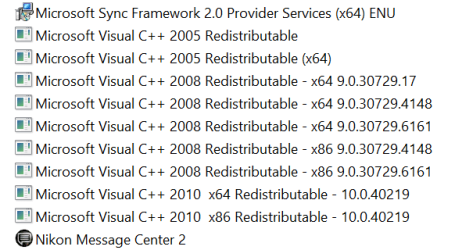
BTW this is what my Win 8 machine looks like....

C++ installs.PNG

My win 7 machine has more.

And unless something tells you to update them, leave them alone.

My two cents.
 

My Computer

Computer type
PC/Desktop
Computer Manufacturer/Model Number
Custom built by me.
OS
Windows 10 Pro
CPU
Intel Core i7-4770K (3.5Ghz)
Motherboard
Gigabyte G1 Sniper 5 (F10 Bios)
Memory
32 gig Corsair Dominator Platinum (4x8Gig)
Graphics Card(s)
Sapphire Tri-X R9 Fury
Sound Card
Soundblaster ZXR
Monitor(s) Displays
NEC PA242W 24" LCD Monitor
Screen Resolution
1920 x 1200
Hard Drives
Primary - Samsung 850 Pro (512gig), Samsung 840 Pro (256gig), 2TB WD Caviar Black.
PSU
EVGA Supernova 1000 G2
Case
Cooler Master HAF X
Cooling
Corsair H100i with Corsair Air Series SP120 Quiet Fans
Keyboard
Logitech Wireless Wave
Mouse
Logitech Performance MX
Internet Speed
High Speed Cable
Antivirus
Norton Security
Browser
IE11
Other Info
Memory Timings - 1866MHz @ 9-9-9-27-1T @ 1.5 volts
Might just do a fresh install, it's not the first time I've uninstalled a c++, I never really knew they were so precious and untouched :/
 

My Computer

Computer type
PC/Desktop
Computer Manufacturer/Model Number
Custom Build
OS
Windows 7 Home Premium x64
CPU
i7 - 3770K
Motherboard
AsRock Extreme4
Memory
16gb Corsair
Graphics Card(s)
Sapphire 7970 OC
Hard Drives
2TB Seagate, 128gb Samsung 840 SSD
Browser
Google Chrome
Might just do a fresh install, it's not the first time I've uninstalled a c++, I never really knew they were so precious and untouched :/

I usually like to do research before just willy nilly uninstalling stuff.

Anyway good luck.
 

My Computer

Computer type
PC/Desktop
Computer Manufacturer/Model Number
Custom built by me.
OS
Windows 10 Pro
CPU
Intel Core i7-4770K (3.5Ghz)
Motherboard
Gigabyte G1 Sniper 5 (F10 Bios)
Memory
32 gig Corsair Dominator Platinum (4x8Gig)
Graphics Card(s)
Sapphire Tri-X R9 Fury
Sound Card
Soundblaster ZXR
Monitor(s) Displays
NEC PA242W 24" LCD Monitor
Screen Resolution
1920 x 1200
Hard Drives
Primary - Samsung 850 Pro (512gig), Samsung 840 Pro (256gig), 2TB WD Caviar Black.
PSU
EVGA Supernova 1000 G2
Case
Cooler Master HAF X
Cooling
Corsair H100i with Corsair Air Series SP120 Quiet Fans
Keyboard
Logitech Wireless Wave
Mouse
Logitech Performance MX
Internet Speed
High Speed Cable
Antivirus
Norton Security
Browser
IE11
Other Info
Memory Timings - 1866MHz @ 9-9-9-27-1T @ 1.5 volts
Don't take r6034 runtime error easy. This error occurs because of improper registry settings, missing or not found system files and due to virus or trojan attack. You must read given article to know about how to fix runtime error r6034.
Fix windows runtime error r6034


You have cheated me. You promised that Regcure pro will remove C+++ runtime error 6034 from my computer. So I have purchased that software and installed it. After scanning it showed about 1164 items need to be fixed. I did that but the error 6034 remained in the computer. I have scanned my system three times more, restarted three times, but the ultimate effect was the system became slow. After spending money and purchasing the software to do some good for my computer, it has done damage on the performance. I can remove Regcure pro software and restore the system to the previous period. But what about the time and money I spend...? This is ridiculous.
 

My Computer

Computer Manufacturer/Model Number
dell dimension 9200
OS
Windows 7 Home Premium 32bit
Memory
2048mb
Graphics Card(s)
Nvidia GE 1700
Monitor(s) Displays
Dell 1707
Runtime error r6034 is very dangerous error it create lots of problem in your computer so you need to fix it as soon as possible. What ever done with joshyklukose it was very bad but don't worry first of all you search about the product from internet then purchase. If you are not able to fix runtime error then go through the google search and find which method is best for removing r6034 error. There are some manual steps which will help you to fix this error and you don't have to spend money. So try to find best windows repair tool to fix runtime error r6034.
 

My Computer

Computer type
PC/Desktop
OS
Windows 7 Ultimate x64
Don't take r6034 runtime error easy. This error occurs because of improper registry settings, missing or not found system files and due to virus or trojan attack. You must read given article to know about how to fix runtime error r6034.
Fix windows runtime error r6034
You have cheated me. You promised that Regcure pro will remove C+++ runtime error 6034 from my computer. So I have purchased that software and installed it. After scanning it showed about 1164 items need to be fixed. I did that but the error 6034 remained in the computer. I have scanned my system three times more, restarted three times, but the ultimate effect was the system became slow. After spending money and purchasing the software to do some good for my computer, it has done damage on the performance. I can remove Regcure pro software and restore the system to the previous period. But what about the time and money I spend...? This is ridiculous.
Runtime error r6034 is very dangerous error it create lots of problem in your computer so you need to fix it as soon as possible. What ever done with joshyklukose it was very bad but don't worry first of all you search about the product from internet then purchase. If you are not able to fix runtime error then go through the google search and find which method is best for removing r6034 error. There are some manual steps which will help you to fix this error and you don't have to spend money. So try to find best windows repair tool to fix runtime error r6034.

The advice to install all of the C++ runtime libraries is the best advice
for the issue described in this thread.
Follow only that advice.

I would not trust any website that obfuscates the true intent by posing as Microsoft and offering a "cure" for sale.
Capture.PNG
Joshyklukose got burned by Regcure - a bad idea to begin with - and it cost some money. I am sorry Josh learned the hard way not to use any so-called registry fix utility.

Hopefully, this post will alert other members
to not use registry fixes, tweaks, repair utilities.​
 
Last edited:

My Computer

Computer type
Laptop
Computer Manufacturer/Model Number
HP Pavilion dv6-6c10us
OS
x64 (6.3.9600) Win8.1 Pro & soon dual boot x64 (6.1.7601) Win7_SP1 HomePrem
CPU
AMD A6-3420M APU with Radeon(tm) HD Graphics
Motherboard
Hewlett-Packard 1805
Memory
6.00 GB
Graphics Card(s)
AMD Radeon(TM) HD 6520G
Sound Card
(1) AMD High Definition Audio Device (2) IDT High Definiti
Monitor(s) Displays
HP W2072a 20" LCD (1600 x 900) @ 60 Hz
Screen Resolution
1366 x 768 x 32 bits (4294967296 colors) @ 60 Hz
Hard Drives
ST640LM0 00 HM641JI SATA Disk Device
Keyboard
Logitech k520 wireless KB
Mouse
Logitech m320 wireless mouse (bundled with KB)
Internet Speed
15/5 | 54 MB Wireless 'n'
Antivirus
Realtime: Defender or Avast | On-demand: Malwarebytes, ESET
Browser
IE 11 on Win8, IE 10 on win 7
Other Info
Media: [Gimp, Audacity, VLC] || Comm: [WEmail 2012, Skype] || Productivity: [OpenOffice,| Textpad] || Utils: [Sysinternals, cCleaner, Speccy, Defraggler]
Back
Top