microsoft windows 7 home premium x86

jimjo16

Banned
Local time
8:16 PM
Messages
24
hi im new to this forum i bought windows 7 home premium x86 at present my desktop pc is running windows xp professional service pack 2 it runs of my c/drive on my pc i have another drive h/drive it ls ntfs it looks like partition drive 390gb in size would it be possible to put window 7 in this h/drve like dual boot any help much appreciated
 

My Computer

OS
windows xp professional
Maybe, maybe not.

Dual boot is typically doable, but can be difficult to get rid of in some cases. If you ultimately want Win 7 as a single OS, you might be better off to just get rid of XP.

But your PC may not support Win 7.

We know nothing about your PC.

Please fill in your system specs.
 

My Computer

Computer type
PC/Desktop
Computer Manufacturer/Model Number
Ignatz Special; 4 speed manual gearbox; factory air conditioning; one of one
OS
Windows 7 Home Premium SP1, 64-bit
CPU
Intel Skylake i5-6600K, not overclocked
Motherboard
AsRock Z170M Extreme 4, micro ATX
Memory
8 GB HyperX DDR4-2666 (2 x 4 GB)
Graphics Card(s)
none; graphics are integrated on CPU
Sound Card
onboard: Realtek ALC1150; external: USB Behringer UF0-202
Monitor(s) Displays
Dell S2340M 23 inch IPS
Screen Resolution
1600 x 900
Hard Drives
System: Crucial MX100 series SSD, 128 GB;
Data: Samsung Spinpoint 103SJ, 1 TB;
Backup: WD Caviar Green WD30EZRX-00D8PB0, 3 TB
PSU
Rosewill SilentNight 500 watt fanless, semi-modular
Case
Antec Solo II
Cooling
Noctua NH-U12S; Noctua F12 intake, Noctua S12A exhaust
Keyboard
Microsoft 200 6JH-00001 USB
Mouse
Dell or Microsoft optical wired; USB
Antivirus
Microsoft Security Essentials and Malwarebytes Premium
Browser
Pale Moon
Other Info
All fans PWM; speeds at idle: CPU circa 500 rpm; intake circa 600 rpm; exhaust circa 600 rpm; CPU temps 27 idle and 47 C load in a warm room (27 C/81 F) when running Intel Extreme Tuning Utility stress test.
hi my pc is hp compaq pressario sr1790uk amd sempron[tm] processor 3000 plus 2gig ram
 

My Computer

OS
windows xp professional
Run the Windows 7 Upgrade Advisor..

The best way to dual boot with separate HD"s is to unplug XP HD during install of Win7, set target HD as first HD to boot in BIOS setup, after DVD drive. Then after install plug back in XP, boot it using one-time BIOS BOot Menu key which on HP is ESC, unless it gives another key to press on first boot screen.

This keeps the HD's independent to come and go as you please, whereas having Win7 configure a Dual Boot will interlock it to XP and require surgery to later remove XP.

Other tips for getting a purrfect Win7 install - use the ones which apply: http://www.sevenforums.com/installation-setup/125874-re-install-windows-7-a.html#post1086729
 
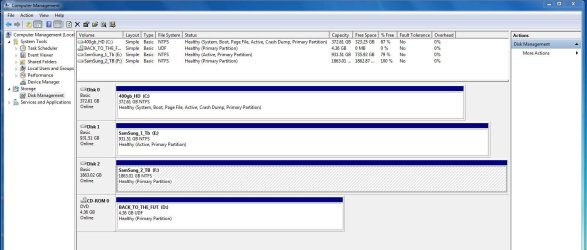
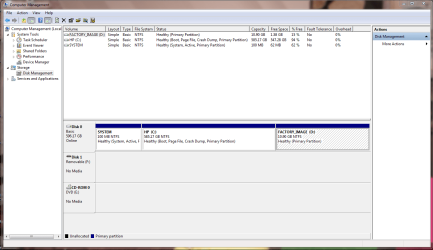
It might help if you post a screen snip of your Disk Management of your HD's

Start :ar: Computer Management :ar: Disk Management
 

Attachments

  • Disk_mgmt_New_HD_2TB_.JPG
    Disk_mgmt_New_HD_2TB_.JPG
    120.9 KB · Views: 7
  • Disk_Mgmt_HP_HD.PNG
    Disk_Mgmt_HP_HD.PNG
    42.5 KB · Views: 4

My Computer

Computer type
PC/Desktop
Computer Manufacturer/Model Number
Built them myself, Science Experiments !
OS
Win7 Enterprise, Win7 x86 (Ult 7600), Win7 x64 Ult 7600, TechNet RTM on AMD x64 (2.8Ghz)
CPU
AMD fx8350 4ghz, AMD-32 2400mhz, AMD-64 3200mhz, AMDx64 2.8G
Motherboard
SIS 755, ECS-K8M890M-M (Ult 7600), GigaByte & others
Memory
2gb, 4gb on the Ult 7600, 4gb on Technet RTM, 32gb on FX8350
Graphics Card(s)
Draw my own Graphics, several nVidia cards
Sound Card
on motherboard
Monitor(s) Displays
19" flat scr, 28" I-Inc widescr,22" Emprex Widescr, 23" Acer
Screen Resolution
1280 x 1024, 1440 x 900, 1920 x 1080
Hard Drives
6 pata Ide HD's & 2 Sata HD's
added 80gb external on Ult 7600 computer,
numerous extra 1tb, 2TB, 3Tb SATA HD's
A collection of ext HD Docks w/ HDs
PSU
430w, 550w, 600w, 700, 800, etc
Case
All Generic Full Towers
Cooling
Open Air & a few fans, some w/ colored LEDs
Keyboard
Compaq & Dell recycled from GoodWill
Mouse
Made in China Optical Wired Mouse
Internet Speed
Fast Cable InterNet
Antivirus
AVG Free on 24 different Desktops, NO Problems!
Browser
IE 8 is preferred, but use FireFox sometimes
Other Info
Linksys Routers, switches, & Hubs
Too Many USB Flash Drives to count, Biggest is 64GB !
Eight computers in my home network.
Sixteen computers at my business network.
Linked via TeamViewer !
Lots of old used spare computer parts everywhere!
if i post scan results from windows 7 uprade advisor it s hard to follow it
 

My Computer

OS
windows xp professional
Hello jimjo16, welcome to Seven Forums!


Have a look through this tutorial at the link below, it is a better method as you will end up with Windows 7 on the first partition on the Hard Disk Drive as that's the fastest part of the HDD and be sure to post back with any further questions you may have and to keep us informed.


Clean Install Windows 7 : Ahead of XP
 

My Computer

Computer Manufacturer/Model Number
* BFK Customs *
OS
W 7 64-bit Ultimate
CPU
Intel Q9550 Yorkfield
Motherboard
ASUS P5Q Pro
Memory
8GB Dominator 8500C5D
Graphics Card(s)
ATI : XFX 5870
Sound Card
Realtek HD Audio 7-1
Monitor(s) Displays
1x 47" LCD HDMI & 3x 26" LCD HDMI
Screen Resolution
1920x1080P & 1920x1200
Hard Drives
1x 80GB Intel X25-M G2 SSD : 1x 500GB & 1x 640GB WD Caviar Black(s)
PSU
Corsair 620HX
Case
Cooler Master RC-690
Cooling
Tuniq Tower 120, 2x 140mm and 3x 120mm case fans
Keyboard
Microsoft 500
Mouse
Razer Diamondback 3G
Internet Speed
14 Mb/s
Other Info
1x Koutech 3Gb/s SATA HDD Hot Swap Rack
hi ive got c/ddrive and long time ago i had other hd fitted its labelled h/drive new volume ntfs 389gb space
 

My Computer

OS
windows xp professional
You can avoid problems later when you want to get rid of XP by unplugging the XP HD now before Win7 install, set Win7 HD as first HD to boot in BIOS setup (after DVD drive), then boot the DVD to install Win7: http://www.sevenforums.com/tutorials/1649-clean-install-windows-7-a.html

Afterwards plug back in XP HD and boot it using one-time BIOS Boot Menu key which on HP is ESC. This method keeps the HD's independent to come and go as you please.

If you don't want to have to unplug XP HD during install or don't prefer to boot via BIOS, then leave both HD's plugged in during install and just make sure you choose the correct HD to install Win7 upon. The installer will configure a Windows Dual Boot menu which will interlock the HD's but we can later help you remove XP if you want.
 
thanks for all the help much appreciated will be back in touch if i hit any problems with clean install
 

My Computer

OS
windows xp professional
Back
Top