Microsoft Windows Operating System Doppleganger

bludgard69

Banned
Local time
4:22 AM
Messages
241
Location
South Carolina
Peace to all.

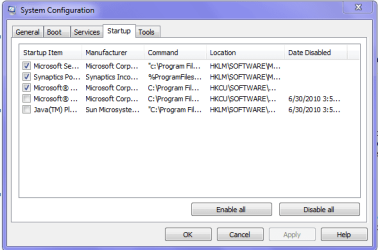
I recently clean-installed W 7 HP 64-Bit,tried to disable entry in configuration settings and it reappeared at re boot.

Should I be scared of this?:devil:

If it's safe,is there a clone I can safely get rid of?

Thanks for any advice on the matter.
:D
 

Attachments

  • Capture0.PNG
    Capture0.PNG
    11.3 KB · Views: 32
Last edited:

My Computer

Computer Manufacturer/Model Number
Acer Aspire 5517-5427 Notebook
OS
MS Windows 7 Home Premium 64-bit
CPU
AMD K8/AMD Athlon(tm) Processor TF-20 @1.6G
Motherboard
Acer Aspire 5517 (Socket S1G1)
Memory
2.0GB Dual-Channel DDR2 @ 319MHz 5-5-5-15
Graphics Card(s)
ATI Radeon HD 3200 Graphics (Acer Incorporated [ALI])
Sound Card
Realtek High Definition Audio
Monitor(s) Displays
Generic PnP Monitor @ 1366x768
Hard Drives
244.20GB Western Digital WDC WD2500BEVT-22A23T0 ATA Device (IDE)
PSU
Stock
Case
Stock
Cooling
Stock
Mouse
Gigaware-Wireless
Internet Speed
HA!
You don't need Synaptics unless you want the scroll feature on a laptop touchpad. It may need to also be turned off by poking through its tabs accessed by clicking it in SysTray.

Put your cursor on the MS items to expand them to see what they are. You want MSE and any gadgets or stikynotes you want to start up with your system. That's all I allow.
 
It is Microsoft Windows Operating System.

Thanks for the look-out.:p

I use that scroll feature a lot when the Wife's asleep;).Mouse can be irritating at times....CLICK...CLICK...CLICK...CLICK...CLICK...
 

My Computer

Computer Manufacturer/Model Number
Acer Aspire 5517-5427 Notebook
OS
MS Windows 7 Home Premium 64-bit
CPU
AMD K8/AMD Athlon(tm) Processor TF-20 @1.6G
Motherboard
Acer Aspire 5517 (Socket S1G1)
Memory
2.0GB Dual-Channel DDR2 @ 319MHz 5-5-5-15
Graphics Card(s)
ATI Radeon HD 3200 Graphics (Acer Incorporated [ALI])
Sound Card
Realtek High Definition Audio
Monitor(s) Displays
Generic PnP Monitor @ 1366x768
Hard Drives
244.20GB Western Digital WDC WD2500BEVT-22A23T0 ATA Device (IDE)
PSU
Stock
Case
Stock
Cooling
Stock
Mouse
Gigaware-Wireless
Internet Speed
HA!
If the program was never reinstalled and you simply restored user files and settings that would be the only way the entries for any startup items from a no longer existant program would still be seen.

There is however a freeware tool called the MSConfiig Cleanup I came across that allows you to remove useless entries when no program is on or was just removed but left entries behind. Windows MSConfig Cleaner – Remove Windows Startup Program Entries easily

You just have to use care when using it however to avoid seeing anything else you want removed when going to select the ones you want off. I came across that one some time back when having a similar problem after a program was removed still seeing the main item hanging around in the msconfig utility.
 

My Computers

System One System Two

  • Computer type
    PC/Desktop
    Computer Manufacturer/Model Number
    Custom builds = 2
    OS
    W7 Ultimate x64/W10 Pro x64/W11 Pro Triple Boot - Main PC W7 Remote PC Micro ATX W7 Pro x64/W11 Pro
    CPU
    AMD Phenom II X4 975 Deneb 3.6ghz - 965 2nd remote pc
    Motherboard
    Gigabyte GA-790XTA-UD4-Gigabyte GA-880GM-D2H remote pc
    Memory
    Kingston Hyper X DDR3 1600 1.5v 16gb - Hyper X Fury 8gb 2nd
    Graphics Card(s)
    MSI HD Radeon 5750 1gb - MSI HD Radeon 6450 on mini tower
    Sound Card
    Creative Labs X-Fi Xtreme Audio P - Realtek onooard 2nd case
    Monitor(s) Displays
    ASUS VW199T-P 19" HP 2082a Main-HP 2082a 20" remote pc
    Screen Resolution
    Asus 1440x900 - HP 1600x900
    Hard Drives
    WD Black 1TB HD per OS W7, W10, and pending W11 presently on 500gb OS Drive - Pending Triple 1TB HDs for Spanned Storage/backup volume
    Single 2TB external USB enclosure, single 1TB System 7 Host/Boot drive, Pending 8TB external HD for system image b
    PSU
    Corsair 750TX - primary / Corsair CX600 - second
    Case
    Antec 900-2 - SSD compatible / NZXT Vulcan mini tower
    Cooling
    Zalman CNPS9900A
    Keyboard
    AZIO L70 Backlit Letters Gaming - ONN Cordless/USB
    Mouse
    MSI DS200 Programmable, Logitech Cordless
    Internet Speed
    30mbps upgrade - primary hard wired - mini tower usb WiFi
    Antivirus
    GFI VIPRE Internet Security 2014 on W7 2016 beta on W10,
    Browser
    Cyberfox, WaterFox 64bit FF variants, FireFox x64, Pale Moon
    Other Info
    Accomdata fan cooled usb 2.0 PIDE/Sata II, III external enclosure.
    Sambient usb/eSata PATA/Sata II, III external enclosure.
  • Computer type
    PC/Desktop
    System Manufacturer/Model Number
    CUSTOM ASSEMBLY
    OS
    W7 Pro x64/W11 Pro
    CPU
    AMD Deneb 3.6ghz - 965
    Motherboard
    Gigabyte GA-880GM-D2H remote pc
    Memory
    Kingston Hyper X Fury 8gb
    Graphics Card(s)
    MSI HD Radeon 6450 DVI Output
    Sound Card
    Realtek onooard Creative or Other separate PENDING
    Monitor(s) Displays
    VIZIO 32" LCD TV Separate LCD Pending
    Screen Resolution
    1600x1080
    Hard Drives
    WD 500GB OS Host/Boot WD Green 1TB Storage/Backup
    PSU
    Corsair 600W - THERMALTAKE 600W spare case
    Case
    NZXT Vulcan mini tower
    Cooling
    Twin 120mm Top Fans - 240mm Side Cover
    Keyboard
    ONN Cordless/USB Logitech Cordless
    Mouse
    ONN USB/Cordless - Logitech Cordless
    Internet Speed
    DSL 5G
    Browser
    MS Edge, FireFox, WaterFox x64, FireFox Nightly
    Other Info
    OS Testing-Remote Access to Main TeamViewer
Thanks for the reply,Night Hawk.

I just Clean-installed last night.I haven't uninstalled any programs.I have moddified the existing programs from within Windows.

As well as the restoring of the user files.No restorations.Only back-ups.

Could it be that I haven't activated my system yet?I disabled this after the install.Could it be that this is what is used to keep track?
 

My Computer

Computer Manufacturer/Model Number
Acer Aspire 5517-5427 Notebook
OS
MS Windows 7 Home Premium 64-bit
CPU
AMD K8/AMD Athlon(tm) Processor TF-20 @1.6G
Motherboard
Acer Aspire 5517 (Socket S1G1)
Memory
2.0GB Dual-Channel DDR2 @ 319MHz 5-5-5-15
Graphics Card(s)
ATI Radeon HD 3200 Graphics (Acer Incorporated [ALI])
Sound Card
Realtek High Definition Audio
Monitor(s) Displays
Generic PnP Monitor @ 1366x768
Hard Drives
244.20GB Western Digital WDC WD2500BEVT-22A23T0 ATA Device (IDE)
PSU
Stock
Case
Stock
Cooling
Stock
Mouse
Gigaware-Wireless
Internet Speed
HA!
It is Microsoft Windows Operating System.

Thanks for the look-out.:p

I use that scroll feature a lot when the Wife's asleep;).Mouse can be irritating at times....CLICK...CLICK...CLICK...CLICK...CLICK...
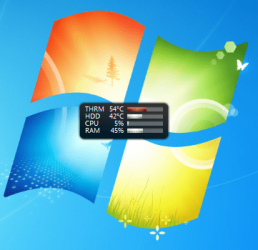
There should be an extension beyond MSWin7 OS like /stikynotes, /sidebar, or /mse. MSE needs to be in there, so turn it on if not.
 
MSE is the first one.The other is a reg key I believe.:huh:Let me verify.........

It is my sidebar.I have it to run with highest priveledges.

Thanks again,gregrocker.

Another case solved.:thumbsup:
 

Attachments

  • Capturet.PNG
    Capturet.PNG
    42.5 KB · Views: 4

My Computer

Computer Manufacturer/Model Number
Acer Aspire 5517-5427 Notebook
OS
MS Windows 7 Home Premium 64-bit
CPU
AMD K8/AMD Athlon(tm) Processor TF-20 @1.6G
Motherboard
Acer Aspire 5517 (Socket S1G1)
Memory
2.0GB Dual-Channel DDR2 @ 319MHz 5-5-5-15
Graphics Card(s)
ATI Radeon HD 3200 Graphics (Acer Incorporated [ALI])
Sound Card
Realtek High Definition Audio
Monitor(s) Displays
Generic PnP Monitor @ 1366x768
Hard Drives
244.20GB Western Digital WDC WD2500BEVT-22A23T0 ATA Device (IDE)
PSU
Stock
Case
Stock
Cooling
Stock
Mouse
Gigaware-Wireless
Internet Speed
HA!
Is there a clone of this files settings that I should delete?
 

My Computer

Computer Manufacturer/Model Number
Acer Aspire 5517-5427 Notebook
OS
MS Windows 7 Home Premium 64-bit
CPU
AMD K8/AMD Athlon(tm) Processor TF-20 @1.6G
Motherboard
Acer Aspire 5517 (Socket S1G1)
Memory
2.0GB Dual-Channel DDR2 @ 319MHz 5-5-5-15
Graphics Card(s)
ATI Radeon HD 3200 Graphics (Acer Incorporated [ALI])
Sound Card
Realtek High Definition Audio
Monitor(s) Displays
Generic PnP Monitor @ 1366x768
Hard Drives
244.20GB Western Digital WDC WD2500BEVT-22A23T0 ATA Device (IDE)
PSU
Stock
Case
Stock
Cooling
Stock
Mouse
Gigaware-Wireless
Internet Speed
HA!
I went to the specified path and there weren't any folders that were duplicates.
 
Last edited:

My Computer

Computer Manufacturer/Model Number
Acer Aspire 5517-5427 Notebook
OS
MS Windows 7 Home Premium 64-bit
CPU
AMD K8/AMD Athlon(tm) Processor TF-20 @1.6G
Motherboard
Acer Aspire 5517 (Socket S1G1)
Memory
2.0GB Dual-Channel DDR2 @ 319MHz 5-5-5-15
Graphics Card(s)
ATI Radeon HD 3200 Graphics (Acer Incorporated [ALI])
Sound Card
Realtek High Definition Audio
Monitor(s) Displays
Generic PnP Monitor @ 1366x768
Hard Drives
244.20GB Western Digital WDC WD2500BEVT-22A23T0 ATA Device (IDE)
PSU
Stock
Case
Stock
Cooling
Stock
Mouse
Gigaware-Wireless
Internet Speed
HA!
Thanks

If the program was never reinstalled and you simply restored user files and settings that would be the only way the entries for any startup items from a no longer existant program would still be seen.

There is however a freeware tool called the MSConfiig Cleanup I came across that allows you to remove useless entries when no program is on or was just removed but left entries behind. Windows MSConfig Cleaner – Remove Windows Startup Program Entries easily

You just have to use care when using it however to avoid seeing anything else you want removed when going to select the ones you want off. I came across that one some time back when having a similar problem after a program was removed still seeing the main item hanging around in the msconfig utility.


Interesting tool.I shall chek it out forthwith.:)
 

My Computer

Computer Manufacturer/Model Number
Acer Aspire 5517-5427 Notebook
OS
MS Windows 7 Home Premium 64-bit
CPU
AMD K8/AMD Athlon(tm) Processor TF-20 @1.6G
Motherboard
Acer Aspire 5517 (Socket S1G1)
Memory
2.0GB Dual-Channel DDR2 @ 319MHz 5-5-5-15
Graphics Card(s)
ATI Radeon HD 3200 Graphics (Acer Incorporated [ALI])
Sound Card
Realtek High Definition Audio
Monitor(s) Displays
Generic PnP Monitor @ 1366x768
Hard Drives
244.20GB Western Digital WDC WD2500BEVT-22A23T0 ATA Device (IDE)
PSU
Stock
Case
Stock
Cooling
Stock
Mouse
Gigaware-Wireless
Internet Speed
HA!
I'm not sure what you mean by clone. For a clean install all settings would be set to default, unless you puposely reimported them which is not a good idea as it is a corruption path.

There wasn't anything in the msconfig Startup list that was left over, just MSE which you had already installed (right) on the new install and your sidebar gadgets.

Just make normal settings changes and avoid tweaking as it is hard to unwind later plus Win7 doesn't need it.
 
Clean

I'm not sure what you mean by clone. For a clean install all settings would be set to default, unless you puposely reimported them which is not a good idea as it is a corruption path.

There wasn't anything in the msconfig Startup list that was left over, just MSE which you had already installed (right) on the new install and your sidebar gadgets.

Just make normal settings changes and avoid tweaking as it is hard to unwind later plus Win7 doesn't need it.

I downloaded MSE after the install.I set up the gadgets after MSE.I then went to Ststem Configuration and saw the entry for MWOS and disabled it(Sidebar Gadgets).Wen I re-booted it started up again.

I havent imported anything but my music.

Sorry,Iwhat I meant by clone is a redundant file of some sort.I figured that since there were two entries for the same app,maybe there were two entries for they're setting or whatnot.
 

My Computer

Computer Manufacturer/Model Number
Acer Aspire 5517-5427 Notebook
OS
MS Windows 7 Home Premium 64-bit
CPU
AMD K8/AMD Athlon(tm) Processor TF-20 @1.6G
Motherboard
Acer Aspire 5517 (Socket S1G1)
Memory
2.0GB Dual-Channel DDR2 @ 319MHz 5-5-5-15
Graphics Card(s)
ATI Radeon HD 3200 Graphics (Acer Incorporated [ALI])
Sound Card
Realtek High Definition Audio
Monitor(s) Displays
Generic PnP Monitor @ 1366x768
Hard Drives
244.20GB Western Digital WDC WD2500BEVT-22A23T0 ATA Device (IDE)
PSU
Stock
Case
Stock
Cooling
Stock
Mouse
Gigaware-Wireless
Internet Speed
HA!
If the program was never reinstalled and you simply restored user files and settings that would be the only way the entries for any startup items from a no longer existant program would still be seen.

There is however a freeware tool called the MSConfiig Cleanup I came across that allows you to remove useless entries when no program is on or was just removed but left entries behind. Windows MSConfig Cleaner – Remove Windows Startup Program Entries easily

You just have to use care when using it however to avoid seeing anything else you want removed when going to select the ones you want off. I came across that one some time back when having a similar problem after a program was removed still seeing the main item hanging around in the msconfig utility.


Interesting tool.I shall chek it out forthwith.:)

If the synaptics software is not installed while the item is still seen checked up you would first uncheck that and go with a full system restart to insure any part of it is unloaded before going to try the cleaner program. The only way you would still see it following a fresh clean install would be having imported a previous backup for the user files and settings however unless you only performed an inplace upgrade to repair type.
 

My Computers

System One System Two

  • Computer type
    PC/Desktop
    Computer Manufacturer/Model Number
    Custom builds = 2
    OS
    W7 Ultimate x64/W10 Pro x64/W11 Pro Triple Boot - Main PC W7 Remote PC Micro ATX W7 Pro x64/W11 Pro
    CPU
    AMD Phenom II X4 975 Deneb 3.6ghz - 965 2nd remote pc
    Motherboard
    Gigabyte GA-790XTA-UD4-Gigabyte GA-880GM-D2H remote pc
    Memory
    Kingston Hyper X DDR3 1600 1.5v 16gb - Hyper X Fury 8gb 2nd
    Graphics Card(s)
    MSI HD Radeon 5750 1gb - MSI HD Radeon 6450 on mini tower
    Sound Card
    Creative Labs X-Fi Xtreme Audio P - Realtek onooard 2nd case
    Monitor(s) Displays
    ASUS VW199T-P 19" HP 2082a Main-HP 2082a 20" remote pc
    Screen Resolution
    Asus 1440x900 - HP 1600x900
    Hard Drives
    WD Black 1TB HD per OS W7, W10, and pending W11 presently on 500gb OS Drive - Pending Triple 1TB HDs for Spanned Storage/backup volume
    Single 2TB external USB enclosure, single 1TB System 7 Host/Boot drive, Pending 8TB external HD for system image b
    PSU
    Corsair 750TX - primary / Corsair CX600 - second
    Case
    Antec 900-2 - SSD compatible / NZXT Vulcan mini tower
    Cooling
    Zalman CNPS9900A
    Keyboard
    AZIO L70 Backlit Letters Gaming - ONN Cordless/USB
    Mouse
    MSI DS200 Programmable, Logitech Cordless
    Internet Speed
    30mbps upgrade - primary hard wired - mini tower usb WiFi
    Antivirus
    GFI VIPRE Internet Security 2014 on W7 2016 beta on W10,
    Browser
    Cyberfox, WaterFox 64bit FF variants, FireFox x64, Pale Moon
    Other Info
    Accomdata fan cooled usb 2.0 PIDE/Sata II, III external enclosure.
    Sambient usb/eSata PATA/Sata II, III external enclosure.
  • Computer type
    PC/Desktop
    System Manufacturer/Model Number
    CUSTOM ASSEMBLY
    OS
    W7 Pro x64/W11 Pro
    CPU
    AMD Deneb 3.6ghz - 965
    Motherboard
    Gigabyte GA-880GM-D2H remote pc
    Memory
    Kingston Hyper X Fury 8gb
    Graphics Card(s)
    MSI HD Radeon 6450 DVI Output
    Sound Card
    Realtek onooard Creative or Other separate PENDING
    Monitor(s) Displays
    VIZIO 32" LCD TV Separate LCD Pending
    Screen Resolution
    1600x1080
    Hard Drives
    WD 500GB OS Host/Boot WD Green 1TB Storage/Backup
    PSU
    Corsair 600W - THERMALTAKE 600W spare case
    Case
    NZXT Vulcan mini tower
    Cooling
    Twin 120mm Top Fans - 240mm Side Cover
    Keyboard
    ONN Cordless/USB Logitech Cordless
    Mouse
    ONN USB/Cordless - Logitech Cordless
    Internet Speed
    DSL 5G
    Browser
    MS Edge, FireFox, WaterFox x64, FireFox Nightly
    Other Info
    OS Testing-Remote Access to Main TeamViewer
Back
Top