Microsoft Wireless Keyboard 7000

MrVagabond

New member
Local time
9:19 PM
Messages
8
I've been trying to pair my Microsoft Wireless Keyboard 7000 and have not been having any luck discovering the device. It came with a Laser Mouse 8000 which has paired successfully. Anyone else having a similar issue? I tried searching around, but no luck so far. Thanks for any help in advance.

I also posted this thread under General Discussion because I was unsure what board this question would fit best!
 

My Computer

OS
Windows 7
hello MrVagabond and welcome..
at what point does the pairing fail?
since you said that the you have successfully paired your mouse this means that it shouldnt be a driver issue (this is a bluetooth pairing correct?) at least with the bluetooth dongle...
is this the first time you pair the device or have you paired it before with another OS in the another system (prefferably a Windows Vista) and can you confirm it works?
 
Last edited:

My Computer

Computer Manufacturer/Model Number
Tx2500z Tablet Pc/Homemade Server
OS
Windows 7 Ult x64(x2), HomePrem x32(x4), Server 08 (+VM), 08 R2 (VM) , SuSe 11.2 (VM), XP 32 (VM)
CPU
Turion X2 ultra (oh well came with laptop)/P4 @3.2 (yes P4)
Motherboard
IDK HP Motherboard / Intel DG965SS
Memory
OCZ Dual Channel 4GB kit/ 1gb Dual Channel
Graphics Card(s)
HD 3200 graphics /GMA x3100 (yay for intergrated!!)
Sound Card
Realtek HD Audio(mic working, well sort of)/Siig IC-70012
Monitor(s) Displays
built-in Hp 12" laptop screen/ Acer 19"
Screen Resolution
1280x800 /1440x900
Cooling
All Air Cooled
Mouse
Logi MX Rev. /MS Wheel Optical 1.1A /Logitech Optical Mouse
Internet Speed
College baby but its still routed through vpn to 1536k...
Other Info
love my wacom pen and pressure sensitivity...
wished it worked in 7, SUSE for that matter though
I've successfully paired the keyboard with XP before and have had it work in 7 as well. However, now when I Add Device and put the keyboard in discoverable mode, Win 7 does not find anything. I can unpair and rediscover my mouse without any problems though. I've tried fresh batteries and that does not help.
 

My Computer

OS
Windows 7
I'll leave this one here as this may end up being a driver issue and delete the other.
 

My Computers

System One System Two

  • Computer type
    PC/Desktop
    Computer Manufacturer/Model Number
    The Beast Model A (homebrew)
    OS
    Windows 11 21H2 Current build
    CPU
    AMD Ryzen 9 3950X
    Motherboard
    MSI MEG X570 GODLIKE
    Memory
    4 * 32 GB - Corsair Vengeance 3600 MHz
    Graphics Card(s)
    EVGA GeForce RTX 3080 Ti XC3 ULTRA GAMING (12G-P5-3955-KR)
    Sound Card
    Realtek® ALC1220 Codec
    Monitor(s) Displays
    2x Eve Spectrum ES07D03 4K Gaming Monitor (Matte) | Eve Spec
    Screen Resolution
    3x 3840 x 2160
    Hard Drives
    3x Samsung 980 Pro NVMe PCIe 4 M.2 2 TB SSD (MZ-V8P2T0B/AM) } 3x Sabrent Rocket NVMe 4.0 1 TB SSD
    PSU
    PC Power & Cooling’s Silencer Series 1050 Watt, 80 Plus Plat
    Case
    Fractal Design Define 7 XL Dark ATX Full Tower Case
    Cooling
    SteelSeries Apex Pro Wired Gaming Keyboard
    Keyboard
    SteelSeries Apex Pro
    Mouse
    Logitech MX Master 3S | MX Master 3 for business
    Internet Speed
    AT&T LightSpeed Gigabit Duplex Ftth
    Antivirus
    Windows Defender + MB 3
    Browser
    Nightly (default) + Firefox (stable),Chrome, Edge
  • Computer type
    PC/Desktop
    System Manufacturer/Model Number
    Dell Latitude E5470
    OS
    ChromeOS Flex Dev Channel (current)
    CPU
    Intel(R) Core(TM) i5-6300U CPU @ 2.40GHz, 2501 Mhz, 2 Core(s), 4 Logical Processor(s)
    Motherboard
    Dell
    Memory
    16 GB
    Graphics Card(s)
    Intel(R) HD Graphics 520
    Sound Card
    Intel(R) HD Graphics 520 + RealTek Audio
    Monitor(s) Displays
    Dell laptop display 15"
    Screen Resolution
    1920 * 1080
    Hard Drives
    Toshiba 128GB M.2 22300 drive
    INTEL Cherryville 520 Series SSDSC2CW180A 180 GB SATA III SSD
    PSU
    Dell
    Case
    Dell
    Cooling
    Dell
    Keyboard
    Dell
    Mouse
    Logitech MX Master 3S (shared w. Sys 1) | Dell TouchPad
    Internet Speed
    AT&T LightSpeed Gigabit Duplex Ftth
I've successfully paired the keyboard with XP before and have had it work in 7 as well. However, now when I Add Device and put the keyboard in discoverable mode, Win 7 does not find anything. I can unpair and rediscover my mouse without any problems though. I've tried fresh batteries and that does not help.

ok so what you are saying is that your bluetooth device cannot discover the keyboard but it can discover the mouse....

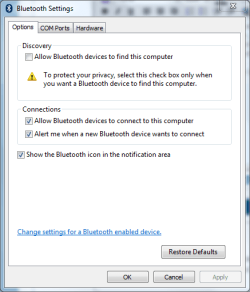
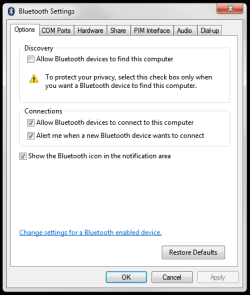
are the your bluetooth setting like this?
bluetooth.PNG
also check your kb manual just in case if you any setting that might stop it from make it discoverable
can you also check for any windows updates for your bluetooth device...
and if that does not work can you try the vista drivers...
 
Last edited:

My Computer

Computer Manufacturer/Model Number
Tx2500z Tablet Pc/Homemade Server
OS
Windows 7 Ult x64(x2), HomePrem x32(x4), Server 08 (+VM), 08 R2 (VM) , SuSe 11.2 (VM), XP 32 (VM)
CPU
Turion X2 ultra (oh well came with laptop)/P4 @3.2 (yes P4)
Motherboard
IDK HP Motherboard / Intel DG965SS
Memory
OCZ Dual Channel 4GB kit/ 1gb Dual Channel
Graphics Card(s)
HD 3200 graphics /GMA x3100 (yay for intergrated!!)
Sound Card
Realtek HD Audio(mic working, well sort of)/Siig IC-70012
Monitor(s) Displays
built-in Hp 12" laptop screen/ Acer 19"
Screen Resolution
1280x800 /1440x900
Cooling
All Air Cooled
Mouse
Logi MX Rev. /MS Wheel Optical 1.1A /Logitech Optical Mouse
Internet Speed
College baby but its still routed through vpn to 1536k...
Other Info
love my wacom pen and pressure sensitivity...
wished it worked in 7, SUSE for that matter though
I've been trying to pair my Microsoft Wireless Keyboard 7000 and have not been having any luck discovering the device. It came with a Laser Mouse 8000 which has paired successfully. Anyone else having a similar issue? I tried searching around, but no luck so far. Thanks for any help in advance.

I also posted this thread under General Discussion because I was unsure what board this question would fit best!
Did you try these drivers?

http://www.microsoft.com/hardware/windows7/support.mspx
 

My Computer

Computer type
PC/Desktop
Computer Manufacturer/Model Number
Black Shadow IV
OS
Win7 x64
CPU
i5-3570K
Motherboard
Asrock Z77 Extreme4
Memory
2x4GB Rip Jaws 8-9-9-24
Graphics Card(s)
Asus R9 280X
Sound Card
X-Fi Extreme Music
Monitor(s) Displays
Dell U2412M
Screen Resolution
1920x1200
Hard Drives
Samsung Evo 250GB /
OCZ Vertex 4 128GB
PSU
Seasonic 660XP2
Case
Fractal Design R4
Cooling
Noctua NH-U12S

My Computer

OS
Windows 7
I have those drivers installed and no success there.

Also, my bluetooth settings do match those of the picture. However, I'm unable to know if the documentation mentions any specific settings. The links for the pdfs on Microsofts site seem to be dead.

can you post a pic of your settings?
 

My Computer

Computer Manufacturer/Model Number
Tx2500z Tablet Pc/Homemade Server
OS
Windows 7 Ult x64(x2), HomePrem x32(x4), Server 08 (+VM), 08 R2 (VM) , SuSe 11.2 (VM), XP 32 (VM)
CPU
Turion X2 ultra (oh well came with laptop)/P4 @3.2 (yes P4)
Motherboard
IDK HP Motherboard / Intel DG965SS
Memory
OCZ Dual Channel 4GB kit/ 1gb Dual Channel
Graphics Card(s)
HD 3200 graphics /GMA x3100 (yay for intergrated!!)
Sound Card
Realtek HD Audio(mic working, well sort of)/Siig IC-70012
Monitor(s) Displays
built-in Hp 12" laptop screen/ Acer 19"
Screen Resolution
1280x800 /1440x900
Cooling
All Air Cooled
Mouse
Logi MX Rev. /MS Wheel Optical 1.1A /Logitech Optical Mouse
Internet Speed
College baby but its still routed through vpn to 1536k...
Other Info
love my wacom pen and pressure sensitivity...
wished it worked in 7, SUSE for that matter though
How's this?
 

Attachments

  • bluetoothsettings.png
    bluetoothsettings.png
    11.2 KB · Views: 37

My Computer

OS
Windows 7
How's this?

sorry if i wasnt clear but what meant was the settings where it says to let bluetooth devices connect to your computer....

is this bluetooth dongle inside a computer or is it a separate device connected by usb?
 

My Computer

Computer Manufacturer/Model Number
Tx2500z Tablet Pc/Homemade Server
OS
Windows 7 Ult x64(x2), HomePrem x32(x4), Server 08 (+VM), 08 R2 (VM) , SuSe 11.2 (VM), XP 32 (VM)
CPU
Turion X2 ultra (oh well came with laptop)/P4 @3.2 (yes P4)
Motherboard
IDK HP Motherboard / Intel DG965SS
Memory
OCZ Dual Channel 4GB kit/ 1gb Dual Channel
Graphics Card(s)
HD 3200 graphics /GMA x3100 (yay for intergrated!!)
Sound Card
Realtek HD Audio(mic working, well sort of)/Siig IC-70012
Monitor(s) Displays
built-in Hp 12" laptop screen/ Acer 19"
Screen Resolution
1280x800 /1440x900
Cooling
All Air Cooled
Mouse
Logi MX Rev. /MS Wheel Optical 1.1A /Logitech Optical Mouse
Internet Speed
College baby but its still routed through vpn to 1536k...
Other Info
love my wacom pen and pressure sensitivity...
wished it worked in 7, SUSE for that matter though
I'm using a Broadcomm USB dongle and I'm not sure I understand what settings you mean by the bluetooth settings.
 

My Computer

OS
Windows 7
I'm using a Broadcomm USB dongle and I'm not sure I understand what settings you mean by the bluetooth settings.

did it come with a cd with any vista drivers and can you try those drivers?


also what i meant is this is checked...
bluetooth.PNG
 

My Computer

Computer Manufacturer/Model Number
Tx2500z Tablet Pc/Homemade Server
OS
Windows 7 Ult x64(x2), HomePrem x32(x4), Server 08 (+VM), 08 R2 (VM) , SuSe 11.2 (VM), XP 32 (VM)
CPU
Turion X2 ultra (oh well came with laptop)/P4 @3.2 (yes P4)
Motherboard
IDK HP Motherboard / Intel DG965SS
Memory
OCZ Dual Channel 4GB kit/ 1gb Dual Channel
Graphics Card(s)
HD 3200 graphics /GMA x3100 (yay for intergrated!!)
Sound Card
Realtek HD Audio(mic working, well sort of)/Siig IC-70012
Monitor(s) Displays
built-in Hp 12" laptop screen/ Acer 19"
Screen Resolution
1280x800 /1440x900
Cooling
All Air Cooled
Mouse
Logi MX Rev. /MS Wheel Optical 1.1A /Logitech Optical Mouse
Internet Speed
College baby but its still routed through vpn to 1536k...
Other Info
love my wacom pen and pressure sensitivity...
wished it worked in 7, SUSE for that matter though
Oh, the pic I attached before was a screen of my settings. Allow Bluetooth devices to connect to this computer is set. That is how I have no problems with my mouse.
 

My Computer

OS
Windows 7
I've been trying to pair my Microsoft Wireless Keyboard 7000 and have not been having any luck discovering the device. It came with a Laser Mouse 8000 which has paired successfully. Anyone else having a similar issue? I tried searching around, but no luck so far. Thanks for any help in advance.

I also posted this thread under General Discussion because I was unsure what board this question would fit best!

HI check your USB devices under device manager - I have/had same problems with 7000 keyboard. Seems that USB driver is not allways installing correctly

andre
 

My Computer

OS
Windows 7 7077
The dongle seems to be operating properly. Device Manager doesn't display anything wrong with the USB port it's using.

What specifically should I be looking for there?
 

My Computer

OS
Windows 7
The dongle seems to be operating properly. Device Manager doesn't display anything wrong with the USB port it's using.

What specifically should I be looking for there?

why are you using a brocom dongle ? what if you just use the dongle from MS ?
 

My Computer

OS
Windows 7 7077
I purchased the keyboard OEM so it didn't come with the MS dongle. Originally, I was able to pair using it no problem though.
 

My Computer

OS
Windows 7
Found a Fix?

Hello i am running in to the same problem i think. I can pair my mouse and i can also pair my keyboard but when i go to type nothing happens but my mouse works fine.

I am also using a generic bluetooth dongle.

Just wondering if you have found a fix for the problem yet?

Also my orginal dongle that came with it is being reconnized as a Generic USB hub anyone know why? is the dongle faulty or is it windows 7 driver issues?
 

My Computer

OS
Windows 7
Back
Top