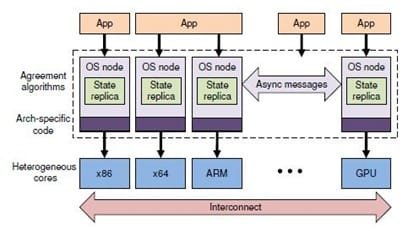
##########################################################################
Copyright (c) 2009, ETH Zurich and Microsoft Corporation.
All rights reserved.

This file is distributed under the terms in the attached LICENSE file.
If you do not find this file, copies can be found by writing to:
ETH Zurich D-INFK, Haldeneggsteig 4, CH-8092 Zurich. Attn: Systems Group.
##########################################################################

"SUPPORTED" HARDWARE

Barrelfish currently runs on x86-64 CPUs. The following are known to work:
 * Intel Xeon Clovertown (X5355) and Gainestown (E5520)
 * AMD Opteron Santa Rosa, Barcelona, and Shanghai (2220, 8350, 8374 and 8380)

The biggest compatibility problems are likely to be in the PCI/ACPI code. We
usually discover new quirks (or missing functionality in the ACPI glue code)
on each new machine we test. The following systems are known to work:
 * Intel x5000XVN
 * Tyan n6650W and S4985
 * Supermicro H8QM3-2
 * Dell PowerEdge R610 and R905
 * Lenovo X200 and X301 laptops

The e1000n driver should work with most recent Intel gigabit ethernet
controllers (see the list in devices/e1000.dev). We've mostly used the
82572EI (PCI device ID 0x1082).

You should also be able to boot Barrelfish on a recent version of QEMU (0.10);
note that the e1000 device emulated by QEMU is not supported by our driver.


REQUIRED TOOLS

The following are required to build Barrelfish and its tools:
 * GCC 4 (4.3.3 and 4.3.4 are known to work; cross-compiling from i386 works)
 * GNU binutils (2.19 is known to work)
 * CMake v2.6
 * GNU make
 * GHC v6.8.2 and Parsec 2.1 (earlier versions may work but are untested)
 * pdflatex (unfortunately CMake fails if this is not present, even when
   not building the documentation)

Our build system may not be very portable; if in doubt, try building on a
recent Debian or Ubuntu system, as these are what we use.


BUILDING

1. Assuming you have already unpacked the sources, create a build directory:
$ mkdir build && cd build

2. Run cmake, giving it the path to the source directory:
$ cmake ..
Lots of output should follow, including using GHC to compile various
tools, and hopefully finishing up with:
-- Configuring done
-- Generating done
-- Build files have been written to: .../barrelfish/build

3. Optionally, configure the compile-time parameters (such as debug output,
   build type, etc.) using a CMake configuration editor, eg:
$ ccmake .

4. Run make, and wait...
$ make

5. If everything worked, you should now be able to run Barrelfish inside QEMU:
$ make sim
(but see the note about broken shell output in KNOWN ISSUES below).


INSTALLING AND BOOTING

Barrelfish requires a Multiboot-compliant bootloader that is capable of loading
an ELF64 image. At the time of writing, this doesn't include the default GRUB.
Your options are either:
 * patch GRUB to support a 64-bit kernel image, using the patch found here:
   http://savannah.gnu.org/bugs/?17963
 * use the pre-loader "elver" that can be found in the tools directory

"Installing" Barrelfish currently consists of copying the ELF files for the CPU
driver and user programs to a location that the target machine can boot from,
and writing a suitable menu.lst file that instructs the bootloader (GRUB) which
programs to load and the arguments to pass them.

If you specify an appropriate INSTALL_PREFIX in the CMake configuration, eg:
$ cmake -DINSTALL_PREFIX:PATH=/tftpboot/barrelfish .
... then running 'make install' will copy all the binaries to the right place
for you.

We usually boot Barrelfish via PXE/TFTP, although loading from a local disk
also works. Instructions for setting up GRUB to do this are beyond the scope of
this document. Assuming you have such a setup, here is a sample menu.lst file
for a basic diskless boot that doesn't do anything useful beyond probing the
PCI buses:

title   Barrelfish
root    (nd)
kernel /barrelfish/elver
module /barrelfish/kernel loglevel=4 logmask=0
module /barrelfish/init
module /barrelfish/mem_serv
module /barrelfish/monitor bootcpus=0-3
module /barrelfish/chips
module /barrelfish/skb
module /barrelfish/pci

Notice the bootcpus argument to the monitor program. This specifies ranges of
cores (identified by their APIC IDs) to boot. This must presently be passed as
a parameter (or by default the system will boot only on the BSP core) -- to
find out that valid APIC IDs for your system, look at the debug output from
the PCI domain when it starts up, or use the APIC IDs reported by another OS.

There are many other programs you can load (take a look around the usr tree for
examples). To start a program on a core other than the BSP core, pass 'core=N'
(where N is an APIC ID) as its first argument.

If things work, you should see output on both the VGA console and COM1.


KNOWN ISSUES

There are many. Those you're likely to encounter include:
 * Parallel builds don't work reliably. A workaround is to first 'make errors'.
 * The documentation is incomplete and out of date.
 * Some drivers and user programs are known not to build, and are commented-out
   in the CMakeLists.txt files.
 * The shell (fish) doesn't work. Actually, it works, but its output is confused
   by line buffering in libterm. In any case, it doesn't do much of use yet!
 * As we are not using IOAPICs yet, device interrupts work only on the BSP core.


LIKELY FAQs

Q: How do I run a program?
A: Add it to the boot sequence by specifying the module in your menu.lst file.
   For example, to run the memtest program, add the line:
       module /PATH/memtest
   to the end of menu.lst, where PATH is relative either to your TFTP
   server's root directory (when booting on hardware) or to your build
   directory (when using a simulator such as QEMU).
   If memtest runs, you should see it output "memtest passed successfully!".

Q: Where's the CPU driver?
A: It's in the directory named kernel :) But don't worry, it really does run
   independently on each core.

Q: Where is the source for the SPLASH2 benchmarks? It seems to be missing.
A: The license for these prevents redistribution, so we were forced to ship our
   changes as a patch. See usr/splash2/README for further instructions.

Q: Can I use a debugger?
A: Maybe. There are two options at the moment:
    * On a simulator, using whatever debug interfaces it supports.
      For QEMU, you could try the "debugsim" target.
    * On hardware, using the kernel-mode remote GDB stubs that operate on the
      primary serial port and are entered in response to a kernel trap or
      exception. However, these are not well maintained, and may not be usable
      beyond reading/writing memory locations and inspecting the stack.
   When debugging the kernel, beware that it is relocated to an address
   determined at core boot time. Look for output such as:
   "Kernel starting at address 0xffffffffc072b000".

Q: Where can I find more information, including papers and new releases?
A: http://www.barrelfish.org/

Q: Can I contribute?
A: We'd certainly like to hear from you. Please send us mail.