Microsoft's Windows 7 Problem Isn't Going Away

Brink

Administrator
Staff member
Local time
7:06 AM
Messages
74,803
Location
Oklahoma
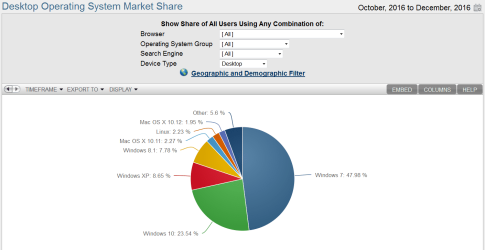
Windows 7 usage share didn’t change much over the past year. That is a huge problem for Windows 10, and for Microsoft.

After the many issues it had getting the Windows XP installed based moved forward to more modern and secure Windows versions, Microsoft is basically facing the same problem again. That is, Microsoft doesn’t want Windows 7 to be the next Windows XP. But Windows 7 is absolutely the next Windows XP.

Oops.

To see what I mean, simply examine the NetMarketShare usage share data that Microsoft also uses. Over the past three Januaries, Windows 7’s usage share has hovered around the 50 percent mark:

  • January 2015: 55.92 percent
  • January 2016: 52.47 percent
  • January 2017: 48.34 percent
Windows 10 was released in August 2015, basically. So looking at the past two Januaries, we see the following for Microsoft’s latest platform:

  • January 2016: 11.85 percent
  • January 2017: 24.36 percent
So Windows 7 usage has barely fallen but Windows 10 usage has of course catapulted upward, though if you look a bit closer you’ll see that this progress has slowed dramatically in recent months...


Read more: Microsoft's Windows 7 Problem Isn't Going Away - Thurrott.com
 

My Computer

Computer type
PC/Desktop
Computer Manufacturer/Model Number
Self built custom
OS
64-bit Windows 11 Pro for Workstations
CPU
Intel i7-8700K OC'd to 5 GHz
Motherboard
ASUS ROG Maximus XI Formula Z390
Memory
64 GB (4x16GB) G.SKILL TridentZ RGB DDR4 3600 MHz
Graphics Card(s)
ASUS ROG-STRIX-GTX1080TI-O11G-GAMING
Sound Card
Integrated
Monitor(s) Displays
2 x Samsung Odyssey G7 27"
Screen Resolution
2560x1440
Hard Drives
1TB Samsung 990 PRO M.2,
4TB Samsung 990 PRO PRO M.2,
TerraMaster F8 SSD Plus NAS
PSU
Seasonic Prime Titanium 850W
Case
Thermaltake Core P3
Cooling
Corsair Hydro H115i
Keyboard
Logitech wireless K800
Mouse
Logitech MX Master 4
Internet Speed
2 Gb/s Download and 100 Mb/s Upload
Antivirus
Malwarebyte Anti-Malware Premium
Browser
Google Chrome
Other Info
Logitech Z625 speaker system,
Logitech BRIO 4K Pro webcam,
HP Color LaserJet Pro MFP M477fdn,
APC SMART-UPS RT 1000 XL - SURT1000XLI,
Galaxy S23 Plus phone
Hi,
Yep I'd imagine more new machines with 10 are more of a reason than upgrading since the freebie was ended through the update system
Extended through other means though for people willing to contact MS directly.

Then we have been seeing more people attempting to bail on new win-10 machines to install 7 on which the people should of asked that question before they bought the machine and possibly they wouldn't of bought it knowing it is a pain at best and more than likely isn't going to happen.

7 rules ;)
I poked at 10 yesterday and updated it and did heaven benchmark I nearly got sick going through the menus refresh install... just to update it to the recent build testing the benchmarks before and after...

4th quarter 2016
4th quarter.PNG
 

My Computer

Computer type
PC/Desktop
Computer Manufacturer/Model Number
Custom assembled by me :}
OS
Win-7-Pro64bit 7-H-Prem-64bit
CPU
i7-5930K 2nd i9-9940x both water blocked VRM's too
Motherboard
ASUS SABERTOOTH X99 2nd ASUS x299 Apex
Memory
Trident-z 3200C14 2nd Trident-z 3600C16
Graphics Card(s)
EVGA 1080ti ftw3 2nd Titan Xp both water blocked
Sound Card
Built-in Realtek
Monitor(s) Displays
1-AOC G2460PG 24"G-Sync 144Hz/ 2nd 1-ASUS VG248QE 24" 144Hz
Screen Resolution
1920 x 1080 144Hz
Hard Drives
2-Samsung M.2 Evo & Evo Plus
2-Samsung 850 EVO 500GB SSD's/ 3-2.5 W.D. Black 1tb-&3-1tb/3-3.5 WD Black 1tb hdd's
PSU
EVGA SuperNOVA 1000-P2 2nd 1200-P2
Case
2-Corsair Obsidian Series 450D Black ATX Mid Tower
Cooling
Custom water loops
Keyboard
Logitech G710+/ 2nd Logitech G910
Mouse
2-RedDragon M901 Perdition 16400 dpi Gaming mouse = wired
Internet Speed
Comcast Ping 19ms 89.31mbps download speed 6.12mbps upload
Antivirus
Malwarebytes Pro/ Superantispyware Pro
Browser
FireFox & Pale moon
Other Info
2nd ASUS X299 Apex/Intel i9-9940x with Custom water loop/7H-Prem-x64/Corsair 450D case/Ram Trident-z 3600C16 4x8gb / Samsung970Evo plus 500gb SSD/Dual ssd EZ swap evo/PSU EVGA SuperNova 1200w-P2 80+Platinum/GPU Titan Xp /8-ML-140 on push-pull on 2-280GTX rads
Hi,
Yep I'd imagine more new machines with 10 are more of a reason than upgrading since the freebie was ended through the update system
That seems to be a reasonable assessment in my view. My hope is W10 will become a stable OS in a couple of years and the world moves on.
My problem is I have a number of W7 PCs with compatible (paid) software that work fine. Moving to W10 is going to involve a fair bit of work and extra $.
 

My Computer

Computer type
PC/Desktop
Computer Manufacturer/Model Number
Own build
OS
Windows 7x64 Home Premium SP1
CPU
Intel i7 2600k
Motherboard
ASUS P8Z68 Deluxe
Memory
G.Skill Ripjaws (DDR3-1600) 2x4GB
Graphics Card(s)
Nvidia GeForce GTS 450; Intel HD Graphics 3000(GT2+)
Monitor(s) Displays
Dell Ultrasharp IPS panel U2311H, Samsung SyncMaster P2350
Screen Resolution
1920x1080
Hard Drives
Samsung 850 Pro SSD 256GB, Samsung SSD 840 120GB, Seagates 1TB Barracuda ST31000528AS x2
PSU
Seasonic M12II 520W
Case
Lian Li Lancool PC-K60
Cooling
Case: 1x120mm, 3x140mm CPU: Hyper 212+
Keyboard
Logitech MK520 (wireless)
Mouse
Logitech MK520
Internet Speed
6-7 Mbps
Antivirus
Norton Security Premium, Malwarebytes on 2 (MSE on 3rd PC)
Browser
FireFox
Other Info
Audio: Logitech Z523 2.1
Checking all of the important user settings, after every W10 update, is a PITA. :(

The new update system (UUP) is farcically slow.
It took 5 hours to update an install (download took ~90 minutes).
The only software installed, other than the default Windows stuff, was Pale Moon.

My problem is I have a number of W7 PCs with compatible (paid) software that work fine. Moving to W10 is going to involve a fair bit of work and extra $.
IMO, the only viable solution to that issue is to convert your existing W7 installs to VHDs/VMs.

I've only had mixed success the times I've tried.
Since my systems are all dual boot (minimum) the conversion process only left one bootable OS.

I suspect that what I should have done is:

  1. Created a backup image of the system
  2. Removed the other OS
  3. Repaired the boot of the OS I wanted to convert (if needed)
  4. Performed the conversion
  5. Re-image the HDD and repeat the above steps (1 - 4) until I had VHDs/VMs of each individual OS

As for running W10, I'm running W10IP as a VM (Linux Mint 18.1 Host running VMware Player).

This has the advantage that you can keep W10 disconnected from the network and yet still be able to browse the Internet when desired/needed.
If an update seems "relatively safe", I can connect to the Internet and download it.
 
Last edited:

My Computer

Computer type
PC/Desktop
Computer Manufacturer/Model Number
n/a
OS
W7 Ultimate SP1, LM19.2 MATE, W10 Home 1703, W10 Pro 1703 VM, #All 64 bit
CPU
AMD Phenom II x6 1100T, 3.3 GHz
Motherboard
ASUS M4A88T-M/USB3 (AM3)
Memory
12GB DDR3 1333 G-Skill (4GB x 2), G-Skill (2GB x 2)
Graphics Card(s)
NVIDIA GeForce GTX 660
Sound Card
Realtek?
Monitor(s) Displays
Samsung S23B350
Screen Resolution
1920x1080
Hard Drives
WD Green 2TB (SATA), WD Green 3TB (SATA), WD Blue 4TB (SATA), WD Blue 6TB (SATA)
PSU
Cooler Master
Case
Antec GX300 Tower
Cooling
3x Antec TRICOOL 120mm Fans
Mouse
Wired Optical
Internet Speed
DSL
Antivirus
Avast
Browser
Pale Moon (64 bit)
Other Info
2018-12-27 Upgraded HDDs
2015-12-10 Upgraded case, graphics card, storage
2015-08-15 Upgraded motherboard & RAM
2015-07-15 Upgraded LM17.1 to LM17.2
Back
Top