Middle button doesn't work

d3us

New member
Local time
6:08 AM
Messages
10
Location
Belgrade
I saw an old thread and mods can merge them if necessary.

So here is my problem:
Since few days ago my mid button doesn't work, so I can't open page in new tab with single click (Ctrl + click works and right click->open in new tab works). I don't care about scrolling faster because my mouse has that "fast scrolling" thing, but browser problem drives me crazy.

I have Logitech G500 mouse, and button is working properly, because when I change it to for example minimize window, it does exactly that. Tried another mouse - same problem.
Can anybody help?

Win7 works perfectly on my computer(s) ever since first RC version (or at least almost perfectly :D)
Updates are off, except for security ones.
I mean... There is one solution - I can always reinstall Win, but maybe something more sophisticated? ^^
 
Last edited:

My Computer

Computer type
PC/Desktop
OS
Win7 x64 Ultimate
CPU
Athlon II x4 620 @3.4Ghz
Motherboard
GA-785GT UD3H
Memory
6GB Mushikin Redline 1666Mhz
Graphics Card(s)
AMD 6850
Monitor(s) Displays
Philips 236VLA
Screen Resolution
1920x1080
Hard Drives
WD 320
WD 750 Green

Seagate 320
Seagate 2TB
PSU
LC Power super silent 650w
Case
Cooler Master Centurion 532
Cooling
Cooler Master Hyper TX3
Keyboard
Logitech Ultraflat
Mouse
Logitech G500
Internet Speed
10mbps
Antivirus
Don't have any :)
Browser
IE9, Chrome, Firefox
d3us, welcome to the forums. Are you using setpoint?
 

My Computer

Computer type
PC/Desktop
Computer Manufacturer/Model Number
Dude Build
OS
Windows 10 Pro X64
CPU
Intel(R) Core(TM) i5-3570K CPU OC@ 4.5GHZ Turbo
Motherboard
MSI Z77A-G45 Gaming
Memory
8.00 GB DDR3 1600Mhz
Graphics Card(s)
MSI Gaming X GTX 1070
Sound Card
Realtek High Definition
Monitor(s) Displays
Dell S23O9W, HP L1710
Screen Resolution
DELL-1920 x 1080 HP-1280 x1024
Hard Drives
Crucial m4 256 SSD, WD 7200RPM 500GB WD 1TB
PSU
Seasonic X650 GOLD
Case
Zalman Z12
Cooling
Antec Kuhler 920
Keyboard
Logitech
Mouse
MSI DS100 Interceptor
Internet Speed
50 down and 5 up
Antivirus
MSE
Browser
Chrome, IE 11
Other Info
Logitech X-620 Speakers
Tnx dude for welcoming.
Yes, I'm using setpoint, but I also tried without setpoint with non-logitesch mouse, and the problem persists.

Also read something about setpoint bug, but never experienced any, and I had mx510, lx6 before rx1000 and g500 which I'm using now.

Edit:
I guess your G500 works fine? :(
 
Last edited:

My Computer

Computer type
PC/Desktop
OS
Win7 x64 Ultimate
CPU
Athlon II x4 620 @3.4Ghz
Motherboard
GA-785GT UD3H
Memory
6GB Mushikin Redline 1666Mhz
Graphics Card(s)
AMD 6850
Monitor(s) Displays
Philips 236VLA
Screen Resolution
1920x1080
Hard Drives
WD 320
WD 750 Green

Seagate 320
Seagate 2TB
PSU
LC Power super silent 650w
Case
Cooler Master Centurion 532
Cooling
Cooler Master Hyper TX3
Keyboard
Logitech Ultraflat
Mouse
Logitech G500
Internet Speed
10mbps
Antivirus
Don't have any :)
Browser
IE9, Chrome, Firefox
Yes, maybe you can try uninstalling setpoint and use the windows default. Or try re-installing setpoint.
 

My Computer

Computer type
PC/Desktop
Computer Manufacturer/Model Number
Dude Build
OS
Windows 10 Pro X64
CPU
Intel(R) Core(TM) i5-3570K CPU OC@ 4.5GHZ Turbo
Motherboard
MSI Z77A-G45 Gaming
Memory
8.00 GB DDR3 1600Mhz
Graphics Card(s)
MSI Gaming X GTX 1070
Sound Card
Realtek High Definition
Monitor(s) Displays
Dell S23O9W, HP L1710
Screen Resolution
DELL-1920 x 1080 HP-1280 x1024
Hard Drives
Crucial m4 256 SSD, WD 7200RPM 500GB WD 1TB
PSU
Seasonic X650 GOLD
Case
Zalman Z12
Cooling
Antec Kuhler 920
Keyboard
Logitech
Mouse
MSI DS100 Interceptor
Internet Speed
50 down and 5 up
Antivirus
MSE
Browser
Chrome, IE 11
Other Info
Logitech X-620 Speakers
But the question is why just a regular mouse doesn't work when setpoint is uninstalled? I'm speaking about some Canyon wireless mouse, it works on my laptop (Win7 Professional).
 

My Computer

Computer type
PC/Desktop
OS
Win7 x64 Ultimate
CPU
Athlon II x4 620 @3.4Ghz
Motherboard
GA-785GT UD3H
Memory
6GB Mushikin Redline 1666Mhz
Graphics Card(s)
AMD 6850
Monitor(s) Displays
Philips 236VLA
Screen Resolution
1920x1080
Hard Drives
WD 320
WD 750 Green

Seagate 320
Seagate 2TB
PSU
LC Power super silent 650w
Case
Cooler Master Centurion 532
Cooling
Cooler Master Hyper TX3
Keyboard
Logitech Ultraflat
Mouse
Logitech G500
Internet Speed
10mbps
Antivirus
Don't have any :)
Browser
IE9, Chrome, Firefox
Try checking canyon for drivers. Which version of setpoint do you have?
 

My Computer

Computer type
PC/Desktop
Computer Manufacturer/Model Number
Dude Build
OS
Windows 10 Pro X64
CPU
Intel(R) Core(TM) i5-3570K CPU OC@ 4.5GHZ Turbo
Motherboard
MSI Z77A-G45 Gaming
Memory
8.00 GB DDR3 1600Mhz
Graphics Card(s)
MSI Gaming X GTX 1070
Sound Card
Realtek High Definition
Monitor(s) Displays
Dell S23O9W, HP L1710
Screen Resolution
DELL-1920 x 1080 HP-1280 x1024
Hard Drives
Crucial m4 256 SSD, WD 7200RPM 500GB WD 1TB
PSU
Seasonic X650 GOLD
Case
Zalman Z12
Cooling
Antec Kuhler 920
Keyboard
Logitech
Mouse
MSI DS100 Interceptor
Internet Speed
50 down and 5 up
Antivirus
MSE
Browser
Chrome, IE 11
Other Info
Logitech X-620 Speakers
SetPoint 5.46.10
Driver 5.33.14

Just to say one more time, everything worked like a charm since few days ago. I restarted computer, and than... VOILA! Doesn't work LOL
 

My Computer

Computer type
PC/Desktop
OS
Win7 x64 Ultimate
CPU
Athlon II x4 620 @3.4Ghz
Motherboard
GA-785GT UD3H
Memory
6GB Mushikin Redline 1666Mhz
Graphics Card(s)
AMD 6850
Monitor(s) Displays
Philips 236VLA
Screen Resolution
1920x1080
Hard Drives
WD 320
WD 750 Green

Seagate 320
Seagate 2TB
PSU
LC Power super silent 650w
Case
Cooler Master Centurion 532
Cooling
Cooler Master Hyper TX3
Keyboard
Logitech Ultraflat
Mouse
Logitech G500
Internet Speed
10mbps
Antivirus
Don't have any :)
Browser
IE9, Chrome, Firefox
Try setting a system restore prior to the date it stopped working.

:ar: System Restore

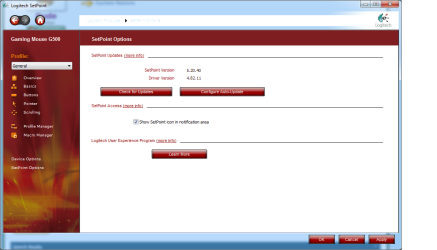
I was using the windows driver so I loaded setpoint
setpoint.png

Mine shows version 5.20.40, driver version 4.82.11.

Hit check for updates and it said it was the latest. Uninstall your setpoint and download this one. Do custom and uncheck the toolbar and avg stuff.

Setpoint 5.2
 

My Computer

Computer type
PC/Desktop
Computer Manufacturer/Model Number
Dude Build
OS
Windows 10 Pro X64
CPU
Intel(R) Core(TM) i5-3570K CPU OC@ 4.5GHZ Turbo
Motherboard
MSI Z77A-G45 Gaming
Memory
8.00 GB DDR3 1600Mhz
Graphics Card(s)
MSI Gaming X GTX 1070
Sound Card
Realtek High Definition
Monitor(s) Displays
Dell S23O9W, HP L1710
Screen Resolution
DELL-1920 x 1080 HP-1280 x1024
Hard Drives
Crucial m4 256 SSD, WD 7200RPM 500GB WD 1TB
PSU
Seasonic X650 GOLD
Case
Zalman Z12
Cooling
Antec Kuhler 920
Keyboard
Logitech
Mouse
MSI DS100 Interceptor
Internet Speed
50 down and 5 up
Antivirus
MSE
Browser
Chrome, IE 11
Other Info
Logitech X-620 Speakers
Installed this one, still doesn't work.
And I lost my profiles for games! III KILLL YYAAAA! J/k :D

Btw tnx for trying ;)
 

My Computer

Computer type
PC/Desktop
OS
Win7 x64 Ultimate
CPU
Athlon II x4 620 @3.4Ghz
Motherboard
GA-785GT UD3H
Memory
6GB Mushikin Redline 1666Mhz
Graphics Card(s)
AMD 6850
Monitor(s) Displays
Philips 236VLA
Screen Resolution
1920x1080
Hard Drives
WD 320
WD 750 Green

Seagate 320
Seagate 2TB
PSU
LC Power super silent 650w
Case
Cooler Master Centurion 532
Cooling
Cooler Master Hyper TX3
Keyboard
Logitech Ultraflat
Mouse
Logitech G500
Internet Speed
10mbps
Antivirus
Don't have any :)
Browser
IE9, Chrome, Firefox
Wow, I sincerely am sorry for that. Did you try canyon for drivers?
 

My Computer

Computer type
PC/Desktop
Computer Manufacturer/Model Number
Dude Build
OS
Windows 10 Pro X64
CPU
Intel(R) Core(TM) i5-3570K CPU OC@ 4.5GHZ Turbo
Motherboard
MSI Z77A-G45 Gaming
Memory
8.00 GB DDR3 1600Mhz
Graphics Card(s)
MSI Gaming X GTX 1070
Sound Card
Realtek High Definition
Monitor(s) Displays
Dell S23O9W, HP L1710
Screen Resolution
DELL-1920 x 1080 HP-1280 x1024
Hard Drives
Crucial m4 256 SSD, WD 7200RPM 500GB WD 1TB
PSU
Seasonic X650 GOLD
Case
Zalman Z12
Cooling
Antec Kuhler 920
Keyboard
Logitech
Mouse
MSI DS100 Interceptor
Internet Speed
50 down and 5 up
Antivirus
MSE
Browser
Chrome, IE 11
Other Info
Logitech X-620 Speakers
It doesn't have any, on the box says P&P, so I guess it's supposed to be used with windows drivers... Is there any way to reinstall generic drivers?
 

My Computer

Computer type
PC/Desktop
OS
Win7 x64 Ultimate
CPU
Athlon II x4 620 @3.4Ghz
Motherboard
GA-785GT UD3H
Memory
6GB Mushikin Redline 1666Mhz
Graphics Card(s)
AMD 6850
Monitor(s) Displays
Philips 236VLA
Screen Resolution
1920x1080
Hard Drives
WD 320
WD 750 Green

Seagate 320
Seagate 2TB
PSU
LC Power super silent 650w
Case
Cooler Master Centurion 532
Cooling
Cooler Master Hyper TX3
Keyboard
Logitech Ultraflat
Mouse
Logitech G500
Internet Speed
10mbps
Antivirus
Don't have any :)
Browser
IE9, Chrome, Firefox
yes, uninstalling setpoint and logitech drivers will the let windows install the windows generic drivers.
 

My Computer

Computer type
PC/Desktop
Computer Manufacturer/Model Number
Dude Build
OS
Windows 10 Pro X64
CPU
Intel(R) Core(TM) i5-3570K CPU OC@ 4.5GHZ Turbo
Motherboard
MSI Z77A-G45 Gaming
Memory
8.00 GB DDR3 1600Mhz
Graphics Card(s)
MSI Gaming X GTX 1070
Sound Card
Realtek High Definition
Monitor(s) Displays
Dell S23O9W, HP L1710
Screen Resolution
DELL-1920 x 1080 HP-1280 x1024
Hard Drives
Crucial m4 256 SSD, WD 7200RPM 500GB WD 1TB
PSU
Seasonic X650 GOLD
Case
Zalman Z12
Cooling
Antec Kuhler 920
Keyboard
Logitech
Mouse
MSI DS100 Interceptor
Internet Speed
50 down and 5 up
Antivirus
MSE
Browser
Chrome, IE 11
Other Info
Logitech X-620 Speakers
Ummm... But what about reinstalling windows generic drivers? That was my q ^^
 

My Computer

Computer type
PC/Desktop
OS
Win7 x64 Ultimate
CPU
Athlon II x4 620 @3.4Ghz
Motherboard
GA-785GT UD3H
Memory
6GB Mushikin Redline 1666Mhz
Graphics Card(s)
AMD 6850
Monitor(s) Displays
Philips 236VLA
Screen Resolution
1920x1080
Hard Drives
WD 320
WD 750 Green

Seagate 320
Seagate 2TB
PSU
LC Power super silent 650w
Case
Cooler Master Centurion 532
Cooling
Cooler Master Hyper TX3
Keyboard
Logitech Ultraflat
Mouse
Logitech G500
Internet Speed
10mbps
Antivirus
Don't have any :)
Browser
IE9, Chrome, Firefox
Ummm... But what about reinstalling windows generic drivers? That was my q ^^

When the other drivers are uninstalled, plugging in the mouse will prompt window to do it automatically.
 

My Computer

Computer type
PC/Desktop
Computer Manufacturer/Model Number
Dude Build
OS
Windows 10 Pro X64
CPU
Intel(R) Core(TM) i5-3570K CPU OC@ 4.5GHZ Turbo
Motherboard
MSI Z77A-G45 Gaming
Memory
8.00 GB DDR3 1600Mhz
Graphics Card(s)
MSI Gaming X GTX 1070
Sound Card
Realtek High Definition
Monitor(s) Displays
Dell S23O9W, HP L1710
Screen Resolution
DELL-1920 x 1080 HP-1280 x1024
Hard Drives
Crucial m4 256 SSD, WD 7200RPM 500GB WD 1TB
PSU
Seasonic X650 GOLD
Case
Zalman Z12
Cooling
Antec Kuhler 920
Keyboard
Logitech
Mouse
MSI DS100 Interceptor
Internet Speed
50 down and 5 up
Antivirus
MSE
Browser
Chrome, IE 11
Other Info
Logitech X-620 Speakers
Nope, nothing happens... I mean, still doesn't work.
 

My Computer

Computer type
PC/Desktop
OS
Win7 x64 Ultimate
CPU
Athlon II x4 620 @3.4Ghz
Motherboard
GA-785GT UD3H
Memory
6GB Mushikin Redline 1666Mhz
Graphics Card(s)
AMD 6850
Monitor(s) Displays
Philips 236VLA
Screen Resolution
1920x1080
Hard Drives
WD 320
WD 750 Green

Seagate 320
Seagate 2TB
PSU
LC Power super silent 650w
Case
Cooler Master Centurion 532
Cooling
Cooler Master Hyper TX3
Keyboard
Logitech Ultraflat
Mouse
Logitech G500
Internet Speed
10mbps
Antivirus
Don't have any :)
Browser
IE9, Chrome, Firefox
d3us, did you try the system restore?
 

My Computer

Computer type
PC/Desktop
Computer Manufacturer/Model Number
Dude Build
OS
Windows 10 Pro X64
CPU
Intel(R) Core(TM) i5-3570K CPU OC@ 4.5GHZ Turbo
Motherboard
MSI Z77A-G45 Gaming
Memory
8.00 GB DDR3 1600Mhz
Graphics Card(s)
MSI Gaming X GTX 1070
Sound Card
Realtek High Definition
Monitor(s) Displays
Dell S23O9W, HP L1710
Screen Resolution
DELL-1920 x 1080 HP-1280 x1024
Hard Drives
Crucial m4 256 SSD, WD 7200RPM 500GB WD 1TB
PSU
Seasonic X650 GOLD
Case
Zalman Z12
Cooling
Antec Kuhler 920
Keyboard
Logitech
Mouse
MSI DS100 Interceptor
Internet Speed
50 down and 5 up
Antivirus
MSE
Browser
Chrome, IE 11
Other Info
Logitech X-620 Speakers
No, but I will tmrw and I'll post the results...
 

My Computer

Computer type
PC/Desktop
OS
Win7 x64 Ultimate
CPU
Athlon II x4 620 @3.4Ghz
Motherboard
GA-785GT UD3H
Memory
6GB Mushikin Redline 1666Mhz
Graphics Card(s)
AMD 6850
Monitor(s) Displays
Philips 236VLA
Screen Resolution
1920x1080
Hard Drives
WD 320
WD 750 Green

Seagate 320
Seagate 2TB
PSU
LC Power super silent 650w
Case
Cooler Master Centurion 532
Cooling
Cooler Master Hyper TX3
Keyboard
Logitech Ultraflat
Mouse
Logitech G500
Internet Speed
10mbps
Antivirus
Don't have any :)
Browser
IE9, Chrome, Firefox
Just to say that system restore didn't do anything. I hooked up my remote which has air mouse function, and that's the only mouse where middle button was working properly (it doesn't use any special driver, and it's HID device). Tried to re-install drivers for my g500, no luck...

Few days later, some registry issue came up and that was it about my Win7 Ulty.

Yesterday my fresh copy of Win8 arrived, and everything works smoothly, we'll see for how long. Hahahaha
So... Problem solved with reinstalling of windows LOL
 

My Computer

Computer type
PC/Desktop
OS
Win7 x64 Ultimate
CPU
Athlon II x4 620 @3.4Ghz
Motherboard
GA-785GT UD3H
Memory
6GB Mushikin Redline 1666Mhz
Graphics Card(s)
AMD 6850
Monitor(s) Displays
Philips 236VLA
Screen Resolution
1920x1080
Hard Drives
WD 320
WD 750 Green

Seagate 320
Seagate 2TB
PSU
LC Power super silent 650w
Case
Cooler Master Centurion 532
Cooling
Cooler Master Hyper TX3
Keyboard
Logitech Ultraflat
Mouse
Logitech G500
Internet Speed
10mbps
Antivirus
Don't have any :)
Browser
IE9, Chrome, Firefox
Back
Top