Solved Migrate system from 32bit to 64bit

sikm

New member
Member
Local time
9:14 PM
Messages
38
Location
Melbourne
I did ask a question about this some time ago and discovered that there was no easy way to do it (I'd thought to use Macrium Reflect).

I recently saw that there is now a facility within Macrium Reflect - Redeploy - that reads as if it could be used.

Does anyone know whether this would be possible?

Simon
 

My Computer

OS
windows7
I am not familiar with "Redeploy" but the only way I know to go from 32 bit to 64 bit is a clean install.
 

My Computer

Computer type
PC/Desktop
Computer Manufacturer/Model Number
Custom Build
OS
Windows 7 Home Premium 32-Bit - Build 7600 SP1
CPU
Intel Core i3-2120 3.30Ghz
Motherboard
Asus P8Z68-V LX Intel Z68 Socket H2 ATX
Memory
Kingston 4 GB DDR3 1333 mhz
Graphics Card(s)
AMD Radeon HD6670
Sound Card
Sound Blaster Audigy SE 24-Bit
Monitor(s) Displays
Asus VE228
Screen Resolution
1440 X 900
Hard Drives
OCZ Vertex 3 120 GB Sata 3 SSD ==
Kingston SH103/S3 120 G Hyper X 120 GB SSD ==
Western Digital 500 GB Caviar Green 7200 RPM ==
PSU
Corsair CX600M == 600 Watt
Case
NZXT Apollo - Silver with Clear Side Panel
Cooling
Three 120 mm Fans
Keyboard
Microsoft Natural 4000
Mouse
Microsoft Custom Optical 3000
Internet Speed
AT&T Fiber Optic Wireless Network
Antivirus
Microsoft Security Essentials
Browser
Chrome
Other Info
120 mm Blue LED Fan -- Three Blue LED Lazer Light Sticks
I took a quick look at the Macrium site regarding Redeploy.

Its stated purpose is "There are various aspects of the windows boot processes that will typically cause a boot failure after significant changes to the hardware. The purpose of ReDeploy is to attempt to overcome these issues enabling a Windows installation to run on new hardware."

It appears to be an add-on the paid version of Macrium.

I don't see any allegation that it can evade the necessity to do a fresh install when moving to 64-bit, but I didn't investigate it in depth.
 

My Computer

Computer type
PC/Desktop
Computer Manufacturer/Model Number
Ignatz Special; 4 speed manual gearbox; factory air conditioning; one of one
OS
Windows 7 Home Premium SP1, 64-bit
CPU
Intel Skylake i5-6600K, not overclocked
Motherboard
AsRock Z170M Extreme 4, micro ATX
Memory
8 GB HyperX DDR4-2666 (2 x 4 GB)
Graphics Card(s)
none; graphics are integrated on CPU
Sound Card
onboard: Realtek ALC1150; external: USB Behringer UF0-202
Monitor(s) Displays
Dell S2340M 23 inch IPS
Screen Resolution
1600 x 900
Hard Drives
System: Crucial MX100 series SSD, 128 GB;
Data: Samsung Spinpoint 103SJ, 1 TB;
Backup: WD Caviar Green WD30EZRX-00D8PB0, 3 TB
PSU
Rosewill SilentNight 500 watt fanless, semi-modular
Case
Antec Solo II
Cooling
Noctua NH-U12S; Noctua F12 intake, Noctua S12A exhaust
Keyboard
Microsoft 200 6JH-00001 USB
Mouse
Dell or Microsoft optical wired; USB
Antivirus
Microsoft Security Essentials and Malwarebytes Premium
Browser
Pale Moon
Other Info
All fans PWM; speeds at idle: CPU circa 500 rpm; intake circa 600 rpm; exhaust circa 600 rpm; CPU temps 27 idle and 47 C load in a warm room (27 C/81 F) when running Intel Extreme Tuning Utility stress test.
I accept...

...that I'm going to have to do a clean install: no probs. However, having installed the 64 bit system, I'd like to make the re-installation of all my existing programs and data as easy - and foolproof - as possible.

Perhaps I'm asking the wrong question, perhaps there is a 'walkthrough' out there which outlines how to go about this changeover. Does anyone know of one?
 

My Computer

OS
windows7
The installation process itself is really no different than 32-bit.

You will end up with a Program Files folder and a Program Files (x86) folder. The former is where 64 bit apps land by default. The latter is where 32 bit programs land. Windows 7 recognizes which is which and assigns the apps to the proper folder.

Some of your programs may not work properly or even install on 64 bit, but they are relatively uncommon.

There is nothing special about installing applications on 64 bit systems.

Likewise for putting your data on a 64 bit system.
 

My Computer

Computer type
PC/Desktop
Computer Manufacturer/Model Number
Ignatz Special; 4 speed manual gearbox; factory air conditioning; one of one
OS
Windows 7 Home Premium SP1, 64-bit
CPU
Intel Skylake i5-6600K, not overclocked
Motherboard
AsRock Z170M Extreme 4, micro ATX
Memory
8 GB HyperX DDR4-2666 (2 x 4 GB)
Graphics Card(s)
none; graphics are integrated on CPU
Sound Card
onboard: Realtek ALC1150; external: USB Behringer UF0-202
Monitor(s) Displays
Dell S2340M 23 inch IPS
Screen Resolution
1600 x 900
Hard Drives
System: Crucial MX100 series SSD, 128 GB;
Data: Samsung Spinpoint 103SJ, 1 TB;
Backup: WD Caviar Green WD30EZRX-00D8PB0, 3 TB
PSU
Rosewill SilentNight 500 watt fanless, semi-modular
Case
Antec Solo II
Cooling
Noctua NH-U12S; Noctua F12 intake, Noctua S12A exhaust
Keyboard
Microsoft 200 6JH-00001 USB
Mouse
Dell or Microsoft optical wired; USB
Antivirus
Microsoft Security Essentials and Malwarebytes Premium
Browser
Pale Moon
Other Info
All fans PWM; speeds at idle: CPU circa 500 rpm; intake circa 600 rpm; exhaust circa 600 rpm; CPU temps 27 idle and 47 C load in a warm room (27 C/81 F) when running Intel Extreme Tuning Utility stress test.
Follow these steps to get a perfect reinstall: Reinstalling Windows 7

There is no app that will transfer your programs. This is the opportunity to get them installed cleanly without previous baggage, so that after setup, cleanup and defrag you can save a backup image that will preclude the need for reinstalls in the future.

To back up your files, easiest is to drag your active User folders (Documents, Pictures, Videos, Downloads, Favorites, etc) to external , DVD's, another computer on the network, or 15gb of free storage with each Windows Live ID.

Then after install open each User folder, on Organize tab>Select All, drag the group to the corresponding folder in Explorer tree on the left, waiting until it stops unfolding and hypertext confirms correct location, then release to drop files there.

This is actually much easier than using a file backup or transfer program which adds layers of potential failure.
 
Reinstall 64bit without original CD

Related to this, I am planning on moving from 32 to 64 bits but I was not supplied with the OEM 64 bit version on CD with my Dell laptop- I only have the 32 bit CD.
I do have a 64 bit Windows 7 Pro VUP (upgrade designed for Vista) on DVD.
I am wondering if I can use that 64 bit upgrade version DVD to do a clean install on my laptop, but using the Windows 7 product ID that was originally issued with my 32 bit version.
 

My Computer

Computer Manufacturer/Model Number
Dell Vostro 3700
OS
Windows 7 pro, 32 bit
CPU
Intel Core i5 M430 @ 2.27GHz
Memory
8gb (3 usable)
Is this a manufacturer's Upgrade kit DVD which came with a Vista computer? Thanks to MS requirements of manufacturers, these are clean copy Win7 installation DVD's in most cases.

What does it say on the front entirely? When you put the disk in to Explore it, what files are in the root?

Is it the same licensed version as on your PC, or if not is their an ei.cfg file in the Sources folder?

You can use either 32- or 64-bit with each license.
 
No, it is not a manufacturers upgrade kit that came with a Vista computer.

It is a Windows 7 pro upgrade kit that was purchased at Best Buy to upgrade a Vista PC to Windows 7. So I have used this license/upgrade kit to do just that. This kit is what I was talking about in my previous post.

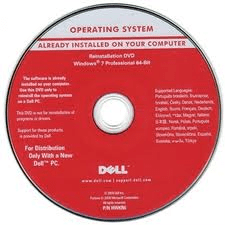
I also have a Windows 7 pro 64 bit reinstallation DVD (just found it) that came with a Dell desktop my employer ordered earlier this year. It has the Dell badge on it, and is pinkish/red in color.

I am thinking this may bet the better DVD to use since it must contain the full OS.
Do I need to worry about it containing other files, such as Dell drivers that are specific for the PC that it shipped with or would this DVD only contain the windows 7 pro OS?
 

My Computer

Computer Manufacturer/Model Number
Dell Vostro 3700
OS
Windows 7 pro, 32 bit
CPU
Intel Core i5 M430 @ 2.27GHz
Memory
8gb (3 usable)
image of the DVD
 

Attachments

  • untitled.png
    untitled.png
    27.6 KB · Views: 145

My Computer

Computer Manufacturer/Model Number
Dell Vostro 3700
OS
Windows 7 pro, 32 bit
CPU
Intel Core i5 M430 @ 2.27GHz
Memory
8gb (3 usable)
If you try and use the Dell DVD shown on a different computer, the install will fail with a message saying it can only be used on the Dell computer it was supplied with.

If you look, it does say "For distribution only with a new Dell PC".

However, it does contain just the operating system as Dell would have provided the drivers on another disc.
 
Last edited:

My Computer

Computer Manufacturer/Model Number
HP Pavilion Elite 495UK
OS
Windows 7 Ultimate SP1 64-Bit
CPU
Intel Core i7 870 @ 2.93GHz
Motherboard
MSI 2A9C (CPU1)
Memory
8Gb Dual-Channel DDR3 @ 664MHz
Graphics Card(s)
nVidia GeForce GTX 460 1024MB dedicated RAM
Sound Card
Realtek HD Audio
Monitor(s) Displays
HP2310i
Screen Resolution
1920 x 1080
Hard Drives
1x1954GB Hitachi HDS22020ALA 330 (RAID), 1x1954GB Hitachi External for backup and storage
PSU
460W
Case
HP Elite
Cooling
Air cooled
Keyboard
Logitech K750 solar-powered keyboard
Mouse
Logitech Wireless M180 mouse
Internet Speed
2Mb
Other Info
Pure Avanti Flow Internet Radio with iPod Dock, 64Gb iPod, HP USB Speakers, Sony MDR-V500 Headphones, Sony Vaio F-Series Laptop
So what are my options? I spent hours trying to get Dell to send me the 64 bit version of Windows 7 pro, but was unsuccesful.
Can I somehow use the windows pro upgrade DVDs I bought at Best Buy?
 

My Computer

Computer Manufacturer/Model Number
Dell Vostro 3700
OS
Windows 7 pro, 32 bit
CPU
Intel Core i5 M430 @ 2.27GHz
Memory
8gb (3 usable)

My Computer

Computer Manufacturer/Model Number
HP Pavilion Elite 495UK
OS
Windows 7 Ultimate SP1 64-Bit
CPU
Intel Core i7 870 @ 2.93GHz
Motherboard
MSI 2A9C (CPU1)
Memory
8Gb Dual-Channel DDR3 @ 664MHz
Graphics Card(s)
nVidia GeForce GTX 460 1024MB dedicated RAM
Sound Card
Realtek HD Audio
Monitor(s) Displays
HP2310i
Screen Resolution
1920 x 1080
Hard Drives
1x1954GB Hitachi HDS22020ALA 330 (RAID), 1x1954GB Hitachi External for backup and storage
PSU
460W
Case
HP Elite
Cooling
Air cooled
Keyboard
Logitech K750 solar-powered keyboard
Mouse
Logitech Wireless M180 mouse
Internet Speed
2Mb
Other Info
Pure Avanti Flow Internet Radio with iPod Dock, 64Gb iPod, HP USB Speakers, Sony MDR-V500 Headphones, Sony Vaio F-Series Laptop
gregrocker,
Its not that I won't provide the info you requested, its just that I am now at home and I left the upgrade kit from Best Buy at the office so I can't reference anything from memory. I can take a photo of it tomorrow and provide all the info you require.

As I stated earlier, I did purchase a Windows 7 pro retail Upgrade DVD (with Product Key )at Best Buy and used it to upgrade a PC with Vista to Windows 7 pro.
The DVD shown in the photo is one I discovered just before I left and is from another office PC we recently purchased. All of these computers I am talking about are at employer's office. They are all fully legal, purchased copies of Windows. I am just trying to take my Dell Vostro 3700 laptop, which came with 32 bit Windopws 7 pro installed, and change it to 64 bit Win 7 pro so I can more effectively use Photoshop CS5.
 

My Computer

Computer Manufacturer/Model Number
Dell Vostro 3700
OS
Windows 7 pro, 32 bit
CPU
Intel Core i5 M430 @ 2.27GHz
Memory
8gb (3 usable)
OK I think I have it sorted now: You bought a retail Pro Upgrade at Best Buy which only came with 32 bit and want to now use a Dell-branded 64 bit if possible to reinstall with same Product Key.

I have used manufacturer's branded Reinstallation disks to install on other make or model machines in the past. The only thing extra added is SLP activation file which is ignored by the new machine's BIOS leaving a 3-day activation timeout for you to insert Product Key from COA sticker.

So I would probably try the Dell disk since you have it there.

If it fails download the 64 bit Pro ISO here to clean reinstall with Product Key on COA sticker: Windows 7 Professional x64 SP1 (bootable)
http://msft.digitalrivercontent.net/win/X17-24281.iso
Write to flash stick or burn to DVD using Windows 7 USB-DVD Download Tool

Follow these steps to get a Perfect Reinstall
 
Thanks for your advice, gregrocker. I think I will download the iso and follow your excellent instructions for a clean install. I already backed up my important files so I'll give it a go in the morning. wish me luck
 

My Computer

Computer Manufacturer/Model Number
Dell Vostro 3700
OS
Windows 7 pro, 32 bit
CPU
Intel Core i5 M430 @ 2.27GHz
Memory
8gb (3 usable)
Let us know how it goes.

Besides your files, remember to back up any stored email, export any Bookmarks which in IE is also the Favorites folder.
 
theog-
just to confirm: I can take the Dell x64 reinstall disk that came with a Dell desktop PC and use it to install win 7 x64 on my Dell laptop- without issues?
 

My Computer

Computer Manufacturer/Model Number
Dell Vostro 3700
OS
Windows 7 pro, 32 bit
CPU
Intel Core i5 M430 @ 2.27GHz
Memory
8gb (3 usable)
Yes, it is the same disk that Dell would send for x64 install.
 

My Computer

OS
ME/XP/Vista/Win7
Back
Top