
Minitool Partition Wizard asking for volume label

agag

New member
Local time
8:27 AM
Messages
3
Hello.

My crazy cat ran and sat on my laptop then somehow when I realized it, my external HDD turned to FAT.
So I am trying to use Minitool Partition Wizard to convert it to NTFS. However, after i clicked Start the program ask for volume label. I ran the command prompt and I got the volume label for the drive. I click on minitool but it does not do anything. It just there. I cannot click on it. So what should I do?
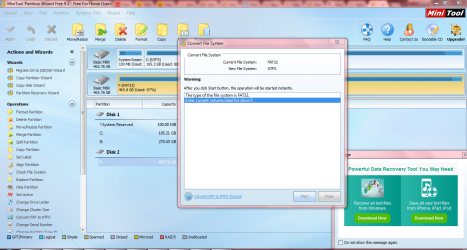
Capture.PNG
 

My Computer

Computer type
Laptop
Computer Manufacturer/Model Number
Asus
OS
Windows 7 Ultimate x64
Welcome to the forum it's simpler to just open for prompt type convert d: /fs: ntfs
 

My Computer

Computer type
PC/Desktop
OS
win 8 32 bit
^ I would really hesitate to do that without knowing whether the file system has really changed from NTFS to FAT32.
 

My Computer

OS
Windows 7 Home Premium 32 bit
Welcome to the forum it's simpler to just open for prompt type convert d: /fs: ntfs

I tried that. The conversion failed because some bad sector of my HDD, I guess.

^ I would really hesitate to do that without knowing whether the file system has really changed from NTFS to FAT32.

I checked my other HDD. It is NTFS, so with my little knowledge, that is where I got confidence, silly me.

So I tried fixing the error on my HDD using the same tool. I can finally access it now without converting it to NTFS but lost quite a number of files. Can't seem to find a free reliable recovery software yet.

Thank you so much for replying to me. Merry Christmas
 

My Computer

Computer type
Laptop
Computer Manufacturer/Model Number
Asus
OS
Windows 7 Ultimate x64
Tell us how you fixed the error - what exactly you did
 

My Computer

OS
Windows 7 Home Premium 32 bit
I use Minitool Partition Wizard. I used Check File System then clicked on the Check and Fix Detected Error. It deleted quite a number of files that perhaps cause the error. After that I can finally access my HDD. So with my lack of knowledge in this, I am not sure what caused the error. I thought my cat did something that turned the HDD to FAT because I googled that HDD supposed to be NTFS or something because of the big files, which is why I tried to convert it to NTFS in the first place but failed to do so.

Perhaps it is best if you can share if you have any idea why. And if you know any free data recovery software that I can try?
 

My Computer

Computer type
Laptop
Computer Manufacturer/Model Number
Asus
OS
Windows 7 Ultimate x64
This will not help you now, but in the future it will. You should always have an image of your HDD on hand so that you can just restore the image and you will be running again in 15 minutes. When this problem is corrected, go to Macrium Reflect Free It is a free download. You would want a different HDD to store you image on. You will not be sorry.
 

My Computer

Computer type
PC/Desktop
Computer Manufacturer/Model Number
Custom Build
OS
Windows 7 Home Premium 32-Bit - Build 7600 SP1
CPU
Intel Core i3-2120 3.30Ghz
Motherboard
Asus P8Z68-V LX Intel Z68 Socket H2 ATX
Memory
Kingston 4 GB DDR3 1333 mhz
Graphics Card(s)
AMD Radeon HD6670
Sound Card
Sound Blaster Audigy SE 24-Bit
Monitor(s) Displays
Asus VE228
Screen Resolution
1440 X 900
Hard Drives
OCZ Vertex 3 120 GB Sata 3 SSD ==
Kingston SH103/S3 120 G Hyper X 120 GB SSD ==
Western Digital 500 GB Caviar Green 7200 RPM ==
PSU
Corsair CX600M == 600 Watt
Case
NZXT Apollo - Silver with Clear Side Panel
Cooling
Three 120 mm Fans
Keyboard
Microsoft Natural 4000
Mouse
Microsoft Custom Optical 3000
Internet Speed
AT&T Fiber Optic Wireless Network
Antivirus
Microsoft Security Essentials
Browser
Chrome
Other Info
120 mm Blue LED Fan -- Three Blue LED Lazer Light Sticks
He`s talking about his external drive, not windows.

I find it impossible that a cat sitting on a keyboard could turn an external drive from NTFS to Fat, there are too many steps that have to be done.

Partition Wizard IS partition recovery software.
 

My Computer

Computer type
PC/Desktop
Computer Manufacturer/Model Number
Skylake Special #666
OS
Windows 10 Pro x64
CPU
Intel Core i7 6700K
Motherboard
Asus Sabertooth Z170 Mark 1
Memory
GSkill TridentZ RGB 16GB 3600 16-16-16-36
Graphics Card(s)
EVGA GTX 980 Ti SC x2
Sound Card
Realtek High Definition
Monitor(s) Displays
AOC G2460PG
Screen Resolution
1920 x 1080 144Hz
Hard Drives
Samsung 860 Pro 256GB, Seagate Barracuda 4TB x2
PSU
EVGA 1000 P2, EVGA White Custom Braided Cables
Case
Corsair Vengeance C70 Gunmetal Black
Cooling
Corsair H100i v2, Corsair ML120 x2, Thermal Grizzly Kryonaut
Keyboard
Logitech G910 Orion Spectrum
Mouse
Logitech G700s
Internet Speed
Verizon Fios Quantum Gateway 75/75
Antivirus
Windows Defender, Malwarebytes Free 3.8.3
Browser
Chrome
Other Info
Corsair SP120 x4, LG Blu-ray Drive, Durabrand HT-395 100 Watt Dolby Digital Amp, Corsair H2100 Wireless 7.1 Headset
He`s talking about his external drive, not windows.

I find it impossible that a cat sitting on a keyboard could turn an external drive from NTFS to Fat, there are too many steps that have to be done.

Partition Wizard IS partition recovery software.

Yes, I agree. The problem is not "Cat Related".
 

My Computer

Computer type
PC/Desktop
Computer Manufacturer/Model Number
Custom Build
OS
Windows 7 Home Premium 32-Bit - Build 7600 SP1
CPU
Intel Core i3-2120 3.30Ghz
Motherboard
Asus P8Z68-V LX Intel Z68 Socket H2 ATX
Memory
Kingston 4 GB DDR3 1333 mhz
Graphics Card(s)
AMD Radeon HD6670
Sound Card
Sound Blaster Audigy SE 24-Bit
Monitor(s) Displays
Asus VE228
Screen Resolution
1440 X 900
Hard Drives
OCZ Vertex 3 120 GB Sata 3 SSD ==
Kingston SH103/S3 120 G Hyper X 120 GB SSD ==
Western Digital 500 GB Caviar Green 7200 RPM ==
PSU
Corsair CX600M == 600 Watt
Case
NZXT Apollo - Silver with Clear Side Panel
Cooling
Three 120 mm Fans
Keyboard
Microsoft Natural 4000
Mouse
Microsoft Custom Optical 3000
Internet Speed
AT&T Fiber Optic Wireless Network
Antivirus
Microsoft Security Essentials
Browser
Chrome
Other Info
120 mm Blue LED Fan -- Three Blue LED Lazer Light Sticks
.........Perhaps it is best if you can share if you have any idea why. And if you know any free data recovery software that I can try?

1. First of all I didn't believe the cat and bull story and that is why I wanted to stop you from converting it to NTFS as per samurai's advice. But you went ahead and tried. And further on with check disk - for what I/we don't know. You never mentioned any problem accessing the external HDD after your " cat changed it from NTFS to FAT32". Did you?

2. Check disk does not delete any valid files. "All that CHKDSK does is make sure that the directory or the listing of files on the disk refers to the correct files. In other words, CHKDSK verifies that all of the pieces are there, the data is structured properly, and that everything that Windows needs to maintain that file system is in its proper order."

"File system errors can come from any number of different places. The more common reasons for this are not shutting down Windows properly, experiencing a crash, or having the power removed while the system is running. It’s also possible that the hard disk could be in the process of failing."

"CHKDSK only tries to repair damage that has already been done. CHKDSK will force the file system to be in a correct and coherent state, and that may result in errors becoming visible in different ways, but this is only as a result of whatever damage had already occurred."

In view of what is stated above there is absolutely no point in recovering the damaged/lost data, IMO

Even if, you would have had better chances had your HDD been NTFS for people say Getdataback - a commercial software - can put together the orphoned clusters/fragments and recover some of the files . But that IMO is a hit and miss.

So all I would recommend now is that - if you have really lost some files - backup all the data in that external drive and then check its health with the manufacturer's Diagnostic/repair utility.

And as bigmck said always have a one to one backup of all your important data that you may not want to lose. ( apart from the system image.) Do not spill and then cry. :)
 

My Computer

OS
Windows 7 Home Premium 32 bit
This will not help you now, but in the future it will. You should always have an image of your HDD on hand so that you can just restore the image and you will be running again in 15 minutes. When this problem is corrected, go to Macrium Reflect Free It is a free download. You would want a different HDD to store you image on. You will not be sorry.


He`s talking about his external drive, not windows.

I find it impossible that a cat sitting on a keyboard could turn an external drive from NTFS to Fat, there are too many steps that have to be done.

Partition Wizard IS partition recovery software.


Image & Clone can be done on data &or any partitions, as i sometimes do it..

Not necessary to be Windows partition.


For any issue with HDD, it is best to clone the faulty HDD.

This is more likely as full backup exactly in sector by sector.

Then using the cloned HDD to do the necessary repair, in order to understand what wrong with the HDD.

I prefer this method, as sometime the cloned HDD can be restore.


Eric.
 

My Computer

Computer type
Laptop
Computer Manufacturer/Model Number
Toshiba L630 and L735
OS
Windows 7 x64
Hard Drives
240 GB SSD
I use Minitool Partition Wizard. I used Check File System then clicked on the Check and Fix Detected Error. It deleted quite a number of files that perhaps cause the error. After that I can finally access my HDD. So with my lack of knowledge in this, I am not sure what caused the error. I thought my cat did something that turned the HDD to FAT because I googled that HDD supposed to be NTFS or something because of the big files, which is why I tried to convert it to NTFS in the first place but failed to do so.

Perhaps it is best if you can share if you have any idea why. And if you know any free data recovery software that I can try?

1. NTSF files just don't convert to FAT all by them selves. If your cat did this conversion, ask the cat to change it back to NTSF.

2. Once you deleted files of some kind your chances of retrieving things is slim.

3. Now that you can access your NTSF drive, copy what you can to another external dive.
In my opinion that will be the best you can do at this stage.

4. Now you have had a learning experience why proper backups are needed. I would suggest using this program in the future.

Macrium Reflect Free

Note:
Retrieving data from a damaged drive is very difficult and the proper steps done in the proper sequence is absolutely critical. Going off the recommended path will only make things harder to retrieve if not impossible.
Jack
 

My Computer

Computer type
PC/Desktop
Computer Manufacturer/Model Number
Home made Desktop
OS
Windows 10 Pro. 64/ version 1709 Windows 7 Pro/64
CPU
Intel i7-6800K @ 4.3
Motherboard
ASUS X-99 Deluxe II
Memory
Corsair Platinum 16 gig @2400
Graphics Card(s)
EVGA GTX 1070 OC
Monitor(s) Displays
Asus 27" LED LCD/VE278Q
Screen Resolution
1920-1080 or 1280-720 HDMI
Hard Drives
INTEL SSD 730-240 Gb Sata 3.0/
PSU
EVGA Platium 1200W
Case
Phanteks Luxe Tempered Glass 8 fans/ one radiator
Cooling
XSPC/ Water Cooled CPU
Keyboard
Das 4 Professional
Mouse
Logitech M705/MX Anywhere 2-S
Internet Speed
100 mbits
Antivirus
Microsoft Security Essentials/ Malwarebytes Premium 3.0/ SAS
Browser
I.E. 11 default/Firefox/ ISP Time Warner Cable/Spectrum
Other Info
LG BluRay Burner/
Sound system-KLipsch-THX/
Icy Dock ssd Hot Swap bays.
Back
Top