Solved Misconfigured Partitions

Babdah

New member
Local time
8:26 PM
Messages
6
Hello Guys and Gals,

So this is really my first time using windows other then at my College, I normally use CentOS or Ubuntu. Here is the problem I received a computer from a friend who decided to go to Mac this computer had no OS and I just so happen to have a copy of windows 7 Pro from an old presents I got. So I went ahead and installed it on this machine, now windows made an 18.9 GB partition that it installed itself on and now I have 498 GB unused and formatted. I was wondering is there any way to mount this 498 GB partition to the 18.9 GB partition so that I do no run out of space. Remember I have very limited experience in windows.
 

My Computer

OS
Windows 7 Pro 64
Yes.

You should be able to do what you need to do in Windows Disk Management.

You get there by entering "disk management" into the start button search box and follow the prompts.

But first:

Do you have an 18.9 GB C drive and 498 GB unallocated space?

Or is the 498 already a partition with a drive letter. If so, what is on that partition? If it is empty, you can delete it in Disk Management. That will turn it into "unallocated space" and you could then extend C into that unallocated space.

Look at Disk Management.

Do you see a System Reserved partition and a C partition and a 498 GB partition?
 

My Computer

Computer type
PC/Desktop
Computer Manufacturer/Model Number
Ignatz Special; 4 speed manual gearbox; factory air conditioning; one of one
OS
Windows 7 Home Premium SP1, 64-bit
CPU
Intel Skylake i5-6600K, not overclocked
Motherboard
AsRock Z170M Extreme 4, micro ATX
Memory
8 GB HyperX DDR4-2666 (2 x 4 GB)
Graphics Card(s)
none; graphics are integrated on CPU
Sound Card
onboard: Realtek ALC1150; external: USB Behringer UF0-202
Monitor(s) Displays
Dell S2340M 23 inch IPS
Screen Resolution
1600 x 900
Hard Drives
System: Crucial MX100 series SSD, 128 GB;
Data: Samsung Spinpoint 103SJ, 1 TB;
Backup: WD Caviar Green WD30EZRX-00D8PB0, 3 TB
PSU
Rosewill SilentNight 500 watt fanless, semi-modular
Case
Antec Solo II
Cooling
Noctua NH-U12S; Noctua F12 intake, Noctua S12A exhaust
Keyboard
Microsoft 200 6JH-00001 USB
Mouse
Dell or Microsoft optical wired; USB
Antivirus
Microsoft Security Essentials and Malwarebytes Premium
Browser
Pale Moon
Other Info
All fans PWM; speeds at idle: CPU circa 500 rpm; intake circa 600 rpm; exhaust circa 600 rpm; CPU temps 27 idle and 47 C load in a warm room (27 C/81 F) when running Intel Extreme Tuning Utility stress test.
Do you see a System Reserved partition and a C partition and a 498 GB partition?

That is correct.

Or is the 498 already a partition with a drive letter. If so, what is on that partition? If it is empty, you can delete it in Disk Management. That will turn it into "unallocated space" and you could then extend C into that unallocated space

It was allocated to drive D, I went ahead and deleted it. I really only want to add 400 GB to the C drive. So how do I extend C into 400 GB? Sorry Not allocated but free space.
 
Last edited:

My Computer

OS
Windows 7 Pro 64
Do these 3 areas read from left to right in Disk Management?

System reserved, C, unallocated or free space?

If so, you should be able to right click C and choose "extend" from a menu. Then choose how much.
 

My Computer

Computer type
PC/Desktop
Computer Manufacturer/Model Number
Ignatz Special; 4 speed manual gearbox; factory air conditioning; one of one
OS
Windows 7 Home Premium SP1, 64-bit
CPU
Intel Skylake i5-6600K, not overclocked
Motherboard
AsRock Z170M Extreme 4, micro ATX
Memory
8 GB HyperX DDR4-2666 (2 x 4 GB)
Graphics Card(s)
none; graphics are integrated on CPU
Sound Card
onboard: Realtek ALC1150; external: USB Behringer UF0-202
Monitor(s) Displays
Dell S2340M 23 inch IPS
Screen Resolution
1600 x 900
Hard Drives
System: Crucial MX100 series SSD, 128 GB;
Data: Samsung Spinpoint 103SJ, 1 TB;
Backup: WD Caviar Green WD30EZRX-00D8PB0, 3 TB
PSU
Rosewill SilentNight 500 watt fanless, semi-modular
Case
Antec Solo II
Cooling
Noctua NH-U12S; Noctua F12 intake, Noctua S12A exhaust
Keyboard
Microsoft 200 6JH-00001 USB
Mouse
Dell or Microsoft optical wired; USB
Antivirus
Microsoft Security Essentials and Malwarebytes Premium
Browser
Pale Moon
Other Info
All fans PWM; speeds at idle: CPU circa 500 rpm; intake circa 600 rpm; exhaust circa 600 rpm; CPU temps 27 idle and 47 C load in a warm room (27 C/81 F) when running Intel Extreme Tuning Utility stress test.
Do these 3 areas read from left to right in Disk Management?

System reserved, C, unallocated or free space?

Yes it does.

If so, you should be able to right click C and choose "extend" from a menu. Then choose how much.

I tried that but only opition that I have it shrink volume and the extend opition it not active.
 

My Computer

OS
Windows 7 Pro 64
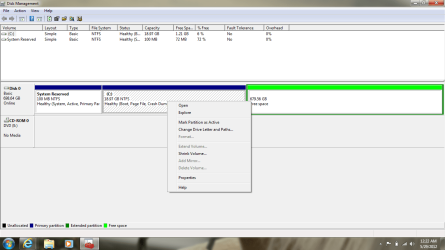
Post a screenshot of Windows Disk Management.

You may have to use a third party tool----Partition Wizard bootable disc.

But I'd like to see the picture.

Specifically--is the area to the right, where the 498 GB partition used to be, "unallocated space" or something else?

Post the picture regardless.
 

My Computer

Computer type
PC/Desktop
Computer Manufacturer/Model Number
Ignatz Special; 4 speed manual gearbox; factory air conditioning; one of one
OS
Windows 7 Home Premium SP1, 64-bit
CPU
Intel Skylake i5-6600K, not overclocked
Motherboard
AsRock Z170M Extreme 4, micro ATX
Memory
8 GB HyperX DDR4-2666 (2 x 4 GB)
Graphics Card(s)
none; graphics are integrated on CPU
Sound Card
onboard: Realtek ALC1150; external: USB Behringer UF0-202
Monitor(s) Displays
Dell S2340M 23 inch IPS
Screen Resolution
1600 x 900
Hard Drives
System: Crucial MX100 series SSD, 128 GB;
Data: Samsung Spinpoint 103SJ, 1 TB;
Backup: WD Caviar Green WD30EZRX-00D8PB0, 3 TB
PSU
Rosewill SilentNight 500 watt fanless, semi-modular
Case
Antec Solo II
Cooling
Noctua NH-U12S; Noctua F12 intake, Noctua S12A exhaust
Keyboard
Microsoft 200 6JH-00001 USB
Mouse
Dell or Microsoft optical wired; USB
Antivirus
Microsoft Security Essentials and Malwarebytes Premium
Browser
Pale Moon
Other Info
All fans PWM; speeds at idle: CPU circa 500 rpm; intake circa 600 rpm; exhaust circa 600 rpm; CPU temps 27 idle and 47 C load in a warm room (27 C/81 F) when running Intel Extreme Tuning Utility stress test.
I am think I might have to also
 

Attachments

  • Disk.png
    Disk.png
    39.9 KB · Views: 12

My Computer

OS
Windows 7 Pro 64
Yeah--I think the problem is that the 498 was originally a logical partition.

Had it been an ordinary primary partition, it would be "unallocated space" and you could extend C into it.

Free download Magic Partition Manager Software, partition magic alternative, free partition magic, partition magic Windows 7 and server partition software - Partition Wizard Online

Download Partition Wizard bootable disk from the bottom link at the above link.

Burn it to a disk and boot from it.

It's a highly reliable tool that should let you do what you need to do.
 

My Computer

Computer type
PC/Desktop
Computer Manufacturer/Model Number
Ignatz Special; 4 speed manual gearbox; factory air conditioning; one of one
OS
Windows 7 Home Premium SP1, 64-bit
CPU
Intel Skylake i5-6600K, not overclocked
Motherboard
AsRock Z170M Extreme 4, micro ATX
Memory
8 GB HyperX DDR4-2666 (2 x 4 GB)
Graphics Card(s)
none; graphics are integrated on CPU
Sound Card
onboard: Realtek ALC1150; external: USB Behringer UF0-202
Monitor(s) Displays
Dell S2340M 23 inch IPS
Screen Resolution
1600 x 900
Hard Drives
System: Crucial MX100 series SSD, 128 GB;
Data: Samsung Spinpoint 103SJ, 1 TB;
Backup: WD Caviar Green WD30EZRX-00D8PB0, 3 TB
PSU
Rosewill SilentNight 500 watt fanless, semi-modular
Case
Antec Solo II
Cooling
Noctua NH-U12S; Noctua F12 intake, Noctua S12A exhaust
Keyboard
Microsoft 200 6JH-00001 USB
Mouse
Dell or Microsoft optical wired; USB
Antivirus
Microsoft Security Essentials and Malwarebytes Premium
Browser
Pale Moon
Other Info
All fans PWM; speeds at idle: CPU circa 500 rpm; intake circa 600 rpm; exhaust circa 600 rpm; CPU temps 27 idle and 47 C load in a warm room (27 C/81 F) when running Intel Extreme Tuning Utility stress test.
Is it possable to use a USB, I currently do not have any disk?
 

My Computer

OS
Windows 7 Pro 64
I would guess so, but I can't help you with that.
 

My Computer

Computer type
PC/Desktop
Computer Manufacturer/Model Number
Ignatz Special; 4 speed manual gearbox; factory air conditioning; one of one
OS
Windows 7 Home Premium SP1, 64-bit
CPU
Intel Skylake i5-6600K, not overclocked
Motherboard
AsRock Z170M Extreme 4, micro ATX
Memory
8 GB HyperX DDR4-2666 (2 x 4 GB)
Graphics Card(s)
none; graphics are integrated on CPU
Sound Card
onboard: Realtek ALC1150; external: USB Behringer UF0-202
Monitor(s) Displays
Dell S2340M 23 inch IPS
Screen Resolution
1600 x 900
Hard Drives
System: Crucial MX100 series SSD, 128 GB;
Data: Samsung Spinpoint 103SJ, 1 TB;
Backup: WD Caviar Green WD30EZRX-00D8PB0, 3 TB
PSU
Rosewill SilentNight 500 watt fanless, semi-modular
Case
Antec Solo II
Cooling
Noctua NH-U12S; Noctua F12 intake, Noctua S12A exhaust
Keyboard
Microsoft 200 6JH-00001 USB
Mouse
Dell or Microsoft optical wired; USB
Antivirus
Microsoft Security Essentials and Malwarebytes Premium
Browser
Pale Moon
Other Info
All fans PWM; speeds at idle: CPU circa 500 rpm; intake circa 600 rpm; exhaust circa 600 rpm; CPU temps 27 idle and 47 C load in a warm room (27 C/81 F) when running Intel Extreme Tuning Utility stress test.
I greatly appreciate your help!!!
 

My Computer

OS
Windows 7 Pro 64
You need to delete the Logical volume shown in green in Disk Management. It has its partition deleted but the Logical container still exists. Rightclick on it to Delete Volume.

Then you can extend C into the space: Partition or Volume - Extend

D apparently had been a logical data partition which is a good idea to keep your User folders linked to the related Win7 Library - Include a Folder - Windows 7 Forums and separate from the Win7 backup image you should store to use in place of reinstall. Having data on separate partition/HD keeps the image smaller and keeps the data current if you need to reimage the C partition: Backup Complete Computer - Create an Image Backup
System Image Recovery
 
Back
Top