Missing Boot Manager can't be repaired – How to, please.

Neophile

New member
Power User
Local time
10:08 PM
Messages
171
Missing Boot Manager can't be repaired – How to, please.

I need help solving a dual boot case, please.
I hope this is the right place to post this. If not, please move it.

I have a Windows 7 / XP dual boot that has been working OK. Suddently, the monitor went black and the reboot button on the computer always On. After many unseccessful trials I could finally boot from the Win7 DVD and try the repair option. The operation window read that Bootmanager was missing, and to click to repair and reboot. On restarting, the Windows 7 option was not included on the boot menu, and instead there was another Windows XP; two similar entries for XP and none for 7. The first XP option does start with XP, but the second freezes on the following menu, the one with several choices like Safe mode, Start Windows normally, etc.

I found strange that during the repair operation with the Win7 DVD, the system found, Windows 7 (Recovered) was on a volume with a 0MB size!

On XP I opened VistaBootPRO and on the Manage OS Entries there is Windows 7 (recovered), but not any Windows XP entry! However, XP boots OK, but Win7 is not accessible. There may be also an error on XP's boot.ini, as the excerpt below. How can I correct it please?
"default=multi(0)disk(0)rdisk(0)partition(2)\WINDOWS
[operating systems]
multi(0)disk(0)rdisk(0)partition(2)\WINDOWS="Microsoft Windows XP Professional" /noexecute=optin /fastdetect /usepmtimer
multi(0)disk(0)rdisk(1)partition(1)\WINDOWS="Microsoft Windows XP Professional" /noexecute=optin /fastdetect"

I read Brink's tutotorial on these forum and also another on Bootmgr is missing - Vista Forums, and followed this one because it contains a similar problem. I get the same results as mattfree99, but not exactly, because the Win7 DVD tells me that Windows 7 (Recovered) is on a volume with a size of 0MB, and not ito him; also, I don't have his duplicate file case, but only what I mention here. If I again run repair from the Win7 DVD, it tells me that Boot Manager is missing again. For me this means there must be an error somewhere, but I don't know where.

I have three discs, one has Win7 alone; the other is a large one with two partitions, XP and the files from Win7 that can be relocated (music, pictures, video, documents, downloads, etc.); the third one has only backups of CD programs and OSs, so I have them handy. Further, looking from XP, everything is OK on the Win7 partition, all files are intact and can be opened.

Could someone please tell me how to fix this boot problem?
 

My Computer

Computer type
PC/Desktop
Computer Manufacturer/Model Number
Home assembled
OS
Windows 7 Ultimate 64-bit SP1
CPU
AMD Athlon 64 II X3 440
Motherboard
M4A785TD-V EVO
Memory
Kingston kit 4GB DDR3 1333MHz (KVR1333D3N9K2/4)
Monitor(s) Displays
ASUS AS VH198S
Screen Resolution
1440x900
Hard Drives
Crucial MX300 2.5" SSD SATA,
Western Digital Caviar Black WD1002FAEX SATA-III,
Samsung HD161HJ SATA-II,
Seagate Barracuda ST3120022A ATA,
Western Digital WD800BB ATA.
Case
Standard
Cooling
Standard
Keyboard
Safeway SW-20
Mouse
Logitech Anywhere, Logitech MX Anywhere 2S, Technet M006
Internet Speed
130 Mbs fiber
Antivirus
Avast Premier
Browser
Firefox, Ice Dragon and Opera
Other Info
PCI ATA-133 Adapter,
Parallel Port Card PCI - PU005V2.

My Computer

Computer Manufacturer/Model Number
Dell and Custom
OS
Systems 1 and 2: Windows 7 Enterprise x64, Win 8 Developer
CPU
System 1: i7 [email protected], System 2: AMD FX-4100 Zambezi 3.6G
Motherboard
System 1:Dell 06NWYK System 2: ASUS M5A97 AM3+
Memory
System 1: 8GB System 2: 8GB
Graphics Card(s)
System 1: ATI FirePro V4800 System 2: Radeon HD 6850
Sound Card
System 1: onboard System 2: onboard
Monitor(s) Displays
System1: Viewsonic HDMI 24"
Screen Resolution
System 1: 1920x1080 System 2: 1920x1080
Hard Drives
System 1: Mirrored .5B drives System 2: Seagate Barracuda ST1000DM003 1TB 7200 RPM 64MB Cache SATA 6.0Gb/s
Case
System 1: Dell System 2: Cooler Master
Internet Speed
10 MBPS

My Computer

Computer type
PC/Desktop
Computer Manufacturer/Model Number
Bruce ... somewhere in his 40's
OS
Windows 7 Ultimate 32bit SP1
CPU
Intel(R) Core(TM)2 Quad CPU @ 2.40GHz, 2400 MHz
Motherboard
INTEL/D975XBX2
Memory
4 GB
Graphics Card(s)
ATI Radeon HD 2600 Pro
Monitor(s) Displays
Samsung SyncMaster 914v
Screen Resolution
1280 x 1024
Hard Drives
2/500GB each ... ST3500630AS ATA Device.
One is not connected
PSU
Rocketfish 700 W
Case
G.Skill Gigabyte Chassis
Keyboard
Standard PS/2 Keyboard
Mouse
Microsoft PS/2 Mouse
Internet Speed
DSL
Antivirus
Avira Internet Security
Browser
IE 11
Other Info
ATI HDMI Audio
Thank you for replying. Before trying all your suggestions, I thought it would be better to check the disks because of how I described is happened. I forgot to say the BIOS too, went wrong, the computer did not start, and that was why the red light turned and stayed On. So I also had to clear the BIOS.

Checking the disks completely (disks and files on the boot disk) took several hours. There were lots and lots of repairs, but no bad sectors. I run it three times on the booting disk, and only on the third time it didn't find any more errors. Then I tried your suggestions, but without result.

There is a tutorial – http://www.sevenforums.com/tutorials/2676-bcdedit-how-use.html?ltr=B. I started trying on XP, but it can't be run from there, XP doesn't recognize the commands.

It is strange that after trying to rebuild the BCD I keep getting the same answer at the commend pront, even after checking the discs:
Successfully scanned Windows installations.
Total identified Windows installations: 0
The operation completed successfully.


How come, if the installation is there and all files available?

So I'll have to try the tutorial after booting with the Win7 DVD, repair option, after printing the tutorial. As this will take me a few more hours, I have to leave it for tomorrow. I'll be back late to let you know. It is of no use trying to reinstall from the DVD on top of the present installation because it will exclude all the programs I have, they will not work again and it will take me many days to rebuild everything.

Thanks.
 

My Computer

Computer type
PC/Desktop
Computer Manufacturer/Model Number
Home assembled
OS
Windows 7 Ultimate 64-bit SP1
CPU
AMD Athlon 64 II X3 440
Motherboard
M4A785TD-V EVO
Memory
Kingston kit 4GB DDR3 1333MHz (KVR1333D3N9K2/4)
Monitor(s) Displays
ASUS AS VH198S
Screen Resolution
1440x900
Hard Drives
Crucial MX300 2.5" SSD SATA,
Western Digital Caviar Black WD1002FAEX SATA-III,
Samsung HD161HJ SATA-II,
Seagate Barracuda ST3120022A ATA,
Western Digital WD800BB ATA.
Case
Standard
Cooling
Standard
Keyboard
Safeway SW-20
Mouse
Logitech Anywhere, Logitech MX Anywhere 2S, Technet M006
Internet Speed
130 Mbs fiber
Antivirus
Avast Premier
Browser
Firefox, Ice Dragon and Opera
Other Info
PCI ATA-133 Adapter,
Parallel Port Card PCI - PU005V2.
Boot the Win7 DVD, press Shift F10 at first screen to open a Command Line to mark Win7 partition Active using Diskpart commands given here: http://www.sevenforums.com/tutorials/71432-partition-mark-active.html

Now close Command Line, open Repair console on second screen, click through to Recovery Tools list to run Startup Repair up to 3 separate times with reboots until Win7 starts: http://www.sevenforums.com/tutorials/105541-startup-repair-run-3-separate-times.html

When Win7 starts, install EasyBCD 2.0. If XP appears in EasyBCD listings remove it first on Edit Boot Menu tab, then Add XP, accept offered boot files, autocompletes, Save, Restart.

If problems persist, post back a screenshot of your full Disk Mgmt drive map with listings, using Snipping Tool in Start Menu.
 
Hi,

I couldn't do the tutorial I mentioned on my last post for lack of time, because I followed some of gregrocke's suggestions.

I had already checked the partition, and it was Active on Computer Management, but I rechecked again and also on the command line. So I had nothing to change there. I did the Startup Repair as recommended and it was fixed, or it so seemed.

Windows 7 rebooted up to only after the growing and shrinking logo and then stooped. A notice popped up saying that file comctl32.dll was missing and that was all. I tried both Safe mode and Safe mode with command prompt, but it happened the same. This originated other troubles.

After repairing, the booting menu was gone. I tried sfc /scannow with the Win7 DVD, but got the answer There is a system repair pending which requires reboot to complete. Restart Windows and run sfc again. I can't do this because of the missing file. Then I tried Startup Repair again. It said it was repaired and the log that Boot status indicates that OS booted successfully. It is like a loop. On a way it is recognised that a successful boot occured, and on another that the pending repair requires the reboot to complete.

To be able to look for the missing file I had to reinstall XP as a repair installation. This is not important because I just use it as a backup to help on possible situations such as this one. It is very easy, but time consuming. On XP I searched on Windows 7 partition and found lots of comctl32.dll.mui files for languages and also many others with long names starting by x86_ on the Windows\winsxs\Backup directory.
I found the following five comctl32.dll files with these versions, sizes, hash and locations:

  • 5.81.4704.1100 -- 556 KB - 48863e7f68c0508d7f39fb11515d0f41 - Root
  • 5.82.7600.16661 - 518 KB - d3ead1cf16ba729a7f7c9a5d94aa7c05 - Windows\System32
  • 5.82.7600.16385 - 518 KB - b62aa1bb1f63839051441d2c6dd7b775 - Windows\winsxs\x86_microsoft-windows-shell-comctl32-v5_31bf3856ad364e35_6.1.7600.16385_none_39727524394b18eb
  • 5.82.7600.16385 - 518 KB - .b62aa1bb1f63839051441d2c6dd7b775 - Windows\winsxs\x86_microsoft.windows.common-controls_6595b64144ccf1df_5.82.7600.16385_none_ebf82fc36c758ad5
  • 6.10.7600.16385 - 1,60 MB - b62aa1bb1f63839051441d2c6dd7b775 - Windows\winsxs\x86_microsoft.windows.common-controls_6595b64144ccf1df_6.0.7600.16385_none_421189da2b7fabfc
Other files of the OS I checked (like regedit.exe) are version 6.1.7600.16385, also the product version. Will this be a version problem? Strange, I don't remember having seen that first file on the drive root before.

So I am stuck here and it would be extremely helpful if you could guide me on how to put an end on that Win7 "loop" and on how to replace the missing file.

Thanks for helping.
 

My Computer

Computer type
PC/Desktop
Computer Manufacturer/Model Number
Home assembled
OS
Windows 7 Ultimate 64-bit SP1
CPU
AMD Athlon 64 II X3 440
Motherboard
M4A785TD-V EVO
Memory
Kingston kit 4GB DDR3 1333MHz (KVR1333D3N9K2/4)
Monitor(s) Displays
ASUS AS VH198S
Screen Resolution
1440x900
Hard Drives
Crucial MX300 2.5" SSD SATA,
Western Digital Caviar Black WD1002FAEX SATA-III,
Samsung HD161HJ SATA-II,
Seagate Barracuda ST3120022A ATA,
Western Digital WD800BB ATA.
Case
Standard
Cooling
Standard
Keyboard
Safeway SW-20
Mouse
Logitech Anywhere, Logitech MX Anywhere 2S, Technet M006
Internet Speed
130 Mbs fiber
Antivirus
Avast Premier
Browser
Firefox, Ice Dragon and Opera
Other Info
PCI ATA-133 Adapter,
Parallel Port Card PCI - PU005V2.
This is a situation where Win7 may not be reparable. If you need to copy out files, do it from XP or use this method with DVD: http://www.sevenforums.com/tutorials/93347-copy-paste-windows-recovery-console.html

Since XP will repair, you might be best off repairing it to boot, then booting the Win7 DVD to clean reinstall Win7 over itself, choosing Custom Install to use Drive options to Delete,, create again and format its partition.

If you had Linux on the HD, all of this could be caused by the corruption of GRUB, so HD needs to be wiped first, as it does also if you suspect infection. http://www.sevenforums.com/tutorials/91339-ssd-hdd-optimize-windows-reinstallation.html
 
So you are sure I have to give up salvaging the Win7 installation? I know installations don't last forever, and the more you use them the shorter they live, but this one is only six months old and gave me a lot of work to build. Not the OS, of course, which is easily replaceable, but programs and settings. I don't loose any of my files because (as I said above) I have all my stuff in another drive as a precaution. The Upgrade option when installing is only possible when starting the DVD from the upgrading partition, and It is not possible to transfer settings from another partition...

I replaced those comctl32.dll files on on root and system32 with the 6.10.7600.16385 version from the computer (saving their copies), but I am not that sure I did the right thing. Well, it did not boot just the same, anyway.

Any possibility to force running sfc /scannow? No other possibility to get the OS back to boot, please?

Thank you for your time.
 

My Computer

Computer type
PC/Desktop
Computer Manufacturer/Model Number
Home assembled
OS
Windows 7 Ultimate 64-bit SP1
CPU
AMD Athlon 64 II X3 440
Motherboard
M4A785TD-V EVO
Memory
Kingston kit 4GB DDR3 1333MHz (KVR1333D3N9K2/4)
Monitor(s) Displays
ASUS AS VH198S
Screen Resolution
1440x900
Hard Drives
Crucial MX300 2.5" SSD SATA,
Western Digital Caviar Black WD1002FAEX SATA-III,
Samsung HD161HJ SATA-II,
Seagate Barracuda ST3120022A ATA,
Western Digital WD800BB ATA.
Case
Standard
Cooling
Standard
Keyboard
Safeway SW-20
Mouse
Logitech Anywhere, Logitech MX Anywhere 2S, Technet M006
Internet Speed
130 Mbs fiber
Antivirus
Avast Premier
Browser
Firefox, Ice Dragon and Opera
Other Info
PCI ATA-133 Adapter,
Parallel Port Card PCI - PU005V2.
A need some light to try something else, please.

I know very little, and that is why I keep on searching for a solution if it exists. I found that sfc has two functions to run at boot, scanonce and scanboot. Because each trial makes me to make an easy but big time consuming repair install on XP, I would like to know if that boot scanning is made after or before the OS completes bootimg. Also, will it stop for the same reason it stopped before (There is a system repair pending which requires reboot to complete. Restart Windows and run sfc again.)? Is there any way to force an sfc scan from the DVD or else, as I asked before, please?

I replaced the comctl32.dll file on system32 with the right one from the Win7 install DVD. It is possible that other ones need to be replaced, not sure.

Thank you.
 

My Computer

Computer type
PC/Desktop
Computer Manufacturer/Model Number
Home assembled
OS
Windows 7 Ultimate 64-bit SP1
CPU
AMD Athlon 64 II X3 440
Motherboard
M4A785TD-V EVO
Memory
Kingston kit 4GB DDR3 1333MHz (KVR1333D3N9K2/4)
Monitor(s) Displays
ASUS AS VH198S
Screen Resolution
1440x900
Hard Drives
Crucial MX300 2.5" SSD SATA,
Western Digital Caviar Black WD1002FAEX SATA-III,
Samsung HD161HJ SATA-II,
Seagate Barracuda ST3120022A ATA,
Western Digital WD800BB ATA.
Case
Standard
Cooling
Standard
Keyboard
Safeway SW-20
Mouse
Logitech Anywhere, Logitech MX Anywhere 2S, Technet M006
Internet Speed
130 Mbs fiber
Antivirus
Avast Premier
Browser
Firefox, Ice Dragon and Opera
Other Info
PCI ATA-133 Adapter,
Parallel Port Card PCI - PU005V2.
Try running sfc /scannow from DVD Command Line: Press Shift F10 to open Command line after booting DVD at first screen.

Can you post back a camera snap or screenshot of your Disk Mangement drive map from XP: http://www.sevenforums.com/tutorials/9717-screenshot-paint.html

Once you confirmed your Win7 partition is marked Active, how many times did you try running Startup Repair with reboots, regardless of what errors it posted or failed?

When you checked Win7 partition was marked Active, did you notice if you have the 100mb SYstem Reserved partition? Try marking it Active instead to run the Repairs x3. You may have Win7 on a Logical partition which won't mark Active. To check this out, see if there is a 100mb partition when you "List Disk" In Diskpart. If not, bring the Win7 partition into focus and "Detail Partition" to see if it is marked Active. Partition - Mark as Active

You can have a graphical Disk Management map to see all of this using free Partition Wizard bootable CD: http://www.partitionwizard.com/download.html Post back a camera snap if you can get one.
 
Sorry gregrocke, I have already tried sfc /scannow with the results I posted on my message #6, 4th paragraph. That's why I asked if that scan could be forced, and also as a perhaps possible alternative to make a boot scan. Please, refer to my post #9 about this. I may prove useless, but for the moment I believe that if the scanboot or scanonce work it might solve the problem, could happen.

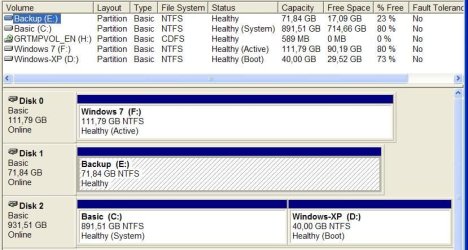
I understand what you mean about the partition to be Active, but it is marked. Actually it is the only one marked as Active on the attached snapshop of my Disk Management. The drives are very easy to identify because I give real meaning names to my HDDs. The drive letters are not the same as I see them from Win7, of course, because the screenshot was taken from XP. Only the disk with XP has two partitions. The Windows 7 partition was already Active, but I entered the command and it accepted, as you can see. It has always been Active, believe me, because I have checked and rechecked often times.

I can't remember exactly how many times I run Startup Repair, but at least six.

Thanks a lot for continuing helping.
 

Attachments

  • HDDs.JPG
    HDDs.JPG
    69.5 KB · Views: 48
  • PartitionDisk0.JPG
    PartitionDisk0.JPG
    42.4 KB · Views: 74

My Computer

Computer type
PC/Desktop
Computer Manufacturer/Model Number
Home assembled
OS
Windows 7 Ultimate 64-bit SP1
CPU
AMD Athlon 64 II X3 440
Motherboard
M4A785TD-V EVO
Memory
Kingston kit 4GB DDR3 1333MHz (KVR1333D3N9K2/4)
Monitor(s) Displays
ASUS AS VH198S
Screen Resolution
1440x900
Hard Drives
Crucial MX300 2.5" SSD SATA,
Western Digital Caviar Black WD1002FAEX SATA-III,
Samsung HD161HJ SATA-II,
Seagate Barracuda ST3120022A ATA,
Western Digital WD800BB ATA.
Case
Standard
Cooling
Standard
Keyboard
Safeway SW-20
Mouse
Logitech Anywhere, Logitech MX Anywhere 2S, Technet M006
Internet Speed
130 Mbs fiber
Antivirus
Avast Premier
Browser
Firefox, Ice Dragon and Opera
Other Info
PCI ATA-133 Adapter,
Parallel Port Card PCI - PU005V2.
The problem is that DISK2 C holds the System MBR and won't release it to DISK0 Win7 on F.

Try unplugging C DISK2, making sure Win7 HD is set as first HD to boot (after DVD drive) in BIOS setup, then boot the Win7 DVD to run Startup Repair up to 3 separate times with reboots until Win7 starts. Report back if it doesn't find an installation to Repair.

After WIn7 starts you can plug back in DISK2 to boot it via one-time BIOS Boot Menu key given on the first boot screen, or in your Manual on mobo maker's Support Downloads webpage.
 
Sorry, I can't try anything now because it is too late here, but this is the order of the disks as copied from Diskpart:

Disk ### . Status . .Size . . . . . . [Names I added]
----------- . -------- . ---------- . . .-------------------
Disk 0 . . . Online . . 112 GB . . . . Windows 7
Disk 1 . . . Online . . . 72 GB . . . . Backup
Disk 2 . . . Online . . 963 GB . . . . Windows XP & Base


This will give you the idea of their order. Tomorrow I will come to read your probable answer and follow your instructions. Thanks again and good night.
 

My Computer

Computer type
PC/Desktop
Computer Manufacturer/Model Number
Home assembled
OS
Windows 7 Ultimate 64-bit SP1
CPU
AMD Athlon 64 II X3 440
Motherboard
M4A785TD-V EVO
Memory
Kingston kit 4GB DDR3 1333MHz (KVR1333D3N9K2/4)
Monitor(s) Displays
ASUS AS VH198S
Screen Resolution
1440x900
Hard Drives
Crucial MX300 2.5" SSD SATA,
Western Digital Caviar Black WD1002FAEX SATA-III,
Samsung HD161HJ SATA-II,
Seagate Barracuda ST3120022A ATA,
Western Digital WD800BB ATA.
Case
Standard
Cooling
Standard
Keyboard
Safeway SW-20
Mouse
Logitech Anywhere, Logitech MX Anywhere 2S, Technet M006
Internet Speed
130 Mbs fiber
Antivirus
Avast Premier
Browser
Firefox, Ice Dragon and Opera
Other Info
PCI ATA-133 Adapter,
Parallel Port Card PCI - PU005V2.
Hi,

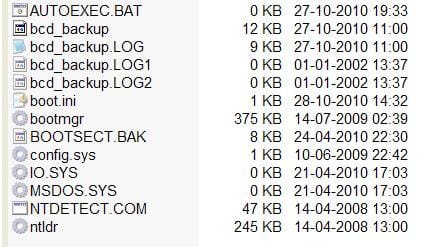
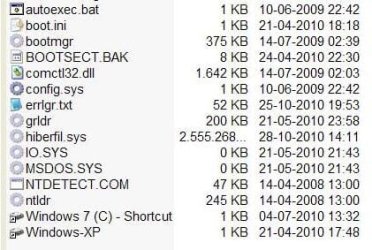
Here are the snapshots of the files on each partition root. Disk 1 doesn't have root files. They should have been attached to my last post but I couldn't. Their names were changed while uploading. I put them close to their pictures:

I don't know why both partitions of Disc 2 have system files when there is only one OS on the Disk. This is not so important, but I had the same configuration on the previous installation, less than six months ago, and only the partition with Win XP on its disk had system files. So I have three roots with OS files, but only two OSs!

Regarding your last post, it took me a very long time, mostly between 30min and 50min for every reboot cycle. Well, this is to say where I spent all my time. So I am really interested to finish with this time consuming thing and put the drive back on the road.

The problem is that DISK2 C holds the System MBR and won't release it to DISK0 Win7 on F.
This configuration exists for about six months without problem. Can the MBR be relocated?

I rebuilt BCD using the Win7 DVD, and at the end there was the same as always:
Successfully scanned Windows installations.
Total identified Windows installations: 0
The operation completed successfully.

It doesn't boot completely, but it boots.


- Startup Repair results (beginning)

One of the results from Startup Repair is
Problem signature 07: NoBootFailure

I disconnected Disk 2 and did as you said. The log counted five trials for each passage time to repair (they takes a very long time), and one of them says:

Root cause found:
Unexpected changes to system configuration might have caused the problem.


There are now two differences when booting. The missing comctl32.dll is gone. After the shrinking/growing logo it reboots right away or a boot menu appears with only one choice and reboots quickly, but there is no menu at the initial booting :confused:.

-Startup Repair results (end)


I did other things. I tried with the SFC command line with the DVD. Scannow doen't work for the same reason as befor (only after booting). I learned that options (switches) like Scanonce and Scanboot are not valid for Windows 7, so I don't know how to force a boot scan, and I didn't understand how to use other switches. However, I tried one that I found: sfc /scannow /offbootdir=c:\ /offlinedir=c:\windows

The answer was that there were problems, but could not make repairs and there was a log at Windows\Logs\CBS.log. I searched the whole computer, but the only log with that name was a 2.390KB one from day 14 to 25, the day the problem happened. I attach I attach only the end of the log, the part of the last day.

From this point, I believe that all I have to do to make the partition boot is to find a way for two things:

  1. Repair the files that SFC could not do, if any;
  2. Repair the OS root files or/and relocate the MBR.
I don't know how, but it does not seem to be very difficult.

Many thanks and sorry if this is long. Have a nice weekend.


. 457 x 214 . . . . . . Disk2 Windows XP
. 421 x 247 . . . . . . Disk2 Basic
. 421 x 283 . . . . . . Disk0 Windows 7
 

Attachments

  • Disk2_Win_XP.JPG
    Disk2_Win_XP.JPG
    24.5 KB · Views: 7
  • Disk2_Basic.JPG
    Disk2_Basic.JPG
    27.1 KB · Views: 6
  • Disk0_Win_7.JPG
    Disk0_Win_7.JPG
    30.6 KB · Views: 7
Last edited:

My Computer

Computer type
PC/Desktop
Computer Manufacturer/Model Number
Home assembled
OS
Windows 7 Ultimate 64-bit SP1
CPU
AMD Athlon 64 II X3 440
Motherboard
M4A785TD-V EVO
Memory
Kingston kit 4GB DDR3 1333MHz (KVR1333D3N9K2/4)
Monitor(s) Displays
ASUS AS VH198S
Screen Resolution
1440x900
Hard Drives
Crucial MX300 2.5" SSD SATA,
Western Digital Caviar Black WD1002FAEX SATA-III,
Samsung HD161HJ SATA-II,
Seagate Barracuda ST3120022A ATA,
Western Digital WD800BB ATA.
Case
Standard
Cooling
Standard
Keyboard
Safeway SW-20
Mouse
Logitech Anywhere, Logitech MX Anywhere 2S, Technet M006
Internet Speed
130 Mbs fiber
Antivirus
Avast Premier
Browser
Firefox, Ice Dragon and Opera
Other Info
PCI ATA-133 Adapter,
Parallel Port Card PCI - PU005V2.
Did you unplug DISK2, set Win7 HD as first to boot in BIOS setup, then run Startup Repair x3?

Does an installation show up to repair when you boot into Repair console?

If not, open a Command Line, type bootrec.exe /fixmbr and bootrec.exe /fixboot to jumpstart repair.

Your System MBR is located on the C partition, not the D XP partition. The MBR is stationary but updates to the first Active partition if not blocked from doing so by misconfiguration.

If you've done a lot of file transfers and other fixin on it outside of the Mark Active + automated Startup Repair protocol then it likely is bricked and won't fix now. Consider clean reinstall with other HD's unplugged, wiping HD first: http://www.sevenforums.com/tutorials/91339-ssd-hdd-optimize-windows-reinstallation.html
 
Thank you for replying.


Does an installation show up to repair when you boot into Repair console?
If not, open a Command Line, type bootrec.exe /fixmbr and bootrec.exe /fixboot to jumpstart repair.
It does, but I did bootrec as recommended, anyway, just before performing the following.


Did you unplug DISK2, set Windows 7 HD as first to boot in BIOS setup, then run Startup Repair x3?
I did answer this; please refer to the section of my post that I marked with the starting in bold. (I noticed that when the drive with XP is disconnected, the BIOS automatically put it up to the top of the list.) I tried this again for another four times with slightly different results; all they run now in less than a minute. Now, at the last two trials, this result disappeared:
Root cause found:
Unexpected changes to system configuration might have caused the problem.


Also, the first Startup Repair before the log (on a white background) did not show up on the last two trials. So that, the issue it mentioned before does not appear any more:
Problem signature 07: NoBootFailure

On the log (where we are asked to send a report to Microsoft) this entry also disappeared from the tow last Startup Repair trials:
Root cause found:
Unexpected changes to system configuration might have caused the problem.


On this same log, a new entry appears now:
Root cause found:
Boot status indicates that the OS booted successfully.


The problem is that it keeps doing the same when trying to boot in a normal way. After the shrinking/growing logo it reboots by itself, and that cycle can go on forever. It is not possible to use sfc /scannow, which might repair the files if needed because the answer is always the same:
There is a system repair pending which requires reboot to complete, Restart windows and run sfc again.

For the third time I ask you, please: Can't this be forced to run? Is it not worth trying?


If you've done a lot of file transfers and other fixin on it outside of the Mark Active + automated Startup Repair protocol then it likely is bricked and won't fix now.
I didn't transfer files expect for the comctl32.dll file, as mentioned. However, after that I replaced that file with the one I extracted from the Win7 DVD according to tutorial http://www.sevenforums.com/tutorials/42776-extract-files-windows-7-installation-dvd.html


Consider clean reinstall with other HD's unplugged, wiping HD first: SSD / HDD : Optimize for Windows Reinstallation
The only reason I came here asking for help was exactly to avoid having to do that.


Everything seems to be OK, but it is not, or else the partition should boot. What can be holding it from booting, please? This seems almost finished, just holding by a hair. I am nearly sure you can give it the last push. Thanks for the continued help.
 

My Computer

Computer type
PC/Desktop
Computer Manufacturer/Model Number
Home assembled
OS
Windows 7 Ultimate 64-bit SP1
CPU
AMD Athlon 64 II X3 440
Motherboard
M4A785TD-V EVO
Memory
Kingston kit 4GB DDR3 1333MHz (KVR1333D3N9K2/4)
Monitor(s) Displays
ASUS AS VH198S
Screen Resolution
1440x900
Hard Drives
Crucial MX300 2.5" SSD SATA,
Western Digital Caviar Black WD1002FAEX SATA-III,
Samsung HD161HJ SATA-II,
Seagate Barracuda ST3120022A ATA,
Western Digital WD800BB ATA.
Case
Standard
Cooling
Standard
Keyboard
Safeway SW-20
Mouse
Logitech Anywhere, Logitech MX Anywhere 2S, Technet M006
Internet Speed
130 Mbs fiber
Antivirus
Avast Premier
Browser
Firefox, Ice Dragon and Opera
Other Info
PCI ATA-133 Adapter,
Parallel Port Card PCI - PU005V2.
Try replacing the registry hives.

Use whatever boot disc is easiest , have a look in windows \system32\config.

You will see the hives there .

There are backup copies in Windows\system32\config\regback.

Rename the original ones in windows\system32\config to e.g. DEFAULTOLD, COMPONENETSOLD, SYTEMOLD, etc.

Then copy the backups from Windows\system32\config\regback into windows\system32\config.


See if that helps.
 

My Computers

System One System Two

  • Computer type
    PC/Desktop
    OS
    7 X64
    CPU
    i5 8400
    Motherboard
    gigabyte b365m ds3h
    Memory
    2x8gb 3200mhz
    Hard Drives
    various
    PSU
    pure power 11 400w cm
    Case
    Coolermaster
    Cooling
    cryorig m9i
  • Computer type
    PC/Desktop
    OS
    7x64
    CPU
    g5400
    Motherboard
    ga b365m ds3h
    Memory
    8gb ddr4 2400
    PSU
    xfx pro 450w
Hi SIW2,

I did think of that, but registry backup used to be very easy, but I find it complicated since XP.

At windows\system32\config\RegBack I don't have all of the files that are on windows\system32\config.

Here are the files I have on RegBack: DEFAULT, SAM, SECURITY, SOFTWARE and SYSTEM. Then I have two log files each one of them, LOG1 and LOG2.

The missing files are: BCD-Template, COMPONENETS (plus 12 with long names starting with the same name), userdiff, and their logs,

Am I missing something?

Please advise.
 

My Computer

Computer type
PC/Desktop
Computer Manufacturer/Model Number
Home assembled
OS
Windows 7 Ultimate 64-bit SP1
CPU
AMD Athlon 64 II X3 440
Motherboard
M4A785TD-V EVO
Memory
Kingston kit 4GB DDR3 1333MHz (KVR1333D3N9K2/4)
Monitor(s) Displays
ASUS AS VH198S
Screen Resolution
1440x900
Hard Drives
Crucial MX300 2.5" SSD SATA,
Western Digital Caviar Black WD1002FAEX SATA-III,
Samsung HD161HJ SATA-II,
Seagate Barracuda ST3120022A ATA,
Western Digital WD800BB ATA.
Case
Standard
Cooling
Standard
Keyboard
Safeway SW-20
Mouse
Logitech Anywhere, Logitech MX Anywhere 2S, Technet M006
Internet Speed
130 Mbs fiber
Antivirus
Avast Premier
Browser
Firefox, Ice Dragon and Opera
Other Info
PCI ATA-133 Adapter,
Parallel Port Card PCI - PU005V2.

My Computer

Computer Manufacturer/Model Number
* BFK Customs *
OS
W 7 64-bit Ultimate
CPU
Intel Q9550 Yorkfield
Motherboard
ASUS P5Q Pro
Memory
8GB Dominator 8500C5D
Graphics Card(s)
ATI : XFX 5870
Sound Card
Realtek HD Audio 7-1
Monitor(s) Displays
1x 47" LCD HDMI & 3x 26" LCD HDMI
Screen Resolution
1920x1080P & 1920x1200
Hard Drives
1x 80GB Intel X25-M G2 SSD : 1x 500GB & 1x 640GB WD Caviar Black(s)
PSU
Corsair 620HX
Case
Cooler Master RC-690
Cooling
Tuniq Tower 120, 2x 140mm and 3x 120mm case fans
Keyboard
Microsoft 500
Mouse
Razer Diamondback 3G
Internet Speed
14 Mb/s
Other Info
1x Koutech 3Gb/s SATA HDD Hot Swap Rack
Hi Neophile,

You will only have DEFAULT, SAM, SECURITY, SOFTWARE and SYSTEM Hives in regbak.

Copy those into system32\config.

Just copy the above , not the LOG files.
 

My Computers

System One System Two

  • Computer type
    PC/Desktop
    OS
    7 X64
    CPU
    i5 8400
    Motherboard
    gigabyte b365m ds3h
    Memory
    2x8gb 3200mhz
    Hard Drives
    various
    PSU
    pure power 11 400w cm
    Case
    Coolermaster
    Cooling
    cryorig m9i
  • Computer type
    PC/Desktop
    OS
    7x64
    CPU
    g5400
    Motherboard
    ga b365m ds3h
    Memory
    8gb ddr4 2400
    PSU
    xfx pro 450w
Back
Top