Solved Missing Boot Manager

Mimalito

New member
Local time
7:53 AM
Messages
22
Hello,

So after browsing multiple forums and posts I decided to make my own since following little snippets of advice for others has possibly led me to my current problem.

Currently my Win 7 does not boot. I believe the current message is
"no active partition"

This all occurred after an update to Ubuntu on a separate external drive and subsequent use of linux based program boot-repair. Might have messed things up.

First off I am having trouble getting the Windows Repair Option to start sometimes with the message "This version of system recovery options is not comparable with the version of windows you are trying to repair"

I understand this is something to do with "EFI mode?" which I don't totally understand. The Win 7 install is on a SATA drive. In BIOS I have the option of switching things around between IDE, RAID or AHCI mode.

When I do get it up and running sometimes it doesn't even see my installation and gives me a "failed to save start up options" error when I try to repair. When I did get it do actualy display my windows install (not sure what combo of settings did it) It tells me it's a "Windows 7 Home Premium on (unknown) Local Disk. I try to repair this and it gives me a read out starting with

"Problem Signature" etc etc

#7 is missingbootmanager

So with all the reading I've done over the last few days from what I can gather there are tools that I can hypothetically use to mark a partition active. My main issue so far is that when I go to the command prompt I can browse all drives except the one my win 7 is on. Is that normal? It starts on X:, C: is not my Win 7 install but rather a completely different internal IDE drive that I have music on.

I apologize that this is long and rambling, if there is anything else I can answer or any tests I can run or post please let me know. I have access to the Internet through a old laptop in the house and have a 1gb thumb drive I can use for diag tools/programs. No ability to burn out anything on a CD. I also have a current report output from the Ubuntu program boot-repair if that would be helpful at all, it lists a lot of info about boot loaders, drives, partition, etc.

I DON'T care about the Ubuntu install at this point. I just want to be able to get back into my windows install.

thanks in advance..
Cheers
 

My Computer

OS
Windows 7 Home Premium X64 Service Pack 1
CPU
AMD Athlon II x4 645 Processor @ 3.1 Ghz
Motherboard
MSI 890GXM-G65
Memory
2 GB
Graphics Card(s)
GeForce GTS450
Sound Card
onboard
Screen Resolution
1280 x 1040
I'm really sorry but I can't seem to find the website I was on with the instructions to set the partition active. Can you post a link or instructions for me? And when you say to run repairs with just the Win 7 HD do you mean to physically disconnect my IDE drives/cable from the motherboard since the Win 7 install is connected to SATA 1?
 

My Computer

OS
Windows 7 Home Premium X64 Service Pack 1
CPU
AMD Athlon II x4 645 Processor @ 3.1 Ghz
Motherboard
MSI 890GXM-G65
Memory
2 GB
Graphics Card(s)
GeForce GTS450
Sound Card
onboard
Screen Resolution
1280 x 1040
Ok.. so I unplugged the IDE cable inside and have only my Win 7 HD and DVD rom drive connected (on SATA 1 & 5) When I start up Windows recovery on the disk it is not finding my installation drive to recover and I'm not sure if that matters? When I use Diskpart is sees the drive as Disk 0 with the following set up ..

Partition 1 System 100MB 1024KB
Partition 2 System 128mb 101mb
Partition 3 System 465GB 229MB

I'm pretty sure this is my WIN 7 install on Partition 3. (drive is 500gb) When I try to use the active command I get.. "The selected disk is not a fixed MBR disk"
 

My Computer

OS
Windows 7 Home Premium X64 Service Pack 1
CPU
AMD Athlon II x4 645 Processor @ 3.1 Ghz
Motherboard
MSI 890GXM-G65
Memory
2 GB
Graphics Card(s)
GeForce GTS450
Sound Card
onboard
Screen Resolution
1280 x 1040
Try marking the 100mb System Reserved partition Active then run Startup Repair - Run 3 Separate Times.

However if Win7 was installed using EFI Boot on a GPT disk, this may not repair it.

What I would do is reinstall Win7 after converting the disk to MBR format using Diskpart and Option Two here: http://www.sevenforums.com/tutorials/26203-convert-gpt-disk-mbr-disk.html

In the future if you cannot install Linux distro to another HD booted only via BIOS so that GRUB doesnt' corrupt Win7, then follow these steps to Dual boot Ubuntu-Win7
 
I attempted to mark just the 100mb partition as active and got the same results. Volume 1 is listed as FAT32, Info:Hidden, Required: No, Attrib:0000000000000000 No listing for active or inactive. Details on all partitions of this drive give the same Info and Attrib. The 2nd small partition is type:RAW (not familiar with this), and 3rd partition is NTFS as expected.

I'm still confused on this EFI boot and GPT disk (were these settings possibly changed via the boot-repair program?) I built this rig from scratch and installed Win 7 myself. All bios settings were default to the board (for better or for worse). I tried to emulate the starting conditions (bios settings, etc) when attempting to repair. So boot order is..

1) 2.2TB Infinity (some MB option that is my understanding it helps to boot disks that are really large, mine is 500GB however)

2) SATA 1 (Win 7)

3) DVD (with Win 7 DVD inserted)

When I boot this way I get a black screen with /EFI/Microsoft/Boot/BCD "an error occurred while tempting to read the boot configuration"

ALSO.. If it is important every time I try to do the repair I look at the log when it can't auto repair and have noticed something that may be helpful. On the external that houses my Ubuntu install there is a NTFS partition that houses a WIN 7 backup disc image from March. When I leave the external OFF the "Problem Signature" part says under (#5 External Media) and (#07 No OS Installed), when it's ON is says (#5 unknown) and (#7 Missing Boot Manager)

I'm curious what part my backup disc image is playing in this? Is my original Win 7 install healthy on my SATA drive and just can't be booted to or is the repair utility somehow seeing my back up image as my install and that's why it can't mark it as active? Maybe I'm reaching as I admittedly don't understand all this.
 

My Computer

OS
Windows 7 Home Premium X64 Service Pack 1
CPU
AMD Athlon II x4 645 Processor @ 3.1 Ghz
Motherboard
MSI 890GXM-G65
Memory
2 GB
Graphics Card(s)
GeForce GTS450
Sound Card
onboard
Screen Resolution
1280 x 1040
Why is the Win7 HD not set first to boot? ENter BIOS setup to change that now.

While in BIOS setup see if you have an EFI Boot Disk in the boot order.

If you have an EFI BIOS then Win7 is installed in EFI mode by choosing the EFI Boot Disk as first to boot, installing only 64 bit this way to a GPT disk: UEFI (Unified Extensible Firmware Interface) - Install Windows 7 with - Windows 7 Forum

The way an EFI BIOS is normally deselected is to remove EFI Boot Disk from the boot order, however you should look for any other EFI settings in BIOS setup and in the Manual for your mobo found on its Support Downloads webpage.

If your HD is MBR and the Win7 partition is Primary then it should mark as Active. The fact that it will not makes me think it is GPT formatted.

It would be very helpful to see a picture of your HD using free Partition Wizard bootable CD. Post a clear camera snap of the entire drive map and listings box: Screenshots and Files - Upload and Post in Seven Forums - Windows 7 Forums
 
The HD is not #1 since that isn't how it was set up from the beginning. I have tried with it as first boot option as well. I'll change it back to first boot but when I set up with PC initially that "2.2TB" thing was already set as first boot in BIOS. I didn't know what it was so I never messed with it.

I've already looked over the spec for my MB online and have looked through the various options. Nothing that says EFI that I can find unless it's called something else. I have a MSI 890GXM-G65.

Just an update. I'm downloading the partition wizard now and will post results.

I appreciate you patience.
 

My Computer

OS
Windows 7 Home Premium X64 Service Pack 1
CPU
AMD Athlon II x4 645 Processor @ 3.1 Ghz
Motherboard
MSI 890GXM-G65
Memory
2 GB
Graphics Card(s)
GeForce GTS450
Sound Card
onboard
Screen Resolution
1280 x 1040
Is there another comparable utility that has the ability to boot from USB? I read the instructions but don't have the ability to make a disk.
 

My Computer

OS
Windows 7 Home Premium X64 Service Pack 1
CPU
AMD Athlon II x4 645 Processor @ 3.1 Ghz
Motherboard
MSI 890GXM-G65
Memory
2 GB
Graphics Card(s)
GeForce GTS450
Sound Card
onboard
Screen Resolution
1280 x 1040
I'm sorry, I feel really stupid but I have searched that page up and down and while I see a huge list of utilities I don't see where to download this disk image
 

My Computer

OS
Windows 7 Home Premium X64 Service Pack 1
CPU
AMD Athlon II x4 645 Processor @ 3.1 Ghz
Motherboard
MSI 890GXM-G65
Memory
2 GB
Graphics Card(s)
GeForce GTS450
Sound Card
onboard
Screen Resolution
1280 x 1040
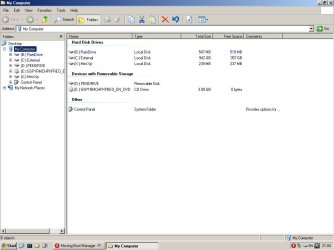
Is this what we are looking for? I don't see my SATA drive listed here. Are there drivers that need to be loaded to see it?
 

Attachments

  • explorer.jpg
    explorer.jpg
    53.4 KB · Views: 92

My Computer

OS
Windows 7 Home Premium X64 Service Pack 1
CPU
AMD Athlon II x4 645 Processor @ 3.1 Ghz
Motherboard
MSI 890GXM-G65
Memory
2 GB
Graphics Card(s)
GeForce GTS450
Sound Card
onboard
Screen Resolution
1280 x 1040
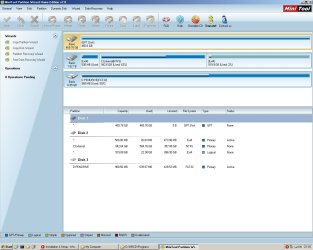
Sorry, just browsed from inside this mini XP and foudn partition wizard, this is probably what you were actually looking for?
 

Attachments

  • partitionwizard.jpg
    partitionwizard.jpg
    110.5 KB · Views: 101

My Computer

OS
Windows 7 Home Premium X64 Service Pack 1
CPU
AMD Athlon II x4 645 Processor @ 3.1 Ghz
Motherboard
MSI 890GXM-G65
Memory
2 GB
Graphics Card(s)
GeForce GTS450
Sound Card
onboard
Screen Resolution
1280 x 1040
I don't know why the 2.2tb is labeled External because it is installed into the computer, correct?

But the problem with DISK1 is clear as it says it is GPT formatted. This would require it to be installed using EFI Boot disk set first in BIOS setup: UEFI (Unified Extensible Firmware Interface) - Install Windows 7 with - Windows 7 Forums

What I would do instead is unplug the other HD, convert the GPT disk to MBR using Diskpart from booted Win7 installer Command Line accessing DISKPART At PC Startup: Convert GPT Disk to MBR Disk

Then close Command Box, click Install Now, at drive selection screen click Next to auto-create and -format, begin install.
 
The disk listed as C: is in fact an external disk. I'm not sure why it is designated as C:

It is divided in 1/2 (Ubuntu 12.04 on one partition and a Win 7 back up image plus some other windows folders on the other)

So I'm clear then.. is my current Win 7 install totally fubar? No amount of boot repairing is going to get me back into it? I see in the photo as well it says GPT format and I don't really know how that happened. That's not how I had it formatted (to my knowledge) when I first installed Win 7 on this disk 6 months ago.
 

My Computer

OS
Windows 7 Home Premium X64 Service Pack 1
CPU
AMD Athlon II x4 645 Processor @ 3.1 Ghz
Motherboard
MSI 890GXM-G65
Memory
2 GB
Graphics Card(s)
GeForce GTS450
Sound Card
onboard
Screen Resolution
1280 x 1040
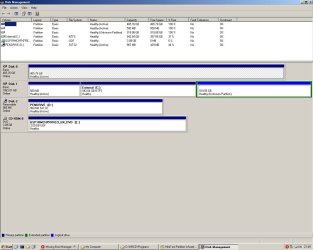
In order to repair DISK0 Win7 it would have to have the EFI boot partition and the 100mb System Reserved partitions which somehow went away. Did you do anything to change them?

Just to double-check can you post up a screenshot of your maximized Disk Management map in the mini-XP by rightclicking Computer and choosing Manage?

You can rightclick on the DISK1 partition in both XP Disk Mgmt and Partition Wizard to Explore the disk to see if you see any files.

If so you can copy out to external your files: Copy & Paste - in Windows Recovery Console
 
Disk Management
 

Attachments

  • diskmgmt.jpg
    diskmgmt.jpg
    100.3 KB · Views: 89

My Computer

OS
Windows 7 Home Premium X64 Service Pack 1
CPU
AMD Athlon II x4 645 Processor @ 3.1 Ghz
Motherboard
MSI 890GXM-G65
Memory
2 GB
Graphics Card(s)
GeForce GTS450
Sound Card
onboard
Screen Resolution
1280 x 1040
I didn't knowingly delete any partitions on that drive but it's possible I guess that the Linux tool Boot-repair did.
 

My Computer

OS
Windows 7 Home Premium X64 Service Pack 1
CPU
AMD Athlon II x4 645 Processor @ 3.1 Ghz
Motherboard
MSI 890GXM-G65
Memory
2 GB
Graphics Card(s)
GeForce GTS450
Sound Card
onboard
Screen Resolution
1280 x 1040
Back
Top