Solved Missing Boot Manager

It's best to keep Linux installs on a separate HD booted only via the BIOS boot menu, not GRUB which can corrupt Win7 beyond repair. Who knows what Linux tools do to Win7. Best to keep them separate as we see lots of problems.
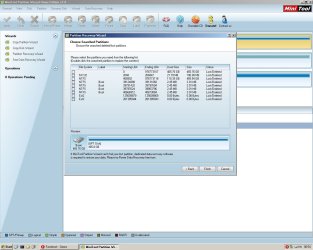
 
I am not able to browse any files with Disk Management or Partition Wizard but I did notice the option in PW for "Partition Recovery Wizard", You said that is appeared that I had 2 partions missing, if I attempt to use it maybe they would come back and then I could try the repair off the Win 7 DVD? I read somewhere that as long as you don't format a drive that deleted partitions can somtimes be recovered. Any harm in trying this?
 

My Computer

OS
Windows 7 Home Premium X64 Service Pack 1
CPU
AMD Athlon II x4 645 Processor @ 3.1 Ghz
Motherboard
MSI 890GXM-G65
Memory
2 GB
Graphics Card(s)
GeForce GTS450
Sound Card
onboard
Screen Resolution
1280 x 1040
The drive is formatted. It needs to be unallocated space to recover deleted partitions. But you can try.

You have backup images, right? Boot into System Recovery Options to see if it detects the stored image and will reimage it to the disk. If not delete the partition first. If that fails, convert it to MBR first then try reimaging again.

What do you see when you rightclick the drive in Disk Mgmt or PW to Explore?

You should also be able to browse into the drive using XP Explorer since you are booted into an XP OS at the moment.
 
I do have a backup image and that was going to be one of my last resorts if I can't fix this boot/Win 7 install. I've never used a disk image to recover a system before. It's from mid March but at this point if it's between a format/reinstall or a recover from 1.5 months ago I'll go with the latter. My question with restoring from a restore point/recovery .. would it format the disc and replace the proper boot loader/partitions needed by windows or would it only restore the OS and then I'd still be left grappling with a non booting system? (to answer your question, yes it sees the image when I have the external on when booting from the DVD)

And when I right click in Disk Mgmt and PW they both have the same result, all options are greyed out. I see "Explore" in both menus but I can't use them.
 

My Computer

OS
Windows 7 Home Premium X64 Service Pack 1
CPU
AMD Athlon II x4 645 Processor @ 3.1 Ghz
Motherboard
MSI 890GXM-G65
Memory
2 GB
Graphics Card(s)
GeForce GTS450
Sound Card
onboard
Screen Resolution
1280 x 1040
It would help if you knew if you had an MBR drive when you took the image, because as long as the drive is correctly either MBR or GPT then you would reimage to unallocated space and it will create and format the partition.

If you're unsure then as I said I would try reimaging to what you have now.

If that fails then delete the partition in XP Disk Mgmt or PW and try again.

If it then fails you know you must convert disk to MBR first to get it reimaged.
 
Thanks for all the info.

I took this latest screen cap since the Partition Wizard finished searching the whole drive for deleted partitions. There are quite a few. What one or ones would you recommend to restore? The 100mb FAT32 one? One of the ones that says boot?
 

Attachments

  • recovered.jpg
    recovered.jpg
    117.2 KB · Views: 58

My Computer

OS
Windows 7 Home Premium X64 Service Pack 1
CPU
AMD Athlon II x4 645 Processor @ 3.1 Ghz
Motherboard
MSI 890GXM-G65
Memory
2 GB
Graphics Card(s)
GeForce GTS450
Sound Card
onboard
Screen Resolution
1280 x 1040
You have to look at the partitions by size to try to determine which were the ones you had. Then you look at starting and ending position as you cannot recover any which are also on that exact position.

Based on that all I can see that would pertain are the second and third listing. Judging by size do these look like your System Reserved and Win7 partitions?

If so I would select those and recover to see what it puts back. Post back any error message.
 
I can actually double click the partitions and in fact the 2nd one down is my windows install. I can see the file structure and installed programs/files. This is exciting.

Curious though because I select them and then press "Finish", nothing seems to happen. I thought this tool would restore them. Maybe since I know it's there another tool on the Hiren's CD will actually do the restore feature?
 

My Computer

OS
Windows 7 Home Premium X64 Service Pack 1
CPU
AMD Athlon II x4 645 Processor @ 3.1 Ghz
Motherboard
MSI 890GXM-G65
Memory
2 GB
Graphics Card(s)
GeForce GTS450
Sound Card
onboard
Screen Resolution
1280 x 1040
There is no better tool I know to undelete a partition than PW Partition Recovery Wizard.

However there is more complication here than I've ever seen in dozens of times it's been used successfully here. For one thing there is an intact GPT partition there, not one which has obviously been deleted.

You also don't seem to think you had a GPT disk and if you did there would be an EFI boot partition there to be recovered. That there's not makes me think it was an MBR disk that somehow was reformatted to GPT. The difference between GPT and MBR is highly complex and only just becoming understood as more EFI BIOS' come into circulation.

Did you check those two partitions and then click Finish? If it won't finish then it may be because the disk has somehow been reformatted as GPT. I've never seen PW Wizard recover from anything other than Unallocated space. You may have to delete the GPT partition to get it to recover. But there are no guarantees. It would take someone with more knowledge of this to advise you with certainty.
 
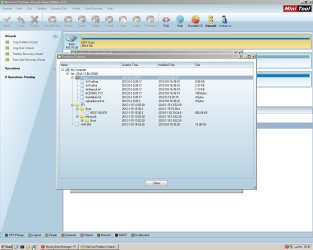
I ticked both boxes and hit finish. Maybe I'll reboot. I didn't get an error message, just no message at all. And speaking of EFI the Fat32 100mb partition has the following file structure. I don't know if this is helpful, perhaps only if it actualy restores.
 

Attachments

  • EFI.jpg
    EFI.jpg
    116.4 KB · Views: 46

My Computer

OS
Windows 7 Home Premium X64 Service Pack 1
CPU
AMD Athlon II x4 645 Processor @ 3.1 Ghz
Motherboard
MSI 890GXM-G65
Memory
2 GB
Graphics Card(s)
GeForce GTS450
Sound Card
onboard
Screen Resolution
1280 x 1040
Looks like it might be an EFI installation on GPT disk.

Maybe the Linux tool you ran corrupted the data as you suspected, so that it is only showing in Recovery Wizard.

There is a recent thread where a data recovery software was able to recover the data (not partition structure) from a GPT disk. I'll try to find it or maybe someone else will link to it or recall the software.

Do you have your files backed up elsewhere? Because even if you can recover the data it will likely require a Clean Reinstall.

I would convert the HD to MBR to reinstall with EFI taken out of the BIOS boot order
 
I decided to check out some of the other tools. I loaded up Diskgenius and looked at the partitions on that drive. I don't remember my exact steps but it scanned the drive and said it could write a new partition table (or some such terminology). It found that 100mb partition and it was set to active. It prompted me to save my new partition table. Asked if I wanted to do MBR or GPT. I chose MBR and restarted. Windows recovery started from the DVD and found my installation to repair. It repaired and restarted. Then Windows 7 started from my SATA drive! Everything seems to be intact.
 

My Computer

OS
Windows 7 Home Premium X64 Service Pack 1
CPU
AMD Athlon II x4 645 Processor @ 3.1 Ghz
Motherboard
MSI 890GXM-G65
Memory
2 GB
Graphics Card(s)
GeForce GTS450
Sound Card
onboard
Screen Resolution
1280 x 1040
Great News! What caught your attention about that particular app on Hiren's Boot CD?

We will have to remember
DiskGenius 3.2 Restore deleted partition, Rebuild MBR, Rebuild partition table, Recover files, Restore formatted partition, Backup files by partition, Disk clone, Backup partition table, Create/Delete/Format Partitions etc.
listed under Recovery Tools section.

Can you post back a Win7 Disk Mgmt screenshot now?
 
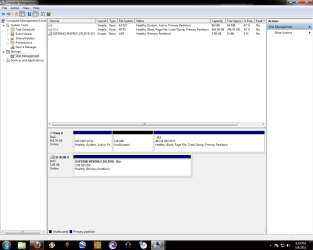
I decided to give DiskGenius a shot because it mentioned "restore deleted partition" since Partition Wizard seemed to see my deleted/lost partitions but didn't seem to actually do anything about it. Maybe I was doing something wrong.. not sure. And I'd love to post a pic. Because after all is said and done I'd love you to look at my set up and see if it seems "back to normal" as far as a basic Win 7 install should. There is that odd bit of unallocated space but I don't know if it was there before or not. I've never actually used the disk management tools before today.
 

Attachments

  • fixed.png
    fixed.png
    35 KB · Views: 69

My Computer

OS
Windows 7 Home Premium X64 Service Pack 1
CPU
AMD Athlon II x4 645 Processor @ 3.1 Ghz
Motherboard
MSI 890GXM-G65
Memory
2 GB
Graphics Card(s)
GeForce GTS450
Sound Card
onboard
Screen Resolution
1280 x 1040
View attachment 210959This is really strange. It seems to have jettisoned the EFI partition which comes with an EFI install to GPT disk. The space is there but not the EFI partition, which I noticed was also missing in the PW Partition Recovery Wizard findings.

I am now wondering if it is still even a GPT disk or was rewritten by DiskGenius as an MBR disk.
 
Well. DiskGenius did ask if I wanted to save it as MBR or GPT and I chose MBR. Don't know if it was the right choice but everything seems to be working.
 

My Computer

OS
Windows 7 Home Premium X64 Service Pack 1
CPU
AMD Athlon II x4 645 Processor @ 3.1 Ghz
Motherboard
MSI 890GXM-G65
Memory
2 GB
Graphics Card(s)
GeForce GTS450
Sound Card
onboard
Screen Resolution
1280 x 1040
To find out in Disk Mgmt rightclick on Disk0 box highlighted in screenshot below, then select Properties, then the Volumes tab to see what format is:

Capture.PNGclick to enlarge
 
And we have...
 

Attachments

  • properties.png
    properties.png
    55 KB · Views: 99

My Computer

OS
Windows 7 Home Premium X64 Service Pack 1
CPU
AMD Athlon II x4 645 Processor @ 3.1 Ghz
Motherboard
MSI 890GXM-G65
Memory
2 GB
Graphics Card(s)
GeForce GTS450
Sound Card
onboard
Screen Resolution
1280 x 1040
That makes DiskGenius even more of a good find. I've already added it to Troubleshooting Windows 7 Failure to Boot. See if you think I placed it correctly in context for how it might work best as a last resort.

Nice work there. :geek: We all learned, and given the title countless others will find this via Google.

When ready you can mark the thread Solved at top.
 
I think it fits in well where you put it. Thanks for all your suggestions. It's never as easy at it seems (or you want it to be) It was a lot of back and forth, a lot of picking through what works and what doesn't. And I'm sure those more savvy then me might find all the info they need in between my ineptitude.

I can happily say that not only does it boot but boots faster then it used to, noticeably.

I may have inadvertently flashed by bios trying something unrelated, but that's another questions for a different thread (or forum?)

Thanks again to forum member gregrocker
 

My Computer

OS
Windows 7 Home Premium X64 Service Pack 1
CPU
AMD Athlon II x4 645 Processor @ 3.1 Ghz
Motherboard
MSI 890GXM-G65
Memory
2 GB
Graphics Card(s)
GeForce GTS450
Sound Card
onboard
Screen Resolution
1280 x 1040
Back
Top