Missing BootMGR and my peril.

drinkdog

New member
Local time
1:03 AM
Messages
5
So I booted up my Windows 7 computer this morning and was given the error 'Missing BootMGR', so I tried repairing my boot system with the windows 7 install CD, but it couldn't find any version of Windows to install, so I presume that it has been wiped one way or another. So I decided to reinstall Windows 7 and use a back-up to restore my files afterwards, but the Windows 7 install manager cannot locate any drives for me to install on.

I have tried creating some partitions (and to simply see if I could locate the problem) in a flash-disk version of Ubunutu, but it couldn't find any drives or partitions either.

Any way I can fix this?
 

My Computer

OS
Windows 7
Boot up using the Startup disk CD or Windows 7 DVD. (not the OEM manufacturer's Recovery Disk) If you have a Netbook, you will need a CD/DVD drive.
Make sure no USB drives are plugged in.

Do a Strartup Repair:
http://www.sevenforums.com/tutorials/681-startup-repair.html?ltr=S
Note: You may need to do startup repair 3 to 4 times.
http://www.sevenforums.com/tutorials/105541-startup-repair-run-3-separate-times.html

If you have not made your Startup Repair
http://www.sevenforums.com/tutorials/2083-system-repair-disc-create.html
Do you have a mate with Windows 7 & CD/DVD RW Drive, how could burn one off.

It may be worth Checking the hard drive with the manufacturer's diagnostic tools first.
Hard Drive Diagnostics Tools and Utilities (Storage) - TACKtech Corp.
HD Diagnostic

Can you post your specs.
http://www.sevenforums.com/general-discussion/22550-filling-out-system-specs.html
http://www.sevenforums.com/hardware-devices/6936-dont-know-what-hardware-you-have.html
VistaForums SysInfo Tool - Vista Forums
 

My Computer

OS
ME/XP/Vista/Win7
I tried both the start-up repair and the start-up repair disc, but they weren't able to detect an OS to repair.
 

My Computer

OS
Windows 7
I had this exact issue! I would recommend getting a professional to do it because when I tried to do it myself I messed it up even more and had to pay more! I got lucky, someone did it for £30.
 

My Computer

Computer Manufacturer/Model Number
AMD
OS
Windows 7 Professional 32bit
Memory
4.00GB
Graphics Card(s)
ATI
Hard Drives
500GB (Primary)
250GB (Ghost Backup)
150GB (General)
We are professionals! :p
 

My Computer

Computer Manufacturer/Model Number
* BFK Customs *
OS
W 7 64-bit Ultimate
CPU
Intel Q9550 Yorkfield
Motherboard
ASUS P5Q Pro
Memory
8GB Dominator 8500C5D
Graphics Card(s)
ATI : XFX 5870
Sound Card
Realtek HD Audio 7-1
Monitor(s) Displays
1x 47" LCD HDMI & 3x 26" LCD HDMI
Screen Resolution
1920x1080P & 1920x1200
Hard Drives
1x 80GB Intel X25-M G2 SSD : 1x 500GB & 1x 640GB WD Caviar Black(s)
PSU
Corsair 620HX
Case
Cooler Master RC-690
Cooling
Tuniq Tower 120, 2x 140mm and 3x 120mm case fans
Keyboard
Microsoft 500
Mouse
Razer Diamondback 3G
Internet Speed
14 Mb/s
Other Info
1x Koutech 3Gb/s SATA HDD Hot Swap Rack
I had this exact issue! I would recommend getting a professional to do it because when I tried to do it myself I messed it up even more and had to pay more! I got lucky, someone did it for £30.

We are professionals! :p

I tried both the start-up repair and the start-up repair disc, but they weren't able to detect an OS to repair.

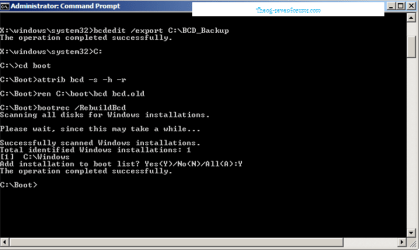
Use the Rebuild BCD in this tutorial:
How to use the Bootrec.exe tool in the Windows Recovery Environment to troubleshoot and repair startup issues in Windows

Startup Repair 4.PNG Startup Repair 5.PNG
 

My Computer

OS
ME/XP/Vista/Win7
I live in the UAE and heat IS a problem, and the ventilation system around my computer wasn't great, so maybe something just over-heated or melted?

I don't know, the thing is still under warranty so I may just turn it in and ask for a replacement (I have all my important files backed up out of habit).
 

My Computer

OS
Windows 7
I had this exact issue! I would recommend getting a professional to do it because when I tried to do it myself I messed it up even more and had to pay more! I got lucky, someone did it for £30.

Sorry for the double post, but do you remember what your 'professional' said?
 

My Computer

OS
Windows 7
It's entirely possible your HD or other hardware has gone south. See if you can boot the HD maker's diagnostics/Repair CD to run a full scan: HD Diagnostic

Follow Theog's tutorial to Rebuild MBR which can at least show an installation to Repair so you can run Startup Repair. Even if not, run Startup Repair from the Recovery Tools list anyway.
 
I had this exact issue! I would recommend getting a professional to do it because when I tried to do it myself I messed it up even more and had to pay more! I got lucky, someone did it for £30.

Sorry for the double post, but do you remember what your 'professional' said?

He basically ran MHDD. Then once he had run that he reinstalled Windows 7 and the files where recovered at C:/Windows.old. What I think I should have said was that if you are like me and had no experience in this kind of situation.
 

My Computer

Computer Manufacturer/Model Number
AMD
OS
Windows 7 Professional 32bit
Memory
4.00GB
Graphics Card(s)
ATI
Hard Drives
500GB (Primary)
250GB (Ghost Backup)
150GB (General)
Well, I'll give all of those a try but I have to be careful that I don't void my warranty, which is basically my back-up plan.

I think as said before, my HDD has just exploded (or something similar) so if I can't fix it by tomorrow morning I'll just turn it in, suck up my pride and ask for a refund/replacement.

Just a quick question, can you transfer backup/restore images across computers?
 

My Computer

OS
Windows 7
Back
Top