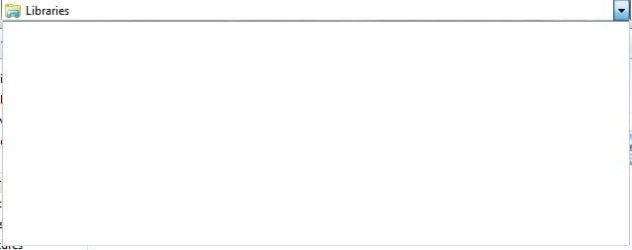
Missing breadcrumbs am I right

Nickyboy

Banned
Local time
1:23 PM
Messages
6
When I click on the address bar at the top of Windows Explorer I get a blank dropdown menu. I'm wondering if this is correct. In XP the dropdown would enable me to go back.I think I attached a screen shot of what I'm talking about.
 

My Computer

OS
windows 7 ultimate
Do you mean Internet explorer, web address, and there is no screen shot.?
 

My Computer

Computer type
PC/Desktop
Computer Manufacturer/Model Number
Dell XPS 420
OS
Windows 10, Home Clean Install
CPU
Intel Core2 processsor Q8200(2.33Ghz 1333FSB) Quad Core Tech
Motherboard
Dell
Memory
6 gb
Graphics Card(s)
ATI Radeon 256MB HD3650
Sound Card
Intergrated 7.1 Channel Audio
Monitor(s) Displays
Dell SP2009W 20"
Hard Drives
640 GB Serial ATA Hard drive
Cooling
Fan
Keyboard
Dell USB Keyboard
Mouse
Dell Premium Optical USB
Internet Speed
DSL 2.85
Hi Richc,no I mean windows explorer.How can I attach a bmp screenshot.I have clicked on attachments and uploaded from my computer with the browse button but no luck.I get message upload failed
 

My Computer

OS
windows 7 ultimate
When I click on the address bar I get

copy address
delete address
delete history

When you are at the screen you want to make a screen shot, try typing snipping tool in search and use that. It should work.

If the above fails, try this:
http://www.seoconsultants.com/windows/print-screen/

At the top[ of your post screen you will see a paper cliip, which can be used to attach the screen shot.
 

My Computer

Computer type
PC/Desktop
Computer Manufacturer/Model Number
Dell XPS 420
OS
Windows 10, Home Clean Install
CPU
Intel Core2 processsor Q8200(2.33Ghz 1333FSB) Quad Core Tech
Motherboard
Dell
Memory
6 gb
Graphics Card(s)
ATI Radeon 256MB HD3650
Sound Card
Intergrated 7.1 Channel Audio
Monitor(s) Displays
Dell SP2009W 20"
Hard Drives
640 GB Serial ATA Hard drive
Cooling
Fan
Keyboard
Dell USB Keyboard
Mouse
Dell Premium Optical USB
Internet Speed
DSL 2.85
you mean like that Nicky?
 

Attachments

  • explorer.JPG
    explorer.JPG
    10.4 KB · Views: 17

My Computer

Computer type
PC/Desktop
OS
Win7 Home Premium x64 SP1, Archlinux x86_64. Elementary Luna
When I click on the address bar I get

copy address
delete address
delete history

When you are at the screen you want to make a screen shot, try typing snipping tool in search and use that. It should work.

If the above fails, try this:
Windows Print Screen Key

At the top[ of your post screen you will see a paper cliip, which can be used to attach the screen shot.

Little confused to where he meant my way or the context menu :S
 

My Computer

Computer type
PC/Desktop
OS
Win7 Home Premium x64 SP1, Archlinux x86_64. Elementary Luna
When I click on the address bar I get

copy address
delete address
delete history

When you are at the screen you want to make a screen shot, try typing snipping tool in search and use that. It should work.

If the above fails, try this:
Windows Print Screen Key

At the top[ of your post screen you will see a paper cliip, which can be used to attach the screen shot.

Little confused to where he meant my way or the context menu :S

We were both typing at the same time. My answer is as though you did not answer, as I did not see it until I posted.
 

My Computer

Computer type
PC/Desktop
Computer Manufacturer/Model Number
Dell XPS 420
OS
Windows 10, Home Clean Install
CPU
Intel Core2 processsor Q8200(2.33Ghz 1333FSB) Quad Core Tech
Motherboard
Dell
Memory
6 gb
Graphics Card(s)
ATI Radeon 256MB HD3650
Sound Card
Intergrated 7.1 Channel Audio
Monitor(s) Displays
Dell SP2009W 20"
Hard Drives
640 GB Serial ATA Hard drive
Cooling
Fan
Keyboard
Dell USB Keyboard
Mouse
Dell Premium Optical USB
Internet Speed
DSL 2.85
Hi Richc I'm using the paperclip type object at the top, I changed the file to a jpg, I hope this works.
 

My Computer

OS
windows 7 ultimate
That's what it's posed to be like.. unless you type in the address box it's only empty if you clean history/right click delete history.
 

My Computer

Computer type
PC/Desktop
OS
Win7 Home Premium x64 SP1, Archlinux x86_64. Elementary Luna
Cheers Nem, thats what I wanted to know.
 

My Computer

OS
windows 7 ultimate
;)..
 

My Computer

Computer type
PC/Desktop
OS
Win7 Home Premium x64 SP1, Archlinux x86_64. Elementary Luna
H5 Nem i have attached the screen dumps from xp and 7 as you can see windows explorer dont react the same.
 

My Computer

OS
windows 7 ultimate
Yeah I know, as far as i can see you've nothing nothing to worry about.. as that's how it is.
 

My Computer

Computer type
PC/Desktop
OS
Win7 Home Premium x64 SP1, Archlinux x86_64. Elementary Luna
Hi Nem I have attached to screen shote one of XP windows explorer and the second of windows 7, they don't behave the same is this correct
 

My Computer

OS
windows 7 ultimate
Back
Top