Missing Equalizer in Windows 7 Enhancements Tab

scirto

New member
Local time
9:33 AM
Messages
6
So I bought some computer speakers that are a little heavy on the bass. Originally, my main computer was my laptop (Samsung r780). It was easy enough to just go into the sound properties, enhancements tab, and fiddle with the equalizer there.

However, I just built a new desktop. The motherboard I bought was an AsRock Extreme4 Gen3. It uses the Realtek ALC892 chipset. I still have the same speakers, so I went to tweak the sound using the EQ... But the only thing in the enhancements tab is Loudness Equalization. I know I can EQ sound through various media players, but I'd like to avoid doing that for now if possible.

Are there different factors that determine what enhancements are in the sound enhancements tab? I have the latest Realtek drivers. Thanks in advance :)
http://www.newegg.com/Product/Produ...ords&cm_mmc=KNC-GoogleAdwords-_-pla-_-NA-_-NA
 

My Computer

OS
Windows Home Premium 64-bit
CPU
i5-2500K
Motherboard
ASRock P67 EXTREME4 GEN3
Memory
4x4GB
Graphics Card(s)
NVIDIA GeForce GTX 560 Ti
Sound Card
Realtek HD Audio (ALC892)
welcome to seven forums,
you say you have the realtek drivers, then im presuming you have the realtek audio manager in control panel.
if you do the equalizer is in there. as well as other sound features like the environment
 

My Computer

Computer Manufacturer/Model Number
Hewlett packard/p6512uk
OS
Microsoft Windows 7 Home Premium 64-bit 7600
CPU
IIx4 amd athelon 635 processor
Motherboard
FOXCONN 2AA9
Memory
2x2gb
Graphics Card(s)
ati radeon HD 5450
Sound Card
(1) Realtek High Definition Audio (2) AMD High Definition
Monitor(s) Displays
samsung lcd tv 32"
Screen Resolution
1360x 768
Hard Drives
(1) WDC WD10 01FAES-60Z2A0 SATA Disk Device (2) Maxtor OneTouch USB Device (3) ST310003 33AS USB Device (4) WD My Book 1111 USB Device
PSU
?
Cooling
air!
Keyboard
wireless hp
Mouse
wireless Hp,optical
Internet Speed
1.10mb/s
Antivirus
MSE
Browser
Firefox
Thanks for the kind welcome.

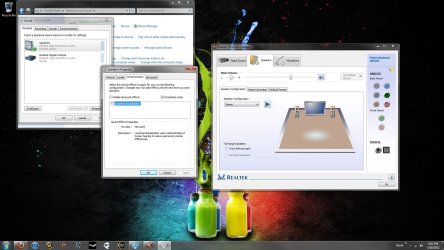
I forgot to mention that I also looked in the Realtek HD Audio Manager in Control Panel and it's not there, either. The tabs I get are Speaker Configuration, Room Correction, and Default Format. Here's what I'm looking at:

soun_SS.jpg
 

My Computer

OS
Windows Home Premium 64-bit
CPU
i5-2500K
Motherboard
ASRock P67 EXTREME4 GEN3
Memory
4x4GB
Graphics Card(s)
NVIDIA GeForce GTX 560 Ti
Sound Card
Realtek HD Audio (ALC892)
When you look at the properties for your "Realtek Digital Output", is the equalizer listed?
I just looked at my Test PC, and some Playback devices have the equalizer, and some don't...
My PC has a different (older) Realtek chipset than you have...
I don't need the equalizer, so i never noticed this before...

You could try using a different version of the Realtek drivers.
If you don't have the latest, try those.
If you do have the latest, try an older version.

You may also want to try the drivers from the AsRock MB site, rather than drivers from the Realtek site (or Win updates).
 

My Computer

Computer type
PC/Desktop
Computer Manufacturer/Model Number
home built
OS
Multi-Boot W7_Pro_x64 W8.1_Pro_x64 W10_Pro_x64 +Linux_VMs +Chromium_VM
CPU
AMD Athlon II x4 620
Motherboard
Gigabyte GA-MA785G-UD3H
Memory
6GB GSkill DDR2 800
Graphics Card(s)
AMD 4670 GPU + AMD 4200 IGP
Sound Card
on board Realtek ALC889A
Monitor(s) Displays
RCA 40" LCD TV, Insignia 32" LCD TV, HP 15" LCD monitor
Screen Resolution
1680 x 1050
Hard Drives
OCZ Vertex 3 120GB,
Samsung F3 1TB (3),
Several others - WD, Seagate, Hitachi, ...
PSU
Corsair 500 W
Case
Rosewill mid tower
Cooling
CM 90mm rifle
Keyboard
Gyration wireless, Logitech wireless, Dell USB wired
Mouse
Gyration wireless, Logitech wireless, V7 USB wired
Internet Speed
Spectrum - 100Mbps D / 10Mbps U
Antivirus
Avast, MBAM3, EMET, WinPatrol
Browser
Pale Moon, Firefox, IE
Other Info
2 multi-boot PC's
Mainly HTPC/Office/Gen purpose (no gaming).
Trendnet USB KVM.
LG DVD burner/Blue Ray Player.
Tray system for removable SATA backup drives.

Not currently OCd, under-volted.
I use Hybrid sleep, rarely re-boot or shutdown.

Hauppauge HD-PVR, Avermedia PCIe TV Tuner, Hauppauge PCI TV Tuner.

My Computer

Computer Manufacturer/Model Number
Hewlett packard/p6512uk
OS
Microsoft Windows 7 Home Premium 64-bit 7600
CPU
IIx4 amd athelon 635 processor
Motherboard
FOXCONN 2AA9
Memory
2x2gb
Graphics Card(s)
ati radeon HD 5450
Sound Card
(1) Realtek High Definition Audio (2) AMD High Definition
Monitor(s) Displays
samsung lcd tv 32"
Screen Resolution
1360x 768
Hard Drives
(1) WDC WD10 01FAES-60Z2A0 SATA Disk Device (2) Maxtor OneTouch USB Device (3) ST310003 33AS USB Device (4) WD My Book 1111 USB Device
PSU
?
Cooling
air!
Keyboard
wireless hp
Mouse
wireless Hp,optical
Internet Speed
1.10mb/s
Antivirus
MSE
Browser
Firefox
i see in your screenshot you have the sound effects tab missing , that is where the equalizer is located,
as suggested try a different driver ,latest version here...

http://www.sevenforums.com/sound-audio/3756-latest-realtek-hd-audio-driver-version.html

Hi there
thanks for posting this --BUT PLEASE COULD THE O/P STATE WHETHER THIS WORKED OR NOT.

Loads of us have got the "equalizer" problem so it would be nice to see if this worked -- and if it didn't also inform the user community.

I don't have access to my computer with this soundcard in it at the moment or I'd certainly try this myself.

Cheers
jimbo
 

My Computer

Computer type
PC/Desktop
Computer Manufacturer/Model Number
Custom built, several laptops HP/ASUS
OS
Linux CENTOS 7 / various Windows OS'es and servers
CPU
Intel i7 Intel i5
Memory
8GB, 16GB
Graphics Card(s)
On Motherboard
Sound Card
Realtek HD audio
Monitor(s) Displays
Apple Cinema display, Samsung LCD
Screen Resolution
1920 X 1080
Hard Drives
4 X 1TB SATA
Mouse
Toshiba wireless laser
Internet Speed
> 20MB up
When I installed the drivers with what was given with the mobo, it didn't have the EQ. So that's what prompted me to make sure I get the latest drivers -- still no EQ. I tried downloading from the asrock website, still no EQ. I will try an older version of the drivers to see if that works. So far no luck with what you've all suggested, but I do really appreciate it.
 

My Computer

OS
Windows Home Premium 64-bit
CPU
i5-2500K
Motherboard
ASRock P67 EXTREME4 GEN3
Memory
4x4GB
Graphics Card(s)
NVIDIA GeForce GTX 560 Ti
Sound Card
Realtek HD Audio (ALC892)
I installed an older driver version, still no fix. Still missing Sound Effects tab in the Realtek control panel and Equalizer in Windows Enhancements.
 

My Computer

OS
Windows Home Premium 64-bit
CPU
i5-2500K
Motherboard
ASRock P67 EXTREME4 GEN3
Memory
4x4GB
Graphics Card(s)
NVIDIA GeForce GTX 560 Ti
Sound Card
Realtek HD Audio (ALC892)

My Computer

Computer type
PC/Desktop
Computer Manufacturer/Model Number
home built
OS
Multi-Boot W7_Pro_x64 W8.1_Pro_x64 W10_Pro_x64 +Linux_VMs +Chromium_VM
CPU
AMD Athlon II x4 620
Motherboard
Gigabyte GA-MA785G-UD3H
Memory
6GB GSkill DDR2 800
Graphics Card(s)
AMD 4670 GPU + AMD 4200 IGP
Sound Card
on board Realtek ALC889A
Monitor(s) Displays
RCA 40" LCD TV, Insignia 32" LCD TV, HP 15" LCD monitor
Screen Resolution
1680 x 1050
Hard Drives
OCZ Vertex 3 120GB,
Samsung F3 1TB (3),
Several others - WD, Seagate, Hitachi, ...
PSU
Corsair 500 W
Case
Rosewill mid tower
Cooling
CM 90mm rifle
Keyboard
Gyration wireless, Logitech wireless, Dell USB wired
Mouse
Gyration wireless, Logitech wireless, V7 USB wired
Internet Speed
Spectrum - 100Mbps D / 10Mbps U
Antivirus
Avast, MBAM3, EMET, WinPatrol
Browser
Pale Moon, Firefox, IE
Other Info
2 multi-boot PC's
Mainly HTPC/Office/Gen purpose (no gaming).
Trendnet USB KVM.
LG DVD burner/Blue Ray Player.
Tray system for removable SATA backup drives.

Not currently OCd, under-volted.
I use Hybrid sleep, rarely re-boot or shutdown.

Hauppauge HD-PVR, Avermedia PCIe TV Tuner, Hauppauge PCI TV Tuner.
I found a couple of posts about this issue, and what some say will fix it.
I can't guarantee anything about these posts, solutions, downloads, ...
But, take a look and see what you think.
I would create a system backup image before attempting this type of fix...

Get The Realtek Equalizer Back In Windows 7/Vista
How to Activate Realtek Sound Equalizer on Windows 7 : D-Install Blog

Yeah, I saw both of those when I was looking around for solutions. Didn't work. I get that whole light blue-ish interface, but towards the top where it has a "General" tab and a "Sound Effect" tab, I only get the "General" tab. It's literally mind-boggling to me at this point.
 

My Computer

OS
Windows Home Premium 64-bit
CPU
i5-2500K
Motherboard
ASRock P67 EXTREME4 GEN3
Memory
4x4GB
Graphics Card(s)
NVIDIA GeForce GTX 560 Ti
Sound Card
Realtek HD Audio (ALC892)
Ah HAH! Found it!

For those who were experiencing a similar situation to mine (where EQ settings in Windows or Realtek weren't showing up where they should), check and see if there is another program controlling sound effects and such on your computer. My mobo driver disc installed a THX program onto my computer that seemed to (poorly) be controlling sound effects. I uninstalled it and BOOM. Everything is the way it should be.

Thanks to those who tried to come up with solutions. Helped me narrow things down a lot.
 

My Computer

OS
Windows Home Premium 64-bit
CPU
i5-2500K
Motherboard
ASRock P67 EXTREME4 GEN3
Memory
4x4GB
Graphics Card(s)
NVIDIA GeForce GTX 560 Ti
Sound Card
Realtek HD Audio (ALC892)
Good work, and thanks for posting the solution !
I'm sure it will help others looking for a solution to this problem.
 

My Computer

Computer type
PC/Desktop
Computer Manufacturer/Model Number
home built
OS
Multi-Boot W7_Pro_x64 W8.1_Pro_x64 W10_Pro_x64 +Linux_VMs +Chromium_VM
CPU
AMD Athlon II x4 620
Motherboard
Gigabyte GA-MA785G-UD3H
Memory
6GB GSkill DDR2 800
Graphics Card(s)
AMD 4670 GPU + AMD 4200 IGP
Sound Card
on board Realtek ALC889A
Monitor(s) Displays
RCA 40" LCD TV, Insignia 32" LCD TV, HP 15" LCD monitor
Screen Resolution
1680 x 1050
Hard Drives
OCZ Vertex 3 120GB,
Samsung F3 1TB (3),
Several others - WD, Seagate, Hitachi, ...
PSU
Corsair 500 W
Case
Rosewill mid tower
Cooling
CM 90mm rifle
Keyboard
Gyration wireless, Logitech wireless, Dell USB wired
Mouse
Gyration wireless, Logitech wireless, V7 USB wired
Internet Speed
Spectrum - 100Mbps D / 10Mbps U
Antivirus
Avast, MBAM3, EMET, WinPatrol
Browser
Pale Moon, Firefox, IE
Other Info
2 multi-boot PC's
Mainly HTPC/Office/Gen purpose (no gaming).
Trendnet USB KVM.
LG DVD burner/Blue Ray Player.
Tray system for removable SATA backup drives.

Not currently OCd, under-volted.
I use Hybrid sleep, rarely re-boot or shutdown.

Hauppauge HD-PVR, Avermedia PCIe TV Tuner, Hauppauge PCI TV Tuner.
well done, glad you have it fixed.
 

My Computer

Computer Manufacturer/Model Number
Hewlett packard/p6512uk
OS
Microsoft Windows 7 Home Premium 64-bit 7600
CPU
IIx4 amd athelon 635 processor
Motherboard
FOXCONN 2AA9
Memory
2x2gb
Graphics Card(s)
ati radeon HD 5450
Sound Card
(1) Realtek High Definition Audio (2) AMD High Definition
Monitor(s) Displays
samsung lcd tv 32"
Screen Resolution
1360x 768
Hard Drives
(1) WDC WD10 01FAES-60Z2A0 SATA Disk Device (2) Maxtor OneTouch USB Device (3) ST310003 33AS USB Device (4) WD My Book 1111 USB Device
PSU
?
Cooling
air!
Keyboard
wireless hp
Mouse
wireless Hp,optical
Internet Speed
1.10mb/s
Antivirus
MSE
Browser
Firefox
I just looked at my Test PC, and some Playback devices have the equalizer, and some don't...

Guess I should mention why I don't have the equalizer on some devices.
On the PC I looked at, the HDMI output is using an AMD (GPU) driver.

Realtek is the provider for the equalizer enhancement.

It makes sense I don't have the equalizer on this HDMI device - I'm not using the Realtek driver.

I'm sure I could change HDMI to the Realtek driver and get the equalizer, but i don't need it...
Just something else to check if the equalizer is not available.
 

My Computer

Computer type
PC/Desktop
Computer Manufacturer/Model Number
home built
OS
Multi-Boot W7_Pro_x64 W8.1_Pro_x64 W10_Pro_x64 +Linux_VMs +Chromium_VM
CPU
AMD Athlon II x4 620
Motherboard
Gigabyte GA-MA785G-UD3H
Memory
6GB GSkill DDR2 800
Graphics Card(s)
AMD 4670 GPU + AMD 4200 IGP
Sound Card
on board Realtek ALC889A
Monitor(s) Displays
RCA 40" LCD TV, Insignia 32" LCD TV, HP 15" LCD monitor
Screen Resolution
1680 x 1050
Hard Drives
OCZ Vertex 3 120GB,
Samsung F3 1TB (3),
Several others - WD, Seagate, Hitachi, ...
PSU
Corsair 500 W
Case
Rosewill mid tower
Cooling
CM 90mm rifle
Keyboard
Gyration wireless, Logitech wireless, Dell USB wired
Mouse
Gyration wireless, Logitech wireless, V7 USB wired
Internet Speed
Spectrum - 100Mbps D / 10Mbps U
Antivirus
Avast, MBAM3, EMET, WinPatrol
Browser
Pale Moon, Firefox, IE
Other Info
2 multi-boot PC's
Mainly HTPC/Office/Gen purpose (no gaming).
Trendnet USB KVM.
LG DVD burner/Blue Ray Player.
Tray system for removable SATA backup drives.

Not currently OCd, under-volted.
I use Hybrid sleep, rarely re-boot or shutdown.

Hauppauge HD-PVR, Avermedia PCIe TV Tuner, Hauppauge PCI TV Tuner.
Surprising

I have this same problem, I've had my laptop for about 2 years and never have found a solution. I tried downloading realtek drivers and whatnot, but nothing seems to work. I'm really surprised this hasnt been a bigger issue, with the way people listen to music nowadays, but I guess this generation only cares about a stupid bass booster button which is all too easy to find these days. My realtek sound manager has as many presets as I know what to do with, but nothing I can do custom. Oh well there is a box I can check off that says "equalizer" and it makes the audio sound a little different, but there is no clue as to what it sounds like. "Well does it sound good" is just not good enough for me. I guess I'm kind of anal about my music. WMP has a tiny eq if you can find it its like hidden in a skin or something. I wish there was something that could personalize my music experience with streaming audio across the pc and without paying for some dumb poorly written internet program, or worse downloading one for free.
 

My Computer

OS
Windows 7 64bit
Ah HAH! Found it!

For those who were experiencing a similar situation to mine (where EQ settings in Windows or Realtek weren't showing up where they should), check and see if there is another program controlling sound effects and such on your computer. My mobo driver disc installed a THX program onto my computer that seemed to (poorly) be controlling sound effects. I uninstalled it and BOOM. Everything is the way it should be.

Thanks to those who tried to come up with solutions. Helped me narrow things down a lot.
Yes, I'm betting this is what happened to me as well. At first I installed the Realtek HD Audio Manager from the official Asus drivers download page. Then I installed (Creative) THX TruStudio Settings from the same page, and sure enough, the [Sound Effects] tab disappeared after a reboot.

Even though I love how THX equalises my audio, there were some fun effects in Realtek, and I don't get why it's like "no, forget it. You're not allowed to run to equalisers at once". I want to have the "conert hall" effect whilst still having the equaliser from THX!

Edit: Just to confirm, I uninstalled THX TruStudio and rebooted, and the Sound Effects tab in Realtek came back, and it works.
 
Last edited:

My Computer

Computer type
Laptop
Computer Manufacturer/Model Number
Asus G74SX
OS
Windows 7 Home Premium 64-bit
Antivirus
Microsoft Security Essentials
Hello.
Thanks for asking this question.
My enhancement tab only has "Disable all sound effects" option.
How do you check if there's another program controlling sound effects?
 

My Computer

OS
Windows 10 Home 64-bit
Hello sueling,

Look at your Add Remove programs list.

And....

Run msconfig.exe from a run box and check both Startup and Services tabs for offenders.

You can look in Device Manager under Sound... and see if you have a secondary driver as well.

I removed the HDMI audio driver, I don't use it, and I still don't see an equalizer still in my Realtek HD Audio Manager, but fortunately I don't care. :cool:

I do have a physical TONE knob on my 2.1 speaker rig though.
Music wise I use 1by1 and foobar2000 players which have some adjustments within, if needed anyway.
 

My Computer

Computer type
PC/Desktop
Computer Manufacturer/Model Number
Self Built Custom
OS
Windows 7 Ultimate Retail Box (64-bit installed) + Service Pack 1
CPU
AMD FX-8350 CPU v1.15 (or 1.0F) BIOS was required!
Motherboard
MSI 890FXA-GD70
Memory
8G CAS-7 G-Skill DDR3 @1333 (2 fours) [mobo nonOC max rec'd]
Graphics Card(s)
Radeon HD 7950 [3 gigs of GDDR5] MSI Twin Frozr model
Sound Card
Realtek High Definition Audio (onboard mobo, ALC-889 chip)
Monitor(s) Displays
2 WS LED Monitors: One LG One Viewsonic
Screen Resolution
1920 by 1080
Hard Drives
SSD for OS: Samsung 840 Pro
SSD for VM and utilities: Adata SX900
7200 RPM SATA HDs for the rest: Hitachi and Seagate
PSU
Corsair TX850 - 850W max, in service since August 2010.
Case
Thermaltake Armor A90
Cooling
Thermaltake Spin Q CPU Cooler, in service since August 2010
Keyboard
Logitech G11
Mouse
Logitech M310 Wireless
Internet Speed
100 Megabit broadband supposedly upgraded from 50 (Cable)
Antivirus
Bitdefender Internet Security 2014 suite
Browser
Pale Moon 64-bit main, also IceDragon, Opera, and Maxthon.
Other Info
CompTIA A+ certified (220-800 series) in July 2013.
Hello sueling,

Look at your Add Remove programs list.

And....

Run msconfig.exe from a run box and check both Startup and Services tabs for offenders.

You can look in Device Manager under Sound... and see if you have a secondary driver as well.

I removed the HDMI audio driver, I don't use it, and I still don't see an equalizer still in my Realtek HD Audio Manager, but fortunately I don't care. :cool:

I do have a physical TONE knob on my 2.1 speaker rig though.
Music wise I use 1by1 and foobar2000 players which have some adjustments within, if needed anyway.

Thank you.
 

My Computer

OS
Windows 10 Home 64-bit
I totally just found my solution to this issue! So I had the same issue as some of the others.. the only option I had in Enhancements was Disable all options.. so I instead went into Playback tab, clicked on the speaker, then selected properties... then onto the General tab and into the properties of the General Tab. Next I selected the Change settings option and I rolled back the driver to the previous one. This one got it back for me...
Hope this helps!
 

My Computer

Computer type
Laptop
Computer Manufacturer/Model Number
Samsung Rf711
OS
Windows 7 64 bit.
Back
Top