
Solved Missing File: CleanMgrScripts\Google Chrome Cache 1 (For Each User Pro

metaguy

Always Appreciative
Member
VIP
Local time
4:07 PM
Messages
140
Location
California
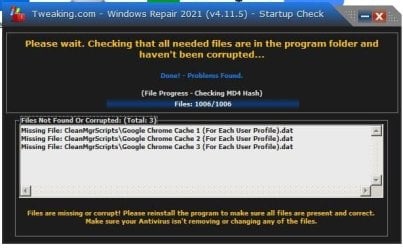
Long time no see. Looking for second opinion. Started Tweaking.com, but... (attached). Following are exchanges with Tweaking support:
ME: I neither use nor want Chrome on my system. Period. Couldn't find an uninstall. I've taken steps to remove anything with Chrome through search. Presently, is shows only in Bitdefender, though system recreated an ibd folder and metadata file. This happened in safe mode also. Please advise so I can run the app. Thanks.

Reply October 12, 2015, 10:57:20 PM »
it means its missing in \windows repair folder\CleanMgrScripts\ did you delete that file by chance or it may have gotten corrupted try reinstalling windows repair in Safe Mode with Networking to eliminate Bitdefender from corrupting the install.

ME: sfc /scannow Windows Resource Protection found corrupt files but was unable to fix some of them. Details are included in the CBS.Log (Google Drive) CBS log metaguy, 10.25.21.txt - Google Drive.

Note: Safe mode does NOT include Windows Repair. Tech sent links for:
https://download.microsoft.com/down...1_ldr_escrow_CLIENT_ULTIMATE_x64FRE_en-us.iso AND
https://files02.tchspt.com/temp/Windows7-USB-DVD-Download-Tool-Installer-en-US.exe

ME: I Just found a disk... GSP1RMCHPXFRER_EN_DVD 3.09 GB from 2011. It opens, but have not run it.

REPLY: On re-reading your post, did you also copy the USB/DVD burner program onto the USB ?
That should only have the ISO on it otherwise the system won't boot from it.

ME: Both on same thumb drive. Are you saying I should I put them on separate thumb drives?
Not quite clear on last message. Use the Installer to boot to E: drive with Win 7, or use the Win 7 disk?
I have the product key.

Okay team. Your thoughts? gw
 

Attachments
  • Tweaking - missing files.jpg
    Tweaking - missing files.jpg
    41.9 KB · Views: 4

My Computer

Computer type
Laptop
Computer Manufacturer/Model Number
Dell E6420 Laptop 64 bit
OS
Win 7 Ultimate
CPU
Intel i5-2520M CPU 2.50 Ghz
Memory
8 GB
Graphics Card(s)
Intel(R) HD Graphics 3000
Sound Card
Intel(R) Display Audio
Monitor(s) Displays
Samsung 32" and Dell 23"
Screen Resolution
1920 x 1080 and 1366 x 768
Hard Drives
Hitachi HTS545032B9A300
Fantom G-Force 2GB
Antivirus
Bitdefender
Browser
Firefox, primary
Hi,,
lets sort out the easy bit first,
please run this tool, it will identify the cbs corruptions, and try and fix them
SFCFix Official Download - Repair Windows Update | Sysnative Forums

it will find errors relating to Avast & IE11, from the cbs log i looked at
you can ignore the avast ones, IE11 if you dont use it turn it Off via Features
do not believe either is causing system problems

Chrome,
download this tool,
Download Farbar Recovery Scan Tool


  • Right click on FRST and select Run as administrator
  • Copy/paste the following in the Search: box
SearchAll: Chrome


  • Click Search Files button
  • When completed click OK and a Search.txt document will open on your desktop

The Tweaking repair tool has initiated a core set of instructions in cleanmgr, so if something is missing it REPORTS it, Google and its spawn, like YouTube NOT neccessarilly Chrome may have set these caches up by default automatically for future use
 

My Computer

Computer type
PC/Desktop
Computer Manufacturer/Model Number
medionl/Aspire 6930G/acer x55a
OS
W7 home premium 32bit/W7HP 64bit/w10 tp insider ring
CPU
E5300 dual core
Motherboard
medion MS7366
Memory
3gb
Graphics Card(s)
Nvidia Geforce 7100 Nforce 630i
Monitor(s) Displays
avixc
Internet Speed
n (isp resticted to 72)
Antivirus
mse/pands
Browser
palemoon
Other Info
Belkin Fd7050 n USB using Railink RT2870 drivers, more upto date
Not sure I've included everything you suggested.

SFCFix version 3.0.2.1 by niemiro.
Start time: 2021-10-28 02:46:55.663
Microsoft Windows 7 Service Pack 1 - amd64
Not using a script file.

AutoAnalysis::
WARNING: Failed to check store directories with return code 1 and error code ERROR_FILE_NOT_FOUND. COMPONENTS hive may be corrupt.

WARNING: Components hive failed load test and may be corrupt.

WARNING: Components hive failed final reload test with error code ERROR_PRIVILEGE_NOT_HELD and may be corrupt.

WARNING: Failed to get store name from identity name with return code 10002 for component Microsoft-Windows-IE-InternetExplorer and file bing.ico. File is reported as corrupt by SFC.
CORRUPT: bing.ico of component Microsoft-Windows-IE-InternetExplorer.

SUMMARY: Some corruptions could not be fixed automatically. Seek advice from helper or sysnative.com.
CBS & SFC total detected corruption count: 1
CBS & SFC total unimportant corruption count: 0
CBS & SFC total fixed corruption count: 0
SURT total detected corruption count: 0
SURT total unimportant corruption count: 0
SURT total fixed corruption count: 0
AutoAnalysis:: directive completed successfully.

Successfully processed all directives.
SFCFix version 3.0.2.1 by niemiro has completed.
Currently storing 0 datablocks.
Finish time: 2021-10-28 03:04:17.634
----------------------EOF-----------------------
 

Attachments

My Computer

Computer type
Laptop
Computer Manufacturer/Model Number
Dell E6420 Laptop 64 bit
OS
Win 7 Ultimate
CPU
Intel i5-2520M CPU 2.50 Ghz
Memory
8 GB
Graphics Card(s)
Intel(R) HD Graphics 3000
Sound Card
Intel(R) Display Audio
Monitor(s) Displays
Samsung 32" and Dell 23"
Screen Resolution
1920 x 1080 and 1366 x 768
Hard Drives
Hitachi HTS545032B9A300
Fantom G-Force 2GB
Antivirus
Bitdefender
Browser
Firefox, primary
Hi Metaguy,

The sfc check returned as expected, allthough the hive access failure is a bit disturbing, having said that if your machine is working well, l would not be unduly concerned.
If it starts to give you problems i would shoot over to the Sysnative forum, from where you downloaded the tool and ask for help.

Now i've had a quick look at the Search all report, As i said Chrome is quite invasive, entries in a number of your programs ie Dashlane/VLC/your Printer/IE /Zoom/Netframework and more including Bitdefender

important Google Chrome, and Chrome entries are NOT the same, granted they share the name, but the Chrome framework is integeral to many programs, hence the list above

Bitdefender, though system recreated an ibd folder and metadata file,
of course it will its part of its core, and expects those files to be on your system, for the reason stated above

i take it you have 3 user profiles on your system, malware/viruses can recreate those caches and be used for their own purposes, remove the AV's ability to scan them and your SOL
note the next time BitDef issues a system update, not a database update, it will recreate them

Be back after i've had a really good look at SearchAll, but 1st glance looks like only 1 item missed
 

My Computer

Computer type
PC/Desktop
Computer Manufacturer/Model Number
medionl/Aspire 6930G/acer x55a
OS
W7 home premium 32bit/W7HP 64bit/w10 tp insider ring
CPU
E5300 dual core
Motherboard
medion MS7366
Memory
3gb
Graphics Card(s)
Nvidia Geforce 7100 Nforce 630i
Monitor(s) Displays
avixc
Internet Speed
n (isp resticted to 72)
Antivirus
mse/pands
Browser
palemoon
Other Info
Belkin Fd7050 n USB using Railink RT2870 drivers, more upto date
This all started when Tweaking wouldn't load. Pending your next reply, do I have to forsake Tweaking?
 

My Computer

Computer type
Laptop
Computer Manufacturer/Model Number
Dell E6420 Laptop 64 bit
OS
Win 7 Ultimate
CPU
Intel i5-2520M CPU 2.50 Ghz
Memory
8 GB
Graphics Card(s)
Intel(R) HD Graphics 3000
Sound Card
Intel(R) Display Audio
Monitor(s) Displays
Samsung 32" and Dell 23"
Screen Resolution
1920 x 1080 and 1366 x 768
Hard Drives
Hitachi HTS545032B9A300
Fantom G-Force 2GB
Antivirus
Bitdefender
Browser
Firefox, primary
only for the time being, please run from an elevated command mode sfc /scannow
back tomorrow

- - - Updated - - -

Hi

Unfortunately you appear to have been OVER zealous in removing certain .dat files that Tweaking relies upon

CleanMgrScripts\Google Chrome Cache 1 (For Each User Profile).dat|27A258431A63D564985AD6C7C2693B77
CleanMgrScripts\Google Chrome Cache 2 (For Each User Profile).dat|7154F83B42749DB753C6A7709A14B686
CleanMgrScripts\Google Chrome Cache 3 (For Each User Profile).dat|E6F640B780767EFB109D020E450C8ECA

the 3 dat files beginning, 27A,715 and E6F are user unique, the above referenced will likely not be the same on your system.

i asked you to run sfc /scannow, did it repair anything??
you could also try SURT, KB947821 and see if the cleanmgr entries have been repaired
 

My Computer

Computer type
PC/Desktop
Computer Manufacturer/Model Number
medionl/Aspire 6930G/acer x55a
OS
W7 home premium 32bit/W7HP 64bit/w10 tp insider ring
CPU
E5300 dual core
Motherboard
medion MS7366
Memory
3gb
Graphics Card(s)
Nvidia Geforce 7100 Nforce 630i
Monitor(s) Displays
avixc
Internet Speed
n (isp resticted to 72)
Antivirus
mse/pands
Browser
palemoon
Other Info
Belkin Fd7050 n USB using Railink RT2870 drivers, more upto date
Same result in safe mode. 2 of 4 results here. For size reasons, 2 on Google drive.
Google Drive: Sign-in,
Google Drive: Sign-in.
Not sure any of this helps. Your advise? Also, why does Windows make it so hard to make use of backup on E: drive?
 

Attachments

My Computer

Computer type
Laptop
Computer Manufacturer/Model Number
Dell E6420 Laptop 64 bit
OS
Win 7 Ultimate
CPU
Intel i5-2520M CPU 2.50 Ghz
Memory
8 GB
Graphics Card(s)
Intel(R) HD Graphics 3000
Sound Card
Intel(R) Display Audio
Monitor(s) Displays
Samsung 32" and Dell 23"
Screen Resolution
1920 x 1080 and 1366 x 768
Hard Drives
Hitachi HTS545032B9A300
Fantom G-Force 2GB
Antivirus
Bitdefender
Browser
Firefox, primary
why does Windows make it so hard to make use of backup on E: Drive?

JFWIW...(just for what it's worth)
Windows doesn't.
I hope I can say this, without sounding insulting.
But, when one thing doesn't work, why not try something else?
I've never liked Microsoft's idea a doing backups.... all the way back to DOS days.
There has always been something better.

Moving forward, from DOS to 1997, a program called simply "Ghost" appeared on the Personal Computer scene.
The owner of a little PC shop I was working in at the time got a Demo copy and gave it to all us Tech's.
I began using Ghost to clone old slow HD's to newer and faster HD's.
After Symantec bought 'Ghost' they revamped it to work with NTFS drives. (Ghost 11.5)

Since then, I've tried just about every Windows Backup program that's come down the pike. But I've always gone back to what I know 'Just Works'.
I still use Ghost 11.5 today,run from a DOS boot disk. Ghost doesn't care what is on a drive, if it's readable Ghost will back it up.
Simple Backup rules apply. The receiving drive or partition must be at least as large as the partition or drive being backed up.
Ghost will back up every version of DOS or Windows, even Linux, or Server. It just don't care! It also backs up data disks with not OS on it at all. It can also back up an HD with a non-working copy of Windows on it. So Windows does not have to be working to back up the drive.

I use Ghost 11.5 every week to back up my C: partition to a large USB drive. I also use it to CLONE my main HD to an 8TB spinner.

Symantec no longer sells or supports Ghost, but it is available........

Cheers Mate

TM :cool:
 

My Computer

Computer type
PC/Desktop
Computer Manufacturer/Model Number
Various
OS
Win 7 Pro, SP1, x86, Win-11/Pro/64
CPU
AMD
Motherboard
Various
Memory
8GB Crucial
Graphics Card(s)
Various
Sound Card
OnBoard
Monitor(s) Displays
Acer 21.5"
Hard Drives
Crucial SSD, 500 GB
PSU
OEM
Case
SFF Slim Line Case
Cooling
OEM
Keyboard
eMachines
Mouse
Logitech Wireless
Internet Speed
varies
Antivirus
Windows Defender/Super Anti-Spyware
Browser
Firefox
Yes, I remember DOS, CPM, etc. I also contracted with Symantec in the early days to create an in house video.
With that said, I think you mistook or misread my last message which was a response to torchwood . I was wondering why MS makes it hard to access the existing installation files on the E: drive on my pc.

Regarding backups... I don't rely on any apps any more. I monthly do my own full and incremental backups manually onto an external HDD. I have a system that works for me.

- - - Updated - - -

torchwood, Senior Member - have you had a chance to look at the 4 reports in #7 ?
 

My Computer

Computer type
Laptop
Computer Manufacturer/Model Number
Dell E6420 Laptop 64 bit
OS
Win 7 Ultimate
CPU
Intel i5-2520M CPU 2.50 Ghz
Memory
8 GB
Graphics Card(s)
Intel(R) HD Graphics 3000
Sound Card
Intel(R) Display Audio
Monitor(s) Displays
Samsung 32" and Dell 23"
Screen Resolution
1920 x 1080 and 1366 x 768
Hard Drives
Hitachi HTS545032B9A300
Fantom G-Force 2GB
Antivirus
Bitdefender
Browser
Firefox, primary
torchwood, Senior Member - have you had a chance to look at the 4 reports in #7 ?
 
Last edited by a moderator:

My Computer

Computer type
Laptop
Computer Manufacturer/Model Number
Dell E6420 Laptop 64 bit
OS
Win 7 Ultimate
CPU
Intel i5-2520M CPU 2.50 Ghz
Memory
8 GB
Graphics Card(s)
Intel(R) HD Graphics 3000
Sound Card
Intel(R) Display Audio
Monitor(s) Displays
Samsung 32" and Dell 23"
Screen Resolution
1920 x 1080 and 1366 x 768
Hard Drives
Hitachi HTS545032B9A300
Fantom G-Force 2GB
Antivirus
Bitdefender
Browser
Firefox, primary
Back
Top