Missing file miniatures in Explorer

Wercik

New member
Local time
11:40 AM
Messages
11
Hi, today's problem is:
I can't see movie miniatures any more. Also: there's no avi in Default Programs in Control Panel. Is it possible it's because I uninstalled Windows' 7 crapware like Silverlight, .NET Framework and Visual C++? If so - which one of them should I reinstall. Also: maybe reinstalling VLC will simply help? I'll check, wait a minute. Ok, it didn't help, now I'll restart my computer and see again...

>>EDIT:
No, it didn't help. I mean now I have at least avi in Default Programs, but still - no miniatures.
 
Last edited:

My Computer

OS
Windows 7 Home Premium x64

My Computer

Computer type
PC/Desktop
Computer Manufacturer/Model Number
Self Assembled
OS
Microsoft Windows 10 Pro Insider Preview 64-bit
CPU
Intel(R) Core(TM) i3-4130 CPU @ 3.40GHz
Motherboard
Gigabyte Technology Co., Ltd. B85M-D3H
Memory
Corsair Vengence 4GB x2 (8.00GB Dual-Channel DDR3 @ 798MHz)
Graphics Card(s)
2047MB GeForce GTS 450 (ZOTAC International)
Sound Card
Onboard (Realtek High Definition Audio)
Monitor(s) Displays
LG Flatron E2040T
Screen Resolution
1600x900
Hard Drives
Western Digital 1 TB
Seagate 500 GB
PSU
Corsair VS550
Case
Cooler Master K380
Cooling
Cooler Master Seidon 120V Plus
Keyboard
Logitech MK260r
Mouse
Logitech MK260r
Internet Speed
PMPL Broadband
Antivirus
Windows Defender + MBAM
Browser
Firefox
Other Info
Dell Studio 15" Laptop
I have no idea what thumbnails are (besides these on my thumbs), the translation is miniatures. What I mean are the little pictures of (usually) the first frames of movies, which are usually shown instead of pictures of icons.
If we are not talking about it, I could not care less about codecs, I have not used crapware since 2007 and I would not like to start now, just because I do not have miniatures. Although I would really much like to have them:(.
 

My Computer

OS
Windows 7 Home Premium x64
I have no idea what thumbnails are (besides these on my thumbs), the translation is miniatures. What I mean are the little pictures of (usually) the first frames of movies, which are usually shown instead of pictures of icons.
That is what called thumbnail . Not miniature.

If we are not talking about it, I could not care less about codecs, I have not used crapware since 2007 and I would not like to start now, just because I do not have miniatures. Although I would really much like to have them:(.
If thumbnail preview is not disabled there in your machine (check it; if disabled, use http://www.sevenforums.com/tutorials/11738-thumbnail-previews-enable-disable.html to enable it) and still those are not showing, you are to upgrade codecs.
 

My Computer

Computer type
PC/Desktop
Computer Manufacturer/Model Number
Self Assembled
OS
Microsoft Windows 10 Pro Insider Preview 64-bit
CPU
Intel(R) Core(TM) i3-4130 CPU @ 3.40GHz
Motherboard
Gigabyte Technology Co., Ltd. B85M-D3H
Memory
Corsair Vengence 4GB x2 (8.00GB Dual-Channel DDR3 @ 798MHz)
Graphics Card(s)
2047MB GeForce GTS 450 (ZOTAC International)
Sound Card
Onboard (Realtek High Definition Audio)
Monitor(s) Displays
LG Flatron E2040T
Screen Resolution
1600x900
Hard Drives
Western Digital 1 TB
Seagate 500 GB
PSU
Corsair VS550
Case
Cooler Master K380
Cooling
Cooler Master Seidon 120V Plus
Keyboard
Logitech MK260r
Mouse
Logitech MK260r
Internet Speed
PMPL Broadband
Antivirus
Windows Defender + MBAM
Browser
Firefox
Other Info
Dell Studio 15" Laptop
Hi, today's problem is:
I can't see movie miniatures any more. Also: there's no avi in Default Programs in Control Panel. Is it possible it's because I uninstalled Windows' 7 crapware like Silverlight, .NET Framework and Visual C++? If so - which one of them should I reinstall. Also: maybe reinstalling VLC will simply help? I'll check, wait a minute. Ok, it didn't help, now I'll restart my computer and see again...

>>EDIT:
No, it didn't help. I mean now I have at least avi in Default Programs, but still - no miniatures.

You might want to re install what you call "crapware".
They are essential for operation of other programs besides videos.

Of course it is your choice.
Good luck.
 

My Computer

Computer Manufacturer/Model Number
Hopalong/ Godzilla
OS
Windows7 Pro 64bit SP-1; Windows XP Pro 32bit
CPU
Intel Core i7-870 Lynnfield 2.93GHz LGA 1156 95W Quad-Core
Motherboard
ASUS P7P55D-E PRO
Memory
8GB@1400MHz Crucial Ballistix DDR3-1600 4x2GB
Graphics Card(s)
ASUS ENGTX460 DirectCU/2DI/1GD5 1GB 256-bit GDDR5
Sound Card
VIA Onboard
Monitor(s) Displays
Asus VS248H-P 24"; Samsung SyncMaster 941BW 19"ws
Screen Resolution
1920x1080; 1440x900
Hard Drives
Samsung 830 120GB SSD
Intel 320 120GB SSD
Western Digital Caviar Black WD7501AALS 750GB 7200 RPM SATA 3.0Gb/s
Western Digital Caviar Black WD6401AALS 640GB 7200 RPM SATA 3.0Gb/s
PSU
COOLER MASTER Silent Pro RS850-AMBAJ3-US 850W Modular
Case
COOLER MASTER HAF 932 RC-932-KKN5-GP Black
Cooling
Scythe "Mugen-2 Rev.B" (2 ScytheKaze-Jyuni PWM fans)
Keyboard
Logitech K-320
Mouse
Kensington
Antivirus
Avast Inernet Suite
Browser
IE 9 ; Chrome
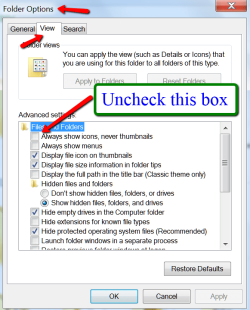
Try this setting:
 

Attachments

  • 2012-04-01_1243.png
    2012-04-01_1243.png
    31.7 KB · Views: 18

My Computer

Computer Manufacturer/Model Number
HP, Dell, Gateway, Toshiba - 4 laptops and 2 desktops
OS
Vista, Windows7, Mint Mate, Zorin, Windows 8
CPU
from 1.6GHz Duo to i7
Monitor(s) Displays
2x HP w2207
Hard Drives
5x HDD, 7x SSD, 12x Externals
Keyboard
with trackball - no mices
Mouse
Trackball mice
Internet Speed
DSL 6000
You might want to re install what you call "crapware".
They are essential for operation of other programs besides videos.

Of course it is your choice.
Good luck.

Oh but I did, it was the first thing I did after I read about codecs and almost smiled. Didn't help. Oh, and another symptom:
beztytuujmbx.jpg
<-- these are from the same folder at the same time ofc.

WHS, checked this setting already, sorry:(.

>>UPDATE: Looks like only newly created files lack thumbnails...
 
Last edited:

My Computer

OS
Windows 7 Home Premium x64
Hmm, the following might have happened.

Originally .avi as assocoiated to WMP which would show thumbnails. Then you installed VLC and it associated .avi to VLC which only shows the traffic cone.

Is that possible? If yes, all you have to do is to change the file association back to WMP.
 

My Computer

Computer Manufacturer/Model Number
HP, Dell, Gateway, Toshiba - 4 laptops and 2 desktops
OS
Vista, Windows7, Mint Mate, Zorin, Windows 8
CPU
from 1.6GHz Duo to i7
Monitor(s) Displays
2x HP w2207
Hard Drives
5x HDD, 7x SSD, 12x Externals
Keyboard
with trackball - no mices
Mouse
Trackball mice
Internet Speed
DSL 6000
Never seen the cone before nor do I know what it means other than maybe "under construction". Do you have custom software to organize libraries or folders? Or maybe a custom indexer? On what screen are you viewing the thumbnails?
 

My Computer

Computer type
PC/Desktop
Computer Manufacturer/Model Number
Built 2/11/2011
OS
Windows 7 Pro-x64
CPU
i7-2600 3.4GHz - 3.8GHz Turbo
Motherboard
Intel DH67BL-B3
Memory
8Gb - 2x4GB, Muskin 991770 PC3-1333
Graphics Card(s)
Integrated Intel HD 2000
Sound Card
Integrated Intel 10.1 HD, RealTek ALC892
Monitor(s) Displays
Asus LCD VH222H, Haier HL24XSL2a
Screen Resolution
1920x1080, 1920x1080
Hard Drives
Crucial SSD C300-128Gb,
Western Digital WD5002AALX - 500Gb,
Western Digital WD7501AALS - 750Gb
PSU
Seasonic 650W 80+ Gold Modular
Case
Rosewill Defender
Cooling
Stock CPU, Four 120mm case fans, PCH fan added
Keyboard
Logitech EX100 Y-RBH94 Wireless
Mouse
Logitech EX100 M-RCE95 Wireless
Internet Speed
3.0/1.5 Mbs
Antivirus
Microsoft Security Essentials
Browser
Microsoft Internet Explorer 11
Other Info
Antec Veris Premier-Multimedia IR Station,
Cyber Accoustics-3602 Speakers,
AFT XM-5U Card Reader,
Hauppauge TV-HVR-2250,
Sony LX300 USB Turntable
Never seen the cone before nor do I know what it means other than maybe "under construction". Do you have custom software to organize libraries or folders? Or maybe a custom indexer? On what screen are you viewing the thumbnails?

VLC uses the cone for all filetypes. Here I have a mixure of .flv files that are associated to VLC and .wmv files that are associated to WMP.
 

Attachments

  • 2012-04-01_1511.png
    2012-04-01_1511.png
    24.1 KB · Views: 4

My Computer

Computer Manufacturer/Model Number
HP, Dell, Gateway, Toshiba - 4 laptops and 2 desktops
OS
Vista, Windows7, Mint Mate, Zorin, Windows 8
CPU
from 1.6GHz Duo to i7
Monitor(s) Displays
2x HP w2207
Hard Drives
5x HDD, 7x SSD, 12x Externals
Keyboard
with trackball - no mices
Mouse
Trackball mice
Internet Speed
DSL 6000
WHS, not possible, been using VLC since day one on this computer. Changed avi file association to WMP, still the same thing, some avis have thumbnails and some don't.
 
Last edited:

My Computer

OS
Windows 7 Home Premium x64
There are all kinds of .avi flavors. The ones that show only with VLC may be different. Can you play thise with WMP?
 

My Computer

Computer Manufacturer/Model Number
HP, Dell, Gateway, Toshiba - 4 laptops and 2 desktops
OS
Vista, Windows7, Mint Mate, Zorin, Windows 8
CPU
from 1.6GHz Duo to i7
Monitor(s) Displays
2x HP w2207
Hard Drives
5x HDD, 7x SSD, 12x Externals
Keyboard
with trackball - no mices
Mouse
Trackball mice
Internet Speed
DSL 6000
Sure. Both types. The thing is I am absolutely sure that they are one type, they were transcoded by me. It seems that I must have screwed something up between.
 

My Computer

OS
Windows 7 Home Premium x64
Oh, OK. A "traffic cone" makes sense. :sarc:
I see actual thumbnails for everything I have except MP3 files. :) Then Windows shows a musical note. :cool:
 

My Computer

Computer type
PC/Desktop
Computer Manufacturer/Model Number
Built 2/11/2011
OS
Windows 7 Pro-x64
CPU
i7-2600 3.4GHz - 3.8GHz Turbo
Motherboard
Intel DH67BL-B3
Memory
8Gb - 2x4GB, Muskin 991770 PC3-1333
Graphics Card(s)
Integrated Intel HD 2000
Sound Card
Integrated Intel 10.1 HD, RealTek ALC892
Monitor(s) Displays
Asus LCD VH222H, Haier HL24XSL2a
Screen Resolution
1920x1080, 1920x1080
Hard Drives
Crucial SSD C300-128Gb,
Western Digital WD5002AALX - 500Gb,
Western Digital WD7501AALS - 750Gb
PSU
Seasonic 650W 80+ Gold Modular
Case
Rosewill Defender
Cooling
Stock CPU, Four 120mm case fans, PCH fan added
Keyboard
Logitech EX100 Y-RBH94 Wireless
Mouse
Logitech EX100 M-RCE95 Wireless
Internet Speed
3.0/1.5 Mbs
Antivirus
Microsoft Security Essentials
Browser
Microsoft Internet Explorer 11
Other Info
Antec Veris Premier-Multimedia IR Station,
Cyber Accoustics-3602 Speakers,
AFT XM-5U Card Reader,
Hauppauge TV-HVR-2250,
Sony LX300 USB Turntable
You can try this....
Click on the Orb (Start Button).
Then select All Programs.
Then select Accessories.
Then select System Tools.
Then select Disk Cleanup.
Then select your Boot drive and click OK.
Check the Thumbnails check box (make sure nothing else is checked).
Click OK.
When prompted, click the Delete Files button.
 

My Computer

Computer type
PC/Desktop
Computer Manufacturer/Model Number
Jeepmann/Custom Built
OS
Windows 7 Ultimate 64bit
CPU
Intel Core i7-2600K Sandy Bridge 3.4GHz (@[email protected])
Motherboard
Asus Maximus IV Extreme LGA 1155 Intel P67
Memory
G.SKILL Ripjaws X Series 16GB 1600Mhz (4 x 4GB) (Stock)
Graphics Card(s)
x2 EVGA GeForce GTX 760's w/ACXCoolers in SLI Surround
Sound Card
On-Board
Monitor(s) Displays
3x Acer 24" HDMI Widescreen LCD Monitor
Screen Resolution
3@ 1920x1080 (5760x1080 In Surround)
Hard Drives
Samsung 830 128gb ssd
Western Digital Caviar Black 640GB 7200 RPM
Western Digital Caviar Black 500GB 7200 RPM
Seagate 2tb 7200 RPM
PSU
COOLER MASTER Silent Pro 1000W
Case
COOLER MASTER HAF X Black
Cooling
CORSAIR Hydro H70
Keyboard
Logitech G510
Mouse
Zalman M300
Internet Speed
100mbps-ish Down & 5mbps-ish Up
Other Info
I installed the stock 140mm case fan outside of case then installed the H70+ 1 of its 120mm fans inside case. Used the 2nd 120mm from the H70 to go in the Gpu tunnel.
230mm Front,200mm side,200mm top,120mm Gpu tunnel,120mm&140mm on H70.
Ha, good thinking, but... no. Now I simply have no thumbnails in movies, they didn't "reboot".
 
Last edited:

My Computer

OS
Windows 7 Home Premium x64
I can gaurentee you, installation of the Shark007 codecs will thumbnail ALL media files.
x64Components addon __ 32bit Win7codecs
After installation, open both Settings Applications and select the checkbox for [x] SUGGESTED settings

If for some reason they didnt get thumbnailed, go to the Config TAB of the 64bit Settings Application and click the button for [Icaros Thumbnailing]
 

My Computer

Computer Manufacturer/Model Number
Selfbuilt
OS
Windows 7 Ultimate 64bit
CPU
i7 2600k
Motherboard
asus P8Z68-V LE
Memory
16GB (4x4) corsair vengeance
Graphics Card(s)
Intel HD3000 iGPU / AMD HD6870 1024MB
Sound Card
bitstreamed to an Onkyo 609
Monitor(s) Displays
Asus VE278 27" LED / Bravia EX7 60" LED
Screen Resolution
native 1080p x2
Hard Drives
4x 2TB int. + 2x 2TB external and a SSD for the boot drive.
PSU
650w Antec
Case
NZXT tempest evo
Cooling
air/stock
Keyboard
Dell
Mouse
logitech m505
Internet Speed
dual: cable/blackberry tether for travel use
Other Info
BD re-writer //
asus notebook G73Jw
I installed only the last part of them (thumbs), didn't need the rest, as presumed. Thanks a lot for all the help!
 

My Computer

OS
Windows 7 Home Premium x64
Back
Top