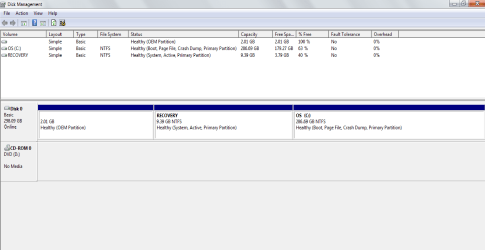
missing hard drive, please help

y0ssar1an22

New member
Local time
4:48 AM
Messages
2
hello. i dont really know too much about computers so i hope this thread is in the right place and if so that i get some help.
basically when i go into 'my computer' the 250gb hard drive is there however the 2gb(i think) 'mini hard drive' has disappeared. i presume this contains vital system info. i already tried a system restore but i dont know how long ago the drive went missing.
any help would be greatly appreciated.
thanks
 

My Computer

Computer Manufacturer/Model Number
dell studio
OS
windows 7 home premium 64 bit
CPU
i7
Memory
4gb
first of all thanks for the reply. heres the screen shot.... hope you can help
 

Attachments

  • desk management.png
    desk management.png
    17.9 KB · Views: 35

My Computer

Computer Manufacturer/Model Number
dell studio
OS
windows 7 home premium 64 bit
CPU
i7
Memory
4gb
1. the partition you are looking for has no drive letter. That is why you do not see it on Computer. You can assign a drive letter in Disk Management (right click), but there does not seem to be much in it.

2. you have a curious setup with the bootmgr in the recovery partition. That in itself is not serious, but your system boot now depends on this partition. This is a bit unusual - to say the least. Any idea how the bootmgr could have gotten there?
 

My Computer

Computer Manufacturer/Model Number
HP, Dell, Gateway, Toshiba - 4 laptops and 2 desktops
OS
Vista, Windows7, Mint Mate, Zorin, Windows 8
CPU
from 1.6GHz Duo to i7
Monitor(s) Displays
2x HP w2207
Hard Drives
5x HDD, 7x SSD, 12x Externals
Keyboard
with trackball - no mices
Mouse
Trackball mice
Internet Speed
DSL 6000
1. the partition you are looking for has no drive letter. That is why you do not see it on Computer. You can assign a drive letter in Disk Management (right click), but there does not seem to be much in it.
Well... not until he does a FORMAT to NTFS for the partition, since there's no file system on it at the moment!

And of course, FORMAT will lose what's on the partition, which if there previously was something worthwhile on that partition it will certainly be disappeared by FORMAT.

Now it's 2GB, which is not tiny. It's fairly large. So what was on it before? Did it ever have a drive letter before it recently vanished?

Very odd.. to show "active" on what's called the Recovery Partition, and now this 2GB partition doesn't have a file system!
 

My Computer

Computer type
PC/Desktop
Computer Manufacturer/Model Number
Home-built, two systems (1) and (2)
OS
Windows 7 Pro x64 (1), Win7 Pro X64 (2)
CPU
i5-3350p 3.1Ghz/6MB-cache (1); E8400 3.0Ghz/6MB-cache (2)
Motherboard
ASUS P8Z77-V Pro (1); ASUS P5Q3 (2)
Memory
8GB PC3-12800 DDR3 (1); 4GB PC3-10600 DDR3 (2)
Graphics Card(s)
ATI HD7750 (1), (see TV cards); ATI R7 250 (2)
Sound Card
Realtek ALC892 HD Audio (1); Realtek ALC1200 HD Audio (2)
Monitor(s) Displays
Eizo HD2441W LCD, Eizo S2433W (1); Eizo 24" S2433W (2)
Screen Resolution
1920x1200, 1920x1200 (1); 1920x1200 (2)
Hard Drives
(1) 1TB SATA-II (7200RPM), 2x2TB SATA-III (7200RPM), 250GB SATA-III (10000RPM) for OS; 2x2TB external USB 3.0

(2) 320GB SATA-II (7200RPM), 750GB SATA-II (7200RPM), 150GB SATA-II (10000RPM) for OS; 2TB external USB 3.0
PSU
Nesteq ECS-6001 600W (1); Nesteq ECS-5001 500W (2)
Case
Acousti-Case 360 (1) and (2)
Cooling
Noctua NH-U12P SE2 for CPU, 2x120mm case fans (1) and (2)
Keyboard
IBM PS/2 (1) and (2)
Mouse
Logitech MX Revolution wireless (1); Microsoft wired (2)
Internet Speed
100mbps down / 10mbps up
Antivirus
Microsoft Security Essentials; Malwarebyte Anti-Malware Pro
Browser
Firefox
Other Info
Ceton InfiniTV 4-tuner cablecard-enabled TV card as well as Hauppauge HVR-2250 OTA/ATSC 2-tuner TV card in (1), running under Win7 WMC
  • Like
Reactions: whs
Those oem partitions are normally reported by Disk Management as empty. They often don't have drive letters assigned.

Looks ok to me.

Very sensible to have Recovery partition as system - good to see Dell doing that.
 

My Computers

System One System Two

  • Computer type
    PC/Desktop
    OS
    7 X64
    CPU
    i5 8400
    Motherboard
    gigabyte b365m ds3h
    Memory
    2x8gb 3200mhz
    Hard Drives
    various
    PSU
    pure power 11 400w cm
    Case
    Coolermaster
    Cooling
    cryorig m9i
  • Computer type
    PC/Desktop
    OS
    7x64
    CPU
    g5400
    Motherboard
    ga b365m ds3h
    Memory
    8gb ddr4 2400
    PSU
    xfx pro 450w
1. the partition you are looking for has no drive letter. That is why you do not see it on Computer. You can assign a drive letter in Disk Management (right click), but there does not seem to be much in it.
Well... not until he does a FORMAT to NTFS for the partition, since there's no file system on it at the moment!

And of course, FORMAT will lose what's on the partition, which if there previously was something worthwhile on that partition it will certainly be disappeared by FORMAT.

Now it's 2GB, which is not tiny. It's fairly large. So what was on it before? Did it ever have a drive letter before it recently vanished?

Very odd.. to show "active" on what's called the Recovery Partition, and now this 2GB partition doesn't have a file system!
Good catch. I overlooked the missing format. It is most likely formatted in FAT - but that does not help. And it most likely has data in it. With Partition Wizard he may see it. Best Free Partition Manager Freeware for Windows 7, Windows Vista, and Windows XP 32 bit & 64 bit. MiniTool Free Partition Manager Software Home Edition.
 
Last edited:

My Computer

Computer Manufacturer/Model Number
HP, Dell, Gateway, Toshiba - 4 laptops and 2 desktops
OS
Vista, Windows7, Mint Mate, Zorin, Windows 8
CPU
from 1.6GHz Duo to i7
Monitor(s) Displays
2x HP w2207
Hard Drives
5x HDD, 7x SSD, 12x Externals
Keyboard
with trackball - no mices
Mouse
Trackball mice
Internet Speed
DSL 6000
Warning: Messing around with the two Dell Recovery Partitions, can make them UNUSABLE.
 

My Computer

OS
ME/XP/Vista/Win7
Back
Top