Missing hard drive space

Catabolism

New member
Local time
9:30 AM
Messages
4
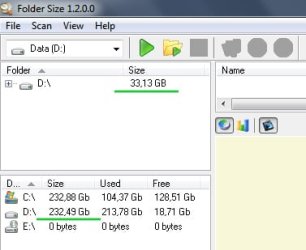
My D: drive should be 230GB. After installing less than 30GB it seems to be all most full. So I downloaded the program 'Folder Size' to check on my space. Which says that my disk is only 33GB in size. So I'm missing a small 200GB. How can I use that missing 200GB?
 

Attachments
  • Wrong hard drive space.jpg
    Wrong hard drive space.jpg
    36.3 KB · Views: 29

My Computer

Computer Manufacturer/Model Number
Toshiba Satellite L500
OS
Windows 7
CPU
Intel Core 2 Duo
Memory
6144MB
My D: drive should be 230GB. After installing less than 30GB it seems to be all most full. So I downloaded the program 'Folder Size' to check on my space. Which says that my disk is only 33GB in size. So I'm missing a small 200GB. How can I use that missing 200GB?


Hi Catabolism and welcome


Can you take a screenshot of your disk management console and upload it to us? Your system recognizes the true size of the drive but the 3rd party app does not.


Thanks

Jan
 

My Computer

Computer Manufacturer/Model Number
LAPTOP. HP Pavilion dv7-4010TX .
OS
Win 7 Ultimate 64-bit. SP1.
CPU
Intel i7 -720QM.[1.6GHz Turbo Boost 2.8GHz. 6MB Cache.]
Memory
8 DDR 3 RAM. 1066MHZ
Graphics Card(s)
ATI 1024 MB. DDR3. Radeon HD5650
Monitor(s) Displays
17.3" High Definition Brightview LCD. LED Backlit.
Screen Resolution
1600 x 900.
Hard Drives
640GB
Case
Laptop / notebook.
Mouse
Logitech Anywhere mouse. MX.
Internet Speed
ADSL [ but too slow ]
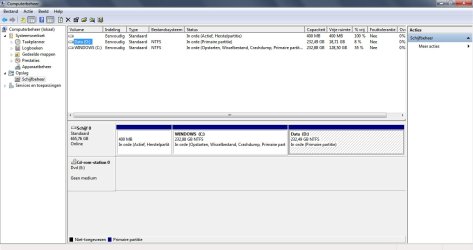
Here it is...
 

Attachments

  • computer management.jpg
    computer management.jpg
    97.8 KB · Views: 210

My Computer

Computer Manufacturer/Model Number
Toshiba Satellite L500
OS
Windows 7
CPU
Intel Core 2 Duo
Memory
6144MB
I still can't seem to fix it...
 

My Computer

Computer Manufacturer/Model Number
Toshiba Satellite L500
OS
Windows 7
CPU
Intel Core 2 Duo
Memory
6144MB
I suggest 2 actions:

1. Run WinDirStat. That will tell you exactly whats on your disk (but not the shadowstorage).
2. For the shadowstorage, go to Start > Computer > right click and go to Properties > System protection (in the left pane on top) > System protection tab > highlight the D drive > configure > and what is the number behind "current usage" in the second half of the window?
 

My Computer

Computer Manufacturer/Model Number
HP, Dell, Gateway, Toshiba - 4 laptops and 2 desktops
OS
Vista, Windows7, Mint Mate, Zorin, Windows 8
CPU
from 1.6GHz Duo to i7
Monitor(s) Displays
2x HP w2207
Hard Drives
5x HDD, 7x SSD, 12x Externals
Keyboard
with trackball - no mices
Mouse
Trackball mice
Internet Speed
DSL 6000
Thanks! I've found it. WindowsImageBackup used most of the free disk space.
 

My Computer

Computer Manufacturer/Model Number
Toshiba Satellite L500
OS
Windows 7
CPU
Intel Core 2 Duo
Memory
6144MB
Great. I am glad it was that easy to fix.
 

My Computer

Computer Manufacturer/Model Number
HP, Dell, Gateway, Toshiba - 4 laptops and 2 desktops
OS
Vista, Windows7, Mint Mate, Zorin, Windows 8
CPU
from 1.6GHz Duo to i7
Monitor(s) Displays
2x HP w2207
Hard Drives
5x HDD, 7x SSD, 12x Externals
Keyboard
with trackball - no mices
Mouse
Trackball mice
Internet Speed
DSL 6000
how did you solve this? On my c: drive I have only 57gb of memory left over after formatting and upgrading to windows 7. Before this I had 250-300bg of space left and now I cant seem to fix the problem. Is there anything you guys can help me out with?
 

My Computer

OS
Windows7 Ultimate x64
how did you solve this? On my c: drive I have only 57gb of memory left over after formatting and upgrading to windows 7. Before this I had 250-300bg of space left and now I cant seem to fix the problem. Is there anything you guys can help me out with?
Do what I suggested in post #5 and then come back with the numbers or snips of the results.
 

My Computer

Computer Manufacturer/Model Number
HP, Dell, Gateway, Toshiba - 4 laptops and 2 desktops
OS
Vista, Windows7, Mint Mate, Zorin, Windows 8
CPU
from 1.6GHz Duo to i7
Monitor(s) Displays
2x HP w2207
Hard Drives
5x HDD, 7x SSD, 12x Externals
Keyboard
with trackball - no mices
Mouse
Trackball mice
Internet Speed
DSL 6000
Post a picture of your disk management. The missing space is probably unallocated.
 

My Computer

Computer Manufacturer/Model Number
HP, Dell, Gateway, Toshiba - 4 laptops and 2 desktops
OS
Vista, Windows7, Mint Mate, Zorin, Windows 8
CPU
from 1.6GHz Duo to i7
Monitor(s) Displays
2x HP w2207
Hard Drives
5x HDD, 7x SSD, 12x Externals
Keyboard
with trackball - no mices
Mouse
Trackball mice
Internet Speed
DSL 6000
Back
Top