
You are using an out of date browser. It may not display this or other websites correctly.
You should upgrade or use an alternative browser.
You should upgrade or use an alternative browser.
Missing HKEY_LOCAL_MACHINE\Software\Classes\mailto
- Thread starter NZRussell
- Start date

Hello Russell, and welcome to Seven Forums.
Did you scroll down past all of the file extensions listed at that registry location? mailto will be under all of the file extenstions in the protocol list like below.
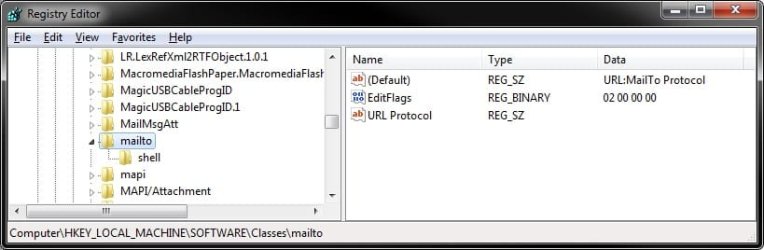
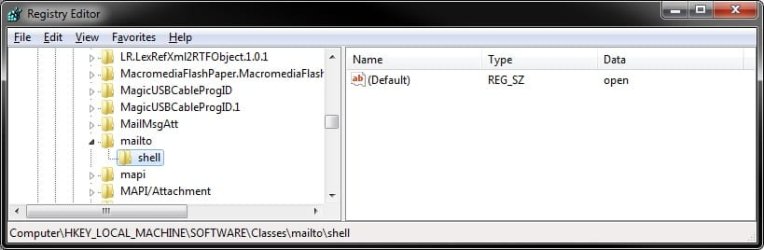
Did you scroll down past all of the file extensions listed at that registry location? mailto will be under all of the file extenstions in the protocol list like below.
My Computer
- Computer type
- PC/Desktop
- Computer Manufacturer/Model Number
- Self built custom
- OS
- 64-bit Windows 11 Pro for Workstations
- CPU
- Intel i7-8700K OC'd to 5 GHz
- Motherboard
- ASUS ROG Maximus XI Formula Z390
- Memory
- 64 GB (4x16GB) G.SKILL TridentZ RGB DDR4 3600 MHz
- Graphics Card(s)
- ASUS ROG-STRIX-GTX1080TI-O11G-GAMING
- Sound Card
- Integrated
- Monitor(s) Displays
- 2 x Samsung Odyssey G7 27"
- Screen Resolution
- 2560x1440
- Hard Drives
- 1TB Samsung 990 PRO M.2,
4TB Samsung 990 PRO PRO M.2,
TerraMaster F8 SSD Plus NAS
- PSU
- Seasonic Prime Titanium 850W
- Case
- Thermaltake Core P3
- Cooling
- Corsair Hydro H115i
- Keyboard
- Logitech wireless K800
- Mouse
- Logitech MX Master 4
- Internet Speed
- 2 Gb/s Download and 100 Mb/s Upload
- Antivirus
- Malwarebyte Anti-Malware Premium
- Browser
- Google Chrome
- Other Info
- Logitech Z625 speaker system,
Logitech BRIO 4K Pro webcam,
HP Color LaserJet Pro MFP M477fdn,
APC SMART-UPS RT 1000 XL - SURT1000XLI,
Galaxy S23 Plus phone
Thank you Brink both for your welcome and reply. You are right,  I didn't go done far enough, perhaps the result of trying to work on when too tired to be doing so. Especially when working in the registry.
The problem started when email links on web sites started opening in Thunderbird and continued to do so even after I uninstalled Thunderbird. I was unable to get Firefox to see Pocomail as the default again.
As a result I went in search of reasons and as a last resort, went to the registry. My preferred email client is an old version (2.64) and this is running in XP mode on Windows 7. Poco has been working fine for ages and I think the problem started when I downloaded Thunderbird to trial it then decided to stick with Pocomail.
The only problem has been that I can't get it back to be recognized for web links. I've uninstalled and reinstalled without achieving the desired result. When I click on a email link in a web page I get a message stating "Could not perform this operation because the default mail client is not properly installed."
Until I installed Thunderbird all was fine now I just can't get it to work correctly. Both Firefox v8 and Pocomail have been uninstalled and reinstalled twice but the same problem occurs when using Internet Explorer.
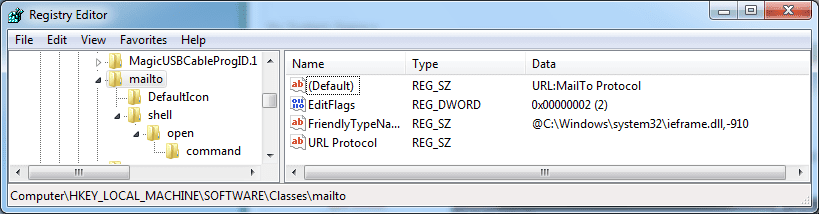
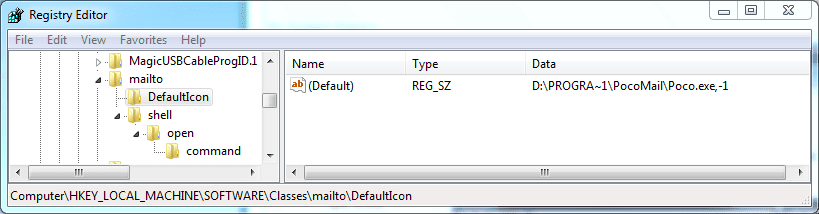
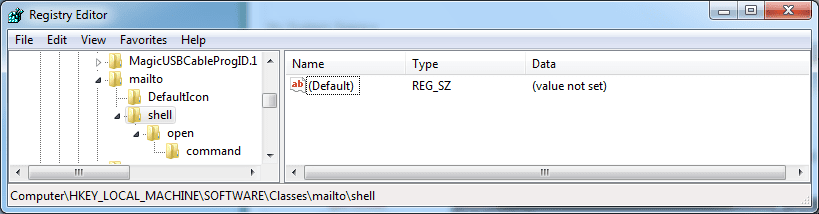
I'm attaching snips of the registry entries found under HKEY_LOCAL_MACHINE\Software\Classes\mailto just in the hope that someone may be able to say if there is a problem there to be fixed.
I didn't go done far enough, perhaps the result of trying to work on when too tired to be doing so. Especially when working in the registry.The problem started when email links on web sites started opening in Thunderbird and continued to do so even after I uninstalled Thunderbird. I was unable to get Firefox to see Pocomail as the default again.
As a result I went in search of reasons and as a last resort, went to the registry. My preferred email client is an old version (2.64) and this is running in XP mode on Windows 7. Poco has been working fine for ages and I think the problem started when I downloaded Thunderbird to trial it then decided to stick with Pocomail.
The only problem has been that I can't get it back to be recognized for web links. I've uninstalled and reinstalled without achieving the desired result. When I click on a email link in a web page I get a message stating "Could not perform this operation because the default mail client is not properly installed."
Until I installed Thunderbird all was fine now I just can't get it to work correctly. Both Firefox v8 and Pocomail have been uninstalled and reinstalled twice but the same problem occurs when using Internet Explorer.
I'm attaching snips of the registry entries found under HKEY_LOCAL_MACHINE\Software\Classes\mailto just in the hope that someone may be able to say if there is a problem there to be fixed.
Attachments


My Computer
- OS
- Window 7
If this hasn't happened to long ago, then you may be able to do a system restore using a restore point (if available) dated before originally installing Thunderbird and this issue to hopefully undo and fix this for you.
My Computer
- Computer type
- PC/Desktop
- Computer Manufacturer/Model Number
- Self built custom
- OS
- 64-bit Windows 11 Pro for Workstations
- CPU
- Intel i7-8700K OC'd to 5 GHz
- Motherboard
- ASUS ROG Maximus XI Formula Z390
- Memory
- 64 GB (4x16GB) G.SKILL TridentZ RGB DDR4 3600 MHz
- Graphics Card(s)
- ASUS ROG-STRIX-GTX1080TI-O11G-GAMING
- Sound Card
- Integrated
- Monitor(s) Displays
- 2 x Samsung Odyssey G7 27"
- Screen Resolution
- 2560x1440
- Hard Drives
- 1TB Samsung 990 PRO M.2,
4TB Samsung 990 PRO PRO M.2,
TerraMaster F8 SSD Plus NAS
- PSU
- Seasonic Prime Titanium 850W
- Case
- Thermaltake Core P3
- Cooling
- Corsair Hydro H115i
- Keyboard
- Logitech wireless K800
- Mouse
- Logitech MX Master 4
- Internet Speed
- 2 Gb/s Download and 100 Mb/s Upload
- Antivirus
- Malwarebyte Anti-Malware Premium
- Browser
- Google Chrome
- Other Info
- Logitech Z625 speaker system,
Logitech BRIO 4K Pro webcam,
HP Color LaserJet Pro MFP M477fdn,
APC SMART-UPS RT 1000 XL - SURT1000XLI,
Galaxy S23 Plus phone
Yep, CCleaner only backups what it changes.
Open Default Programs, and scroll down towards the bottom for MAILTO. Next, make sure that MAILTO has it's "Current Default" set to the Pocomail email client program. If not, click on Change program, and navigate to and select the .exe file for the Pocomail program.
Open Default Programs, and scroll down towards the bottom for MAILTO. Next, make sure that MAILTO has it's "Current Default" set to the Pocomail email client program. If not, click on Change program, and navigate to and select the .exe file for the Pocomail program.
My Computer
- Computer type
- PC/Desktop
- Computer Manufacturer/Model Number
- Self built custom
- OS
- 64-bit Windows 11 Pro for Workstations
- CPU
- Intel i7-8700K OC'd to 5 GHz
- Motherboard
- ASUS ROG Maximus XI Formula Z390
- Memory
- 64 GB (4x16GB) G.SKILL TridentZ RGB DDR4 3600 MHz
- Graphics Card(s)
- ASUS ROG-STRIX-GTX1080TI-O11G-GAMING
- Sound Card
- Integrated
- Monitor(s) Displays
- 2 x Samsung Odyssey G7 27"
- Screen Resolution
- 2560x1440
- Hard Drives
- 1TB Samsung 990 PRO M.2,
4TB Samsung 990 PRO PRO M.2,
TerraMaster F8 SSD Plus NAS
- PSU
- Seasonic Prime Titanium 850W
- Case
- Thermaltake Core P3
- Cooling
- Corsair Hydro H115i
- Keyboard
- Logitech wireless K800
- Mouse
- Logitech MX Master 4
- Internet Speed
- 2 Gb/s Download and 100 Mb/s Upload
- Antivirus
- Malwarebyte Anti-Malware Premium
- Browser
- Google Chrome
- Other Info
- Logitech Z625 speaker system,
Logitech BRIO 4K Pro webcam,
HP Color LaserJet Pro MFP M477fdn,
APC SMART-UPS RT 1000 XL - SURT1000XLI,
Galaxy S23 Plus phone
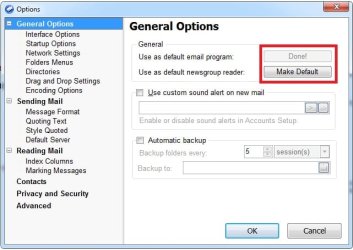
After you installed Pocomail, did you click on Tools -> Options in Pocomail, then click on both the Make Default buttons as below? Pocomail should also be available to select in this Default Programs.
I also installed Pocomail in a virtual machine, and extracted the defaiult MAILTO registry entries below for you If you like, download it, and double click on the .reg file approve and merge it to see if that may help afterwards.
Attachments
My Computer
- Computer type
- PC/Desktop
- Computer Manufacturer/Model Number
- Self built custom
- OS
- 64-bit Windows 11 Pro for Workstations
- CPU
- Intel i7-8700K OC'd to 5 GHz
- Motherboard
- ASUS ROG Maximus XI Formula Z390
- Memory
- 64 GB (4x16GB) G.SKILL TridentZ RGB DDR4 3600 MHz
- Graphics Card(s)
- ASUS ROG-STRIX-GTX1080TI-O11G-GAMING
- Sound Card
- Integrated
- Monitor(s) Displays
- 2 x Samsung Odyssey G7 27"
- Screen Resolution
- 2560x1440
- Hard Drives
- 1TB Samsung 990 PRO M.2,
4TB Samsung 990 PRO PRO M.2,
TerraMaster F8 SSD Plus NAS
- PSU
- Seasonic Prime Titanium 850W
- Case
- Thermaltake Core P3
- Cooling
- Corsair Hydro H115i
- Keyboard
- Logitech wireless K800
- Mouse
- Logitech MX Master 4
- Internet Speed
- 2 Gb/s Download and 100 Mb/s Upload
- Antivirus
- Malwarebyte Anti-Malware Premium
- Browser
- Google Chrome
- Other Info
- Logitech Z625 speaker system,
Logitech BRIO 4K Pro webcam,
HP Color LaserJet Pro MFP M477fdn,
APC SMART-UPS RT 1000 XL - SURT1000XLI,
Galaxy S23 Plus phone
Brink, the option to merge didn't come but a run option did, those entries are in the registry but will need editing as they show Poco in the C drive instead of D but I don't see this as difficult to overcome.
However, when I went into Default Programs/Associate a file... the MAILTO protocol has disappeared. As I backed up the reg before using your file I'm thinking that I should merge the back up to see if it restores MAILTO.
I'm also considering uninstalling Poco and reinstalling to the C drive as it has never been there and so there should be no old reg entries that may be messing things up. I may off track with that thinking though.
However, when I went into Default Programs/Associate a file... the MAILTO protocol has disappeared. As I backed up the reg before using your file I'm thinking that I should merge the back up to see if it restores MAILTO.
I'm also considering uninstalling Poco and reinstalling to the C drive as it has never been there and so there should be no old reg entries that may be messing things up. I may off track with that thinking though.
My Computer
- OS
- Window 7
Running a .reg file is the same as when you right click on a .reg file and click on Merge.
Yeah, try uninstalling and then installing Pocomail using the default installation settings and C: drive location to see if that may work. If not, then check to make sure Pocomail is set as default like in my screenshot above.
Yeah, try uninstalling and then installing Pocomail using the default installation settings and C: drive location to see if that may work. If not, then check to make sure Pocomail is set as default like in my screenshot above.
My Computer
- Computer type
- PC/Desktop
- Computer Manufacturer/Model Number
- Self built custom
- OS
- 64-bit Windows 11 Pro for Workstations
- CPU
- Intel i7-8700K OC'd to 5 GHz
- Motherboard
- ASUS ROG Maximus XI Formula Z390
- Memory
- 64 GB (4x16GB) G.SKILL TridentZ RGB DDR4 3600 MHz
- Graphics Card(s)
- ASUS ROG-STRIX-GTX1080TI-O11G-GAMING
- Sound Card
- Integrated
- Monitor(s) Displays
- 2 x Samsung Odyssey G7 27"
- Screen Resolution
- 2560x1440
- Hard Drives
- 1TB Samsung 990 PRO M.2,
4TB Samsung 990 PRO PRO M.2,
TerraMaster F8 SSD Plus NAS
- PSU
- Seasonic Prime Titanium 850W
- Case
- Thermaltake Core P3
- Cooling
- Corsair Hydro H115i
- Keyboard
- Logitech wireless K800
- Mouse
- Logitech MX Master 4
- Internet Speed
- 2 Gb/s Download and 100 Mb/s Upload
- Antivirus
- Malwarebyte Anti-Malware Premium
- Browser
- Google Chrome
- Other Info
- Logitech Z625 speaker system,
Logitech BRIO 4K Pro webcam,
HP Color LaserJet Pro MFP M477fdn,
APC SMART-UPS RT 1000 XL - SURT1000XLI,
Galaxy S23 Plus phone