
willum08
New member
Hi,
I'm using Windows 7 Home Premium 32 bit and I've recently upgraded my copy of Windows Live Mail to WLM 2011. However, compared with the previous version of WLM, there are two functions which I am unable to find in the new version.
1. In the previous version, I could choose whether or not WLM checked for new emails just at start-up, or at pre-set intervals. Is this facility still available and if so, where can I find it?
2. If I accidentally delete something in an email I am forwarding, there does not appear to be an 'Undo' facility, like there was in the previous version.
I would appreciate any help regarding these two issues
Thanks.
I'm using Windows 7 Home Premium 32 bit and I've recently upgraded my copy of Windows Live Mail to WLM 2011. However, compared with the previous version of WLM, there are two functions which I am unable to find in the new version.
1. In the previous version, I could choose whether or not WLM checked for new emails just at start-up, or at pre-set intervals. Is this facility still available and if so, where can I find it?
2. If I accidentally delete something in an email I am forwarding, there does not appear to be an 'Undo' facility, like there was in the previous version.
I would appreciate any help regarding these two issues
Thanks.
My Computer
At a glance
Windows 10 Pro 64bit and Windows 7 Pro 64 bitIntel Core i58GB
- Computer type
- Laptop
- Computer Manufacturer/Model Number
- 2 off Acer Travelmate P253 Laptop
- OS
- Windows 10 Pro 64bit and Windows 7 Pro 64 bit
- CPU
- Intel Core i5
- Memory
- 8GB
- Hard Drives
- 500GB SSD

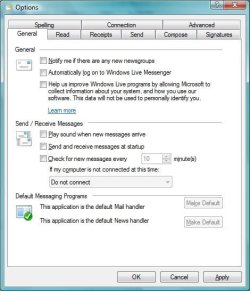
 That's the 'window' I couldn't find ! Now that I know where it is (Extreme Top Left Icon), I can see the familiar 'Options' window..... which was under the 'Tools' menu in the previous version of WLM......


