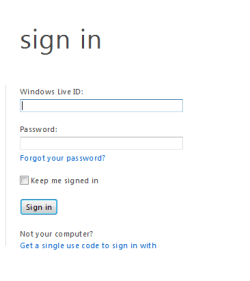
Missing Multiple Hotmail Accounts on login screen

jbrune

New member
Until recently something caused a change to my Window Live Hotmail login screen. It used to display multiple hotmail accounts. Now the multiple accounts are gone and replaced by the fields for my hotmail address and my password. The REMEMBER ME option is also missing.
I'm using IE version 8.0.7601.175141C on Windows 7 Ultimate 64 bit Service Pack 1.
My attempts to fix this have failed so far. After reading a number of posts in various forums, I successfully downloaded and re-installed the sign-in assistant. I've been to the Manage Add-on area but there's no sign-in assistant showing, only Windows Live ID Sign-in Control and Windows Live ID Sign-in Helper -- both are enabled. Most of the posts I've read suggest enabling the Sign-in Assistant but it's not there to be enabled. Is that the problem and if so, how do I get it to “show” in the add-on manager so I can enable it?
Otherwise, what else should I do to fix this problem?
Thanks

Jeff
 

My Computer

OS
Windows 7 Ultimate
Until recently something caused a change to my Window Live Hotmail login screen. It used to display multiple hotmail accounts. Now the multiple accounts are gone and replaced by the fields for my hotmail address and my password. The REMEMBER ME option is also missing.
I'm using IE version 8.0.7601.175141C on Windows 7 Ultimate 64 bit Service Pack 1.
My attempts to fix this have failed so far. After reading a number of posts in various forums, I successfully downloaded and re-installed the sign-in assistant. I've been to the Manage Add-on area but there's no sign-in assistant showing, only Windows Live ID Sign-in Control and Windows Live ID Sign-in Helper -- both are enabled. Most of the posts I've read suggest enabling the Sign-in Assistant but it's not there to be enabled. Is that the problem and if so, how do I get it to “show” in the add-on manager so I can enable it?
Otherwise, what else should I do to fix this problem?
Thanks

Jeff


You are not the only one. I have the same issue. I can't find the solution.

Is this what you see ?......

Image 9.png
 

My Computer

Computer Manufacturer/Model Number
Acer Aspire 7741Z
OS
Windows 7 Home Premium 64-bit, SP1
CPU
Intel Pentium P6200, Cores 2, 2.13 GHz
Memory
4 GB
Graphics Card(s)
Intel HD
Sound Card
unknown
Monitor(s) Displays
17.3 inches
Screen Resolution
1600 x 900
Hard Drives
640 GB, 5400 PRM
Link to Windows Live Solution Center, Hotmail forum :
Hotmail Threads

All Windows Live issues are to be handled by Windows Live Solution Center.
We might get an answer there.
 

My Computer

Computer Manufacturer/Model Number
Acer Aspire 7741Z
OS
Windows 7 Home Premium 64-bit, SP1
CPU
Intel Pentium P6200, Cores 2, 2.13 GHz
Memory
4 GB
Graphics Card(s)
Intel HD
Sound Card
unknown
Monitor(s) Displays
17.3 inches
Screen Resolution
1600 x 900
Hard Drives
640 GB, 5400 PRM
I ran into it too but figured that MS had removed the feature to make the login screen more secure. Not a big deal to me, I just type in email id & pw to log in.
 

My Computer

Computer type
PC/Desktop
Computer Manufacturer/Model Number
Home Built desktop, Dell G15 5511 Gaming laptop,MS Surface Pro 7 tablet
OS
W10 Pro desktop, W11 laptop, W11 Pro tablet (all 64-bit)
CPU
3.7Ghz 8700K i7, i7-11800H, i7-1065G7
Motherboard
ASUS TUF Z370-Pro Gaming in desktop
Memory
16G desktop, 16G laptop, 4G tablet
Graphics Card(s)
AMD Radeon RX580, RTX 3060, Intel Iris Plus
Sound Card
High Definition Audio (Built-in to mobo)
Monitor(s) Displays
Samsung U32J59 32" (2x), 15.6", 12"
Screen Resolution
3840x2160, 3840x2160, 1920x1080, 2160x1440
Hard Drives
500G SSD for OS; 2T, 10T & 15T HDDs for Data on Desktop, 1TB SSD laptop, 128G SSD tablet.
PSU
Corsair CX 750M
Case
Antec 100
Cooling
CM 212+
Keyboard
IBM Model M - used continuously since 1986
Mouse
Microsoft Pro IntelliMouse
Internet Speed
400M down 8M up
Antivirus
Windows Defender
Browser
FireFox
Other Info
Built my first computer (8Mhz 8088cpu, 640K RAM, 20MB HDD, 2 360K floppy drives) in 1985 and have been building them for myself, relatives and friends ever since.
I ran into it too but figured that MS had removed the feature to make the login screen more secure. Not a big deal to me, I just type in email id & pw to log in.

For login security, it is agreeable, absolutely.

For someone who has "multiple " hotmail accounts, not so agreeable.
 

My Computer

Computer Manufacturer/Model Number
Acer Aspire 7741Z
OS
Windows 7 Home Premium 64-bit, SP1
CPU
Intel Pentium P6200, Cores 2, 2.13 GHz
Memory
4 GB
Graphics Card(s)
Intel HD
Sound Card
unknown
Monitor(s) Displays
17.3 inches
Screen Resolution
1600 x 900
Hard Drives
640 GB, 5400 PRM
I'm all for security controls as long as they are proportional to the risk. in this case, not so much.
 

My Computer

OS
Windows 7 Ultimate
I am having the same problem. It has run perfectly well for years and then changed the other day, just after I installed IE9 and a few updates I think. Driving me crazy! It runs fine on my windows 7, it is with vista on my laptop that I am having the issue. I have reinstalled everything to no avail. Hope someone can find a solution soon!
 

My Computer

OS
7 32 bit
Remember me is gone

I get the same problem, the 'remember me' option has gone :(

No big deal for someone with one account but if you have multiple accounts it really is annoying :mad:
 

My Computer

OS
dont want to say
I run a couple different Hotmail accounts for personal and private matters and it kind of sucks and I hope they fix soon.
 

My Computer

OS
vista
Back
Top