missing music files?

Lissy

New member
Local time
5:26 AM
Messages
8
Location
England
i'm transferring my music from my old laptop to the new one, and on the new one I cant find some of the songs in the music folder yet they are appearing in windows media player. how/why is it doing that? and is there a way to add the files back to the music folder?
 

My Computer

OS
Windows 7 Home Premium 64-Bit
Hi, welcome to the forums :)

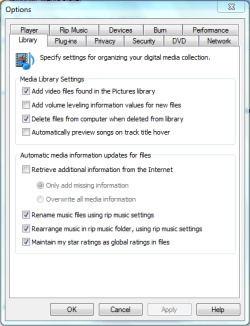
With WMP open, click Organize, Manage Libraries then Music. Here you will see what folders are included in your Music library. Also, if you click Organize, Options and under the Library tab make sure that 3 options at the bottom are set (see pic) then click ok.

WMP Options.PNG

Now click Organize then Apply media information changes. This should then start a copy/move/rename function that'll organize your music into the Music library.


OS
 

My Computer

Computer Manufacturer/Model Number
Compaq Desktop
OS
Windows 7 Ultimate x64
CPU
AMD Sempron Dual Core
Memory
3GB
Graphics Card(s)
NVIDIA GeForce 6150SE nForce 430
Screen Resolution
1024x768
Hard Drives
150GB Sata
Hi and welcome to SF!
Once I went through this kind of problem. What happened in my case was to perform various tasks in addition to be transferring a large number of files at once. But this came with Windows XP and with a setting much more basic than I have today. Another thing that could be the reason for your problem would be damage to the external hd ... I would recommend you two things: pass the check disk on both hdd and always move the files, never cut and paste. As for how to recover files in the main hdd, do this: Go into the folder where the files were you want to recover, right click and click Properties, click the "backward" and wait for Windows to enumerate them. Select one by one and click "open" if the version that interests you, copy and paste the contents where it deems appropriate. And remember: never cut and paste. Good luck and let us know the result! ;)


"PLEASE REP ANYONE WHO HELPS YOU"
 

My Computer

Computer Manufacturer/Model Number
WALLONN7 / LIN BLACK SERIES II
OS
Windows 7 Ultimate x64 SP1
CPU
AMD PHENOM II X6 1090T 3.2GHz
Motherboard
GIGABYTE GA-890FXA-UD7
Memory
8GB G.SKILL RIPJAWS - F3-10666CL7D
Graphics Card(s)
SAPPHIRE ATI RADEON HD 5870 VAPOR X OC
Sound Card
REALTEK DOLBY HOME THEATER
Monitor(s) Displays
LED LG W2486L
Screen Resolution
1080p
Hard Drives
SEAGATE 1TB -ST31000528AS - AHCI MODE - AS SATA
PSU
ZALMAN ZM1000-HP 1000W
Case
THERMALTAKE XASER VI VG4000SWA
Cooling
140MM x3 / 120MM x1 AIR COOLING - THERMALTAKE
Keyboard
MICROSOFT DIGITAL MEDIA KEYBOARD 3000 - USB
Mouse
MICROSOFT BASIC OPTICAL MOUSE 2.0 - USB
Internet Speed
600KBPS
Other Info
MICROSOFT XBOX 360 CONTROLLER
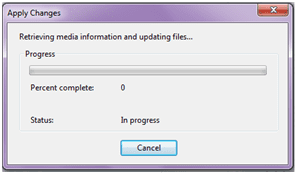
thanks for the reply, I did what you said and all of those 3 options were not set so I did that. But I also selected the Apply media information changes a while ago as you said to do and its progress is still 0.
Untitled.png
Do I just have to wait it out or do i need to restart it or something?
 

My Computer

OS
Windows 7 Home Premium 64-Bit
Do you have a lot of music files? This could account for very slow progress. Also, is there a fair amount of HDD activity while the Apply Changes box is open?
 

My Computer

Computer Manufacturer/Model Number
Compaq Desktop
OS
Windows 7 Ultimate x64
CPU
AMD Sempron Dual Core
Memory
3GB
Graphics Card(s)
NVIDIA GeForce 6150SE nForce 430
Screen Resolution
1024x768
Hard Drives
150GB Sata
1051 songs currently on the laptop. There were a few other windows open which i have now closed (I am using the other laptop for internet) and it has now just started to progress but is still slow. It was 4% complete but it keeps dropping back to 0 and then crawling back up again, it also says that the "server is busy, retrying"
 

My Computer

OS
Windows 7 Home Premium 64-Bit
Back
Top