Missing network adapter after windows 7 installation

babysmiles98

New member
Local time
2:00 AM
Messages
6
Hi, I reinstalled Windows 7 home premium 64bit on my Asus U36J laptop. Installation is done, but I can't find any wireless connection. When I troubleshoot, the computer says "install a driver for your network adapter" . I've tried to find it on internet but not to any avail. I downloaded a few diff drivers off ASUSTeK Computer Inc. -Support- Drivers and Download U36JC but it I don't really know if I am doing the right thing. Please help me :) Before I reinstalled windows 7, my computer can connect to the wifi (internet). Right not, my sister's computer can also connect (which is what I'm using now). Thank you in advance!!
 

My Computer

Computer type
Laptop
Computer Manufacturer/Model Number
Asus
OS
Windows 7 Home Premium 64-bit
Hi please go to device manager in control panel then to the device, it should have either a red X or yellow ! on the left of it there will be a small arrow/triangle, click on it to expand the view then right click on the device and choose properties on the new window click on the details tab and see which device it tells you is there or click on the drop down list where it says driver details and change it to hardware id and post the pci ven and dev
 

My Computer

Computer type
Laptop
Computer Manufacturer/Model Number
Samsung
OS
Win 7 home
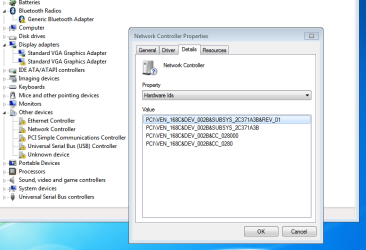
Hi, is it this? I'm not very sure as there are many !s
Attatched is the picture for verification purpose. Please advise :) Thank you very much !!!

PCI\VEN_168C&DEV_002B&SUBSYS_2C371A3B&REV_01
PCI\VEN_168C&DEV_002B&SUBSYS_2C371A3B
PCI\VEN_168C&DEV_002B&CC_028000
PCI\VEN_168C&DEV_002B&CC_0280
 

Attachments

  • Capture.PNG
    Capture.PNG
    25.5 KB · Views: 0

My Computer

Computer type
Laptop
Computer Manufacturer/Model Number
Asus
OS
Windows 7 Home Premium 64-bit
Hi first you need the chipset first then vga then lan once you have those we can look at the others take the earlier dated vga for now and post another screen shot of device manager when you have them installed
 

My Computer

Computer type
Laptop
Computer Manufacturer/Model Number
Samsung
OS
Win 7 home
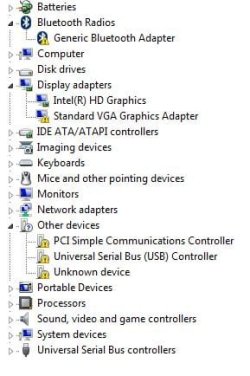
Hi, I installed all that you have said and also while waiting for reply , I had downloaded and installed one of the wireless drivers (idk which cause I downloaded all and tried my luck cause I need internet on my com!!) and it worked!! There are still a few more !s though
 

Attachments

  • Capture.JPG
    Capture.JPG
    30.3 KB · Views: 40

My Computer

Computer type
Laptop
Computer Manufacturer/Model Number
Asus
OS
Windows 7 Home Premium 64-bit
Hi the 2nd graphics,the card reader and I think the usb 3 and bluetooth and let's see what is left
 

My Computer

Computer type
Laptop
Computer Manufacturer/Model Number
Samsung
OS
Win 7 home

My Computer

Computer type
PC/Desktop
Computer Manufacturer/Model Number
Custome Built
OS
Microsoft Windows 7 Ultimate 64-bit 7601 Multiprocessor Free Service Pack 1
CPU
Intel(R) Core(TM) i7 CPU 950 @ 3.07GHz
Motherboard
ASUSTeK Computer INC. SABERTOOTH X58 (LGA1366)
Memory
16.0GB Dual-Channel DDR3 @ 534MHz (8-8-8-20)
Graphics Card(s)
1023MB NVIDIA GeForce GTX 650 (EVGA)
Sound Card
(1) NVIDIA High Definition Audio (2) High Definition Audio
Monitor(s) Displays
HP W2072a LED Backlit
Screen Resolution
1920x1080@60Hz
Hard Drives
(1) SAMSUNG MMCRE28G5MXP-0VB SCSI Disk Device
(2) ST1000DM 003-1CH162 SCSI Disk Device
(3) WDC WD10EURX-73FH1Y0 SCSI Disk Device
PSU
XION XON-1000P14F
Cooling
Fans
Antivirus
Windows Security Essentials
Browser
Mozilla Firefox
Other Info
BIOS Version/Date
American Megatrends Inc. 1402, 8/9/2012
SMBIOS Version 2.5
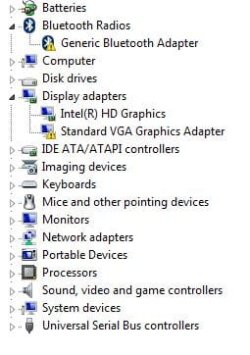
Hi, most of them are cleared now. Left 2 more. I downloaded the slim drivers and it helped fixed most of the problems too.
 

Attachments

  • Capture.JPG
    Capture.JPG
    25.2 KB · Views: 32

My Computer

Computer type
Laptop
Computer Manufacturer/Model Number
Asus
OS
Windows 7 Home Premium 64-bit
My vga no longer has ! so only the bluetooth is left
 

My Computer

Computer type
Laptop
Computer Manufacturer/Model Number
Asus
OS
Windows 7 Home Premium 64-bit
A trick with drivers that you are having trouble with is to delete it's entry in the Device Manager and reboot.
Rebooting can cause MS to install the device with the reboot.
It's worth a try.

If that doesn't fix the issue, try rerunning Slim Drivers.
 

My Computer

Computer type
PC/Desktop
Computer Manufacturer/Model Number
Custome Built
OS
Microsoft Windows 7 Ultimate 64-bit 7601 Multiprocessor Free Service Pack 1
CPU
Intel(R) Core(TM) i7 CPU 950 @ 3.07GHz
Motherboard
ASUSTeK Computer INC. SABERTOOTH X58 (LGA1366)
Memory
16.0GB Dual-Channel DDR3 @ 534MHz (8-8-8-20)
Graphics Card(s)
1023MB NVIDIA GeForce GTX 650 (EVGA)
Sound Card
(1) NVIDIA High Definition Audio (2) High Definition Audio
Monitor(s) Displays
HP W2072a LED Backlit
Screen Resolution
1920x1080@60Hz
Hard Drives
(1) SAMSUNG MMCRE28G5MXP-0VB SCSI Disk Device
(2) ST1000DM 003-1CH162 SCSI Disk Device
(3) WDC WD10EURX-73FH1Y0 SCSI Disk Device
PSU
XION XON-1000P14F
Cooling
Fans
Antivirus
Windows Security Essentials
Browser
Mozilla Firefox
Other Info
BIOS Version/Date
American Megatrends Inc. 1402, 8/9/2012
SMBIOS Version 2.5
How are you updating the driver ? I would download it to your desktop and run the .exe but try uninstalling as suggested then try the install.
 

My Computer

Computer type
Laptop
Computer Manufacturer/Model Number
Samsung
OS
Win 7 home
Hi, sorry, lost you at delete the entry, how to delete at device manager? After deleting, how do I download and reinstall? Many thanks to you guys!!
 

My Computer

Computer type
Laptop
Computer Manufacturer/Model Number
Asus
OS
Windows 7 Home Premium 64-bit
Back
Top