Missing Network Adapter? Please help!

Trident

New member
Local time
1:34 PM
Messages
4
Hi,

I just reinstalled Windows 7 Ultimate x64 and for some reason, I am missing one of my network adapters. I have had this system up and running before and I use the second adapter to stream media to my PS3 - so it is essential to me! I've done a Windows update and checked to make sure both ports were enabled in my BIOS, which they were. I've attached a screenshot of my device manager. Prior to my reinstall, it said "Realtek PCIe GBE Family Controller #1" and "Realtek PCIe GBE Family Controller #2." Any suggestions on how to fix this would be EXTREMELY grateful. Thanks.

ej8qba.png


-T
 

My Computer

OS
Windows 7 Ultimate x64
hello trident.

can you check at msinfo32 > tab component > network > adapter
post it and let we see.
 

My Computer

Computer Manufacturer/Model Number
built up
OS
windows 7
CPU
Phenom II AMD Dragon 3.5Ghz
Memory
DDR3 4GB
Graphics Card(s)
ATI Radeon 512Mb
Monitor(s) Displays
HP L1506
Screen Resolution
1152 x 864
Hard Drives
WDC 1 TB SATA-II Green Power
Keyboard
HP wireless keyboard
Mouse
HP Optic
Internet Speed
1GB
Name [00000000] WAN Miniport (SSTP)
Adapter Type Not Available
Product Type WAN Miniport (SSTP)
Installed Yes
PNP Device ID ROOT\MS_SSTPMINIPORT\0000
Last Reset 3/24/2010 3:44 AM
Index 0
Service Name RasSstp
IP Address Not Available
IP Subnet Not Available
Default IP Gateway Not Available
DHCP Enabled No
DHCP Server Not Available
DHCP Lease Expires Not Available
DHCP Lease Obtained Not Available
MAC Address Not Available
Driver c:\windows\system32\drivers\rassstp.sys (6.1.7600.16385, 82.00 KB (83,968 bytes), 7/13/2009 7:10 PM)

Name [00000001] WAN Miniport (IKEv2)
Adapter Type Not Available
Product Type WAN Miniport (IKEv2)
Installed Yes
PNP Device ID ROOT\MS_AGILEVPNMINIPORT\0000
Last Reset 3/24/2010 3:44 AM
Index 1
Service Name RasAgileVpn
IP Address Not Available
IP Subnet Not Available
Default IP Gateway Not Available
DHCP Enabled No
DHCP Server Not Available
DHCP Lease Expires Not Available
DHCP Lease Obtained Not Available
MAC Address Not Available
Driver c:\windows\system32\drivers\agilevpn.sys (6.1.7600.16385, 59.00 KB (60,416 bytes), 7/13/2009 7:10 PM)

Name [00000002] WAN Miniport (L2TP)
Adapter Type Not Available
Product Type WAN Miniport (L2TP)
Installed Yes
PNP Device ID ROOT\MS_L2TPMINIPORT\0000
Last Reset 3/24/2010 3:44 AM
Index 2
Service Name Rasl2tp
IP Address Not Available
IP Subnet Not Available
Default IP Gateway Not Available
DHCP Enabled No
DHCP Server Not Available
DHCP Lease Expires Not Available
DHCP Lease Obtained Not Available
MAC Address Not Available
Driver c:\windows\system32\drivers\rasl2tp.sys (6.1.7600.16385, 127.00 KB (130,048 bytes), 7/13/2009 7:10 PM)

Name [00000003] WAN Miniport (PPTP)
Adapter Type Not Available
Product Type WAN Miniport (PPTP)
Installed Yes
PNP Device ID ROOT\MS_PPTPMINIPORT\0000
Last Reset 3/24/2010 3:44 AM
Index 3
Service Name PptpMiniport
IP Address Not Available
IP Subnet Not Available
Default IP Gateway Not Available
DHCP Enabled No
DHCP Server Not Available
DHCP Lease Expires Not Available
DHCP Lease Obtained Not Available
MAC Address Not Available
Driver c:\windows\system32\drivers\raspptp.sys (6.1.7600.16385, 109.00 KB (111,616 bytes), 7/13/2009 7:10 PM)

Name [00000004] WAN Miniport (PPPOE)
Adapter Type Not Available
Product Type WAN Miniport (PPPOE)
Installed Yes
PNP Device ID ROOT\MS_PPPOEMINIPORT\0000
Last Reset 3/24/2010 3:44 AM
Index 4
Service Name RasPppoe
IP Address Not Available
IP Subnet Not Available
Default IP Gateway Not Available
DHCP Enabled No
DHCP Server Not Available
DHCP Lease Expires Not Available
DHCP Lease Obtained Not Available
MAC Address Not Available
Driver c:\windows\system32\drivers\raspppoe.sys (6.1.7600.16385, 90.50 KB (92,672 bytes), 7/13/2009 7:10 PM)

Name [00000005] WAN Miniport (IPv6)
Adapter Type Not Available
Product Type WAN Miniport (IPv6)
Installed Yes
PNP Device ID ROOT\MS_NDISWANIPV6\0000
Last Reset 3/24/2010 3:44 AM
Index 5
Service Name NdisWan
IP Address Not Available
IP Subnet Not Available
Default IP Gateway Not Available
DHCP Enabled No
DHCP Server Not Available
DHCP Lease Expires Not Available
DHCP Lease Obtained Not Available
MAC Address Not Available
Driver c:\windows\system32\drivers\ndiswan.sys (6.1.7600.16385, 160.50 KB (164,352 bytes), 7/13/2009 7:10 PM)

Name [00000006] WAN Miniport (Network Monitor)
Adapter Type Not Available
Product Type WAN Miniport (Network Monitor)
Installed Yes
PNP Device ID ROOT\MS_NDISWANBH\0000
Last Reset 3/24/2010 3:44 AM
Index 6
Service Name NdisWan
IP Address Not Available
IP Subnet Not Available
Default IP Gateway Not Available
DHCP Enabled No
DHCP Server Not Available
DHCP Lease Expires Not Available
DHCP Lease Obtained Not Available
MAC Address Not Available
Driver c:\windows\system32\drivers\ndiswan.sys (6.1.7600.16385, 160.50 KB (164,352 bytes), 7/13/2009 7:10 PM)

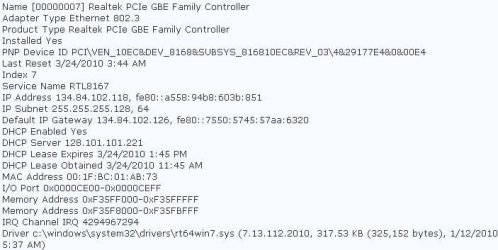
Name [00000007] Realtek PCIe GBE Family Controller
Adapter Type Ethernet 802.3
Product Type Realtek PCIe GBE Family Controller
Installed Yes
PNP Device ID PCI\VEN_10EC&DEV_8168&SUBSYS_816810EC&REV_03\4&29177E4&0&00E4
Last Reset 3/24/2010 3:44 AM
Index 7
Service Name RTL8167
IP Address 134.84.102.118, fe80::a558:94b8:603b:851
IP Subnet 255.255.255.128, 64
Default IP Gateway 134.84.102.126, fe80::7550:5745:57aa:6320
DHCP Enabled Yes
DHCP Server 128.101.101.221
DHCP Lease Expires 3/24/2010 1:45 PM
DHCP Lease Obtained 3/24/2010 11:45 AM
MAC Address 00:1F:BC:01:AB:73
I/O Port 0x0000CE00-0x0000CEFF
Memory Address 0xF35FF000-0xF35FFFFF
Memory Address 0xF35F8000-0xF35FBFFF
IRQ Channel IRQ 4294967294
Driver c:\windows\system32\drivers\rt64win7.sys (7.13.112.2010, 317.53 KB (325,152 bytes), 1/12/2010 5:37 AM)

Name [00000008] WAN Miniport (IP)
Adapter Type Not Available
Product Type WAN Miniport (IP)
Installed Yes
PNP Device ID ROOT\MS_NDISWANIP\0000
Last Reset 3/24/2010 3:44 AM
Index 8
Service Name NdisWan
IP Address Not Available
IP Subnet Not Available
Default IP Gateway Not Available
DHCP Enabled No
DHCP Server Not Available
DHCP Lease Expires Not Available
DHCP Lease Obtained Not Available
MAC Address Not Available
Driver c:\windows\system32\drivers\ndiswan.sys (6.1.7600.16385, 160.50 KB (164,352 bytes), 7/13/2009 7:10 PM)

Name [00000009] Microsoft ISATAP Adapter
Adapter Type Tunnel
Product Type Microsoft ISATAP Adapter
Installed Yes
PNP Device ID ROOT\*ISATAP\0000
Last Reset 3/24/2010 3:44 AM
Index 9
Service Name tunnel
IP Address Not Available
IP Subnet Not Available
Default IP Gateway Not Available
DHCP Enabled No
DHCP Server Not Available
DHCP Lease Expires Not Available
DHCP Lease Obtained Not Available
MAC Address Not Available
Driver c:\windows\system32\drivers\tunnel.sys (6.1.7600.16385, 122.50 KB (125,440 bytes), 7/13/2009 7:09 PM)

Name [00000010] RAS Async Adapter
Adapter Type Not Available
Product Type RAS Async Adapter
Installed Yes
PNP Device ID Not Available
Last Reset 3/24/2010 3:44 AM
Index 10
Service Name AsyncMac
IP Address Not Available
IP Subnet Not Available
Default IP Gateway Not Available
DHCP Enabled No
DHCP Server Not Available
DHCP Lease Expires Not Available
DHCP Lease Obtained Not Available
MAC Address Not Available

Name [00000011] Microsoft 6to4 Adapter
Adapter Type Tunnel
Product Type Microsoft 6to4 Adapter
Installed Yes
PNP Device ID ROOT\*6TO4MP\0000
Last Reset 3/24/2010 3:44 AM
Index 11
Service Name tunnel
IP Address Not Available
IP Subnet Not Available
Default IP Gateway Not Available
DHCP Enabled No
DHCP Server Not Available
DHCP Lease Expires Not Available
DHCP Lease Obtained Not Available
MAC Address Not Available
Driver c:\windows\system32\drivers\tunnel.sys (6.1.7600.16385, 122.50 KB (125,440 bytes), 7/13/2009 7:09 PM)

Name [00000012] Microsoft Teredo Tunneling Adapter
Adapter Type Tunnel
Product Type Microsoft Teredo Tunneling Adapter
Installed Yes
PNP Device ID ROOT\*TEREDO\0000
Last Reset 3/24/2010 3:44 AM
Index 12
Service Name tunnel
IP Address Not Available
IP Subnet Not Available
Default IP Gateway Not Available
DHCP Enabled No
DHCP Server Not Available
DHCP Lease Expires Not Available
DHCP Lease Obtained Not Available
MAC Address Not Available
Driver c:\windows\system32\drivers\tunnel.sys (6.1.7600.16385, 122.50 KB (125,440 bytes), 7/13/2009 7:09 PM)
 

My Computer

OS
Windows 7 Ultimate x64
Name [00000000] WAN Miniport (SSTP)
Adapter Type Not Available
Product Type WAN Miniport (SSTP)
Installed Yes
PNP Device ID ROOT\MS_SSTPMINIPORT\0000
Last Reset 3/24/2010 3:44 AM
Index 0
Service Name RasSstp
IP Address Not Available
IP Subnet Not Available
Default IP Gateway Not Available
DHCP Enabled No
DHCP Server Not Available
DHCP Lease Expires Not Available
DHCP Lease Obtained Not Available
MAC Address Not Available
Driver c:\windows\system32\drivers\rassstp.sys (6.1.7600.16385, 82.00 KB (83,968 bytes), 7/13/2009 7:10 PM)

Name [00000001] WAN Miniport (IKEv2)
Adapter Type Not Available
Product Type WAN Miniport (IKEv2)
Installed Yes
PNP Device ID ROOT\MS_AGILEVPNMINIPORT\0000
Last Reset 3/24/2010 3:44 AM
Index 1
Service Name RasAgileVpn
IP Address Not Available
IP Subnet Not Available
Default IP Gateway Not Available
DHCP Enabled No
DHCP Server Not Available
DHCP Lease Expires Not Available
DHCP Lease Obtained Not Available
MAC Address Not Available
Driver c:\windows\system32\drivers\agilevpn.sys (6.1.7600.16385, 59.00 KB (60,416 bytes), 7/13/2009 7:10 PM)

Name [00000002] WAN Miniport (L2TP)
Adapter Type Not Available
Product Type WAN Miniport (L2TP)
Installed Yes
PNP Device ID ROOT\MS_L2TPMINIPORT\0000
Last Reset 3/24/2010 3:44 AM
Index 2
Service Name Rasl2tp
IP Address Not Available
IP Subnet Not Available
Default IP Gateway Not Available
DHCP Enabled No
DHCP Server Not Available
DHCP Lease Expires Not Available
DHCP Lease Obtained Not Available
MAC Address Not Available
Driver c:\windows\system32\drivers\rasl2tp.sys (6.1.7600.16385, 127.00 KB (130,048 bytes), 7/13/2009 7:10 PM)

Name [00000003] WAN Miniport (PPTP)
Adapter Type Not Available
Product Type WAN Miniport (PPTP)
Installed Yes
PNP Device ID ROOT\MS_PPTPMINIPORT\0000
Last Reset 3/24/2010 3:44 AM
Index 3
Service Name PptpMiniport
IP Address Not Available
IP Subnet Not Available
Default IP Gateway Not Available
DHCP Enabled No
DHCP Server Not Available
DHCP Lease Expires Not Available
DHCP Lease Obtained Not Available
MAC Address Not Available
Driver c:\windows\system32\drivers\raspptp.sys (6.1.7600.16385, 109.00 KB (111,616 bytes), 7/13/2009 7:10 PM)

Name [00000004] WAN Miniport (PPPOE)
Adapter Type Not Available
Product Type WAN Miniport (PPPOE)
Installed Yes
PNP Device ID ROOT\MS_PPPOEMINIPORT\0000
Last Reset 3/24/2010 3:44 AM
Index 4
Service Name RasPppoe
IP Address Not Available
IP Subnet Not Available
Default IP Gateway Not Available
DHCP Enabled No
DHCP Server Not Available
DHCP Lease Expires Not Available
DHCP Lease Obtained Not Available
MAC Address Not Available
Driver c:\windows\system32\drivers\raspppoe.sys (6.1.7600.16385, 90.50 KB (92,672 bytes), 7/13/2009 7:10 PM)

Name [00000005] WAN Miniport (IPv6)
Adapter Type Not Available
Product Type WAN Miniport (IPv6)
Installed Yes
PNP Device ID ROOT\MS_NDISWANIPV6\0000
Last Reset 3/24/2010 3:44 AM
Index 5
Service Name NdisWan
IP Address Not Available
IP Subnet Not Available
Default IP Gateway Not Available
DHCP Enabled No
DHCP Server Not Available
DHCP Lease Expires Not Available
DHCP Lease Obtained Not Available
MAC Address Not Available
Driver c:\windows\system32\drivers\ndiswan.sys (6.1.7600.16385, 160.50 KB (164,352 bytes), 7/13/2009 7:10 PM)

Name [00000006] WAN Miniport (Network Monitor)
Adapter Type Not Available
Product Type WAN Miniport (Network Monitor)
Installed Yes
PNP Device ID ROOT\MS_NDISWANBH\0000
Last Reset 3/24/2010 3:44 AM
Index 6
Service Name NdisWan
IP Address Not Available
IP Subnet Not Available
Default IP Gateway Not Available
DHCP Enabled No
DHCP Server Not Available
DHCP Lease Expires Not Available
DHCP Lease Obtained Not Available
MAC Address Not Available
Driver c:\windows\system32\drivers\ndiswan.sys (6.1.7600.16385, 160.50 KB (164,352 bytes), 7/13/2009 7:10 PM)

Name [00000007] Realtek PCIe GBE Family Controller
Adapter Type Ethernet 802.3
Product Type Realtek PCIe GBE Family Controller
Installed Yes
PNP Device ID PCI\VEN_10EC&DEV_8168&SUBSYS_816810EC&REV_03\4&29177E4&0&00E4
Last Reset 3/24/2010 3:44 AM
Index 7
Service Name RTL8167
IP Address 134.84.102.118, fe80::a558:94b8:603b:851
IP Subnet 255.255.255.128, 64
Default IP Gateway 134.84.102.126, fe80::7550:5745:57aa:6320
DHCP Enabled Yes
DHCP Server 128.101.101.221
DHCP Lease Expires 3/24/2010 1:45 PM
DHCP Lease Obtained 3/24/2010 11:45 AM
MAC Address 00:1F:BC:01:AB:73
I/O Port 0x0000CE00-0x0000CEFF
Memory Address 0xF35FF000-0xF35FFFFF
Memory Address 0xF35F8000-0xF35FBFFF
IRQ Channel IRQ 4294967294
Driver c:\windows\system32\drivers\rt64win7.sys (7.13.112.2010, 317.53 KB (325,152 bytes), 1/12/2010 5:37 AM)

Name [00000008] WAN Miniport (IP)
Adapter Type Not Available
Product Type WAN Miniport (IP)
Installed Yes
PNP Device ID ROOT\MS_NDISWANIP\0000
Last Reset 3/24/2010 3:44 AM
Index 8
Service Name NdisWan
IP Address Not Available
IP Subnet Not Available
Default IP Gateway Not Available
DHCP Enabled No
DHCP Server Not Available
DHCP Lease Expires Not Available
DHCP Lease Obtained Not Available
MAC Address Not Available
Driver c:\windows\system32\drivers\ndiswan.sys (6.1.7600.16385, 160.50 KB (164,352 bytes), 7/13/2009 7:10 PM)

Name [00000009] Microsoft ISATAP Adapter
Adapter Type Tunnel
Product Type Microsoft ISATAP Adapter
Installed Yes
PNP Device ID ROOT\*ISATAP\0000
Last Reset 3/24/2010 3:44 AM
Index 9
Service Name tunnel
IP Address Not Available
IP Subnet Not Available
Default IP Gateway Not Available
DHCP Enabled No
DHCP Server Not Available
DHCP Lease Expires Not Available
DHCP Lease Obtained Not Available
MAC Address Not Available
Driver c:\windows\system32\drivers\tunnel.sys (6.1.7600.16385, 122.50 KB (125,440 bytes), 7/13/2009 7:09 PM)

Name [00000010] RAS Async Adapter
Adapter Type Not Available
Product Type RAS Async Adapter
Installed Yes
PNP Device ID Not Available
Last Reset 3/24/2010 3:44 AM
Index 10
Service Name AsyncMac
IP Address Not Available
IP Subnet Not Available
Default IP Gateway Not Available
DHCP Enabled No
DHCP Server Not Available
DHCP Lease Expires Not Available
DHCP Lease Obtained Not Available
MAC Address Not Available

Name [00000011] Microsoft 6to4 Adapter
Adapter Type Tunnel
Product Type Microsoft 6to4 Adapter
Installed Yes
PNP Device ID ROOT\*6TO4MP\0000
Last Reset 3/24/2010 3:44 AM
Index 11
Service Name tunnel
IP Address Not Available
IP Subnet Not Available
Default IP Gateway Not Available
DHCP Enabled No
DHCP Server Not Available
DHCP Lease Expires Not Available
DHCP Lease Obtained Not Available
MAC Address Not Available
Driver c:\windows\system32\drivers\tunnel.sys (6.1.7600.16385, 122.50 KB (125,440 bytes), 7/13/2009 7:09 PM)

Name [00000012] Microsoft Teredo Tunneling Adapter
Adapter Type Tunnel
Product Type Microsoft Teredo Tunneling Adapter
Installed Yes
PNP Device ID ROOT\*TEREDO\0000
Last Reset 3/24/2010 3:44 AM
Index 12
Service Name tunnel
IP Address Not Available
IP Subnet Not Available
Default IP Gateway Not Available
DHCP Enabled No
DHCP Server Not Available
DHCP Lease Expires Not Available
DHCP Lease Obtained Not Available
MAC Address Not Available
Driver c:\windows\system32\drivers\tunnel.sys (6.1.7600.16385, 122.50 KB (125,440 bytes), 7/13/2009 7:09 PM)

et.JPG
when i saw that your ethernet card. that has been have ip address.
what connection you are using?
 

My Computer

Computer Manufacturer/Model Number
built up
OS
windows 7
CPU
Phenom II AMD Dragon 3.5Ghz
Memory
DDR3 4GB
Graphics Card(s)
ATI Radeon 512Mb
Monitor(s) Displays
HP L1506
Screen Resolution
1152 x 864
Hard Drives
WDC 1 TB SATA-II Green Power
Keyboard
HP wireless keyboard
Mouse
HP Optic
Internet Speed
1GB
I'm on a T1 university connection. Is there a way to get my second ethernet port back?
 

My Computer

OS
Windows 7 Ultimate x64
I'm on a T1 university connection. Is there a way to get my second ethernet port back?

when you going to device manager,try to scan new hardware..
 

My Computer

Computer Manufacturer/Model Number
built up
OS
windows 7
CPU
Phenom II AMD Dragon 3.5Ghz
Memory
DDR3 4GB
Graphics Card(s)
ATI Radeon 512Mb
Monitor(s) Displays
HP L1506
Screen Resolution
1152 x 864
Hard Drives
WDC 1 TB SATA-II Green Power
Keyboard
HP wireless keyboard
Mouse
HP Optic
Internet Speed
1GB
I tried that and it didn't work. I ended up updating my BIOS to the latest version and it worked. I now have both network connections back.

dqoguu.png
 

My Computer

OS
Windows 7 Ultimate x64
glad hear is ok now.

cheers.
 

My Computer

Computer Manufacturer/Model Number
built up
OS
windows 7
CPU
Phenom II AMD Dragon 3.5Ghz
Memory
DDR3 4GB
Graphics Card(s)
ATI Radeon 512Mb
Monitor(s) Displays
HP L1506
Screen Resolution
1152 x 864
Hard Drives
WDC 1 TB SATA-II Green Power
Keyboard
HP wireless keyboard
Mouse
HP Optic
Internet Speed
1GB
Back
Top