JavaScript is disabled. For a better experience, please enable JavaScript in your browser before proceeding.
You are using an out of date browser. It may not display this or other websites correctly.
You should upgrade or use an
alternative browser .
Solved Missing "Open With" command with right-click
Hi Folks:
If I right-click a single file, the "open with" command is missing in Windows 7 Home Premium.
How do I fix this missing command?
Thanks, MS
Computer type PC/Desktop Computer Manufacturer/Model Number Asus CM-6870 OS Windows 7 Home Premium 64bit CPU Intel Core i7-3770, CPU @ 3.4 GHz Motherboard Asus Memory 16 GB RM (4 cores) Graphics Card(s) NVIDIA GeForce GT 630, Sound Card Realtek HD Audio standard Monitor(s) Displays Asus VE248Q Screen Resolution 1920 x 1080 Hard Drives 2 TB PSU 300W Case Asus Cooling Smart Cooling System and Q-Fan Keyboard Microsoft Wireless Mouse Microsoft Laser 3500 Wireless Internet Speed 25 mbps or greater Antivirus Bitdefender Total Security 2018 Browser Firefox/Chrome/IE Other Info Firewall - Bitdefender 2018
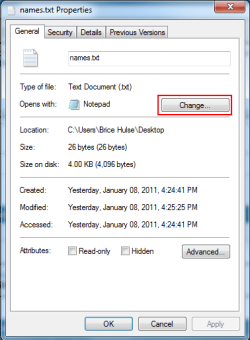
That's strange. Have you edited the registry? Until you fix it, you can right click, choose Properties , and then click Change next to Open With .
Properties Open With.PNG
13.5 KB
· Views: 84
Computer Manufacturer/Model Number Lenovo ThinkPad W520 (4270CT) OS Windows 7 Professional x64 CPU Intel Core i7-2720QM Memory 4GB (2 x 2GB) Graphics Card(s) NVIDIA Quadro 2000M (with Optimus) Hard Drives 500 GB @ 7200 RPM
Administrator
Staff member
Computer type PC/Desktop Computer Manufacturer/Model Number Self built custom OS 64-bit Windows 11 Pro for Workstations CPU Intel i7-8700K OC'd to 5 GHz Motherboard ASUS ROG Maximus XI Formula Z390 Memory 64 GB (4x16GB) G.SKILL TridentZ RGB DDR4 3600 MHz Graphics Card(s) ASUS ROG-STRIX-GTX1080TI-O11G-GAMING Sound Card Integrated Monitor(s) Displays 2 x Samsung Odyssey G7 27" Screen Resolution 2560x1440 Hard Drives 1TB Samsung 990 PRO M.2, PSU Seasonic Prime Titanium 850W Case Thermaltake Core P3 Cooling Corsair Hydro H115i Keyboard Logitech wireless K800 Mouse Logitech MX Master 4 Internet Speed 2 Gb/s Download and 100 Mb/s Upload Antivirus Malwarebyte Anti-Malware Premium Browser Google Chrome Other Info Logitech Z625 speaker system,
New member
Member
VIP
Thread Starter
Open With Missing
Computer type PC/Desktop Computer Manufacturer/Model Number Asus CM-6870 OS Windows 7 Home Premium 64bit CPU Intel Core i7-3770, CPU @ 3.4 GHz Motherboard Asus Memory 16 GB RM (4 cores) Graphics Card(s) NVIDIA GeForce GT 630, Sound Card Realtek HD Audio standard Monitor(s) Displays Asus VE248Q Screen Resolution 1920 x 1080 Hard Drives 2 TB PSU 300W Case Asus Cooling Smart Cooling System and Q-Fan Keyboard Microsoft Wireless Mouse Microsoft Laser 3500 Wireless Internet Speed 25 mbps or greater Antivirus Bitdefender Total Security 2018 Browser Firefox/Chrome/IE Other Info Firewall - Bitdefender 2018
Administrator
Staff member
You're welcome MS. Please let us know how it went.
Computer type PC/Desktop Computer Manufacturer/Model Number Self built custom OS 64-bit Windows 11 Pro for Workstations CPU Intel i7-8700K OC'd to 5 GHz Motherboard ASUS ROG Maximus XI Formula Z390 Memory 64 GB (4x16GB) G.SKILL TridentZ RGB DDR4 3600 MHz Graphics Card(s) ASUS ROG-STRIX-GTX1080TI-O11G-GAMING Sound Card Integrated Monitor(s) Displays 2 x Samsung Odyssey G7 27" Screen Resolution 2560x1440 Hard Drives 1TB Samsung 990 PRO M.2, PSU Seasonic Prime Titanium 850W Case Thermaltake Core P3 Cooling Corsair Hydro H115i Keyboard Logitech wireless K800 Mouse Logitech MX Master 4 Internet Speed 2 Gb/s Download and 100 Mb/s Upload Antivirus Malwarebyte Anti-Malware Premium Browser Google Chrome Other Info Logitech Z625 speaker system,
New member
Member
VIP
Thread Starter
Hi Brink and All:
Unfortunately, many things have gone wrong with my recent clean install of Win7 Home Premium from XP.
In addition to the "Open with" problem, my IE8 is missing it's "low" folder (can't find the silly thing) and I can't print. Plus several more major "bugs". Therefore, I called for re-enforcements ... the Microsoft Techy Support. Level 2 is calling this afternoon for the IE8 "bug".
The "open with" problem has been fixed.
Thanks so much for the help,
MS
Computer type PC/Desktop Computer Manufacturer/Model Number Asus CM-6870 OS Windows 7 Home Premium 64bit CPU Intel Core i7-3770, CPU @ 3.4 GHz Motherboard Asus Memory 16 GB RM (4 cores) Graphics Card(s) NVIDIA GeForce GT 630, Sound Card Realtek HD Audio standard Monitor(s) Displays Asus VE248Q Screen Resolution 1920 x 1080 Hard Drives 2 TB PSU 300W Case Asus Cooling Smart Cooling System and Q-Fan Keyboard Microsoft Wireless Mouse Microsoft Laser 3500 Wireless Internet Speed 25 mbps or greater Antivirus Bitdefender Total Security 2018 Browser Firefox/Chrome/IE Other Info Firewall - Bitdefender 2018
Administrator
Staff member
Computer type PC/Desktop Computer Manufacturer/Model Number Self built custom OS 64-bit Windows 11 Pro for Workstations CPU Intel i7-8700K OC'd to 5 GHz Motherboard ASUS ROG Maximus XI Formula Z390 Memory 64 GB (4x16GB) G.SKILL TridentZ RGB DDR4 3600 MHz Graphics Card(s) ASUS ROG-STRIX-GTX1080TI-O11G-GAMING Sound Card Integrated Monitor(s) Displays 2 x Samsung Odyssey G7 27" Screen Resolution 2560x1440 Hard Drives 1TB Samsung 990 PRO M.2, PSU Seasonic Prime Titanium 850W Case Thermaltake Core P3 Cooling Corsair Hydro H115i Keyboard Logitech wireless K800 Mouse Logitech MX Master 4 Internet Speed 2 Gb/s Download and 100 Mb/s Upload Antivirus Malwarebyte Anti-Malware Premium Browser Google Chrome Other Info Logitech Z625 speaker system,
New member
Member
VIP
Thread Starter
Hi Brink:
Thanks every so much for the "fix" solution. Sadly, I tried all of them and I then contacted Microsoft Techy Support. The Level 2 couldn't get it to work either. There must have been something wrong with the registry when I did the clean install of Win7 or corrupted during the updates.
I/We used all of these:
Try to use the following methods to fix the missing "low" folder missing and not working in %temp%. Can't print/preview in IE8 without:
Icacls C:\Users\Username\AppData\Local\Temp\Low /setintegritylevel (OD)(CI)low
Turning off Protection Mode
No Add-ons
Reset Internet Explorer 8
Restarting Internet Explorer
Re-create the missing folder
Reset low integrity level on the low folder
Microsoft Software Inventory Analyzer (MSIA)
and re-installing IE8
In the end, I had to do a repair of Windows 7 Home Premium. Just finished about an hour ago. So far so good. I'm keeping my fingers and toes crossed!
Thanks bunches,
MS
Computer type PC/Desktop Computer Manufacturer/Model Number Asus CM-6870 OS Windows 7 Home Premium 64bit CPU Intel Core i7-3770, CPU @ 3.4 GHz Motherboard Asus Memory 16 GB RM (4 cores) Graphics Card(s) NVIDIA GeForce GT 630, Sound Card Realtek HD Audio standard Monitor(s) Displays Asus VE248Q Screen Resolution 1920 x 1080 Hard Drives 2 TB PSU 300W Case Asus Cooling Smart Cooling System and Q-Fan Keyboard Microsoft Wireless Mouse Microsoft Laser 3500 Wireless Internet Speed 25 mbps or greater Antivirus Bitdefender Total Security 2018 Browser Firefox/Chrome/IE Other Info Firewall - Bitdefender 2018
Administrator
Staff member
You're welcome MS. I just wished it had worked for you. Hopefully the repair will.
Computer type PC/Desktop Computer Manufacturer/Model Number Self built custom OS 64-bit Windows 11 Pro for Workstations CPU Intel i7-8700K OC'd to 5 GHz Motherboard ASUS ROG Maximus XI Formula Z390 Memory 64 GB (4x16GB) G.SKILL TridentZ RGB DDR4 3600 MHz Graphics Card(s) ASUS ROG-STRIX-GTX1080TI-O11G-GAMING Sound Card Integrated Monitor(s) Displays 2 x Samsung Odyssey G7 27" Screen Resolution 2560x1440 Hard Drives 1TB Samsung 990 PRO M.2, PSU Seasonic Prime Titanium 850W Case Thermaltake Core P3 Cooling Corsair Hydro H115i Keyboard Logitech wireless K800 Mouse Logitech MX Master 4 Internet Speed 2 Gb/s Download and 100 Mb/s Upload Antivirus Malwarebyte Anti-Malware Premium Browser Google Chrome Other Info Logitech Z625 speaker system,
"Open With" missing Win7 Windows Explorer
Administrator
Staff member
That's great news Tom. I'm happy to hear it was able to help.
Computer type PC/Desktop Computer Manufacturer/Model Number Self built custom OS 64-bit Windows 11 Pro for Workstations CPU Intel i7-8700K OC'd to 5 GHz Motherboard ASUS ROG Maximus XI Formula Z390 Memory 64 GB (4x16GB) G.SKILL TridentZ RGB DDR4 3600 MHz Graphics Card(s) ASUS ROG-STRIX-GTX1080TI-O11G-GAMING Sound Card Integrated Monitor(s) Displays 2 x Samsung Odyssey G7 27" Screen Resolution 2560x1440 Hard Drives 1TB Samsung 990 PRO M.2, PSU Seasonic Prime Titanium 850W Case Thermaltake Core P3 Cooling Corsair Hydro H115i Keyboard Logitech wireless K800 Mouse Logitech MX Master 4 Internet Speed 2 Gb/s Download and 100 Mb/s Upload Antivirus Malwarebyte Anti-Malware Premium Browser Google Chrome Other Info Logitech Z625 speaker system,