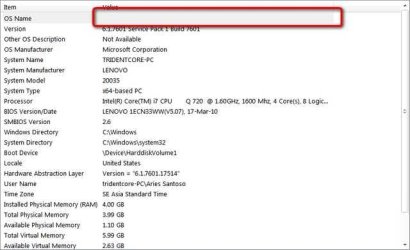
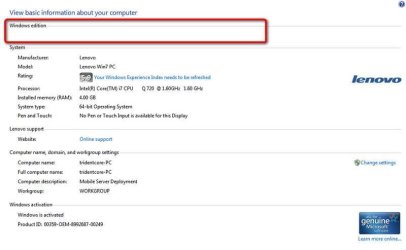
missing OS name in system properties and system information

tridentcore

New member
Local time
12:37 AM
Messages
8
Hello, I'm new here... need some assistance for my Windows... After I updated to Service Pack 1 from Windows Update (online update), I founded there's no OS name and OS version in System Properties like usual. Same with System Information.

Is there any solution for this? Thanks before...

tridentcore

-----------------------------
this is the first time I posted in sevenforums, after a year just became a reader of sevenforums. sorry if my English bad...
 

Attachments
  • 20110326170749.jpg
    20110326170749.jpg
    26.2 KB · Views: 151
  • 20110326170927.jpg
    20110326170927.jpg
    28.4 KB · Views: 122

My Computer My Computer

Computer Manufacturer/Model Number
Lenovo IdeaPad Y550P
OS
Windows 7 Home Premium 64bit
CPU
Intel Core i7 720QM
Motherboard
Lenovo PM55 Intel chipset
Memory
VenomRX 2x 4GB DDR3
Graphics Card(s)
NVIDIA GeForce GT240M-N11
Sound Card
Realtek ALC272
Monitor(s) Displays
Lenovo Widescreen Monitor
Screen Resolution
1280x768
Hard Drives
Hitachi 500GB
Case
default from Lenovo
Cooling
default from Lenovo
Keyboard
default from Lenovo
Mouse
Logitech A100
Internet Speed
CDMA-EVDO by Smart ISP (Indonesian)
Hello tridentcore and welcome to Seven Forums.

I noticed from your snips that System Information (snip # 2) does show under Version that SP1 was in fact installed. So at least part of your system is showing correct information. Have you completely shut down your system and rebooted since you did the SP1 update? (Not just a restart.) And your English is fine! :)
 

My Computer My Computer

Computer type
Laptop
Computer Manufacturer/Model Number
Sony Vaio VPCEB47GM Laptop
OS
Win 7 Pro 64-bit
CPU
Intel i5 2.4 Ghz
Memory
8GB DDR3
Graphics Card(s)
Intel HD 3000
Sound Card
IDT High Definition
Monitor(s) Displays
15.6 WGXA Anti-Glare LED
Screen Resolution
1280x800
Hard Drives
640Gb 7200rpm
Antivirus
MSE
Browser
Opera (primary) with IE9 backup
Hello tridentcore and welcome to Seven Forums.

I noticed from your snips that System Information (snip # 2) does show under Version that SP1 was in fact installed. So at least part of your system is showing correct information. Have you completely shut down your system and rebooted since you did the SP1 update? (Not just a restart.) And your English is fine! :)

well.. I haven't completely turn off my notebook since updating SP1... I kinda heard that tips from another website but I'm not take it seriously... maybe It's time to do that... thanks for the tips.. I will try it ASAP... Thanks by the way...
 

My Computer My Computer

Computer Manufacturer/Model Number
Lenovo IdeaPad Y550P
OS
Windows 7 Home Premium 64bit
CPU
Intel Core i7 720QM
Motherboard
Lenovo PM55 Intel chipset
Memory
VenomRX 2x 4GB DDR3
Graphics Card(s)
NVIDIA GeForce GT240M-N11
Sound Card
Realtek ALC272
Monitor(s) Displays
Lenovo Widescreen Monitor
Screen Resolution
1280x768
Hard Drives
Hitachi 500GB
Case
default from Lenovo
Cooling
default from Lenovo
Keyboard
default from Lenovo
Mouse
Logitech A100
Internet Speed
CDMA-EVDO by Smart ISP (Indonesian)
Sometimes there are system files that are in use when updates are downloaded and installed. Because they're alrady in use doing something else, they can't be updated immediately. They need to wait until Windows is shut down and then they can update during the boot process. Please keep us informed if the problem is fixed or not.
 

My Computer My Computer

Computer type
Laptop
Computer Manufacturer/Model Number
Sony Vaio VPCEB47GM Laptop
OS
Win 7 Pro 64-bit
CPU
Intel i5 2.4 Ghz
Memory
8GB DDR3
Graphics Card(s)
Intel HD 3000
Sound Card
IDT High Definition
Monitor(s) Displays
15.6 WGXA Anti-Glare LED
Screen Resolution
1280x800
Hard Drives
640Gb 7200rpm
Antivirus
MSE
Browser
Opera (primary) with IE9 backup
Sometimes there are system files that are in use when updates are downloaded and installed. Because they're alrady in use doing something else, they can't be updated immediately. They need to wait until Windows is shut down and then they can update during the boot process. Please keep us informed if the problem is fixed or not.

still disappear sir... I already shutdown and unplug the power line, also detached the battery... is this somekind common problems or is there any tutorial to "add" the missing information manually?

thanks...
 

My Computer My Computer

Computer Manufacturer/Model Number
Lenovo IdeaPad Y550P
OS
Windows 7 Home Premium 64bit
CPU
Intel Core i7 720QM
Motherboard
Lenovo PM55 Intel chipset
Memory
VenomRX 2x 4GB DDR3
Graphics Card(s)
NVIDIA GeForce GT240M-N11
Sound Card
Realtek ALC272
Monitor(s) Displays
Lenovo Widescreen Monitor
Screen Resolution
1280x768
Hard Drives
Hitachi 500GB
Case
default from Lenovo
Cooling
default from Lenovo
Keyboard
default from Lenovo
Mouse
Logitech A100
Internet Speed
CDMA-EVDO by Smart ISP (Indonesian)
OK, let's see what the registry has to say. If you've never worked with the registry it's very important to NOT delete anything. All we're going to do for now is look at some of the entries. Click on the Start orb to open the Start Menu. Type regedit into the Start Menu Search Box. Now click the Enter key on your keyboard. You should see a similar screen shot to this (I took this from my work computer which is running XP):


Now you're going to open individual sections of the registry by clicking on the little arrow next to each of the following names:

HKLM\SOFTWARE\Microsoft\WindowsNT\CurrentVersion

So first click on the arrow next to HKLM. That should open new branches. Then click the arrow next to SOFTWARE and more branches open up. Then click the arrow next to Microsoft, and then WindowsNT. When you click the arrow next to WindowsNT you should see yet another branch and one of the branch names should be CurrentVersion. Click on CurrentVersion to highlight it (not the arrow this time.) This should open up a lot of information in the right side panel. Three columns called Name | Type | Data.

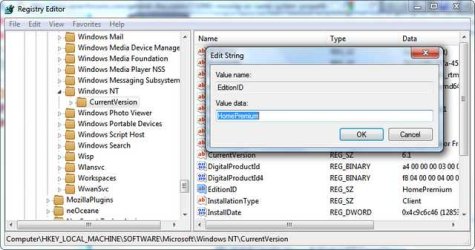
Look in the name column and look for something called EditionID. The Type column should say REG_SZ and the Data column should show the name of your operating system. Let me know if it shows the OS.
 

My Computer My Computer

Computer type
Laptop
Computer Manufacturer/Model Number
Sony Vaio VPCEB47GM Laptop
OS
Win 7 Pro 64-bit
CPU
Intel i5 2.4 Ghz
Memory
8GB DDR3
Graphics Card(s)
Intel HD 3000
Sound Card
IDT High Definition
Monitor(s) Displays
15.6 WGXA Anti-Glare LED
Screen Resolution
1280x800
Hard Drives
640Gb 7200rpm
Antivirus
MSE
Browser
Opera (primary) with IE9 backup
OK, let's see what the registry has to say. If you've never worked with the registry it's very important to NOT delete anything. All we're going to do for now is look at some of the entries. Click on the Start orb to open the Start Menu. Type regedit into the Start Menu Search Box. Now click the Enter key on your keyboard. You should see a similar screen shot to this (I took this from my work computer which is running XP):


Now you're going to open individual sections of the registry by clicking on the little arrow next to each of the following names:

HKLM\SOFTWARE\Microsoft\WindowsNT\CurrentVersion

So first click on the arrow next to HKLM. That should open new branches. Then click the arrow next to SOFTWARE and more branches open up. Then click the arrow next to Microsoft, and then WindowsNT. When you click the arrow next to WindowsNT you should see yet another branch and one of the branch names should be CurrentVersion. Click on CurrentVersion to highlight it (not the arrow this time.) This should open up a lot of information in the right side panel. Three columns called Name | Type | Data.

Look in the name column and look for something called EditionID. The Type column should say REG_SZ and the Data column should show the name of your operating system. Let me know if it shows the OS.

no need expand the tree navigation sir, I've been experienced with that one long ago... hahahaha...

Well, it seems normal inside the registry entry.. screenshot attached... well, I haven't experienced with this kind of problems, is there any solution to re-appearing the information entry in System Properties? or just one of many bugs in SP1?

one thing... Is it normal the resource of RAM and HDD consumption increased so large? RAM idle became 1,950MB from 1,430MB (normal startup) and almost 2 GB HDD space eaten up.. still looking a solution for this one...
 

Attachments

  • 20110326201409.jpg
    20110326201409.jpg
    36.1 KB · Views: 133

My Computer My Computer

Computer Manufacturer/Model Number
Lenovo IdeaPad Y550P
OS
Windows 7 Home Premium 64bit
CPU
Intel Core i7 720QM
Motherboard
Lenovo PM55 Intel chipset
Memory
VenomRX 2x 4GB DDR3
Graphics Card(s)
NVIDIA GeForce GT240M-N11
Sound Card
Realtek ALC272
Monitor(s) Displays
Lenovo Widescreen Monitor
Screen Resolution
1280x768
Hard Drives
Hitachi 500GB
Case
default from Lenovo
Cooling
default from Lenovo
Keyboard
default from Lenovo
Mouse
Logitech A100
Internet Speed
CDMA-EVDO by Smart ISP (Indonesian)
This is a very strange problem. I haven't heard anything about this being a bug in SP1, but who knows what kind of problems people may experience. :confused:

I've heard about a tool that lets you edit System Properties information. But I haven't used it so I can't offer any opinion about it. If you want to give it a try, I'd definitely suggest making a System Restore point and even better, a complete System Image ... just in case. And this will do nothing for System Information.

Quickly Edit Windows 7 System Properties With Info Box

As far as RAM and HDD - I've noticed an increase on my two laptops. But one lappy has 4GB RAM and a 500GB HDD. The other has 8GB RAM and 640GB HDD. The SP1 used up about 1GB of HDD space. You might get some of that back by using Disk Cleanup and deleting temporary files. One word of caution ... I've heard that Disk Cleanup can also remove the SP1 uninstall file. If that happens, and if you ever wish to uninstall SP1, you won't be able to do it. You'd have to completely reformat and reinstall your Windows 7.
 

My Computer My Computer

Computer type
Laptop
Computer Manufacturer/Model Number
Sony Vaio VPCEB47GM Laptop
OS
Win 7 Pro 64-bit
CPU
Intel i5 2.4 Ghz
Memory
8GB DDR3
Graphics Card(s)
Intel HD 3000
Sound Card
IDT High Definition
Monitor(s) Displays
15.6 WGXA Anti-Glare LED
Screen Resolution
1280x800
Hard Drives
640Gb 7200rpm
Antivirus
MSE
Browser
Opera (primary) with IE9 backup
This is a very strange problem. I haven't heard anything about this being a bug in SP1, but who knows what kind of problems people may experience. :confused:

I've heard about a tool that lets you edit System Properties information. But I haven't used it so I can't offer any opinion about it. If you want to give it a try, I'd definitely suggest making a System Restore point and even better, a complete System Image ... just in case. And this will do nothing for System Information.

Quickly Edit Windows 7 System Properties With Info Box

As far as RAM and HDD - I've noticed an increase on my two laptops. But one lappy has 4GB RAM and a 500GB HDD. The other has 8GB RAM and 640GB HDD. The SP1 used up about 1GB of HDD space. You might get some of that back by using Disk Cleanup and deleting temporary files. One word of caution ... I've heard that Disk Cleanup can also remove the SP1 uninstall file. If that happens, and if you ever wish to uninstall SP1, you won't be able to do it. You'd have to completely reformat and reinstall your Windows 7.

Thanks for the great help sir... Well.. for using the Windows Info Box, I already done it with scheduled backup since last year for my notebook. Never re-install or re-format again.. hahaha... I will use that tool tomorrow morning after scheduled backup done..

About the increased resource consumption, I kinda hate Microsoft for this one... If the SP1 is just a cumulative of Windows 7 updates, it's not normal to eat up the HDD space almost 2 GB and almost 500 MB of RAM. kinda weird... What should I do to free up HDD space? all useless features and program I installed already removed. But the suspect is still the WINSXS folder.

One more thing (sorry if I asking too much), since last year... I wanna know is there any tutorial to move the WINSXS folder to another partition.. some references is using a junction point but I couldn't understand what and how to make a junction point. I kinda hate this WINSXS folder, It's very huge and easily increasing everyday.

Thanks in advance..
 

My Computer My Computer

Computer Manufacturer/Model Number
Lenovo IdeaPad Y550P
OS
Windows 7 Home Premium 64bit
CPU
Intel Core i7 720QM
Motherboard
Lenovo PM55 Intel chipset
Memory
VenomRX 2x 4GB DDR3
Graphics Card(s)
NVIDIA GeForce GT240M-N11
Sound Card
Realtek ALC272
Monitor(s) Displays
Lenovo Widescreen Monitor
Screen Resolution
1280x768
Hard Drives
Hitachi 500GB
Case
default from Lenovo
Cooling
default from Lenovo
Keyboard
default from Lenovo
Mouse
Logitech A100
Internet Speed
CDMA-EVDO by Smart ISP (Indonesian)
About the increased resource consumption, I kinda hate Microsoft for this one... If the SP1 is just a cumulative of Windows 7 updates, it's not normal to eat up the HDD space almost 2 GB and almost 500 MB of RAM. kinda weird... What should I do to free up HDD space? all useless features and program I installed already removed. But the suspect is still the WINSXS folder.

One more thing (sorry if I asking too much), since last year... I wanna know is there any tutorial to move the WINSXS folder to another partition.. some references is using a junction point but I couldn't understand what and how to make a junction point. I kinda hate this WINSXS folder, It's very huge and easily increasing everyday.

This is getting a bit out of my knowledge range. :) From what I think I understand, the SP1 included a lot more than just a cumulative of previous updates. I might be wrong but I think I read it also included several hundred additional updates. As to the SXS (side by side) assembly, this is Microsoft's way of reducing DLL (dynamic link library) problems. Used to be computers would have problems when there were missing, or duplicate DLLs. In SXS, Windows stores multiple versions of a DLL in the WinSXS subdirectory of the Windows directory, and loads them on demand. This reduces dependency problems for applications that include an SXS manifest. In other words, the SXS folder can get very large very quickly.

How to make this better? Short of getting a larger HDD for your netbook or using a large external HDD (which absolutely defeats the purpose of having a small, easily transportable machine) I'm not sure what can be done. As long as your machine has at least 15-20% free space on the HDD and as long as you're not exceeding available RAM, a lot of people would say, "What's the problem? That's what the HDD and RAM are for ... to be used."

Let us know how that tool works out. And I'm sorry i couldn't be more help. Perhaps someone else will see this thread and jump in with better information.
 

My Computer My Computer

Computer type
Laptop
Computer Manufacturer/Model Number
Sony Vaio VPCEB47GM Laptop
OS
Win 7 Pro 64-bit
CPU
Intel i5 2.4 Ghz
Memory
8GB DDR3
Graphics Card(s)
Intel HD 3000
Sound Card
IDT High Definition
Monitor(s) Displays
15.6 WGXA Anti-Glare LED
Screen Resolution
1280x800
Hard Drives
640Gb 7200rpm
Antivirus
MSE
Browser
Opera (primary) with IE9 backup
maybe it's kinda a bad news... the software that you offered me to edit the information entry in system properties doesn't work at all... well.. maybe I have to pass this problem since this doesn't effect any of my daily work... It's normal and no problems since updated to SP1, I have no worries in my mind.

I still have my backup image before upgrading to SP1 just in case, I still looking for a solution for this problem tought.. thanks for the assistance..
 

My Computer My Computer

Computer Manufacturer/Model Number
Lenovo IdeaPad Y550P
OS
Windows 7 Home Premium 64bit
CPU
Intel Core i7 720QM
Motherboard
Lenovo PM55 Intel chipset
Memory
VenomRX 2x 4GB DDR3
Graphics Card(s)
NVIDIA GeForce GT240M-N11
Sound Card
Realtek ALC272
Monitor(s) Displays
Lenovo Widescreen Monitor
Screen Resolution
1280x768
Hard Drives
Hitachi 500GB
Case
default from Lenovo
Cooling
default from Lenovo
Keyboard
default from Lenovo
Mouse
Logitech A100
Internet Speed
CDMA-EVDO by Smart ISP (Indonesian)

My Computer My Computer

Computer type
Laptop
Computer Manufacturer/Model Number
Sony Vaio VPCEB47GM Laptop
OS
Win 7 Pro 64-bit
CPU
Intel i5 2.4 Ghz
Memory
8GB DDR3
Graphics Card(s)
Intel HD 3000
Sound Card
IDT High Definition
Monitor(s) Displays
15.6 WGXA Anti-Glare LED
Screen Resolution
1280x800
Hard Drives
640Gb 7200rpm
Antivirus
MSE
Browser
Opera (primary) with IE9 backup

My Computer My Computer

Computer type
PC/Desktop
Computer Manufacturer/Model Number
Home Built
OS
Windows 10 Education 64 bit
CPU
AMD Phenom II X4 980 Black Edition Deneb 3.7GHz
Motherboard
Asus M4N68T-M V2 µATX Motherboard
Memory
8GB 4GBx2 Kingston PC10600 DDR3 1333 Memory
Graphics Card(s)
Zotac NVIDIA Geforce GT640 2 Gig DDR3 PCIe
Sound Card
VIA VT1708s High Definition Audio 8-channel Onboard
Monitor(s) Displays
22" LG E2242 1080p and 2 19" I-INC AG191D
Screen Resolution
1280x1024 - 1920x1080 - 1280x1024
Hard Drives
Crucial M100 256 GB SSD and 500 GB WD Blue SATA
PSU
Thermaltake TR 620
Case
Power Up Black ATX Mid-Tower Case
Cooling
Stock heatsink and fan
Keyboard
Logitech Wireless K350 Wave
Mouse
Logitech Wireless M570 Trackman Wheel
Internet Speed
80 Mbps Down 30 Mbps Up
Antivirus
Windows Defender
Browser
Internet Explorer 11
Other Info
HP DVD1040e Lightscribe - External USB2

My Computer My Computer

Computer type
PC/Desktop
Computer Manufacturer/Model Number
Custom Built
OS
Windows 10 Pro
CPU
AMD Ryzen 5 2400G Processor with Radeon RX Vega 11 Graphics
Motherboard
ASRock X470 Master SLI/AC AM4 AMD Promontory X470 SATA 6Gb/s
Memory
G.SKILL Ripjaws V Series 16GB (2 x 8GB) 288-Pin DDR4 SDRAM D
Graphics Card(s)
2047MB NVIDIA GeForce GTX 1060 6GB (EVGA)
Sound Card
Motherboard Built in
Monitor(s) Displays
Acer R240HY bidx 23.8-Inch IPS HDMI DVI VGA (1920 x 1080) Wi
Screen Resolution
1920 x 1080
Hard Drives
1TB Sandisk SSD PLUS (Main drive)
500 GB Seagate 7200 RPM (Games)
500 GB Western Digital 7200 RPM (Virtual Machines)
PSU
CORSAIR TX Series TX650M 650W 80+ Gold Modular Power Supply
Case
CORSAIR CARBIDE SPEC-02 Mid-Tower Gaming Case, Red LED Fan
Cooling
220mm, two 120mm, and four 60mm fans
Keyboard
Wired Dell keyboard
Mouse
Wireless Logitech mouse
Internet Speed
250mb down, 30mb up
Antivirus
Panda Cloud Antivirus
Browser
Chrome-ish x64
Other Info
Your awesome for reading this.
The OEM info that is displayed on the System page is in [HKEY_LOCAL_MACHINE\Software\Microsoft\Windows\CurrentVersion\OEMInformation].
All that's there on my PC is Logo, Manufacturer, Model, and SupportURL.

What is listed for "Product Name" in HKLM\SOFTWARE\Microsoft\WindowsNT\CurrentVersion
Mine shows "Windows 8.1 Pro with Media Center" which is what is listed under Windows Edition on my System page.
 

My Computer My Computer

Computer type
PC/Desktop
Computer Manufacturer/Model Number
Home Built
OS
Windows 10 Education 64 bit
CPU
AMD Phenom II X4 980 Black Edition Deneb 3.7GHz
Motherboard
Asus M4N68T-M V2 µATX Motherboard
Memory
8GB 4GBx2 Kingston PC10600 DDR3 1333 Memory
Graphics Card(s)
Zotac NVIDIA Geforce GT640 2 Gig DDR3 PCIe
Sound Card
VIA VT1708s High Definition Audio 8-channel Onboard
Monitor(s) Displays
22" LG E2242 1080p and 2 19" I-INC AG191D
Screen Resolution
1280x1024 - 1920x1080 - 1280x1024
Hard Drives
Crucial M100 256 GB SSD and 500 GB WD Blue SATA
PSU
Thermaltake TR 620
Case
Power Up Black ATX Mid-Tower Case
Cooling
Stock heatsink and fan
Keyboard
Logitech Wireless K350 Wave
Mouse
Logitech Wireless M570 Trackman Wheel
Internet Speed
80 Mbps Down 30 Mbps Up
Antivirus
Windows Defender
Browser
Internet Explorer 11
Other Info
HP DVD1040e Lightscribe - External USB2
Back
Top