Missing partition in Windows

quang010692

New member
Local time
7:45 AM
Messages
6
[Solved] Missing partition in Windows

Hi,
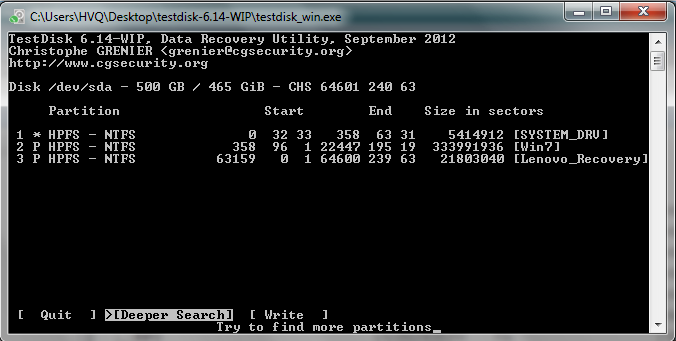
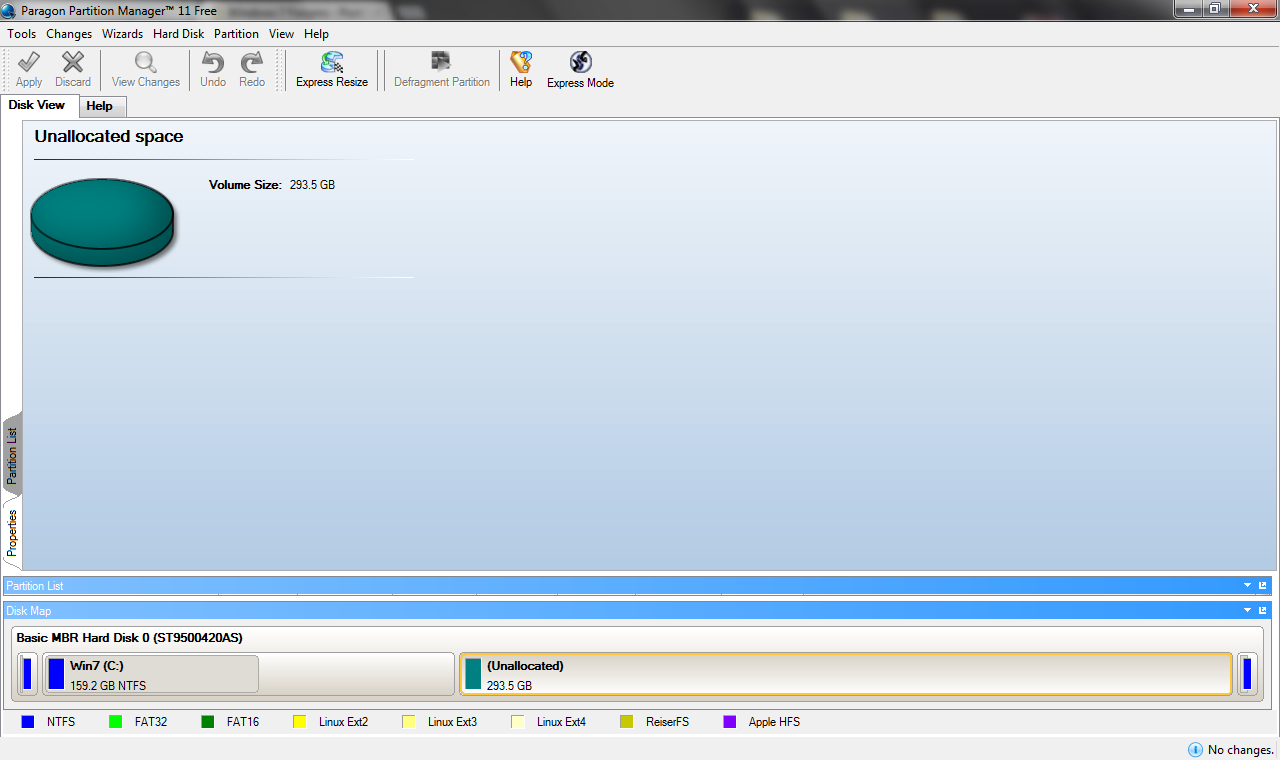
I guess I have some kind of problem with my partition table since I cant install ubuntu. I used testdisk to fix it and now I lost my partition D. However, I can still see it in testdisk. How can I restore my lost partition? I didn't backup my partition list before I try testdisk:(
Please check the 2 screenshots of my current system state.
RL09e.png

The [Local Disk] shown below is the one I need to restore.
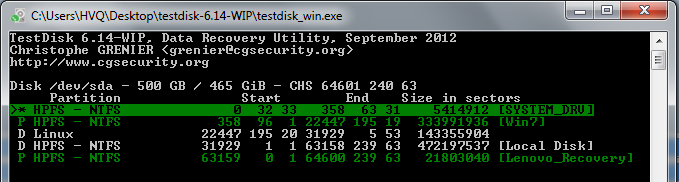
z8lDK.png


Thank you.
 
Last edited:

My Computer

OS
Windows 7 Pro x64
My brain cells are almost dead to take in any fresh data after a tiresome day, but I believe going through this guide may perhaps throw some light on the issue faced by you. http://www.sevenforums.com/software/190430-regain-lost-drive-using-test-disk-illustrated-guide.html

Thank you for your reply.
Sadly that's exactly what caused the problem. TestDisk did not detect my [Local Drive] and I believe that's what made my [Local Drive] disappear. Please see the results right after "Quick Search":
S3zGm.png

I didnt notice the choice to back up partition list and thus I cant restore now.
At present, after "Quick Search", I see 5 drives as in the 2nd screenshot. After I choose "continue", there are only 3 drives left.
btw, Im doing a "deep search" in TestDisk (it's run for 1 hour alr), let's see what it can detect.
Do you know any software that can recover data from an unallocated partition? I think my data is still there. If I cant restore the partition table, I will get my files back by the recovery software instead. Also, it would be great if I can keep the folder structure. Tried GetDataBack and Undelete, both of them dont support unallocated partition.
UPDATE: I've just found that I can access to my lost drive from testdisk. As mentioned above, testdisk can see 5 partitions right after "quick search" including my [local disk]. I tried to copy one small file to drive C and it worked. I will need to find another large enough hard disk to copy my data first.
 
Last edited:

My Computer

OS
Windows 7 Pro x64
Give us a shot of disk management. it may have just lost its letter.
 

My Computer

Computer type
PC/Desktop
Computer Manufacturer/Model Number
Skylake Special #666
OS
Windows 10 Pro x64
CPU
Intel Core i7 6700K
Motherboard
Asus Sabertooth Z170 Mark 1
Memory
GSkill TridentZ RGB 16GB 3600 16-16-16-36
Graphics Card(s)
EVGA GTX 980 Ti SC x2
Sound Card
Realtek High Definition
Monitor(s) Displays
AOC G2460PG
Screen Resolution
1920 x 1080 144Hz
Hard Drives
Samsung 860 Pro 256GB, Seagate Barracuda 4TB x2
PSU
EVGA 1000 P2, EVGA White Custom Braided Cables
Case
Corsair Vengeance C70 Gunmetal Black
Cooling
Corsair H100i v2, Corsair ML120 x2, Thermal Grizzly Kryonaut
Keyboard
Logitech G910 Orion Spectrum
Mouse
Logitech G700s
Internet Speed
Verizon Fios Quantum Gateway 75/75
Antivirus
Windows Defender, Malwarebytes Free 3.8.3
Browser
Chrome
Other Info
Corsair SP120 x4, LG Blu-ray Drive, Durabrand HT-395 100 Watt Dolby Digital Amp, Corsair H2100 Wireless 7.1 Headset
Give us a shot of disk management. it may have just lost its letter.

It shows "Unallocated space" just like in paragon disk manager.
I think testdisk has deleted my old partition. Currently, it shows "D" as in my 2nd screenshot.
RvZ4h.png
 

My Computer

OS
Windows 7 Pro x64
Hi,
Somehow I accidentally deleted the partition by pressing left/right key, and I didnt even notice that. Just fix it by pressing left/right key again :)
Thank you for all your helps
 

My Computer

OS
Windows 7 Pro x64
Back
Top