Missing pictures in User folder

Squirrelling

New member
Local time
4:27 PM
Messages
3
Recently I purchased a new laptop with Windows 7 Home Premium installed. I transferred my files over, but after a few weeks all the pictures disappeared from the My Pictures folder, though other pictures which weren't stored there didn't. I rebooted and they came back, but now they have disappeared again and show no signs of returning. I've done searches on them and looked through different folders, but haven't seen any. Is there any way to retrieve them again?
 

My Computer

Computer Manufacturer/Model Number
ASUS X52F
OS
Windows 7 Home Premium 64 bit
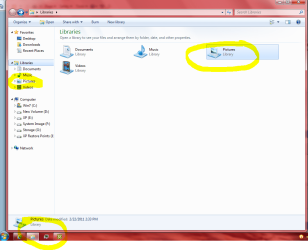
Click the Libraries icon on the taskbar - yellow circle bottom left of Snip I posted. Looks like a folder.

Then click Pictures in left column or dbl click on right Pictures. Also circled in yellow.
Opens the library for all pictures.

Documents, videos and Music are also listed as you can see if needed sometime.

I always use the Library to find pics because they are all in one location.
I hope all yours are also. If not let us know.
Mike

Click the picture to enlarge.
 

Attachments

  • Libraries.PNG
    Libraries.PNG
    55.2 KB · Views: 322

My Computer

Computer Manufacturer/Model Number
Hopalong/ Godzilla
OS
Windows7 Pro 64bit SP-1; Windows XP Pro 32bit
CPU
Intel Core i7-870 Lynnfield 2.93GHz LGA 1156 95W Quad-Core
Motherboard
ASUS P7P55D-E PRO
Memory
8GB@1400MHz Crucial Ballistix DDR3-1600 4x2GB
Graphics Card(s)
ASUS ENGTX460 DirectCU/2DI/1GD5 1GB 256-bit GDDR5
Sound Card
VIA Onboard
Monitor(s) Displays
Asus VS248H-P 24"; Samsung SyncMaster 941BW 19"ws
Screen Resolution
1920x1080; 1440x900
Hard Drives
Samsung 830 120GB SSD
Intel 320 120GB SSD
Western Digital Caviar Black WD7501AALS 750GB 7200 RPM SATA 3.0Gb/s
Western Digital Caviar Black WD6401AALS 640GB 7200 RPM SATA 3.0Gb/s
PSU
COOLER MASTER Silent Pro RS850-AMBAJ3-US 850W Modular
Case
COOLER MASTER HAF 932 RC-932-KKN5-GP Black
Cooling
Scythe "Mugen-2 Rev.B" (2 ScytheKaze-Jyuni PWM fans)
Keyboard
Logitech K-320
Mouse
Kensington
Antivirus
Avast Inernet Suite
Browser
IE 9 ; Chrome
Nope, all that's in there are the sample pics which came with the laptop. Thanks for the response, any other ideas?
 

My Computer

Computer Manufacturer/Model Number
ASUS X52F
OS
Windows 7 Home Premium 64 bit
I'll make a post for more help.

Mike
 

My Computer

Computer Manufacturer/Model Number
Hopalong/ Godzilla
OS
Windows7 Pro 64bit SP-1; Windows XP Pro 32bit
CPU
Intel Core i7-870 Lynnfield 2.93GHz LGA 1156 95W Quad-Core
Motherboard
ASUS P7P55D-E PRO
Memory
8GB@1400MHz Crucial Ballistix DDR3-1600 4x2GB
Graphics Card(s)
ASUS ENGTX460 DirectCU/2DI/1GD5 1GB 256-bit GDDR5
Sound Card
VIA Onboard
Monitor(s) Displays
Asus VS248H-P 24"; Samsung SyncMaster 941BW 19"ws
Screen Resolution
1920x1080; 1440x900
Hard Drives
Samsung 830 120GB SSD
Intel 320 120GB SSD
Western Digital Caviar Black WD7501AALS 750GB 7200 RPM SATA 3.0Gb/s
Western Digital Caviar Black WD6401AALS 640GB 7200 RPM SATA 3.0Gb/s
PSU
COOLER MASTER Silent Pro RS850-AMBAJ3-US 850W Modular
Case
COOLER MASTER HAF 932 RC-932-KKN5-GP Black
Cooling
Scythe "Mugen-2 Rev.B" (2 ScytheKaze-Jyuni PWM fans)
Keyboard
Logitech K-320
Mouse
Kensington
Antivirus
Avast Inernet Suite
Browser
IE 9 ; Chrome
This "My pictures" folder, is this the Pictures library or a user created folder? In any case, try the following:

1) Try restoring to previous version.

Previous versions of files: frequently asked questions

2) How are you searching? Open "Computer" in windows explorer, in the search box at the top right, type kind:pictures, hit Enter.

3) It could be a permissions problem, windows does not search in folders that are inaccessible to the user. Are you logging on as multiple users?

4) Its possible the pictures have got deleted. Try using a tool like recuva to get them back.
 

My Computer

Computer Manufacturer/Model Number
Too many to describe...
OS
Windows 7 x64 pro/ Windows 7 x86 Pro/ XP SP3 x86
Previously I've been searching for some of the picture names I know and *.jpg. I'm trying the kind: pictures search right now, though it hasn't found them yet. It's the windows library folder, but I can't find the pictures in either it or the folder I had (which is also gone). Recuva couldn't find them either. I'm the only user account on this computer and I think it was too far back to find a restore point. Thanks for the suggestions though.
 

My Computer

Computer Manufacturer/Model Number
ASUS X52F
OS
Windows 7 Home Premium 64 bit

My Computer

Computer Manufacturer/Model Number
Toshiba Satellite S875D-S7239 laptop
OS
MS Windows 7 Ultimate SP1 64-bit
CPU
AMD A10-4600M
Motherboard
AMD Pumori (Socket FT1)
Memory
6.00 GB Dual-Channel DDR3 @ 798MHz (11-11-12-28)
Graphics Card(s)
AMD Radeon HD 7660G
Sound Card
High Definition Audio Device
Monitor(s) Displays
Generic PnP Monitor (1600x900@60Hz)
Screen Resolution
1600x900@60Hz
Hard Drives
SSD 119GB Corsair CSSD-V128GB2 ATA Device
Keyboard
Standard PS/2 Keyboard
Mouse
HP Wireless Optical Mobile Mouse Model FHA-3410
Internet Speed
What the local pub, local coffee shop offers.
Other Info
Optical Drive:MATSHITA BD-CMB UJ160B ATA Device


Also have an Asus ha1002xp netbook with Win 7 Ultimate installed.
SOLUTION:
Ah sherbet. I just typed this out and the page reloaded so here I go again!

How to get your pictures, video, music and documents library back.

http://www.sevenforums.com/tutorials/585-library-include-folder.html

Open "My computer", on the left in the quick navigation bar you will see your librarys listed. Documents, Music, Pictures and Videos. If you do not have the quick nav bar, make a plan to see your "pictures" icon.

Right click on "Pictures" -> Click "properties"
see the button "Include a Folder" -> Click it
You now need to locate your "C drive", you should see it in the quick nav bar on the left ("Local Disc C") ->Click it
In here you need to find the "Users" folder (you might have to scroll down) -> Click it
In your users folder find your computer name or your name (Not default or Public) -> Click it

In here find the folder "My pictures". Highlight / Select it (dont go into it)

Click the "Include Folder" button. Apply. Ok. and BAM go check your pictures library, it should be looking healthy.

This method applies to Videos, Music and documents.

No problem :)
 
Last edited by a moderator:

My Computer

Computer Manufacturer/Model Number
Aopen
OS
Windows 7 64 bit
CPU
i3 2.9 GHz
Motherboard
Unkown
Memory
4GB 1333mhz
Graphics Card(s)
Nvidia Gefore 9600gt
Sound Card
standard
Monitor(s) Displays
24" Samsung LCD
Hard Drives
2TB
PSU
400w
Case
Aopen
Cooling
standard

My Computer

Computer type
PC/Desktop
Computer Manufacturer/Model Number
Medion MS-7728
OS
Win7 Home Premium 64 bit
CPU
i7-26600 CPU @ 3.40GHz
Memory
8.00GB
Graphics Card(s)
NVIDIA GeForce GT545
Monitor(s) Displays
Dell U2312HM DVI
Screen Resolution
1920X1080
Hard Drives
HSS:250 GB
1396 GB
Keyboard
Standard PS/2
Mouse
HID Compliant
Back
Top