When I right-click on a folder or file it doesn't give me the option to Pin to task bar or pin to start menu. It works on my friends PC. What is the problem?
Regards,
Core7
A file can only be pinned to the taskbar by having it pinned through the jump list for the program that opens the file with by default. (ex: NotePad for a .txt file) See step 5 in OPTION ONE in the tutorial below for an example of this. http://www.sevenforums.com/tutorials/397-taskbar-pin-unpin-program-links.html
Hope this helps,
Shawn
My Computer
Computer type
PC/Desktop
Computer Manufacturer/Model Number
Self built custom
OS
64-bit Windows 11 Pro for Workstations
CPU
Intel i7-8700K OC'd to 5 GHz
Motherboard
ASUS ROG Maximus XI Formula Z390
Memory
64 GB (4x16GB) G.SKILL TridentZ RGB DDR4 3600 MHz
Graphics Card(s)
ASUS ROG-STRIX-GTX1080TI-O11G-GAMING
Sound Card
Integrated
Monitor(s) Displays
2 x Samsung Odyssey G7 27"
Screen Resolution
2560x1440
Hard Drives
1TB Samsung 990 PRO M.2,
4TB Samsung 990 PRO PRO M.2,
TerraMaster F8 SSD Plus NAS
PSU
Seasonic Prime Titanium 850W
Case
Thermaltake Core P3
Cooling
Corsair Hydro H115i
Keyboard
Logitech wireless K800
Mouse
Logitech MX Master 4
Internet Speed
2 Gb/s Download and 100 Mb/s Upload
Antivirus
Malwarebyte Anti-Malware Premium
Browser
Google Chrome
Other Info
Logitech Z625 speaker system,
Logitech BRIO 4K Pro webcam,
HP Color LaserJet Pro MFP M477fdn,
APC SMART-UPS RT 1000 XL - SURT1000XLI,
Galaxy S23 Plus phone
Thanks, but when I have a program opened and when I right-click on the icon the optoin for pin this program to taskbar is not there did something disable it or what because I realy whant that. the only optoin I get is close this program.
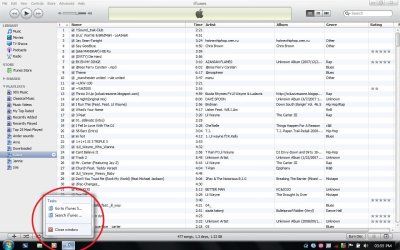
Could you post a screenshot of your taskbar area so I can see what is says when you have iTunes opened and right click on it's icon on the taskbar? It might help better understand what is happening.
My Computer
Computer type
PC/Desktop
Computer Manufacturer/Model Number
Self built custom
OS
64-bit Windows 11 Pro for Workstations
CPU
Intel i7-8700K OC'd to 5 GHz
Motherboard
ASUS ROG Maximus XI Formula Z390
Memory
64 GB (4x16GB) G.SKILL TridentZ RGB DDR4 3600 MHz
Graphics Card(s)
ASUS ROG-STRIX-GTX1080TI-O11G-GAMING
Sound Card
Integrated
Monitor(s) Displays
2 x Samsung Odyssey G7 27"
Screen Resolution
2560x1440
Hard Drives
1TB Samsung 990 PRO M.2,
4TB Samsung 990 PRO PRO M.2,
TerraMaster F8 SSD Plus NAS
PSU
Seasonic Prime Titanium 850W
Case
Thermaltake Core P3
Cooling
Corsair Hydro H115i
Keyboard
Logitech wireless K800
Mouse
Logitech MX Master 4
Internet Speed
2 Gb/s Download and 100 Mb/s Upload
Antivirus
Malwarebyte Anti-Malware Premium
Browser
Google Chrome
Other Info
Logitech Z625 speaker system,
Logitech BRIO 4K Pro webcam,
HP Color LaserJet Pro MFP M477fdn,
APC SMART-UPS RT 1000 XL - SURT1000XLI,
Galaxy S23 Plus phone
How are you launching iTunes? If the taskbar can't resolve the exe or shortcut used to launch a window it won't give you the option to pin it (since it won't know how to relaunch it).
Is this only with itunes, or with all programs? If only with itunes, then it may need to have an updated version before it will work properly in Windows 7.
My Computer
Computer type
PC/Desktop
Computer Manufacturer/Model Number
Self built custom
OS
64-bit Windows 11 Pro for Workstations
CPU
Intel i7-8700K OC'd to 5 GHz
Motherboard
ASUS ROG Maximus XI Formula Z390
Memory
64 GB (4x16GB) G.SKILL TridentZ RGB DDR4 3600 MHz
Graphics Card(s)
ASUS ROG-STRIX-GTX1080TI-O11G-GAMING
Sound Card
Integrated
Monitor(s) Displays
2 x Samsung Odyssey G7 27"
Screen Resolution
2560x1440
Hard Drives
1TB Samsung 990 PRO M.2,
4TB Samsung 990 PRO PRO M.2,
TerraMaster F8 SSD Plus NAS
PSU
Seasonic Prime Titanium 850W
Case
Thermaltake Core P3
Cooling
Corsair Hydro H115i
Keyboard
Logitech wireless K800
Mouse
Logitech MX Master 4
Internet Speed
2 Gb/s Download and 100 Mb/s Upload
Antivirus
Malwarebyte Anti-Malware Premium
Browser
Google Chrome
Other Info
Logitech Z625 speaker system,
Logitech BRIO 4K Pro webcam,
HP Color LaserJet Pro MFP M477fdn,
APC SMART-UPS RT 1000 XL - SURT1000XLI,
Galaxy S23 Plus phone
When I right-click on a folder or file it doesn't give me the option to Pin to task bar or pin to start menu. It works on my friends PC. What is the problem?
Regards,
Core7
What happens if you right-click and HOLD the icon that's on the desktop, drag and drop onto the Taskbar? Do you get the option to PIN then? That's what I did last night at home and it worked out for me. Itunes 9.1.....
Rgds
Rod
My Computer
Computer Manufacturer/Model Number
System Model: HP d530 CMT(PD203PA)
OS
Dual boot Win7 Home Premium and Vista Home Premium SP2
CPU
Intel(R) Pentium(R) 4 CPU 3.00GHz (2 CPUs), ~3.0GHz
Motherboard
System Model: HP d530 CMT(PD203PA)
Memory
4GB
Graphics Card(s)
Radeon X1550 Dual PCI (NOT PCI Express!)
Sound Card
C Media PCI
Monitor(s) Displays
ASUS VW192T
Screen Resolution
1440x900
Hard Drives
1x750GB Partioned into C Drive 500GB Vista and W Drive 250GB Win7
1x500GB D drive for storage
1x1GB Removable USB Drive
PSU
?
Case
Tower?
Cooling
none
Keyboard
Microsoft Wireless 1000
Mouse
Microsoft Wireless Laser 5000
Internet Speed
DSL
Other Info
Wacom Bamboo Tablet
HP C4280 Printer/Scanner/Copier
Just as a update to anyone else with this problem. Using the tutorial below to removed the shortcut arrows will still allow you to pin the shortcut without it's arrow overlay icon to be pinned to the taskbar.
Okay Core7, i actually had the same problem (thanks to brink i fixed it). What i did is go into the start menu, right clicked iTunes, and clicked "Pin to taskbar", just like Brink said I hope the problem is solved.
I have had the same issue. There is no "pin to taskbar" in any of the drop down list of options. I think it has something to do with the tweak tools i used to get rid of the arrow on shortcuts, but have not had time to play with it.





 I hope the problem is solved.