Missing recovery partition

UnknownScout

New member
Local time
3:24 AM
Messages
15
Ok so:

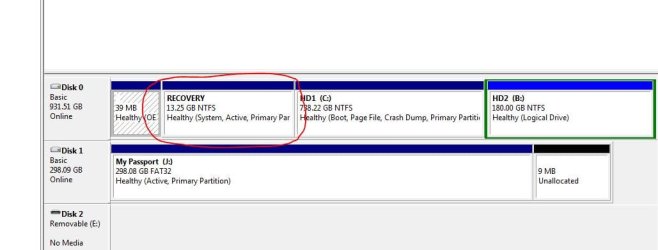
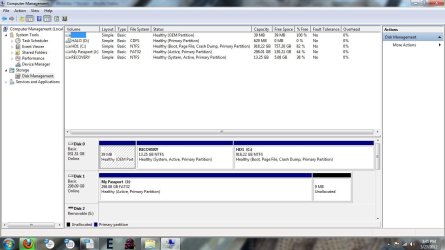
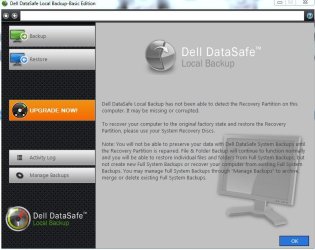
I reinstalled my win 7 from a reinitialization disk BUT Dell datasafe Local Backup says its gone but when i go into Computer management its there.

I would like to make recovery disks using Dell DataSafe Local Backup but I can't because it doesn't think its there.

Thanks,
UnknownScout
 

Attachments
  • DataSafe.JPG
    DataSafe.JPG
    72 KB · Views: 32
  • Computer Manag.JPG
    Computer Manag.JPG
    41 KB · Views: 74

My Computer

Computer Manufacturer/Model Number
Dell
OS
Windows 7 Home Edition x64
CPU
Studio Phenom II X4 945 (3.0GHz)
Memory
8GB DDR3 SDRAM,1333MHz, 4x2GB
Graphics Card(s)
AMD Radeon HD 6450 1GB DDR3
Monitor(s) Displays
Dell EH910 VGA
Screen Resolution
1366x768
Hard Drives
1TB Serial ATA 2 Hard Drive 7200 RPM
Case
Studio XPS 7100 Minitower
Keyboard
Dell Consumer Multimedia Keyboard
Mouse
Dell USB 6-Button Laser Mouse
Internet Speed
56MBPS
How are you accessing Dell Data Safe if you clean reinstalled using the Dell Reinstallation DVD? Did you reinstall it? That may not be enough to relink to the Recovery partition to make the Recovery disks or even run Recovery. Try now to run Dell Factory Recovery from boot to see if it cues up: Dell Restoring Your Computer´s Software to the Factory Settings

If Recovery will run from boot then you can run it to make the Recovery disks, decide if you want to keep the factory install or Clean Reinstall again using these steps to get a perfect Clean Reinstall - Factory OEM Windows 7

If not you can try to re-link the hotkey to run Dell Recovery Partition - restoring F8 link.

Obviously you needed to make your Recovery disks before clean reinstalling but if you are happy with your reinstall and Recovery partition is useless now then you can recover its space into C using free Partition Wizard bootable CD to Resize C to the left after deleting Recovery. If you would like steps for doing this then post back a maximized Disk Mgmt drive map and listings screenshot instead of the small snip.
 
Obviously you needed to make your Recovery disks before clean reinstalling but if you are happy with your reinstall and Recovery partition is useless now then you can recover its space into C using free Partition Wizard bootable CD to Resize C to the left after deleting Recovery. If you would like steps for doing this then post back a maximized Disk Mgmt drive map and listings screenshot instead of the small snip.

I don't quite get that. And yes i reinstalled Dell DataSafe Local Backup
 

Attachments

  • Capture.JPG
    Capture.JPG
    106.5 KB · Views: 83

My Computer

Computer Manufacturer/Model Number
Dell
OS
Windows 7 Home Edition x64
CPU
Studio Phenom II X4 945 (3.0GHz)
Memory
8GB DDR3 SDRAM,1333MHz, 4x2GB
Graphics Card(s)
AMD Radeon HD 6450 1GB DDR3
Monitor(s) Displays
Dell EH910 VGA
Screen Resolution
1366x768
Hard Drives
1TB Serial ATA 2 Hard Drive 7200 RPM
Case
Studio XPS 7100 Minitower
Keyboard
Dell Consumer Multimedia Keyboard
Mouse
Dell USB 6-Button Laser Mouse
Internet Speed
56MBPS
Perhaps you could tell me exactly what you don't understand?

You can't make Recovery Disks because Win7 lost its link to Recovery after reinstall which is common. Your Recovery partition is also useless if it won't run from boot using the steps in the Dell link I gave above.

If Recovery will run you can recover to factory condition which will allow you to make Recovery disks and keep the factory install if that's what you want.

Or you can leave it as it is. If the Recovery partition will not run when using the steps from Dell link then you can delete it and recover that disk space into Win7 partition if you want using steps we can give you.

The other small OEM partition is to run Dell Diagnostics using it's key given on the first boot screen. If it will run that way I would keep it but it will no longer run from Win7 after clean reinstall. If it won't run from boot there is a Dell Download to put it on a flash stick here: How to run Dell diagnostics from a USB stick

Most clean reinstall enthusiasts don't want any of the factory bloatware as there are much better versions built into Win7, like backup imaging which can re-image your HD or replacement from an externally stored image in 20 minutes. This is your own customized Win7 image, too. Backup Complete Computer - Create an Image Backup

I would only reimport the drivers and programs which you absolutely need from Dell's website.

There is more information here on getting a perfect Clean Reinstall - Factory OEM Windows 7
 
Back
Top