- Local time
- 10:04 AM
- Messages
- 25
Hey guys,
let me start by congratulating you on this GEM forum you have set up.
I found all my answers to some annoyances on this forum
Background to the problem:
(OS: Windows 7 Professional x86)
I have managed to create a Homegroup in Windows 7, everything works great.
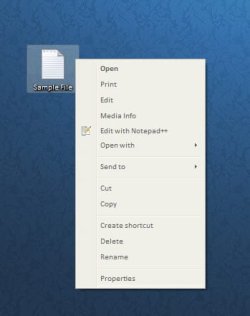
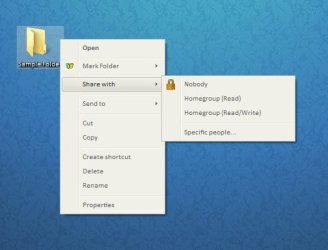
Though I cannot share a single file but "Share with" appears in the context menu of a folder. (see images attached)
Problem:
When right clicking the file i want to share with other computers in my network, I don't get the "Share with" or "Sharing.." entry in the context menu.
Maybe I messed up with the registry, I hope this is repairable
Question:
How can I add this entry to the context menu of the file I want to share?
I would be grateful if someone helps me out
Thanks & Regards
Kyle
let me start by congratulating you on this GEM forum you have set up.
I found all my answers to some annoyances on this forum
Background to the problem:
(OS: Windows 7 Professional x86)
I have managed to create a Homegroup in Windows 7, everything works great.
Though I cannot share a single file but "Share with" appears in the context menu of a folder. (see images attached)
Problem:
When right clicking the file i want to share with other computers in my network, I don't get the "Share with" or "Sharing.." entry in the context menu.
Maybe I messed up with the registry, I hope this is repairable
Question:
How can I add this entry to the context menu of the file I want to share?
I would be grateful if someone helps me out
Thanks & Regards
Kyle
Attachments
Last edited:
My Computer
- OS
- Windows 7 Professional x86