
Missing SM Bus controller and USB controller

DPappabear

New member
Local time
4:26 PM
Messages
5
Bought Asus Q400a laptop with Intel i7-3632QM processor, tried to see which chipset, but not able to obtain.

It came preloaded with Windows 8 (not pro), decided to delete partitions, reformat and installed Windows 7 Home 64bit Was missing several drivers, but have been able to install all but the SM Bus controller and the USB Controller. Currently have yellow exclamation marks on these in device manager.

I have tested all my devices except webcam other devices usb ports 3.0 and 2.0 , card reader, hdmi port, all work. Seems like computer working fine, but just not sure when this glitch will crop up.

I have search Intel drivers, Asus support and read many threads, just not sure which driver I need for these and where to find these. Any help will be greatly appreciated.

I am not sure what happens if I down load the wrong drivers.

Thanks in advance.
 

My Computer

Computer type
Laptop
Computer Manufacturer/Model Number
Asus
OS
Windows 7 home 64 bit

My Computer

Computer type
PC/Desktop
Computer Manufacturer/Model Number
Custom Build
OS
Win 10 Pro 64
CPU
Intel Core i7 960 @3.20 GHz
Motherboard
MSI MS7522
Memory
24.0 GB DDR3
Graphics Card(s)
EVGA GTX 750Ti
Monitor(s) Displays
LG E2341 23 Inch
Screen Resolution
1920x1080
Hard Drives
1TB Western Dgital 1002FAEX-00Y9A0
1TB Hitachi HDS721010CLA322
PSU
700 Watt
Case
Haf 912
Cooling
Fans
Keyboard
Logitech MK710
Mouse
Logitech M705
Internet Speed
Cable
Antivirus
AIS 2015 .10.0.2225
Browser
Firefox 49
Other Info
MalwareBytes Anti-Rootkit utility
Thank you both for your responses. I tried Gary's but did not see a change.
Maxie, I had seen the chipset for win 8 for this computer but did not know if it would cause any issues, I downloaded it and ran it, and Voila, the SM Bus controller issue disappeared.

The USB Controller still shows yellow exclamation mark in device manager. BUT progress has been made.
Thank you again
 

My Computer

Computer type
Laptop
Computer Manufacturer/Model Number
Asus
OS
Windows 7 home 64 bit
Glad you got that sorted :) A reboot should sort out every thing... If your USB controller is still having problems ..... Run windows update ..... If you still are having problems Report back to us with the issue it could be USB 3. I am certain it will be easy sorted .
 

My Computer

Computer Manufacturer/Model Number
W530-3630QM1
OS
windows 7 home 64bit
CPU
INTEL-CORE I7
Memory
16GB
Hard Drives
750GB
Browser
Chrome
Maxie,
No change on reboot, ran Window updates and rebooted still no change. I Uninstalled the USB Controller under Other devices with yellow exclamation point, rebooted. Computer found the USB Controller device and tried to find/install driver, but was unsuccessful. I was hopeful!

I can live with it as long as no issues arise, but I have no idea what the conflict will impact.

I would like to resolve the USB Controller issue is possible.

You said something about possible USB 3, do you think my 2 3.0 USB ports are just working as 2.0 ports?
 

My Computer

Computer type
Laptop
Computer Manufacturer/Model Number
Asus
OS
Windows 7 home 64 bit
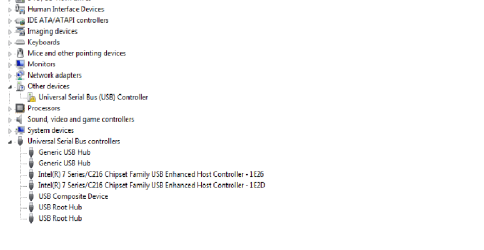
Thank you for the help link on being able to attach a screen shot. Here is what I have...

device manager  USB.png
 

My Computer

Computer type
Laptop
Computer Manufacturer/Model Number
Asus
OS
Windows 7 home 64 bit
Hi there ...... I think it is your Card Reader can you test that please ? Is all your USB ports working ? Also right click on the USB controller with the yellow exclamation mark right click and select ‘Properties’. .... What error code if any does it show ? Thanks for your patience in this issue .... Would be a lot easier if we both lived on the same side of the pond.
 

My Computer

Computer Manufacturer/Model Number
W530-3630QM1
OS
windows 7 home 64bit
CPU
INTEL-CORE I7
Memory
16GB
Hard Drives
750GB
Browser
Chrome
It is a big pond.
I thought it might be the card reader driver as well, and tried a Win 7 driver amd win 8 card drivers from Asus site. The interesting thing is that everything seems to be working. Card read works, all 3 usb ports work, hdmi port works, webcam works. I have no idea which device the USB Controller is looking at for drivers. Not sure if there is a device looking specifically for Win 8 driver.
The error code 28 shows up but looks like a generic code, no real direction from it.

I may just need to live with it, since as far as I can tell it is not causing any problems. I do thank you for your ideas and exploring possible causes.
 

My Computer

Computer type
Laptop
Computer Manufacturer/Model Number
Asus
OS
Windows 7 home 64 bit
Great news that every thing is working :) ..... The reason i said it was a Card Reader is because i didn't see it in your Device Manager ..... And the main thing is if its not broke .... No real need for a fix.
 

My Computer

Computer Manufacturer/Model Number
W530-3630QM1
OS
windows 7 home 64bit
CPU
INTEL-CORE I7
Memory
16GB
Hard Drives
750GB
Browser
Chrome
Back
Top