Missing two Drivers after downgrading PC to Win7

AlternativeChao

New member
Local time
9:34 AM
Messages
1
Location
Boston
Hi, i Just purchased a HP Envy dv6t 7200 Quad Edition, which is not a Bad PC for HP but it came pre-installed with windows 8. i recently downgraded it to windows 7 and have been using most of the drivers from the HP Pavilion dv6t-7000 which came with windows 7 but i seem to be missing two drivers that i have not been able to find:

One Unknown Driver
one PCI Device Driver


gp2q7i4m1


I know the unknown Driver may be hard to find but i was hoping to get some help in finding the PCI Device driver.

Here are the specs of the laptop:
dv6t Quad
• Windows 8 64
• 3rd generation Intel(R) Core(TM) i7-3820QM Processor (2.7 GHz, 8MB L3 Cache)
• NVIDIA(R) GeForce(R) GT 650M Graphics with 2GB GDDR 5 video memory
• 12GB DDR3 System Memory (2 Dimm)
• 750GB 5400 rpm Hard Drive with HP ProtectSmart Hard Drive Protection
• 9 cell Lithium Ion Battery
• 15.6-inch diagonal Full HD Anti-glare LED-backlit Display (1920 x 1080)
• SuperMulti 8X DVD+/-R/RW with Double Layer Support
• HP TrueVision HD Webcam with integrated dual array digital microphone
• 802.11b/g/n WLAN
• Backlit Keyboard
 

My Computer

Computer Manufacturer/Model Number
HP Envy Dv6 7200
OS
Windows 7 Pro 64bit
CPU
Inter Core i7-3820Q 2.70GHz
Memory
12GB
Graphics Card(s)
Nvidia GEFORCE GT 650M 2GB
Screen Resolution
1920x1080
Hard Drives
1TB
Hi AlternativeChao, Welcome to the forums, I can not see the links you have posted, but have you tried going to device manager and right clicking on the offending devices and selecting "update driver" and let win update find the drivers for you ?
Alternatively did you try installing the drivers in compatibility mode ? Did you reinstall the chipset drivers ? :)
 

My Computer

Computer type
PC/Desktop
Computer Manufacturer/Model Number
self build
OS
win 7 ultimate32bit, Win8.1pro wmc 32bit
CPU
amd phenom x4 9600
Motherboard
asus m2n32-sli deluxe
Memory
corsair twinxs 2x2gb
Graphics Card(s)
2x nvidia 1gb 8500gt
Sound Card
onboard
Monitor(s) Displays
23" PB Viseo 233d
Screen Resolution
1920x1080
Hard Drives
maxtor sata 500gb
maxtor sata 320gb
fujitsu sata200gb
PSU
oryxx tornado 750w
Case
thermaltake xaser lll
Cooling
artic freezer64 pro + 7 case fans
I would love to try and help but I need some more information. The links and the image you posted are not working. Also, is the laptop working regardless of the missing drivers?
 

My Computer

Computer Manufacturer/Model Number
Cranky's Rig
OS
Windows 7 Home Premium 64bit
CPU
Intel Core 2 Quad Q9550 (3329.0 MHz)
Motherboard
Asus P5Q Pro
Memory
Kingston Hyper X 1066Mhz (8GB)
Graphics Card(s)
XFX R7870 Black Edition OC
Sound Card
Asus Xonar DX
Monitor(s) Displays
Dell 2407WFP (24")
Screen Resolution
1920x1200
Hard Drives
OCZ Vertex 2 SSD (150GB)
PSU
Antec True Power Quattro 850W
Case
AZZA
Cooling
Arctic Cooling Freezer 7 Pro
Keyboard
Razer Black Widow
Mouse
Cyborg RAT 7
Internet Speed
30mbs
Other Info
Logitech Z-680 5.1 speakers
Logitech G13 Gamepad
One thing you can try is installing DoubleDriver, which allows you to export your drivers to a folder.

Install that on the Win7 box, then export all the drivers to a folder, then copy the folder to a USB stick, then insert the USB stick in this PC, and point to the upper-level folder to search for drivers.

I've done this when reinstalling Windows and it works great.
 

My Computer

Computer type
PC/Desktop
Computer Manufacturer/Model Number
Custom
OS
Win7 Pro 32-bit, Win8 Pro 32-bit
CPU
AMD Phenom II X6 1090T
Motherboard
Gigabyte
Memory
4GB ddr3 1300
Graphics Card(s)
AMD HD 4290 onboard
Sound Card
Builtin Realtek HD Audio
Monitor(s) Displays
Samsung 24" widescreen, LG 23" widescreen
Screen Resolution
1920x1200/1920x1080
Hard Drives
Kingston 256GB SSD
Keyboard
Logitech Illuminated Keyboard
Mouse
Logitech M705 wireless mouse
Antivirus
Norton Av 2013
Browser
IE v10
I consider buying HP Envy dv6-7200ea[FONT=&quot] (which seems to be the European version of this laptop) [/FONT] and I would naturally like to be able to install Windows 7 as well (I plan to use the laptop as an audio/music production workstation and Windows 8 got a terrible reputation for that use).
Op doesn't seem to be around these days so I thought I'd just ask here in case there's someone who owns it/was in the same position as me and the OP who could help me out.

1. Is it confirmed that all it takes is simply changing Boot mode in Bios to Legacy? Will it be okay if I install Windows 7 in the same disk that came with the laptop or do I have to use another? I am a bit concerned with all this new “Serial number is written in Bios” thing and I am afraid I won’t be able to use Windows 7 even if I manage to install it.

2. Then there’s the drivers thing… Was anyone able to locate all the right ones, using the laptop without BSOD or other driver related problems? I saw online that using Pavilion dv6-7000/ dv6t-7000 (previous model) could do the job but given the HP "you are alone" policy I am trying to find out for sure.

3. What do you think of the laptop in general? Would you recommend it? What about heat/noise? As I’ve said, I intend to use it for music production so it’s important to be as quiet as possible. Also there's another thing troubling us musicians known as DC Latency. It is possible that even a great laptop suffers from DPC Latency problems making it virtually useless for music production applications. If anyone who has purchased the laptop in question could do a little test for me by downloading and running DPC Latency Checker for a minute or so and post the results I would be more than grateful.

DPC Latency Checker

The program is completely safe (you can check it out online in case you are worried) and you don't even need to install it, just running it once would do.

I tried to do the test myself by asking the shop owner if it'd be possible to take the tool in a usb drive and run it in the shop before I purchase it (as it is advised to do) but he denied. I know Macbook Pro is usually advised for my intended use but I can't afford this at this point and since I've found the laptop in question in a relatively good price any advice would be useful.

Thanks a lot for your time. :)
 

My Computer

Computer type
PC/Desktop
OS
Windows XP 32 Bit

My Computer

Computer type
Laptop
Computer Manufacturer/Model Number
HP ENVY 17-1150eg
OS
Windows 10 Pro x64 EN-GB
CPU
1.6 GHz Intel Core i7-720QM Processor
Memory
6 GB
Graphics Card(s)
ATI Mobility Radeon HD 5850 Graphics
Sound Card
Beats sound system with integrated subwoofer
Monitor(s) Displays
17" laptop display, 22" LED and 32" Full HD TV through HDMI
Screen Resolution
1600*900 (1), 1920*1080 (2&3)
Hard Drives
Internal: 2 x 500 GB SATA Hard Disk Drive 7200 rpm
External: 2TB for backups, 3TB USB3 network drive for media
Cooling
As Envy runs a bit warm, I have it on a Cooler Master pad
Keyboard
Logitech diNovo Media Desktop Laser (bluetooth)
Mouse
Logitech Performance Mouse MX
Internet Speed
50/10 Mbps VDSL
Antivirus
Windows Defender 4.3.9431.0
Browser
Maxthon 3.5.2., IE11
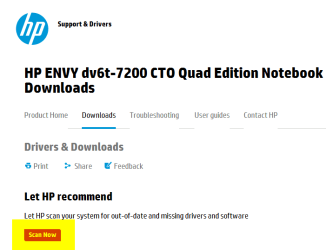
Did you let the HP support page scan your PC?

View attachment 265534

Kari

Thanks for your reply Kari.
As I've said, I am CONSIDERING buying the laptop so I cannot possibly do that. But even I had it already, HP has been pretty vocal about not supporting downgrading to Windows 7 so that wouldn't be possible through their site.
That's the reason I am not sure whether I should buy the laptop in question and the reason I replied in this thread in the first place. :)
 

My Computer

Computer type
PC/Desktop
OS
Windows XP 32 Bit
My post was meant as an answer to the OP.
 

My Computer

Computer type
Laptop
Computer Manufacturer/Model Number
HP ENVY 17-1150eg
OS
Windows 10 Pro x64 EN-GB
CPU
1.6 GHz Intel Core i7-720QM Processor
Memory
6 GB
Graphics Card(s)
ATI Mobility Radeon HD 5850 Graphics
Sound Card
Beats sound system with integrated subwoofer
Monitor(s) Displays
17" laptop display, 22" LED and 32" Full HD TV through HDMI
Screen Resolution
1600*900 (1), 1920*1080 (2&3)
Hard Drives
Internal: 2 x 500 GB SATA Hard Disk Drive 7200 rpm
External: 2TB for backups, 3TB USB3 network drive for media
Cooling
As Envy runs a bit warm, I have it on a Cooler Master pad
Keyboard
Logitech diNovo Media Desktop Laser (bluetooth)
Mouse
Logitech Performance Mouse MX
Internet Speed
50/10 Mbps VDSL
Antivirus
Windows Defender 4.3.9431.0
Browser
Maxthon 3.5.2., IE11
Back
Top